3.8.3 Configuring Cascading Lists
When you need one page item's value to influence the list of choices in another list-driven item, you can easily configure this cascading effect.
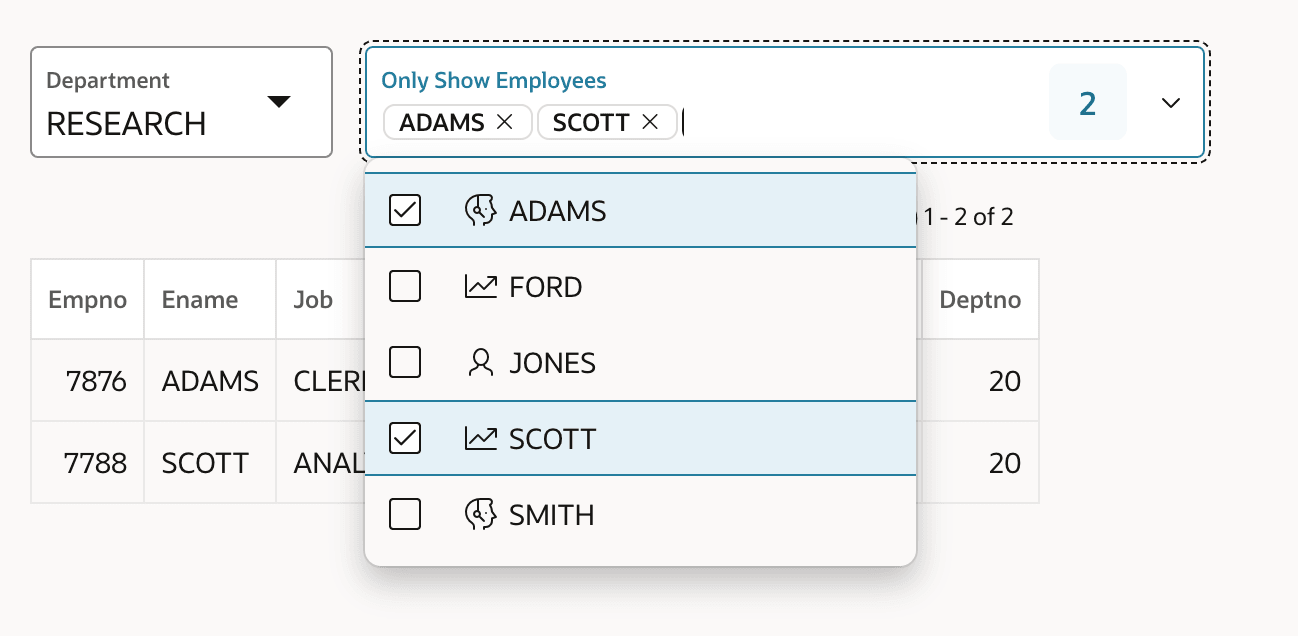
For example, in the Only Show Employees Select Many list below, the list of employees shown depends on the department selected in the Select List item to its left.
Figure 3-44 Department Page Item as Cascading Parent Item for Employees List
select ename as d,
       empno as r
from emp
where deptno = :P2_DEPARTMENT
order by ename
Then, you configure the Parent Items(s) property on the
P2_ONLY_EMPLOYEES list item to name the page item it depends
on: P2_DEPARTMENT. This property is in the Cascading List
of Values section of the Property Editor.
Setting the Parent Items(s) property enables two
automatic runtime behaviors. When a user changes P2_DEPARTMENT, then
the value of P2_ONLY_EMPLOYEES gets cleared and its list of
available choices is refreshed. If your list of values query depends on any other
page items as bind variables, list their names in the Items to
Submit property in the same section. The values of the page items
mentioned in Items to Submit are sent along when the list
gets refreshed, but there is no other automatic behavior related to the change in
their values. It's only a parent item's value change that clears and refreshes the
cascading list.
select ename as d,
       empno as r,
       case job
            when 'PRESIDENT' then 'fa-badgerine'
            when 'ANALYST'   then 'fa-line-chart'
            when 'CLERK'     then 'fa-user-headset'
            when 'SALESMAN'  then 'fa-badge-dollar'
            when 'MANAGER'   then 'fa-user'
       end as icon
from emp
where deptno = :P2_DEPARTMENT
order by ename
The example above shows a pair of cascading page items, but using the same technique, you can configure multiple levels of cascading. For example, a user could pick the brand of an automobile like Volkswagen from a P2_BRAND list. Then, they might select a particular model of Volkswagen like Tiguan from a P2_MODEL list that uses P2_BRAND as its parent item. Finally, the user could choose an available Tiguan engine configuration like 1.5 TSI 130 PS (96kW) from a P2_ENGINE list that mentions P2_MODEL as its parent item. At each level, when the parent item is cleared, the cascading list item gets cleared and refreshed.
The same cascading list behavior is available among editable Interactive Grid region cells, with the same simple configuration steps. Your grid column's list of values query references the parent column's value as a bind variable using its column name, and you configure the Parent Column(s) property using one or more column names.
Parent topic: Cascading, List-Driven Items