18.3.1 Configuring Chain to Run in Background
Configure an execution chain to run in the background and optionally associate it with a context value.
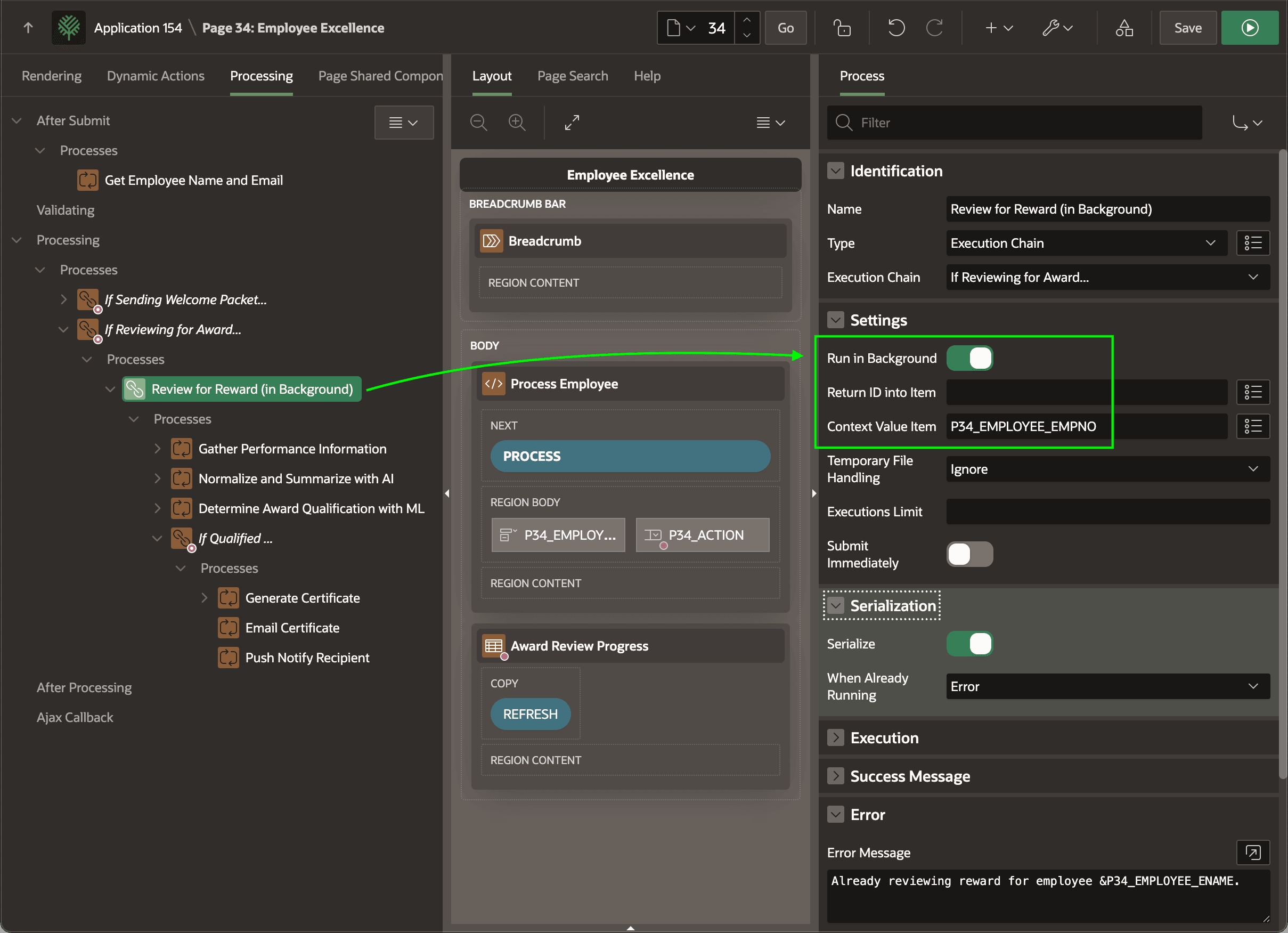
When you enable an execution chain's Run in Background switch, at runtime the APEX engine enqueues a background job to execute as soon as possible and proceeds to the next process in the list, if any. To learn the unique job execution ID the system assigns, provide the name of a page item for the Return ID into Item property. To associate a context value with the background job, as shown below, configure the name of a page item for the Context Value Item property.
For example, the Employee Excellence page ignores the job's execution id by leaving Return ID into Item property blank, and configures P34_EMPLOYEE_EMPNO to provide the context value. This means that each instance of the Review for Reward (in Background) job is linked to the employee ID it is processing.
Tip:
The context value you associate with a background job appears in the CONTEXT_VALUE column of the APEX_APPL_PAGE_BG_PROC_STATUS view.
Figure 18-7 Setting Execution Chain to Run in the Background
Parent topic: Offloading Work to the Background