8.5.3 How APEX Manages User Session State
For the Onboard New Employee wizard page flow shown below, you only
want to insert the new employee row in the EMP table when the user clicks
(Finish) on the last page.
The user expects to click (Next) and (<) previous between the pages without losing any of their data entry when returning to review previous pages. You can configure the page items in pages 43, 44, and 45 to use APEX's automatic session state management to temporarily store the user's submitted values so you can decide when to save them permanently in your application tables. To do this, simply configure its Session State > Storage property to Per Session (Persistent). The diagram illustrates the page render, submit, and branch flow of the three-page Onboard New Employee wizard flow. The session state values the APEX engine managed for the current user session display in the table, tagged with the application ID, page ID, and item name. For simplicity, the session ID of the current user is not shown in the figure, but all session state values are partitioned and secured based on that context value as well.
Figure 8-23 Automatic Session State Management
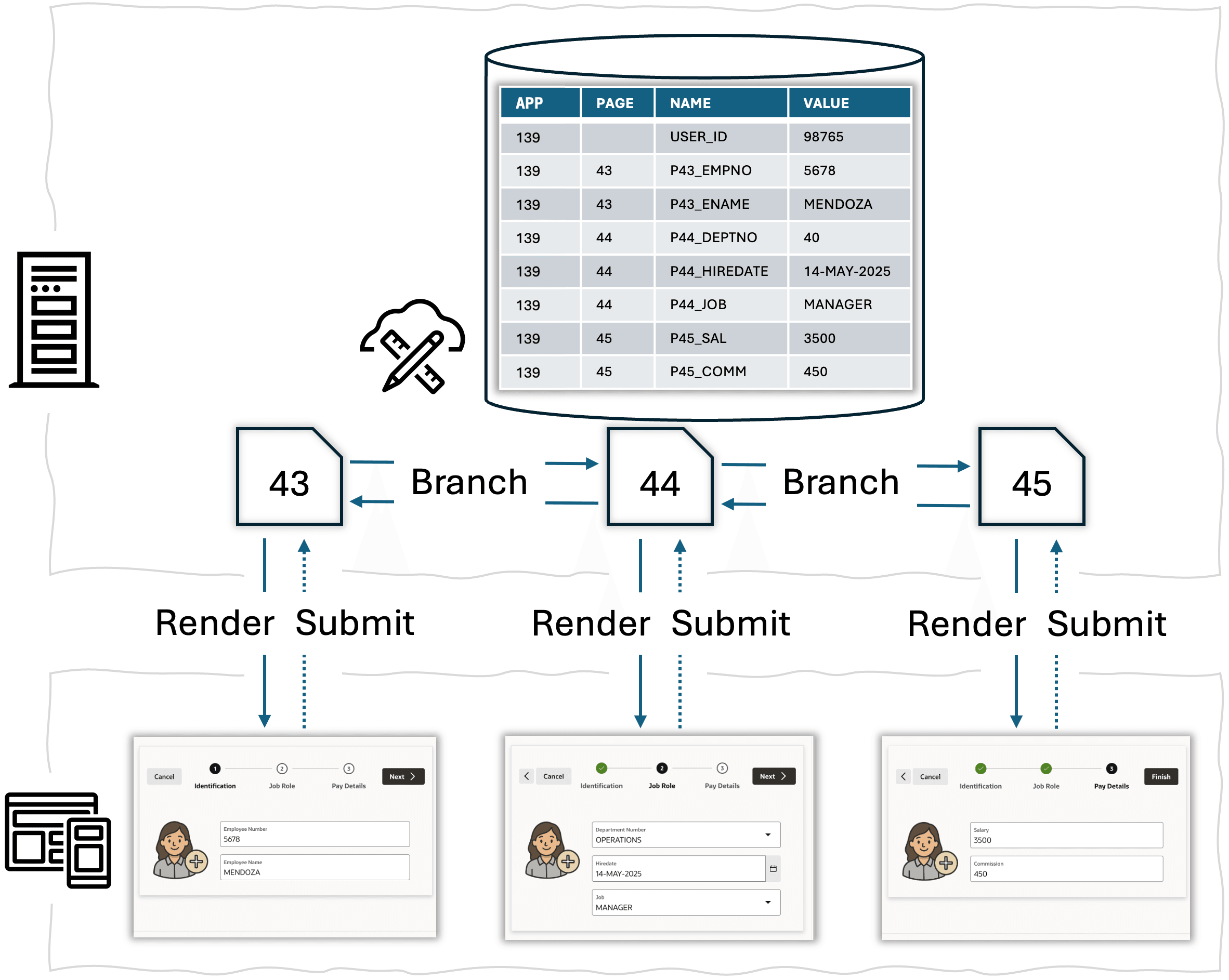
When the APEX engine renders a page, it automatically uses any page item values from session state before your Pre-Rendering computations, processes, or branches execute. Then when rendering is complete, it stores the values of any page items whose Session State > Storage property is set to Per Session (Persistent) into session state.
When the user submits a page, the APEX engine lets your computations, processes, and branches reference the values of all page items. When submit processing is complete, the it saves the values of any Per Session (Persistent) page items from the current page. This occurs before it follows a branch to a new page or re-renders the existing page.
It "forgets" any page items whose Session State > Storage property is set to Per Request (Memory Only). If your processes do not permanently store these page item values, or pass them along to the next page to render as parameters in the link, then they are no longer available.
The APEX engine stores the application id, page number, page item name, and value for every session state item. It also ensures complete isolation between user sessions so one user session can only see its own session state values.
The figure shows the contents of the user session state after a user has visited each of the three pages in the Onboard New Employee wizard and returned back to view previous steps as well. All page items in pages 43, 44, and 45 have Per Session (Persistent) storage. When the user clicks (Finish) on the last page, the page process related to that button passes the values from the relevant page items in pages 43, 44, and 45 to the ADD_NEW_EMPLOYEE procedure that permanently stores the new employee's data in the EMP table.
Parent topic: Understanding Session State Management