25.2.3 Starting a Patient Onboarding Workflow
Create a workflow definition and start building its first version in Workflow Designer.
In the existing application, you create a new Workflow shared component named
Patient Onboarding. The workflow Diagram Builder feels familiar, since it
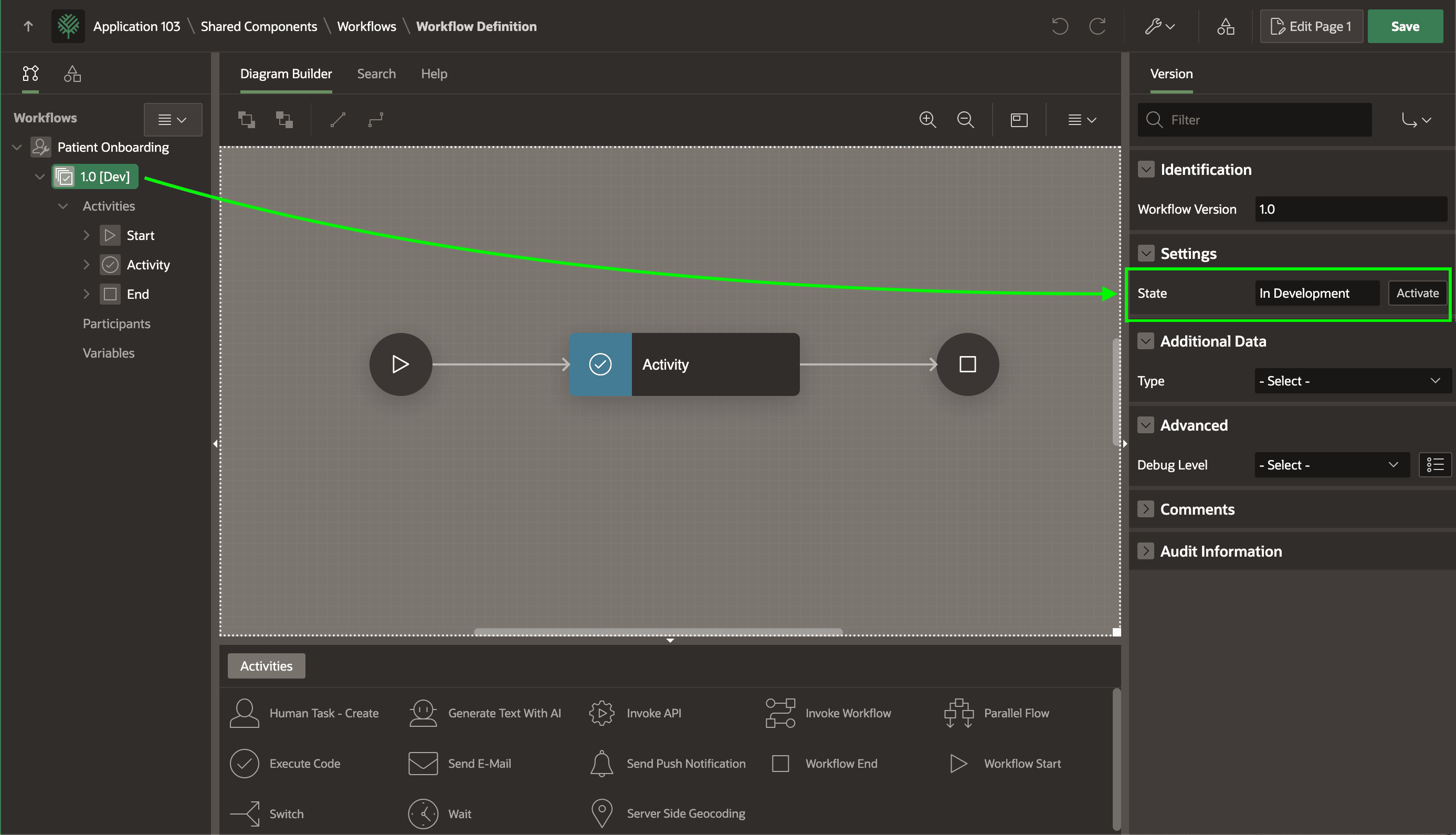
works like Page Designer. As shown below, your workflow appears in the tree in the
Workflows tab. Since a business process can change over time, a workflow
definition can have multiple versions. Out of habit, you name the first version
1.0. A version starts in the In Development state until you
activate it later for use in production. Notice the 1.0 [Dev] label in the tree
below confirms this state. The Property Editor also reflects it.
To get you started, App Builder creates a single Execute Code activity sequenced between a Start and an End. You can change its type and properties as needed, and add other activities and connections to the diagram to build up your flow. As flows get more involved or you identify a reusable "subflow", one workflow can invoke another like a subroutine, passing parameters in and out as required.
Figure 25-76 Workflow Version Starts in Development Mode Until You Activate It
Parent topic: Exploring Patient Onboarding Example