16.8.2.5.4.1 Toggling UI Based on Collection Contents
Toggle the page between image upload and title entry based on whether staged photos exist.
When the Add Break Room Photos page re-renders after the (Upload)
button click, the collection now contains one or more unique uploaded file names. This
makes the UPLOADED_BREAKROOM_PHOTOS function return true. In turn, that
causes the If Clear Set or No Temp Photos Exist... Pre-Rendering process to be
skipped.
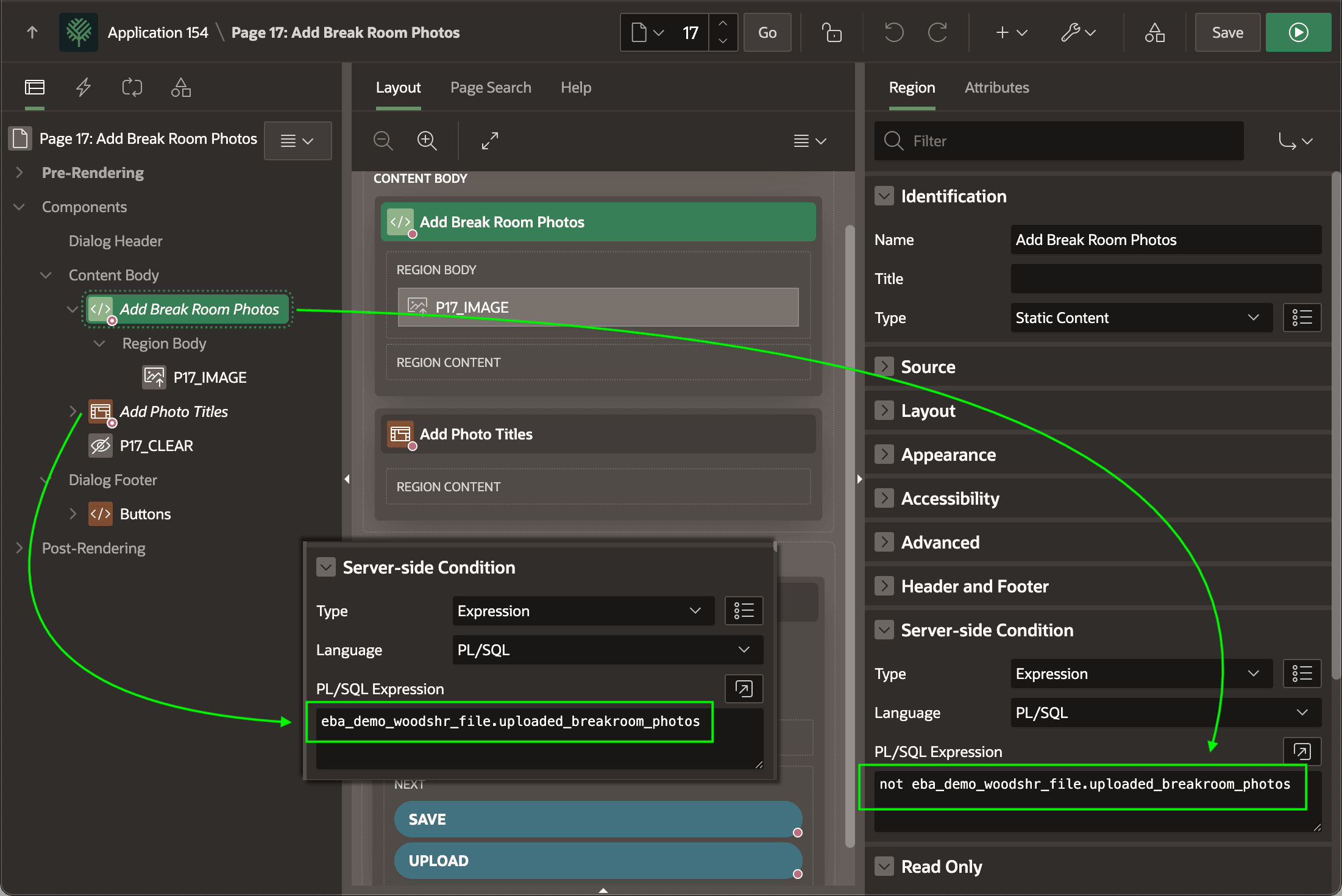
It also changes the page from showing the Image Upload page item to show the Add Photo Titles interactive grid instead. As shown below, the Add Break Room Photos static content region containing the Image Upload page item
P17_IMAGE uses the server-side condition:not eba_demo_woodshr_file.uploaded_breakroom_photosIn contrast, the Add Photo Titles interactive grid region uses the logically opposite condition:
eba_demo_woodshr_file.uploaded_breakroom_photosSo, the presence of rows in the collection toggles the page to show one or the other.
Figure 16-79 Collection Rows Determine if Image Upload or Titles Grid Displays
Parent topic: Previewing Images in a Grid to Enter Titles