25.3.6.1 Understanding Lifecycle Event Strategy
Log procedure lifecycle events in a trigger and process them on a schedule with an automation.
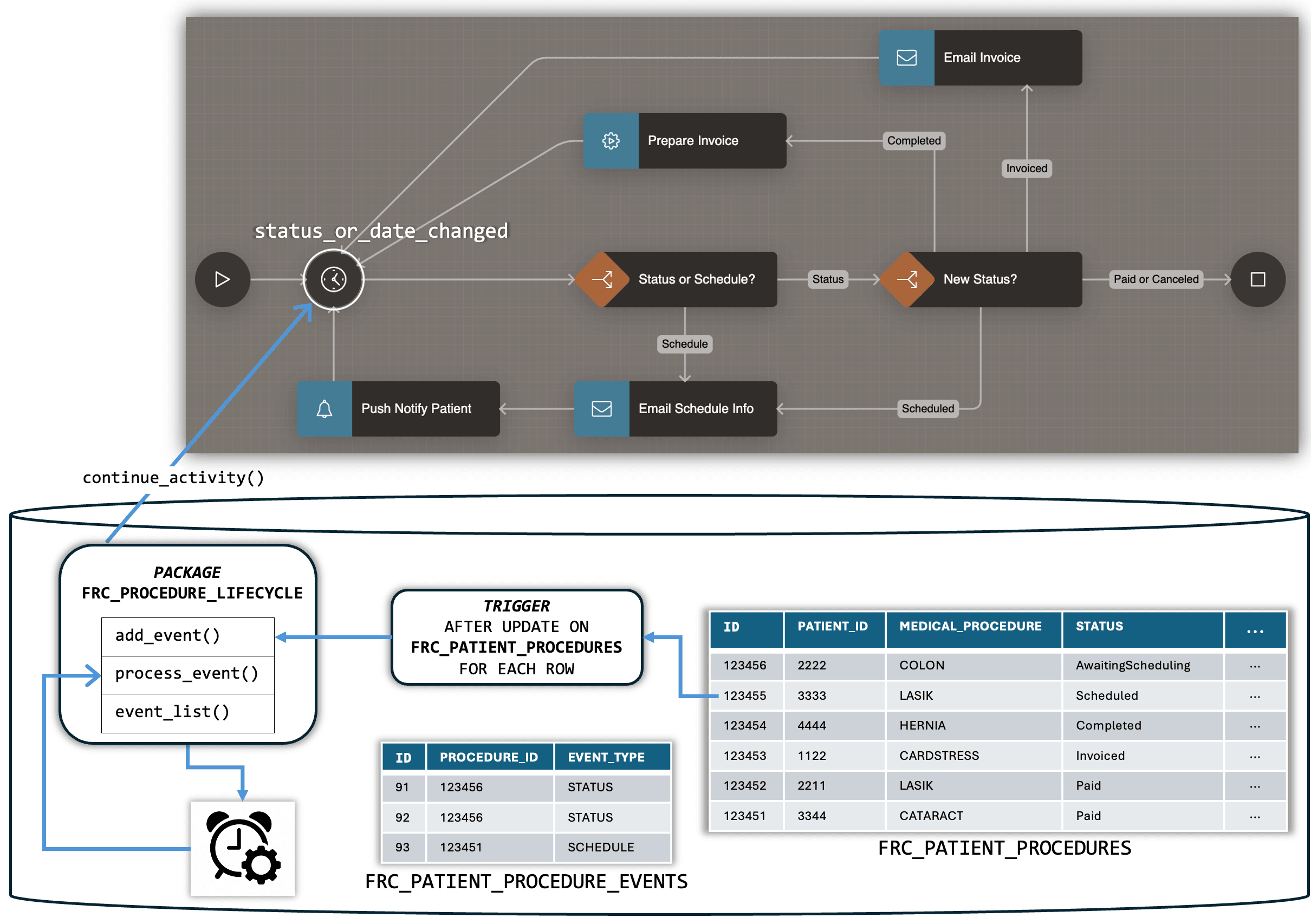
To notify the workflow of data changes, you adopt a strategy shown below that
decouples the lifecycle event for a status change from the work it entails.
This separation keeps the user experience fast by offloading work to the background.
Using an AFTER UPDATE FOR EACH ROW trigger on the
FRC_PATIENT_PROCEDURES table, you call the
ADD_EVENT procedure in the FRC_PROCEDURE_LIFECYCLE
application package to register the event. That procedure inserts a row in the
FRC_PATIENT_PROCEDURE_EVENTS table. The row contains the primary
key of the patient procedure, and an event type indicating whether the procedure is new,
or whether its schedule or status changed.
On a recurring schedule, an Automation shared component "wakes up" and queries the list of events to process in the current run using the EVENTS_LIST function in the same package. For each lifecycle event to process, the automation's action calls the PROCESS_EVENT procedure. The package calls CONTINUE_ACTIVITY in the APEX_WORKFLOW package, passing the event type value back to the workflow.
Figure 25-148 Strategy for Using Workflow to Orchestrate Patient Procedure Lifecycle
Parent topic: Notifying Workflow of Data Changes