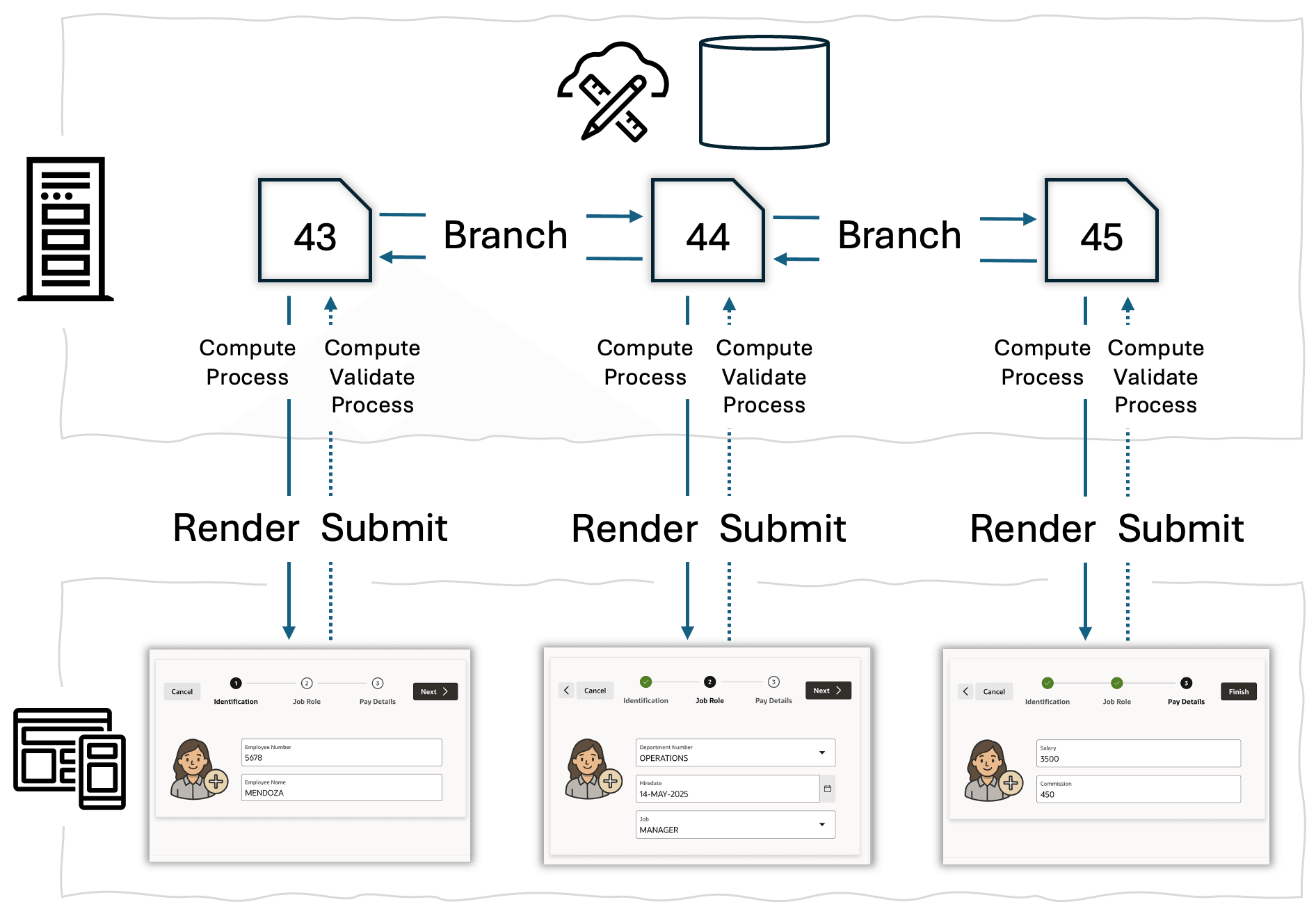
8.3.5.1 Wizard Example Page Lifecycle
When a user clicks Onboard New Employee in your app's navigation menu, the APEX engine renders page 43 based on its page definition. As the user enters data and clicks buttons in the page, branches control what page to show next. Optional computations, validations, and processing let you create flows of pages for any business process.
It sends appropriate data, HTML markup, CSS style rules, and JavaScript to the user's browser based on the regions, template options, page items, and buttons the page contains.
Before rendering the page, however, it executes any computations or processes you define in the page's Pre-Rendering section of the Page Designer Rendering tab. These optional elements influence the data initially shown to the user. The net result: the user sees the first page of the Onboard New Employee page flow in their browser. The diagram below illustrates the Onboard New Employee wizard pages lifecyle.
After entering the employee's identifying information, when the user clicks on the (Next) button in page 43, as shown below, the browser submits the page to the APEX engine for processing. It includes the values of all page items. When APEX engine receives this page submission, if you defined any computations, validations, processes, or branches in the Processing tab in Page Designer, then it executes these elements in the order you sequenced them. You can optionally configure a server-side condition on any of these elements, or a When Button Pressed condition. This lets you control exactly when each element executes.
Page 43 defines a branch for the (Next) button the user clicked. This determines page 44 shows next, and the process repeats itself. Page 44 renders to the browser.
- click a navigation menu link to start the wizard,
- enter some data on the Identification step of the wizard and click (Next), and
- see the Job Role step of the wizard.
If there they click the (<) previous button, they return to the Identification step.
Figure 8-9 Page Renders to Browser, then User Submits Page for Processing
For more information, see Controlling Navigation Using Branches in Oracle APEX App Builder User’s Guide.
Parent topic: Render, Submit, Branch, Repeat