4.5.3.1 Working with Data Values as Numbers
If a page item contains a numeric value, using its value as a
VARCHAR2-typed bind variable is fine when the database performs automatic
type conversion.
For example, in a WHERE clause like the following, the database implicitly converts the string value of :P5_MAX_QUANTITY to a number to compare it with a number column like QUANTITY:
QUANTITY BETWEEN 1 AND :P5_MAX_QUANTITYCASE statement, referencing :P5_MAX_QUANTITY in a position where the database expects a number produces an error. For example, consider the following usage:QUANTITY BETWEEN 1 AND CASE CATEGORY
WHEN 'SMALL' THEN 10
WHEN 'LARGE' THEN :P5_MAX_QUANTITY
ELSE 15
END ORA-00932: expression (:1) is of data type CHAR,
which is incompatible with expected data type NUMBERThe solution is to reference the value as a number using the GET_NUMBER() function in the APEX_SESSION_STATE package. This automatically accounts for any format mask you might have configured on the page item to correctly convert the value to a number result.
Another common situation is comparing the value of two page items containing numbers. Consider the following query by example page featuring a P1_SAL_RANGE_LOW and P1_SAL_RANGE_HIGH page items of type Number Field.
Figure 4-4 Numeric Range Using Two Number Field Page Items
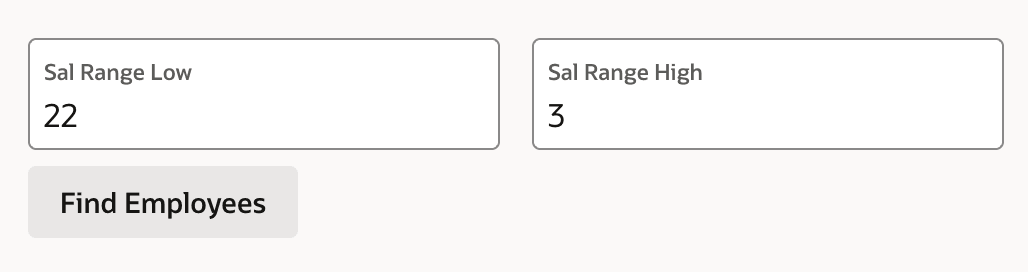
If you define a validator Check Salary Range with the PL/SQL expression below, the user submitting a low value of 22 and a high value of 3 does not receive a validation error as expected. This happens because the string values containing digits 22 and 3 get compared in text order rather than numeric order.
:P1_SAL_RANGE_LOW <= :P1_SAL_RANGE_HIGHTo have the values compared as numbers, rewrite the validation rule as follows. Notice the bind variable notation is replaced by passing the name of the page item to the GET_NUMBER() function.
apex_session_state.get_number('P1_SAL_RANGE_LOW')
 <= apex_session_state.get_number('P1_SAL_RANGE_HIGH')
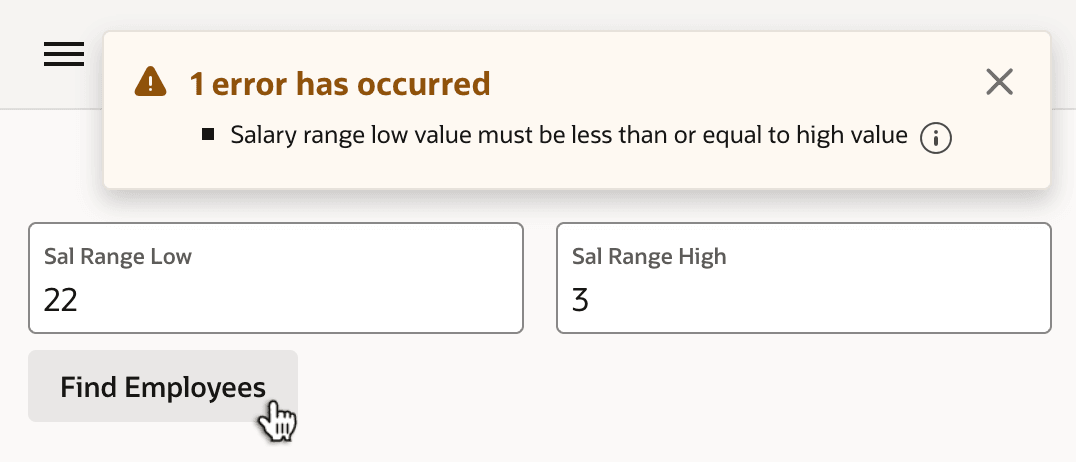
With this solution in place, clicking Find Employees now produces the expected validation error as shown below, "Salary range low value must be less than or equal to high value."
Figure 4-5 Expected Validation Error Treating Numeric Items as Numbers
Tip:
When working with number values of Interactive Grid columns, convert
the column's VARCHAR2 value to a number using the
to_number function with an appropriate format mask.
Parent topic: Values Bind as Strings