23.3 Working with Multiple Environments
Use separate environments with distinct banners to develop, test, and release APEX changes safely.
Most teams use at least three environments in an application’s lifecycle: development (DEV) for making changes, testing (TEST or QA) for validation, and production (PROD) for end users. Multiple environments let you develop and test safely without risking the stability of the live system. Separate environments let developers work without disrupting end users and let testers experiment without touching real data. It’s far better to find a bug in TEST than have end users stumble on it in PROD. Developers can also try ideas freely in DEV, confident they’re not altering the production app.
There are two ways to organize dev/test/prod setups in APEX: separate APEX instances, and separate workspaces on one instance.
For larger or mission-critical apps, the ideal setup is to use separate APEX instances for each environment. For example, you might run one database (or pluggable database) with APEX for development, another for test, and another for production. Each environment is fully isolated. Changes in DEV have no effect on PROD until you explicitly export and import the app. A key benefit is that you can reuse the same application ID, alias, and workspace name across environments without conflict, since each has its own APEX installation. Your DEV workspace MyApp can host application 100, and the TEST instance can host the same app ID and workspace name. This one-to-one setup simplifies tracking. Many Oracle teams follow this model, provisioning separate APEX services for DEV, TEST, and PROD.
If running multiple APEX instances isn’t practical, you can still separate environments logically using multiple workspaces in a single instance. For example, a MYAPP_DEV workspace can handle development, MYAPP_TEST for testing, and MYAPP_PROD for production, each mapped to its own schema. The apps remain distinct even though they share the same APEX installation. You export from the DEV workspace and import into the test workspace, then on to prod when QA gives the thumbs up. The trade-off is that application IDs and aliases must be unique across the instance, so you may need different IDs. For example, app 100 in DEV might become app 1100 in TEST, and 2100 in PROD. APEX lets you assign new IDs, new aliases, and remap schemas during import. This approach achieves isolation, though it requires more coordination since everything runs in one database.
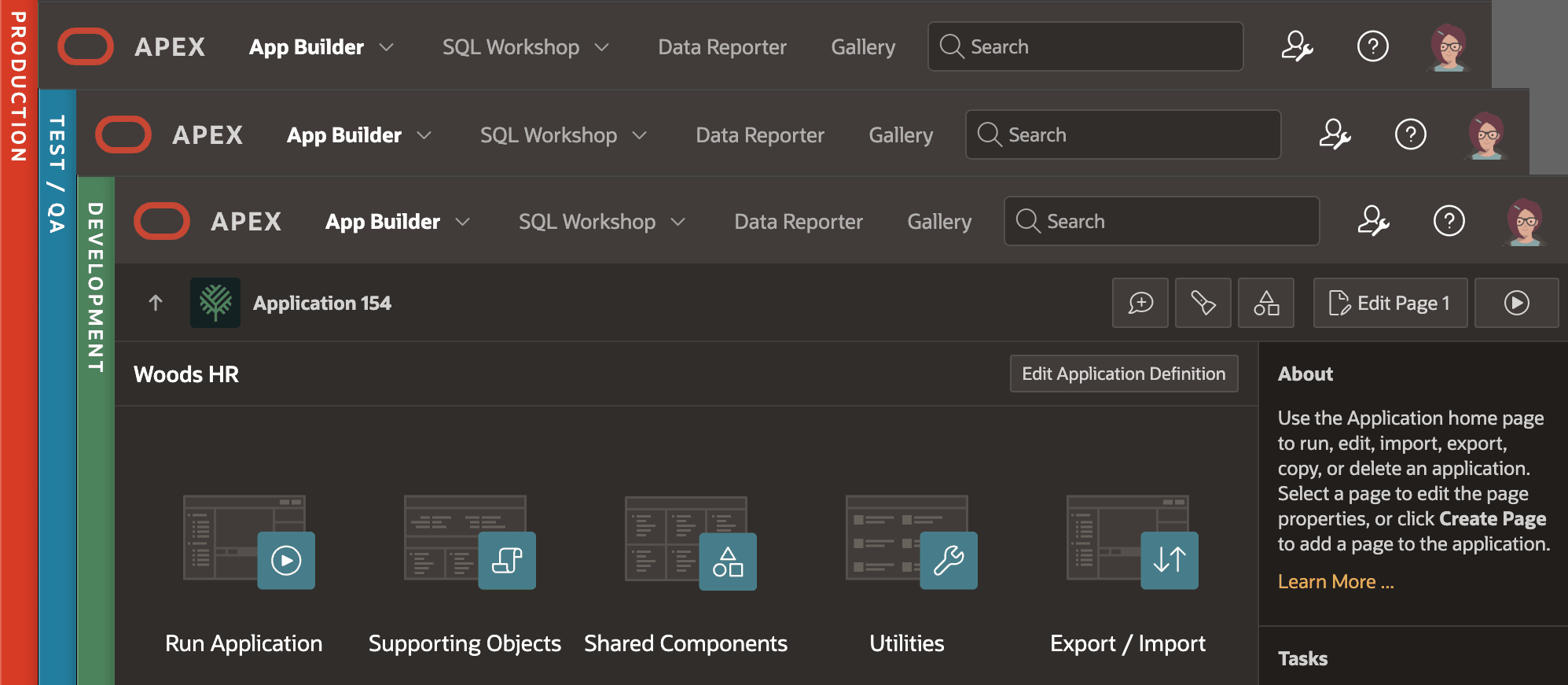
Whatever setup you choose, label your environments clearly. APEX offers an Environment Banner that lets you display a colored stripe and text at the top or along the side of the screen. For example, you might show a bright red PRODUCTION banner in production, a blue TEST banner in test, and a green DEV banner in development. These cues appear in the App Builder, helping prevent mistakes like editing production by accident. A distinct banner for each environment is a simple but powerful safeguard. The figure shows three App Builder in three different workspaces, each with a different color banner clearly representing PRODUCTION, TEST / QA, and DEVELOPMENT environments.
Figure 23-1 Using Environment Banners for DEV, TEST, and PROD
With multiple environments in place, a typical release workflow looks like this: Developers build and test changes in DEV. When a set of updates is ready, the team exports the APEX application and any required data scripts from DEV and imports them into TEST. In TEST, QA or stakeholders verify everything works as expected. If issues appear, fixes are made in DEV and re-tested. Once the app passes testing, the same export file is imported into PROD. This ensures the code in production matches what was tested. Teams often increment the application’s Version Number setting with each release so versions are easy to track. DEV might be on 2.0 while PROD uses at 1.9. Moving changes through stages keeps environments isolated, reduces risk, and builds confidence that production runs only well-tested code.
Parent topic: Understanding Application Lifecycle