Configuring an Environment Banner in Administration Services
Configure a environment banner for an instance in Administration Services.
Environment banners can display at either the left or top of the page. You can define an environment banner for a given workspace or an entire development instance. Workspace-level environment banners override those defined at the instance-level.
Note: If a workspace or instance-level environment banner is enabled, the text and color displays in App Builder pages and Runtime Developer toolbar in the application runtime.
To define a environment banner in Administration Services:
-
Sign in to Oracle APEX Administration Services.
-
Click Manage Instance.
-
Under Messages, click Define Environment Banner.
-
In the Environment Banner dialog:
-
Enable Banner - Specify whether to include an environment banner. Select Yes or No.
-
Position - Select the banner display position. Select Left or Top.
-
Label - Edit the text to display as a label on the banner.
-
Color - Select the banner color.
-
-
Click Apply Changes.
A confirmation message appears that reads:
Environment banner settings saved.
The following illustration shows an instance-level environment displaying on the left.
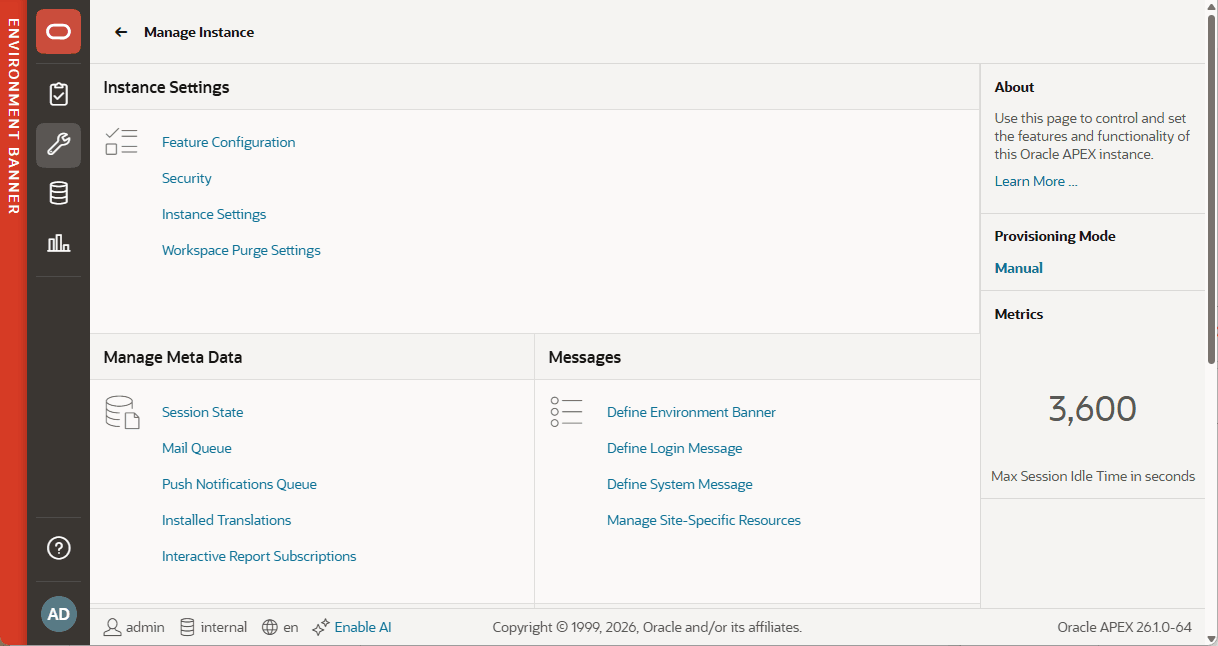
Description of the illustration instance_environment_banner.png