About the Quick SQL Page
Learn about the layout and controls available on the Quick SQL page.
The Quick SQL page is divided into two panes: Quick SQL and SQL.
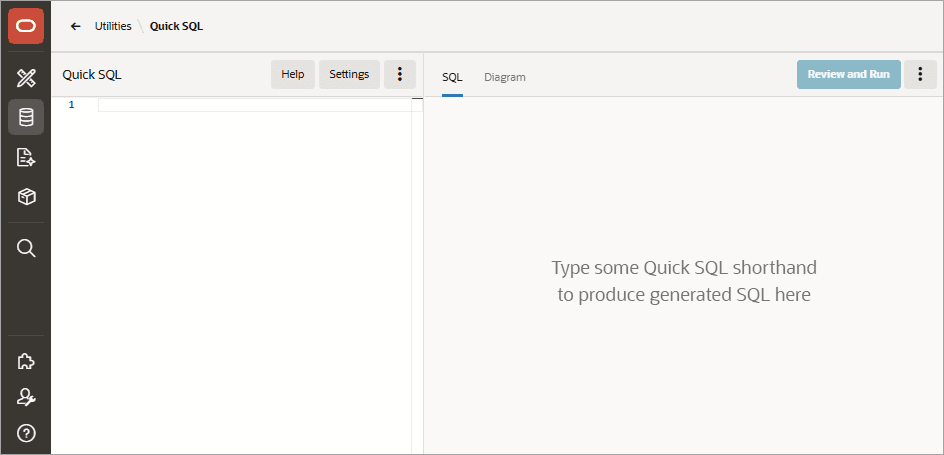
Description of the illustration quick_sql.png
Quick SQL Pane
The Quick SQL pane displays on the left side of the page. Enter SQL shorthand syntax into the Quick SQL pane and instantly generate a SQL script in the SQL pane.
Available controls on the Quick SQL pane include:
-
Help - Learn more about using Quick SQL.
-
Settings - Displays the Settings dialog to declaratively configure generation options.
-
Quick SQL Actions menu - Displays as three vertical dots (
 ). Available options include:
-
Load - Load an existing saved Quick SQL model.
-
Save Model - Save a Quick SQL model.
-
Save Model As - Rename a Quick SQL model. Only displays for previously saved models.
-
Reset - Remove previously entered text in the Quick SQL pane.
-
Properties - View properties of the current loaded Quick SQL model.
-
SQL Pane
The SQL pane displays on the right side of the page. Use this pane to view generated SQL. Available controls include:
-
SQL tab - Displays generated SQL.
-
Diagram tab - Displays a entity relationship diagram of your data model’s tables, columns, datatypes, and relationships.
-
Review and Run - Access SQL Scripts to review and run the script.
-
SQL Actions menu - Displays as three vertical dots (
). Available options include:-
Save SQL Script - Save generated SQL as a script.
-
Download - Download a generated SQL script locally.
-