About the SQL Commands Home Page
Learn about the SQL Commands home page.
The SQL Commands home page is divided into two sections: a Command Editor and a Display pane. You use the Command Editor to execute SQL commands and the display pane to view output, saved command lists, and history lists.
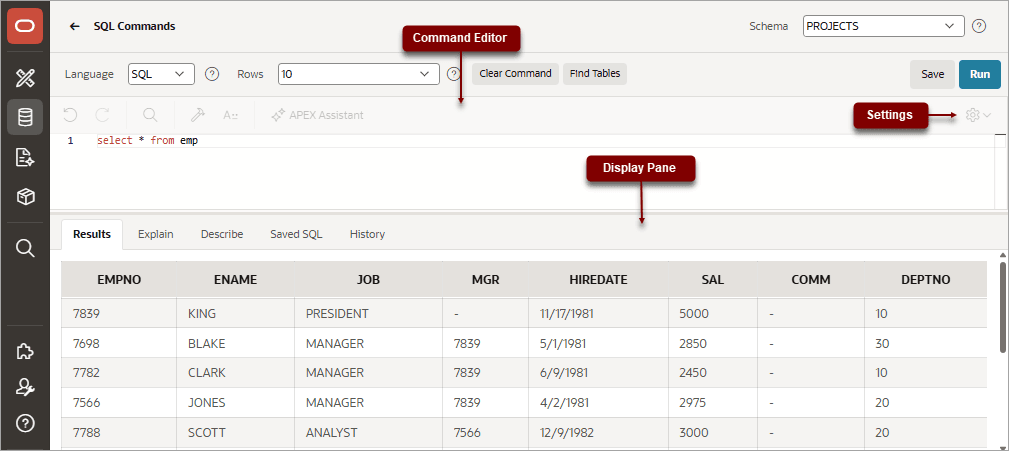
Description of the illustration sql_c_top.png
Command Editor
The top of the SQL Commands home page features a Command Editor with the following controls:
-
Language. Determines the language which should be used to execute the entered statement.
-
Rows. Select the number of rows of output to display simultaneously up to a maximum of 100,000. All rows of DBMS Output are displayed regardless of the Display list setting.
-
Clear Command. Use the Clear Command button to clear the text in the command editor.
-
Find Tables. Use the Find Tables button to view tables within the currently selected schema.
-
Save. Click the Save button to save the contents of the command editor, or the currently highlighted content to a file. You are prompted to enter a name and an optional description. The command appears in the Saved SQL list.
-
Run. Click the Run button (Ctrl+Enter) to run the command in the command editor, or the currently highlighted command in the command editor.
The text editor features the following controls:
-
Undo (Ctrl+Z)
-
Redo (Ctrl+Shift+Z)
-
Find (Ctrl+F)
-
Auto Complete (Ctrl+Space)
-
Context Menu - Right-click and select one of the following:
-
Change All Occurrences (Ctrl+F2) - Right click and select Change All Occurrences from the context menu.
-
Cut
-
Copy
-
Command Palette (F1) - The Command Palette includes over 80 commands including: Replace (Ctrl+H), Replace with Next Value (Ctrl+Shift+.), and Replace with Previous Value (Ctrl+Shift+,).
-
-
Multi Cursor Selection:
-
Add cursors at arbitrary positions - Select a position with your mouse and press Shift+Alt+click (Shift+Option+click on macOS).
-
Set cursors above the current position - Select a position with your mouse and press Ctrl+Alt+Up (Option+Command+Up on macOS).
-
Set cursors below the current position - Select a position with your mouse and press Ctrl+Alt+Down (Option+Command+Down on macOS).
-
-
Settings Menu - Displays on the right side and includes the following options:
-
Indentation - Options include: Tab Inserts Spaces, Tab Size, and Indent Size
-
Themes - Options include: Automatic, Light, Dark, and High Contrast Dark
-
Show Ruler
-
Display Pane
The display pane is at the bottom of the SQL Commands home page and features the following five tabs:
-
Results. Click the Results tab to see the results from the last successfully executed SQL command. Click DBMS Output at the bottom of the displayed results to display lines of DBMS output. This control only appears when there is DBMS output to display. Click Download to export results to a comma-delimited file on your local file system.
-
Explain. Click the Explain tab to examine the execution plan used by the optimizer for statements that make changes to the database. Objects in the output are linked to the Object Browser. Click the linked object to view its properties in the Object Browser.
-
Describe. Enter Describe object_name and click Run to display column definitions for a table or view, or specifications for a function or procedure in the Describe tab. Select links in the Describe results to write that information into the command editor. For example, click a table name to add owner.table, click a column name to add the column name, click a procedure or function name to add the object call with parameters, or click a package name to add the package call.
-
Saved SQL. Click the Saved SQL tab to display a list of all SQL commands saved in the current workspace. Click the command title to load it into the command editor.
-
History. Click the History tab to list your recently executed commands. Your last 200 executed commands are saved.
See Also: