Adjusting UI When Selected Job Changes
React to a value change using a dynamic action event handler.
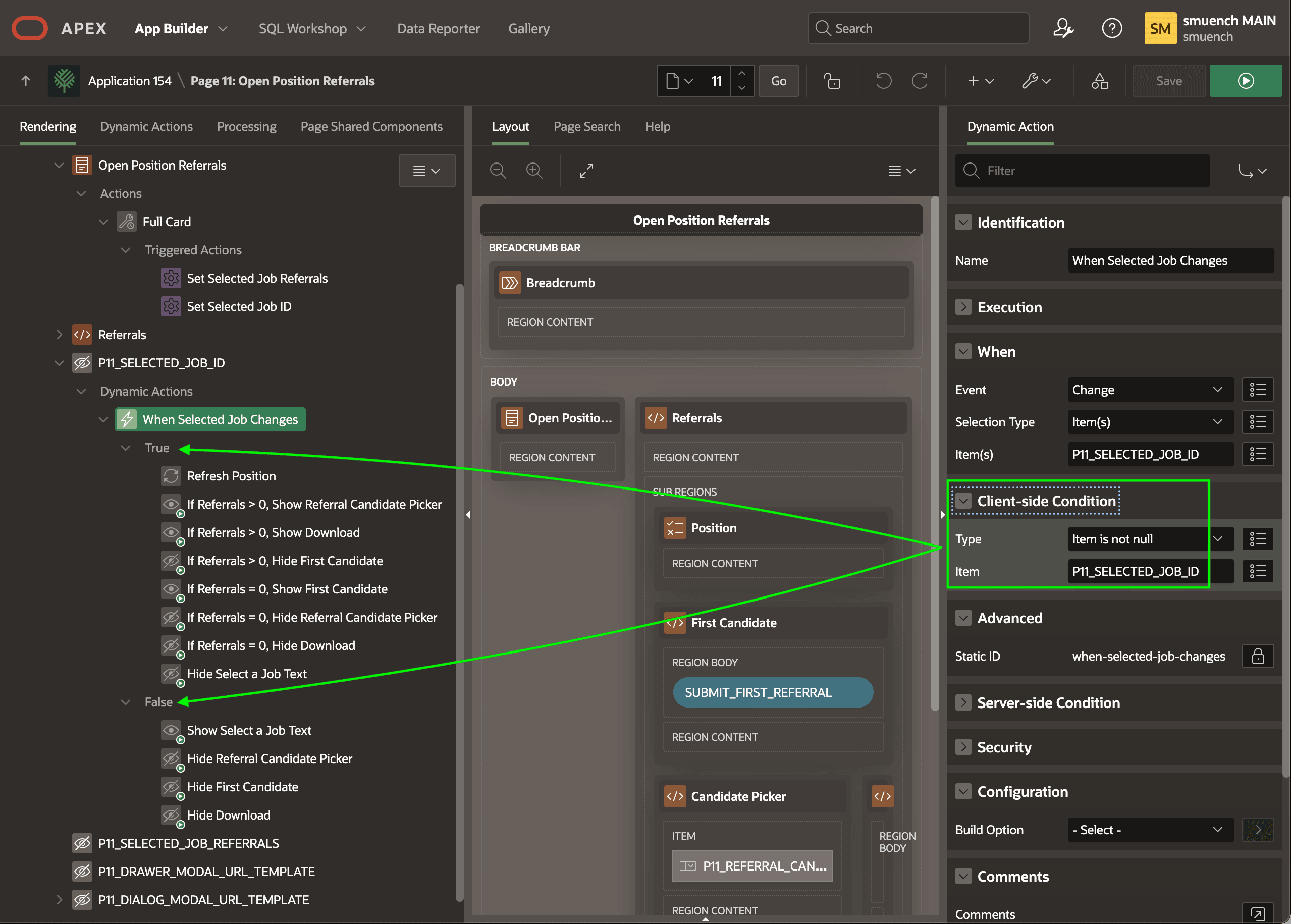
When the hidden P11_SELECTED_JOB_ID changes value, a When Selected Job Changes dynamic action handles that event. It evaluates its Client-side Condition highlighted below:
-
Type:
Item is not null -
Item:
P11_SELECTED_JOB_IDIfP11_SELECTED_JOB_IDis not null, then the True list of action steps executes. If it is null, then the False list of action steps runs instead. These actions combine declarative Refresh, Hide, and Show action steps with appropriate client-side conditions based on theP11_SELECTED_JOB_REFERRALSto decide what to refresh, hide, and show on the right side of the page.
Tip: Assigning a descriptive name to each action step makes the logic easier to follow when you or a teammates needs to enhance this page in the future.
The figure shows the When Selected Job Changes dynamic action event handler selected in the component tree. It highlights how the true or false result of its configuredClient-side Condition affects which set of action steps execute.
Description of the illustration adjust-right-side-job-id-change.png