Defining Automation Actions in Sequence
Define automation actions that decide which rows to process, perform conditional updates, and notify affected users.
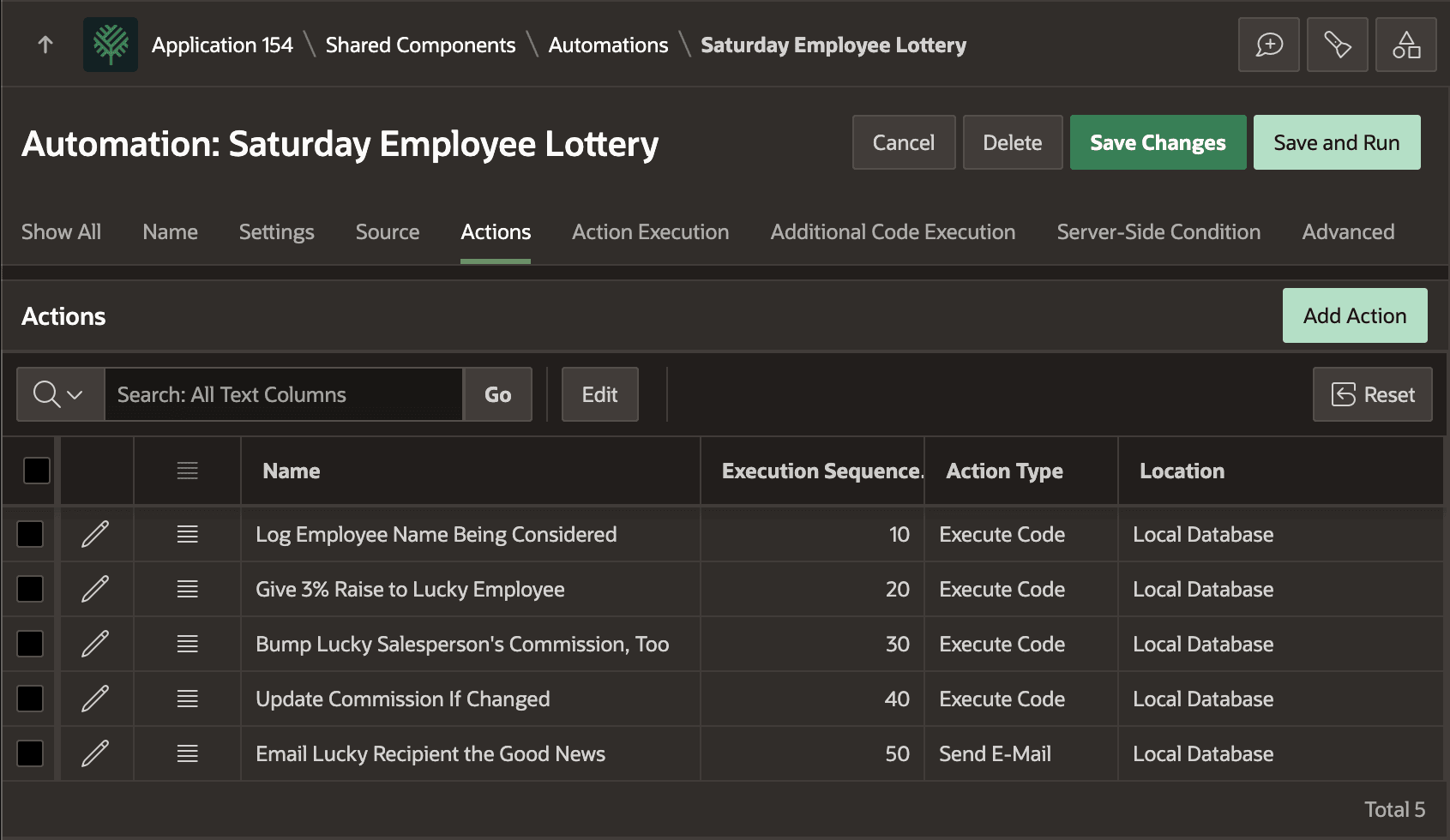
The Saturday Employee Lottery automation includes the sequence of five actions shown below:
-
Log Employee Name Being Considered
-
Give 3% Raise to Lucky Employee
-
Bump Lucky Salesperson’s Commission, Too
-
Update Commission If Changed
-
Email Lucky Recipient the Good News.
The figure shows the Actions tab of the Automation edit page showing the five actions described above, in execution sequence order, listing the Action Type for each one. Each one is explained in more detail below.
Description of the illustration saturday-automation-actions.png
Log Employee Name Being Considered
Log Employee Name Being Considered writes a message to the automation log with information about the employee being processed. It is an Execute Code action with the following code. If the ordinal RN value matches the randomly selected winning row number, then it logs a message to that effect. Otherwise, it calls SKIP_CURRENT_ROW to continue on to process the next row. This avoids the execution of the remaining actions in the sequence for the non-winning employee row.
if :RN = :G_LOTTERY_PICK then
    apex_automation.log_info(
        apex_string.format('Processing bottom quartile lucky employee %s with rn=%s',
                           :ENAME, :RN));
else
    apex_automation.skip_current_row(
        apex_string.format('Skipping bottom quartile employee %s with rn=%s',
                           :ENAME, :RN));
end if;
Give 3% Raise to Lucky Employee
If the employee is the lucky one, Give 3% Raise to Lucky Employee computes their 3% salary raise, updates their SAL in the EBA_DEMO_EMP table, and writes a message to the automation log. It is an Execute Code action with the following Server-side condition so it only executes for the winning employee.
:RN = :G_LOTTERY_PICKIt has the following code. Notice how it’s using the NEW_SALARY column in the current row as temporary storage for the new salary it calculates. The Send E-Mail action below passes this NEW_SALARY value to an email template placeholder.
:NEW_SALARY := round(to_number(:SAL) * 1.03);
apex_automation.log_info(
    apex_string.format('Lucky employee %s gets 3% salary raise from %s to %s',
                       :ENAME, :SAL, :NEW_SALARY));
update eba_demo_emp
   set sal = :NEW_SALARY
 where empno = :EMPNO;
apex_automation.log_info(
    apex_string.format('Updated Lucky employee %s salary from %s to %s',
                       :ENAME, :SAL, :NEW_SALARY));
Bump Lucky Salesperson’s Commission, Too
If the lucky employee is a salesperson, Bump Lucky Salesperson’s Commission, Too computes their 3% commission raise and writes a message to the automation log. It is an Execute Code action with the following Server-side condition so it only executes for a winning salesperson with an existing commission.
:RN = :G_LOTTERY_PICK and :JOB = 'SALESMAN' and :COMM is not nullIt has the following code. Notice again how it’s using the NEW_COMMISSION column in the current row as temporary storage for the new commission it computes. The Update Commission If Changed and the Send E-Mail action below both reference this value.
:NEW_COMMISSION := round(to_number(:COMM) * 1.03);
apex_automation.log_info(
    apex_string.format('Lucky Salesperson %s also gets 3% commission bump from %s to %s',
                       :ENAME, :COMM, :NEW_COMMISSION));
Update Commission If Changed
If the commission has changed, Update Commission If Changed reflects the change in the database and writes a message to the automation log. It is an Execute Code action with the following Server-side condition to only run if a new commission got set.
:NEW_COMMISSION is not nullIt has the following code. Notice how it’s referencing the NEW_COMMISSION column in the current row that the previous action might have assigned a value to. It shows how temporary storage columns can be assigned by earlier actions in preparation for a later action to save the changes.
update eba_demo_emp
   set comm = :NEW_COMMISSION
 where empno = :EMPNO;
apex_automation.log_info(
    apex_string.format('Updated Lucky Salesperson %s commission from %s to %s',
    :ENAME, :COMM, :NEW_COMMISSION));
Email Lucky Recipient the Good News
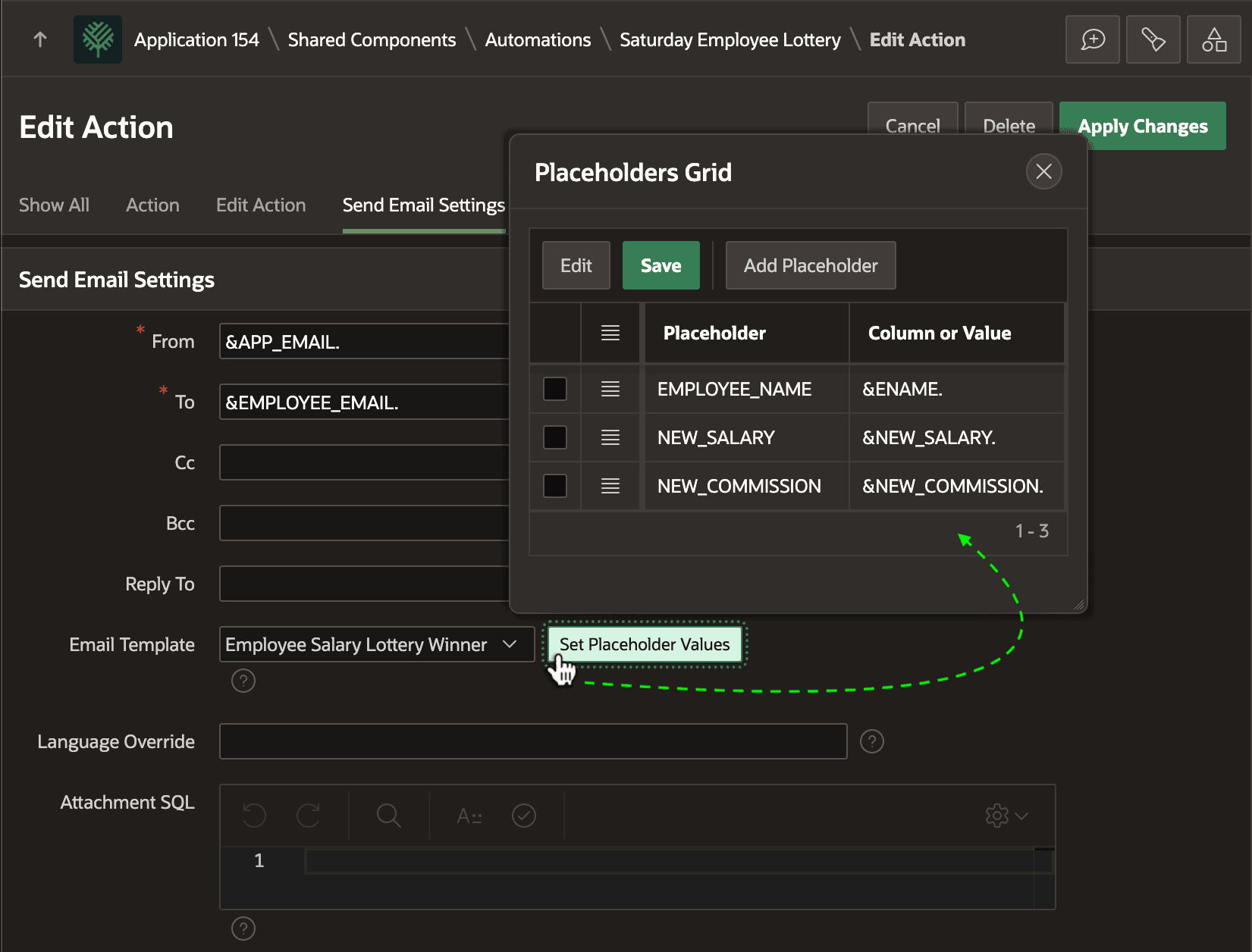
If the employee is the lucky one, Email Lucky Recipient the Good News sends them an congratulatory email with their new salary, and commission if relevant. It is a Send E-Mail action with Server-side condition :RN = :G_LOTTERY_PICK configured as shown below. Notice how it’s using the Email Salary Lottery Winner email template. The email template placeholders get their values using substitution syntax from the columns names in the current row.