Joining Collection with Temp Files Table
Join APEX_APPLICATION_TEMP_FILES to a collection on unique file name to process uploaded images with additional information related to them.
The EBA_DEMO_WOODSHR_TEMP_PHOTOS view shown below unifies the “sidecar” storage of image titles with the temporary storage of the uploaded images. It uses the unique uploaded file name to join the APEX_APPLICATION_TEMP_FILES table with the UPLOADED_PHOTOS collection. The collection stores the unique uploaded file name in column C001 and the user-entered title for each uploaded image in column C002. The diagram illustrates of the EBA_DEMO_WOODSHR_TEMP_PHOTOS view joins APEX_APPLICATION_TEMP_FILES and the APEX_COLLECTIONS view (for COLLECTION_NAME = 'UPLOADED_PHOTOS')
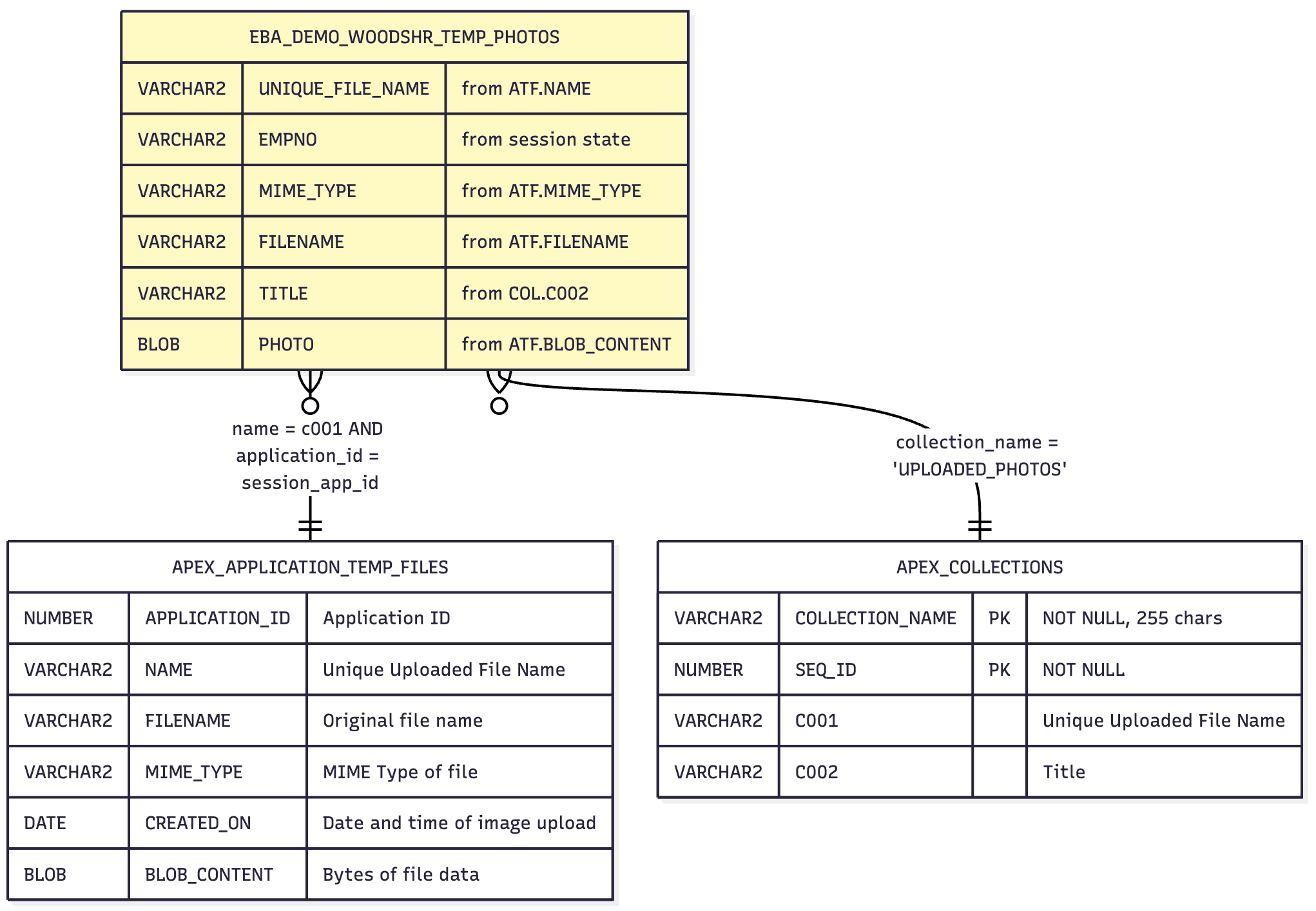
Description of the illustration view-joining-apex-collections-and-temp-files.png
The view pulls in session state values of the currently logged-in user and the current application id using the NV function in a common table expression. It uses the NO_MERGE query optimizer hint to avoid having those functions evaluated multiple times.
create view eba_demo_woodshr_temp_photos as
with session_state as (
    select /*+ NO_MERGE */
           nv('G_APP_USER_EMPNO') as empno,
           nv('APP_ID')           as current_app_id
      from dual
)
select atf.name as unique_file_name,
       sst.empno,
       atf.mime_type,
       atf.filename,
       col.c002 as title,
       atf.blob_content as photo
  from session_state sst
  join apex_collections col
    on col.collection_name = 'UPLOADED_PHOTOS'
  join apex_application_temp_files atf
    on atf.name = col.c001 /* Join on Unique File Name */
   and atf.application_id = sst.current_app_id