Processing Multiple Uploaded Files
Process multiple uploaded files with PL/SQL that chooses the right Data Load Definition and expands ZIP archives.
When the user clicks the (Load) button it submits the page and the Load Employees from Files page process executes. It’s an Invoke API page process that calls the EMPLOYEES_FROM_FILES procedure in the EBA_DEMO_WOODSHR_LOAD package explained below. The p_file_names IN parameter gets its value from the File Upload page item P33_FILE, and the three OUT parameters return their values into respective hidden page items:
-
p_file_count=>P33_FILE_COUNT -
p_processed_rows=>P33_PROCESSED_ROWS -
p_error_rows=>P33_ERROR_ROWS
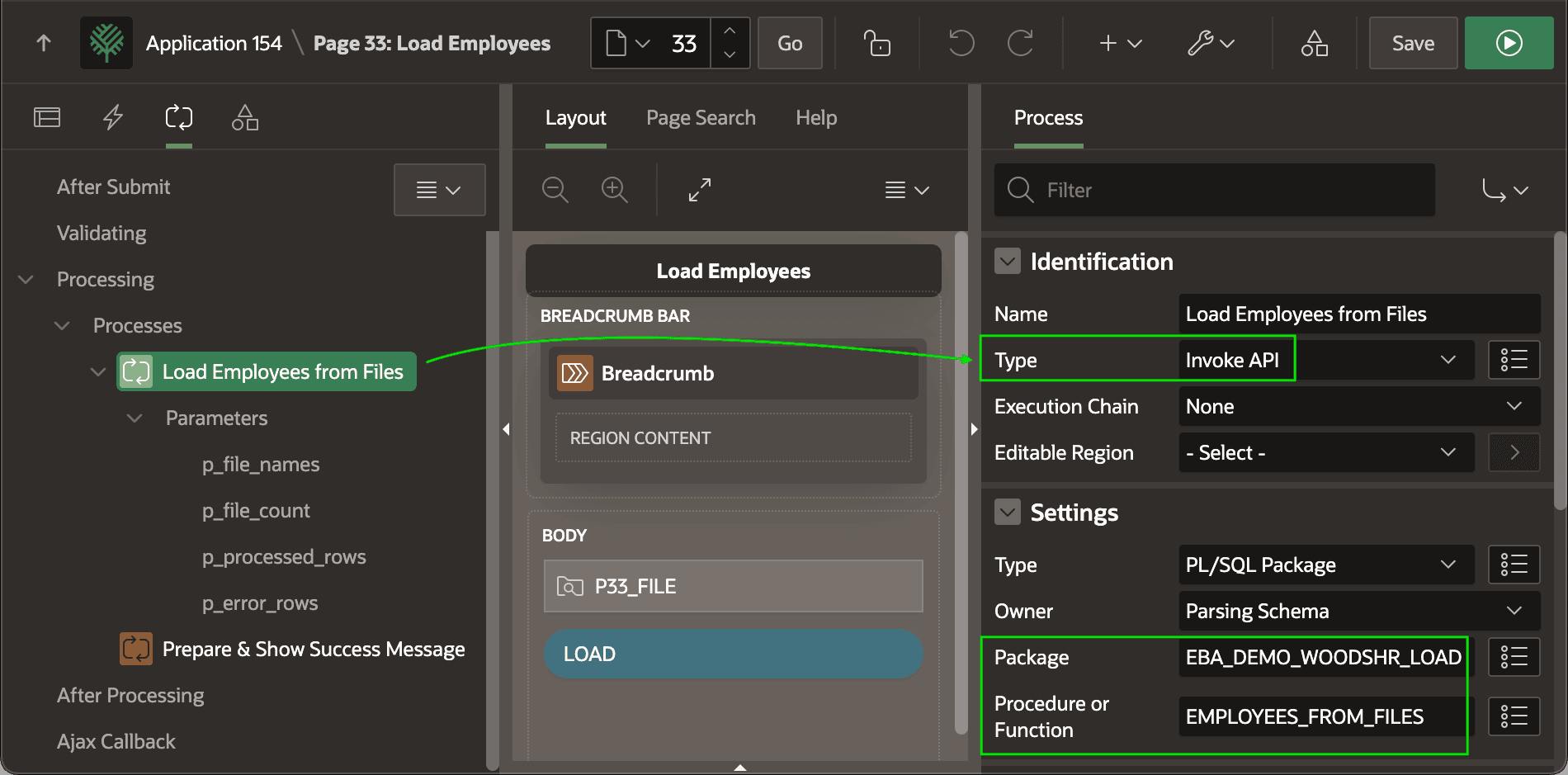
Description of the illustration custom-load-invokeapi.png
The app defines two translatable text messages:
-
ONE_FILE_ROWS_PROCESSED=> “Loaded 1 file, new employees: %0” -
MANY_FILES_ROWS_PROCESSED=> “Loaded %0 files, new employees: %1”
A subsequent Execute Code page process references these translatable messages to compute the value of the hidden P33_SUCCESS_MESSAGE. It uses APEX_LANG.GET_MESSAGE and CASE expressions with to supply an appropriate number of placeholder values for a conditional translatable text message key.
:P33_SUCCESS_MESSAGE :=
    apex_lang.get_message(
        p_name => case when :P33_FILE_COUNT = 1
                       then 'ONE_FILE_ROWS_PROCESSED'
                       else 'MANY_FILES_ROWS_PROCESSED'
                  end,
        p_params => case when :P33_FILE_COUNT = 1
                         then apex_t_varchar2('0',:P33_PROCESSED_ROWS)
                         else apex_t_varchar2('0',:P33_FILE_COUNT,
                                              '1',:P33_PROCESSED_ROWS)
                  end);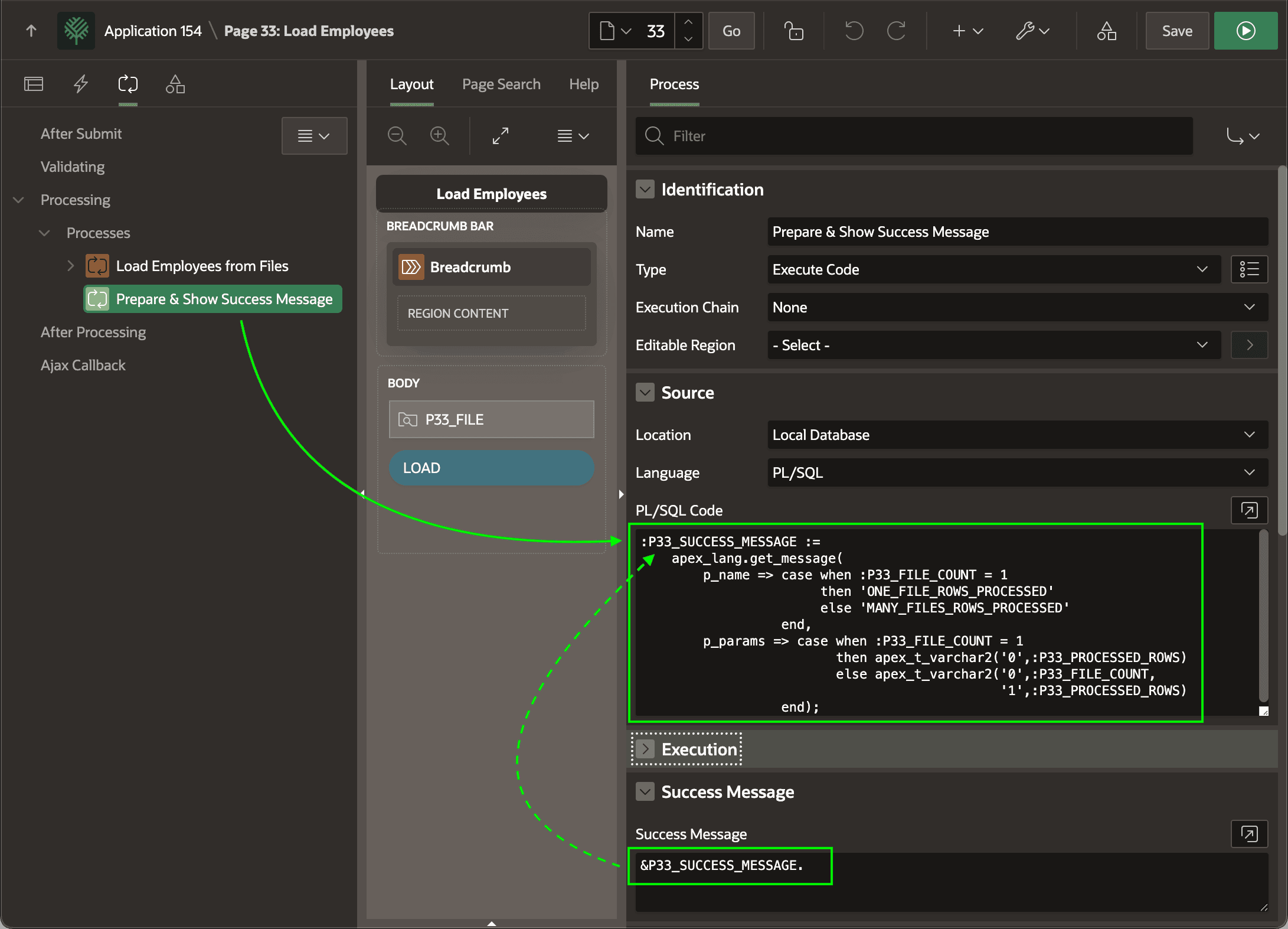
Description of the illustration custom-load-successmessage.png
The source for the EMPLOYEES_FOR_FILES procedure appears below. It loops over the uploaded files in temporary storage from the File Upload item passed in, and calls the DATA_LOAD_FOR_FILE helper procedure to perform the data load on the current file.
-- In package eba_demo_woodshr_load
procedure employees_from_files(
    p_file_names      in varchar2,
    p_file_count     out number,
    p_processed_rows out number,
    p_error_rows     out number)
is
begin
    p_file_count     := 0;
    p_processed_rows := 0;
    p_error_rows     := 0;

    -- Loop over uploaded files in temp storage from File Upload item
    for j in (select blob_content, filename, mime_type
                from apex_application_temp_files
               where name in (select column_value
                                from apex_string.split(p_file_names,':')))
    loop
        -- Load the employees from the current file
        data_load_for_file(
            p_content        => j.blob_content,
            p_filename       => j.filename,
            p_mime_type      => j.mime_type,
            p_file_count     => p_file_count,
            p_processed_rows => p_processed_rows,
            p_error_rows     => p_error_rows);
    end loop;
end employees_from_files;
The DATA_LOAD_FOR_FILE procedure looks at the extension of the passed-in file name as well as the MIME Type of the file if supplied to decide the suffix of the Data Load Definition to use. Depending on the match, the l_data_load_def_suffix ends up being csv, json, xml, excel, or zip. If nothing matches, it will be null.
If we’re processing a ZIP file, then it calls the DATA_LOAD_FROM_ZIP helper procedure to process the contents of the zip file. Otherwise, if the data load suffix is not null, it appends the suffix to “load_employees_from_” to produce the static ID of the Data Load Definition to use. Finally, it passes this data load definition static id to APEX_DATA_LOADING.LOAD_DATA to perform the data load based on the file profile it specifies.
It keeps a running total of the number of files loaded and employees processed using the processed_rows field value from the t_data_load_result return value.
-- In package eba_demo_woodshr_load
----------------------------------------------
-- Load the employees data using the filename
-- extension or the mime type to determine
-- whether we're processing a zip file, or
-- a CSV, JSON, XML, or Excel file to data load
----------------------------------------------
procedure data_load_for_file(
    p_content        in blob,
    p_filename       in varchar2,
    p_mime_type      in varchar2,
    p_file_count     in out number,
    p_processed_rows in out number,
    p_error_rows     in out number)
is
    c_extension            constant varchar2(255)  := extension_of(p_filename);
    l_data_load_def_suffix          varchar2(255);
    l_result                        apex_data_loading.t_data_load_result;
begin
    l_data_load_def_suffix :=
        case
            when    c_extension in ('txt','csv')
                 or p_mime_type in ('text/plain','text/csv')
            then
                'csv'
            when    c_extension = 'json'
                 or p_mime_type = 'application/json'
            then
                'json'
            when    c_extension = 'xml'
                 or p_mime_type = 'text/xml'
            then
                'xml'
            when    c_extension in ('xls','xlsx')
                 or p_mime_type in ('application/vnd.ms-excel',
                                    'application/vnd.openxmlformats-officedocument.spreadsheetml.sheet')
            then
                'excel'
            when    c_extension = 'zip'
                 or p_mime_type = 'application/zip'
            then
                'zip'
        end;
    if l_data_load_def_suffix = 'zip' then
        data_load_from_zip(
            p_zip_content    => p_content,
            p_file_count     => p_file_count,
            p_processed_rows => p_processed_rows,
            p_error_rows     => p_error_rows);
    elsif l_data_load_def_suffix is not null then
        l_result := apex_data_loading.load_data(
                        p_static_id => 'load_employees_from_'||l_data_load_def_suffix,
                        p_data_to_load => p_content);
        p_file_count     := p_file_count + 1;
        p_processed_rows := p_processed_rows + l_result.processed_rows;
        p_error_rows     := p_error_rows + l_result.error_rows;
    end if;
end data_load_for_file;
The DATA_LOAD_FROM_ZIP uses APEX_ZIP.GET_FILES and a FOR loop to process the list of files contained in the zip file. It calls DATA_LOAD_FOR_FILE to get the job done.
-- In package eba_demo_woodshr_load
----------------------------------------------
-- Load the employees data files contained in
-- the supplied zip file blob
----------------------------------------------
procedure data_load_from_zip(
    p_zip_content    in blob,
    p_file_count     in out number,
    p_processed_rows in out number,
    p_error_rows     in out number)
is
    l_files        apex_zip.t_files;
    l_file_content blob;
begin
    -- Get list of files from the zip
    l_files := apex_zip.get_files(p_zip_content);

    -- Process the individual files inside the zip
    for j in 1..l_files.count loop

        -- Get the contents of the current file in the zip file
        l_file_content := apex_zip.get_file_content(p_zip_content,l_files(j));

        -- Load employees from the current file
        data_load_for_file(
            p_content        => l_file_content,
            p_filename       => l_files(j),
            p_mime_type      => null,
            p_file_count     => p_file_count,
            p_processed_rows => p_processed_rows,
            p_error_rows     => p_error_rows);
    end loop;