Updating a REST Source Row in Code
Review an example of updating a row using a REST Data Source.
A simple example that updates the HIREDATE of one employee using the Employees (Simple HTTP) REST Data Source is below. Notice the code references the REST Data Source using its Static ID employees_simple_http for the DML context. To support lost update protection, the code needs to fetch the existing Employee row first before proceeding to update the necessary fields in it. To perform this fetch by primary key, the code uses a second REST Data Source with Static ID employees_simple_http_by_pk to retrieve the single row to be updated. After using this second REST Data Source to retrieve the existing Employees row using a query context, it:
-
Opens the DML context for
employees_simple_http -
Adds a DML row to the context with the update operation
-
Sets the row version checksum on the DML row using the existing row to compute it
-
Calls the
SET_VALUESprocedure to copy all the existing row values into the DML row
Then it proceeds to update any values that need to be changed. Finally, it calls EXECUTE_DML to process the DML context. It closes both query and DML contexts to release resources when completed or in case of an exception.
declare
    l_params   apex_exec.t_parameters;
    l_cols     apex_exec.t_columns;
    l_ctx      apex_exec.t_context;
    l_dml_ctx  apex_exec.t_context;
begin
    apex_exec.add_column(
        p_columns        => l_cols,
        p_column_name    => 'EMPNO',
        p_data_type      => apex_exec.c_data_type_number,
        p_is_primary_key => true);
    apex_exec.add_column(
        p_columns        => l_cols,
        p_column_name    => 'MGR',
        p_data_type      => apex_exec.c_data_type_number);
    apex_exec.add_column(
        p_columns        => l_cols,
        p_column_name    => 'SAL',
        p_data_type      => apex_exec.c_data_type_number);
    apex_exec.add_column(
        p_columns        => l_cols,
        p_column_name    => 'COMM',
        p_data_type      => apex_exec.c_data_type_number);
    apex_exec.add_column(
        p_columns        => l_cols,
        p_column_name    => 'DEPTNO',
        p_data_type      => apex_exec.c_data_type_number);
    apex_exec.add_column(
        p_columns     => l_cols,
        p_column_name => 'ENAME',
        p_data_type   => apex_exec.c_data_type_varchar2);
    apex_exec.add_column(
        p_columns     => l_cols,
        p_column_name => 'JOB',
        p_data_type   => apex_exec.c_data_type_varchar2);
    apex_exec.add_column(
        p_columns     => l_cols,
        p_column_name => 'HIREDATE',
        p_data_type   => apex_exec.c_data_type_date);
    apex_exec.add_parameter(
        p_parameters => l_params,
        p_name       => 'empno_update',
        p_value      => 7788);
    -- Add parameter used by employee_by_pk_simple_http
    -- Fetch rows operation
    apex_exec.add_parameter(
        p_parameters => l_params,
        p_name       => 'empno_getone',
        p_value      => 7788);
    l_ctx := apex_exec.open_rest_source_query(
                p_static_id  => 'employee_by_pk_simple_http',
                p_columns    => l_cols,
                p_parameters => l_params);
    if apex_exec.next_row(l_ctx) then
        l_dml_ctx := apex_exec.open_rest_source_dml_context(
                        p_static_id             => 'employees_simple_http',
                        p_columns               => l_cols,
                        p_lost_update_detection => apex_exec.c_lost_update_implicit);
        -- Update SCOTT
        apex_exec.add_dml_row(l_dml_ctx,apex_exec.c_dml_operation_update);
        -- Checksum used for lost-update protection
        apex_exec.set_row_version_checksum(
            p_context   => l_dml_ctx,
            p_checksum  => apex_exec.get_row_version_checksum( p_context => l_ctx ));
        apex_exec.set_values(
            p_context         => l_dml_ctx,
            p_source_context  => l_ctx );
        -- Update the hiredate of the SCOTT employee
        apex_exec.set_value(l_dml_ctx,'HIREDATE',date'2024-07-14');
        -- Process the DML context
        apex_exec.execute_dml(l_dml_ctx);
    end if;
    apex_exec.close(l_ctx);
    apex_exec.close(l_dml_ctx);
exception
    when others then
        apex_exec.close(l_ctx);
        apex_exec.close(l_dml_ctx);
        raise;
end;
The Employee by PK (Simple HTTP) REST Data Source, with Static ID employee_by_pk_simple_http has just a single GET operation with Database Action of Fetch rows. As shown below, it’s configured to use the URL Pattern parameter empno_getone in the URL to retrieve a single employee.
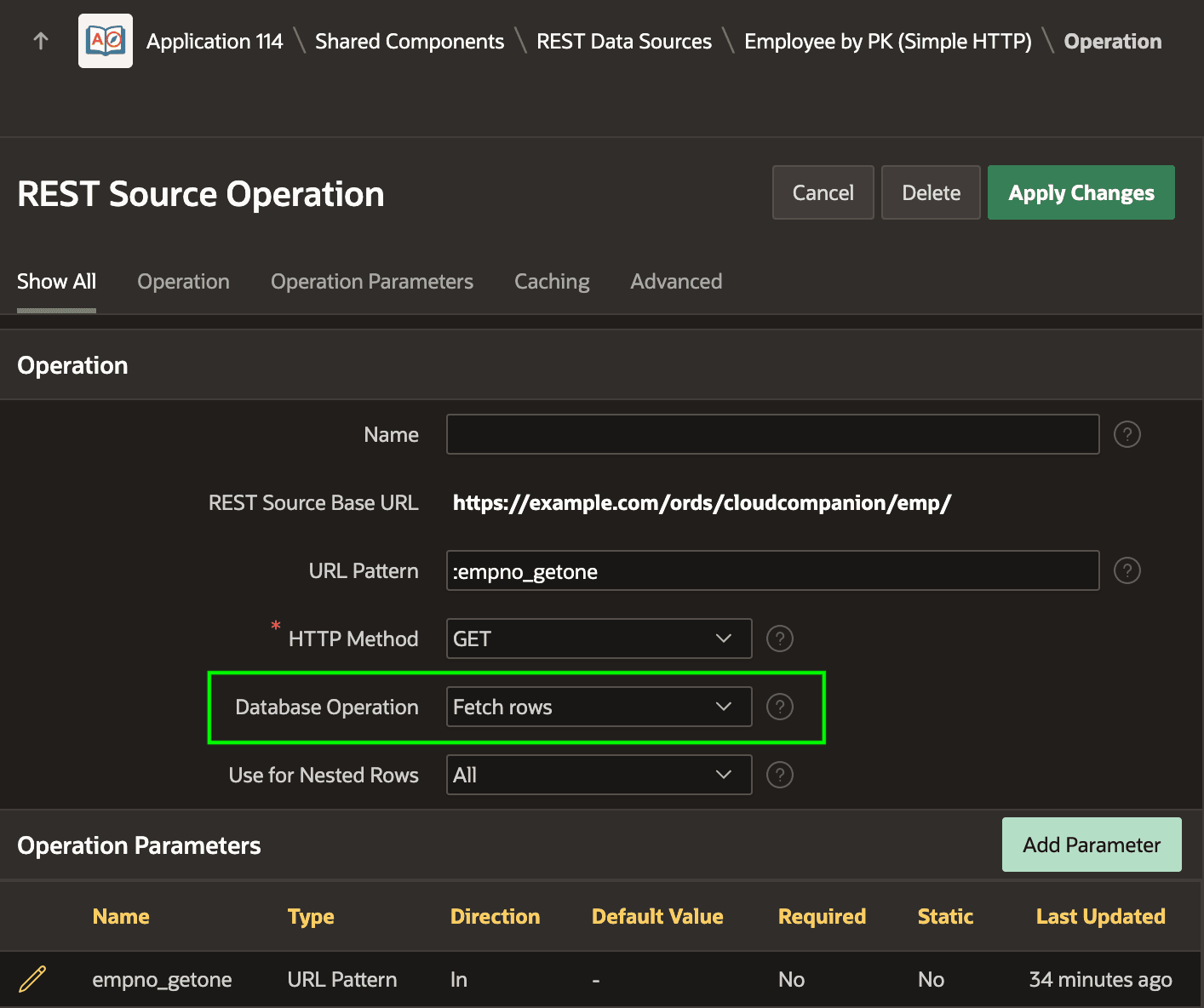
Description of the illustration rest-data-source-fetchonebypkoper.png
At runtime, by setting the empno_getone parameter to a value like 7788 as the example above is doing, if debug tracing is enabled you would see the APEX engine requests the URL:
making GET request to https://example.com/ords/cloudcompanion/emp/7788When requesting a single employee from the Employees service, it responds with a JSON payload like the following that contains just a single object instead of an items array with one or more objects in it:
{
    "empno": 7788,
    "ename": "SCOTT",
    "job": "ANALYST",
    "mgr": 7566,
    "hiredate": "1982-12-09T00:00:00Z",
    "sal": 3000,
    "comm": null,
    "deptno": 20,
    "links": [
        {
            "rel": "self",
            "href": "https://example.com/ords/cloudcompanion/emp/7788"
        },
        ⋮
    ]
}
This means the Employee by PK (Simple HTTP) REST Data Source needs a Data Profile that caters for this different, single-row response. As shown below, the Data Profile for this REST Data Source omits the Row Selector and enables the Contains Single Row switch.
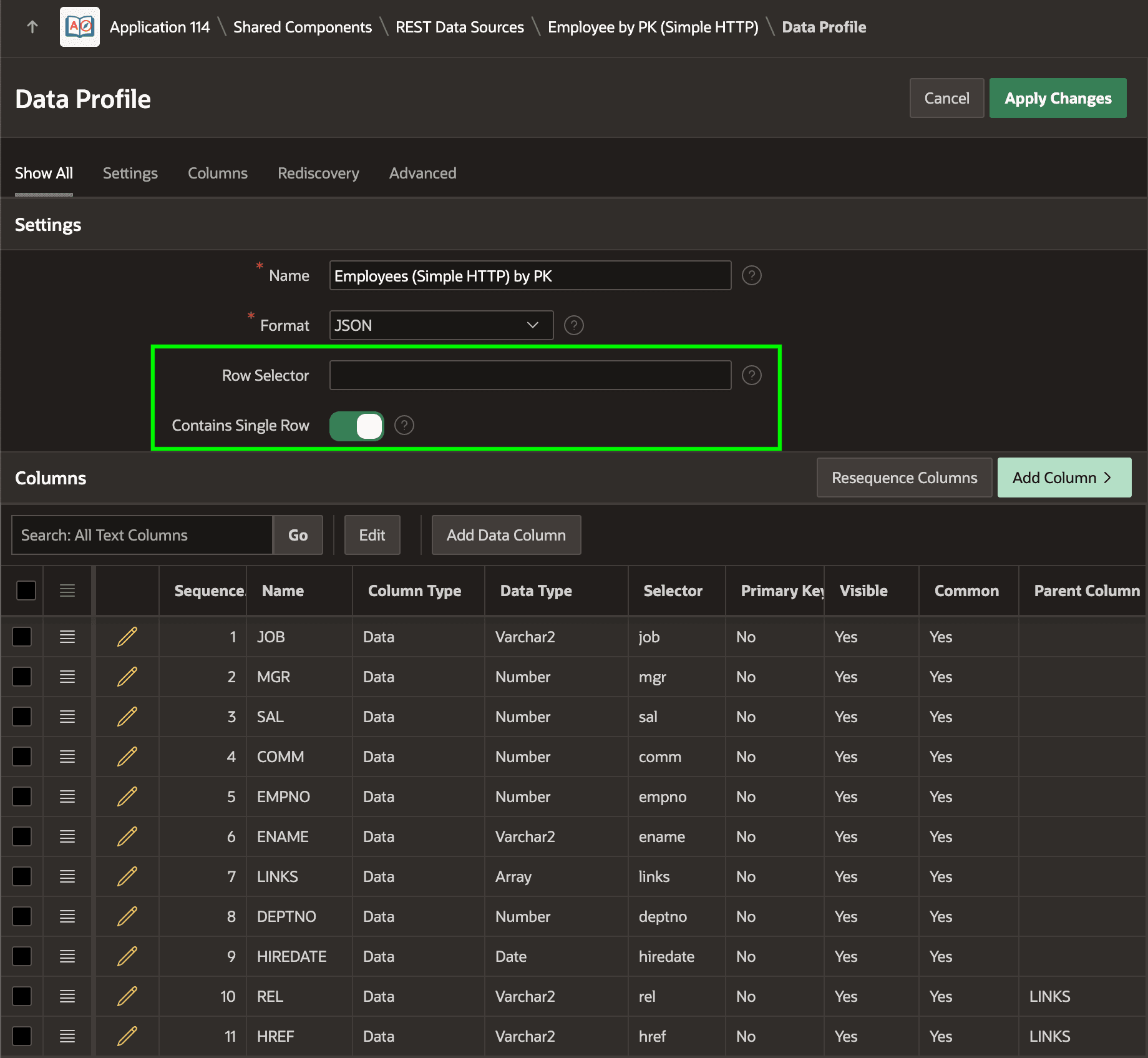
Description of the illustration rest-data-source-fetchonebypkprofile.png