Understanding Access Control
Adding the Access Control feature to an application, creates multiple pages and the following components: an Access Control region, access roles, authorization schemes, a build option, and an Application Setting.
About Adding Access Control
Learn about adding Access Control.
Running the Access Control Wizard creates multiple pages and the following components:
-
Adds an Access Control region to the Administration page you specify.
-
Creates the access roles:
Administrator,Contributor, andReader. -
Creates the authorization schemes:
Administration Rights,Contribution Rights, andReader Rights.Note: When you add a new Access Control to an existing application, these authorization schemes are only be created if the names do not exist. For example, if
Administration Rightsalready exists (case sensitive comparison), the wizard will not recreate. Instead, the Access Control page will re-use the existing authorization scheme. -
Creates the build option,
Feature: Access Control. -
Creates the Application Setting,
ACCESS_CONTROL_SCOPE.
Developers use the access control list to associate the privileges, view, edit, and administration, with application users. Within the final Access Control UI, each privileges correlates to an access role:
-
Viewcorrelates to theReaderrole. -
Editcorrelates to theContributorrole. -
Administrationcorrelates to theAdministratorrole.
See Also:
Attaching an Authorization Scheme to an Application, Page, or Components Managing Roles and User Assignments
About Access Control Authorization Schemes
Learn about Access Control authorization schemes.
When you add the Access Control feature to an application, the PL/SQL Body Wizard creates the following authorization schemes:
-
Administration Rights– This authorization scheme checks if the current user in the application is assignedADMINISTRATORrole.return APEX_ACL.HAS_USER_ROLE ( p_application_id=>:APP_ID, p_user_name => :APP_USER, p_role_static_id => 'ADMINISTRATOR'); -
Contribution Rights– This authorization scheme checks if the current user in the application is assigned theADMINISTRATORrole or theCONTRIBUTORrole.if apex_acl.has_user_role ( p_application_id=>:APP_ID, p_user_name => :APP_USER, p_role_static_id => 'ADMINISTRATOR') or apex_acl.has_user_role ( p_application_id=>:APP_ID, p_user_name=> :APP_USER, p_role_static_id=> 'CONTRIBUTOR') then return true; else return false; end if; -
Reader Rights– This authorization scheme returns TRUE if the access control is configured to allow any authenticated user access the application. If this behavior is not allowed, it checks if the current user in the application is assigned to any application role.if nvl(apex_app_setting.get_value( p_name => 'ACCESS_CONTROL_SCOPE'),'x') = 'ALL_USERS' then -- allow user not in the ACL to access the application return true; else -- require user to have at least one role return apex_acl.has_user_any_roles ( p_application_id => :APP_ID, p_user_name => :APP_USER); end if;
See Also: Attaching an Authorization Scheme to an Application, Page, or Components
About Configuring Access Control
Configure Access Control by running the application and accessing the Access Control region on the Administration page.
Once you add the Access Control feature, you configure it by running the application and accessing the Access Control region on the Administration page.
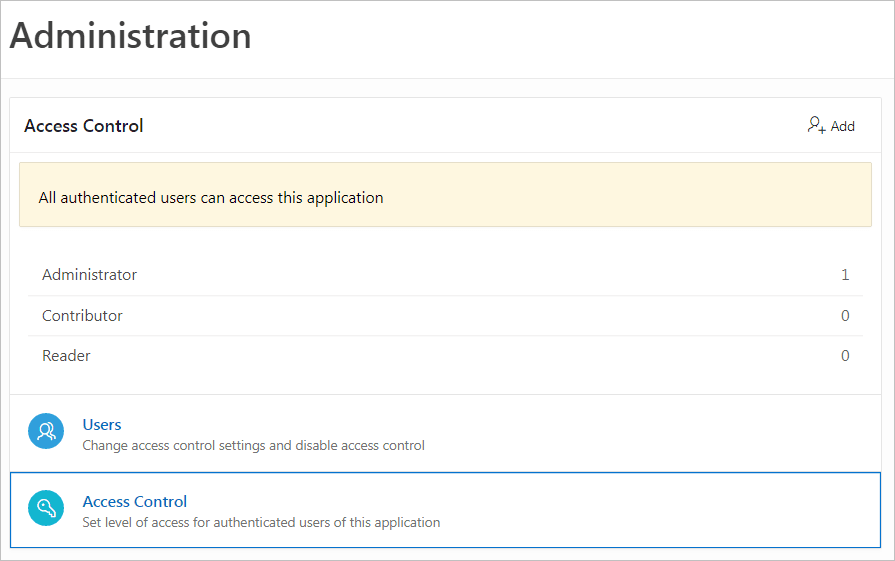
Description of the illustration admin_access_control.png
The Access Control region lists currently defined access roles and contains two sections: Users and Access Control.
Users
Click Users to add new users, change a user’s role, or disable access control by locking an account.
Tip: You add additional roles and configure role assignments on the Shared Components, Application Access Control page. See Managing Roles and User Assignments.
Access Control
Click Access Control to specify the behavior when authenticated users access the application.
For Any authenticated user may access this application, select one of the following:
-
Off - Choose Off if all defined users are included in the access control list.
-
On - Choose On if authenticated users not in the access control list may also use this application.
About Exporting an Application with Access Control
Learn about exporting an application with Access Control.
When your export an application with the Access Control feature, the application roles, Administrator, Contributor, and Reader, are exported. However, the users assigned to these roles are not exported. If you deploy a exported application with the Access Control feature, navigation menu entry for Administration page will not display. When you deploy an application with Access Control feature, your can add user roles as needed by going to Shared Components, Application Access Control. If the application is being deployed in a runtime environment, you can add user roles using APEX_ACL API. For example, the following example adds the user name ‘SCOTT’ as Administrator in application 255:
begin
    APEX_ACL.ADD_USER_ROLE (
        p_application_id => 255,
        p_user_name      => 'SCOTT',
        p_role_static_id => 'ADMINISTRATOR' );
end;
You can also execute the APEX_ACL API from the command line or create an install script in application supporting objects.
See Also: Attaching an Authorization Scheme to an Application, Page, or Components Managing Roles and User Assignments APEX_ACL in Oracle APEX API Reference