Configuring a SAN Server to Communicate with Oracle Database Security Central
To configure a storage area network (SAN) for Oracle Database Security Central, complete this procedure.
Oracle Database Security Central uses Linux Open-iSCSI to communicate with SAN servers. You must ensure that the iSCSI service is enabled on the SAN server you want to use for storing Oracle Database Security Central data, and provide the Audit Vault Server’s iSCSI initiator name to your storage administrator to use in configuring the SAN server. The SAN server must allow iSCSI targets and LUNs (logical unit numbers) to communicate with this iSCSI initiator name. We recommend that the LUN numbers assigned to a disk should be fixed.
Note:
-
Ensure that you do not have more than one target mapped to the same disk on the SAN storage server.
-
Multipath is not supported with ISCSI storage.
Some SAN servers may also require the Oracle Audit Vault Server’s IP address.
To find the Oracle Audit Vault Server’s iSCSI initiator name and IP address:
-
Log in to the Oracle Audit Vault Server as a super administrator.
-
Select Settings, and then select SAN.
The SAN Servers page is displayed with the iSCSI initiator name at the bottom.
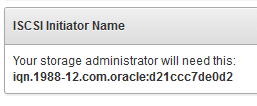
Description of the illustration san_iscsi_name.png
In a high availability environment, you see two iSCSI initiator names: one for the primary Oracle Audit Vault Server, and one for the secondary.
-
To find the Oracle Audit Vault Server’s IP address, select Settings, and then select Network. The IP address is at the top of this page.
Note: Do not restart the iSCSI service on either the Oracle Audit Vault Server, or the SAN server that is servicing the Oracle Audit Vault Server. If there is a need to restart either of these services, then contact Oracle Support.