Introduction to Database Firewall Deployment
Depending on your operational needs you can monitor SQL traffic only, or you can monitor and block SQL traffic to the target database.
When configuring the Database Firewall, you can choose one of the following deployment modes:
| Deployment Mode | Minimum Number of Network Interface Cards (NICs) | Operational Notes |
|---|---|---|
| Monitoring/Blocking (Proxy) | 3 (for deployment with network separation) 1 (for deployment without network separation) |
This mode enables the Database Firewall to both monitor and block SQL traffic, as well as optionally substitute SQL statements. You configure clients to connect to the Database Firewall instead of the database so that the firewall can intercept all SQL traffic and take the necessary actions, based on policies that you define. |
| Monitoring (Host Monitor) | 1 | To use this mode, you install the Audit Vault Agent and Host Monitor Agent on the host machine that’s running the target database. The Host Monitor Agent captures traffic from the NIC on the host machine and securely forwards it to the Database Firewall. |
| Monitoring (Out-of-Band) | 2 | In this mode, the Database Firewall monitors and alerts on SQL traffic, but it can’t block or substitute SQL statements. To copy database traffic to the Database Firewall, you can use a switch with a SPAN port (as shown in the diagram), a network tap, a packet replicator, or other similar technology. |
One Database Firewall can monitor traffic from multiple targets deployed in different modes. For example, one Database Firewall can be deployed in Monitoring/Blocking (Proxy) mode for some targets and in Monitoring (Host Monitor) mode and Monitoring (Out-of-Band) mode for other targets.
Note:
-
A single NIC is required when the client and database are on the same subnet. There is no network separation.
-
Additional NICs are required when the client and database are on different subnets.
-
When there are three NICs, the network separation requires you to have a management network interface, which is usually attached to the default gateway. The first NIC is placed in the client subnet. The second NIC is placed in the database subnet. No additional routing is required in this configuration. All the addresses for clients and databases are local to the networks that are accessible to the Database Firewall NICs.
Monitoring/Blocking (Proxy)
Monitoring/Blocking (Proxy) mode enables the Database Firewall to both monitor and block SQL traffic, as well as optionally substitute SQL statements.
You configure clients to connect to the Database Firewall instead of the database so that the firewall can intercept all SQL traffic and take the necessary actions, based on policies that you define. In all cases, the database server identifies the Database Firewall as the client.
Oracle recommends that you configure the database to reject all connections that do not come from the Database Firewall.
Note: To simplify the modification required for applications to connect to the Database Firewall proxy mode deployments, configure local domain name servers (DNS) to resolve the fully-qualified domain name (FQDN) of the target database to the IP address of the Database Firewall.
You can deploy the Monitoring/Blocking (Proxy) mode in the following ways:
-
Proxy without network separation
-
Proxy without network separation using a dedicated network interface card (NIC)
-
Proxy with network separation
Proxy Without Network Separation
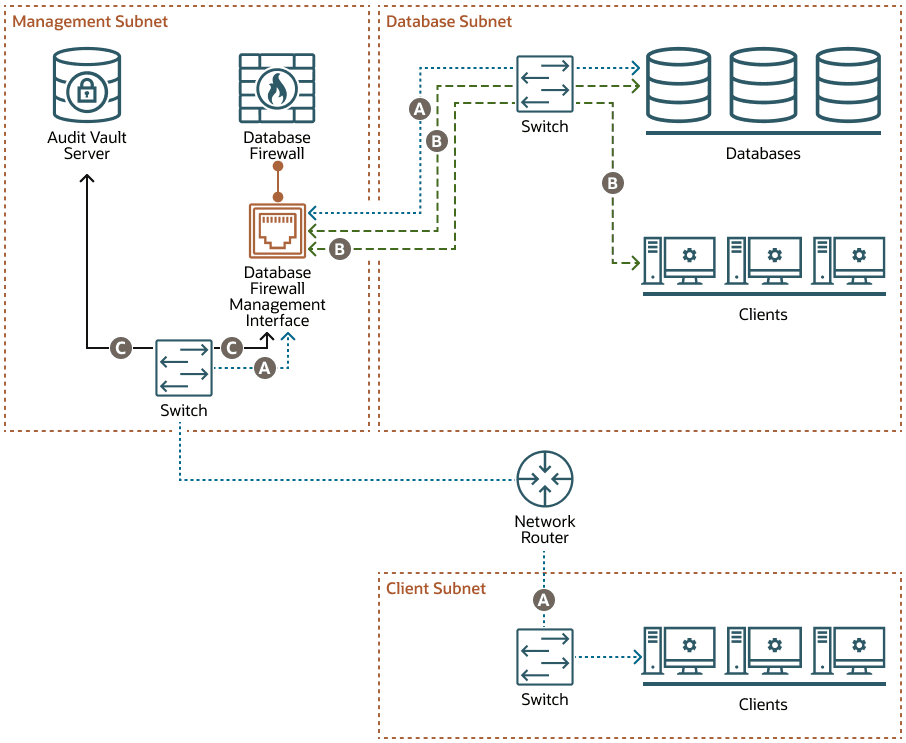
Description of the illustration dbfw-proxy-network-separation.png
When you deploy the Database Firewall as a proxy without network separation, the Database Firewall has one NIC called the Database Firewall management interface, which handles all communication between the clients and databases, as well as between the Database Firewall and the Audit Vault Server. This NIC is deployed in the management subnet.
The example in this diagram has three subnets:
-
The management subnet contains the Audit Vault Server, the Database Firewall, the Database Firewall management interface, and a switch.
-
The client subnet contains three clients and a switch.
-
The database subnet contains three databases, three clients, and a switch.
The following letter callouts describe how traffic flows to and from the Database Firewall in the diagram:
-
A: In the client subnet, traffic travels from the clients through a switch to the network router. The router sends the traffic to the switch in the management subnet, which forwards the traffic to the Database Firewall traffic management interface. From there the traffic travels to the databases through the switch in the database subnet. The database responses return to the clients through the same path.
-
B: In the database subnet, traffic travels from the clients through the switch in the database subnet to the Database Firewall traffic management interface in the management subnet. From there the traffic travels to the databases through the switch in the database subnet. The database responses return to the clients through the same path.
-
C: The Database Firewall extracts and analyzes SQL data from the client traffic and sends it through the Database Firewall management interface to the switch in the management subnet and then to the Audit Vault Server, based on the Database Firewall policy.
Proxy Without Network Separation Using a Dedicated NIC for the Proxy Service
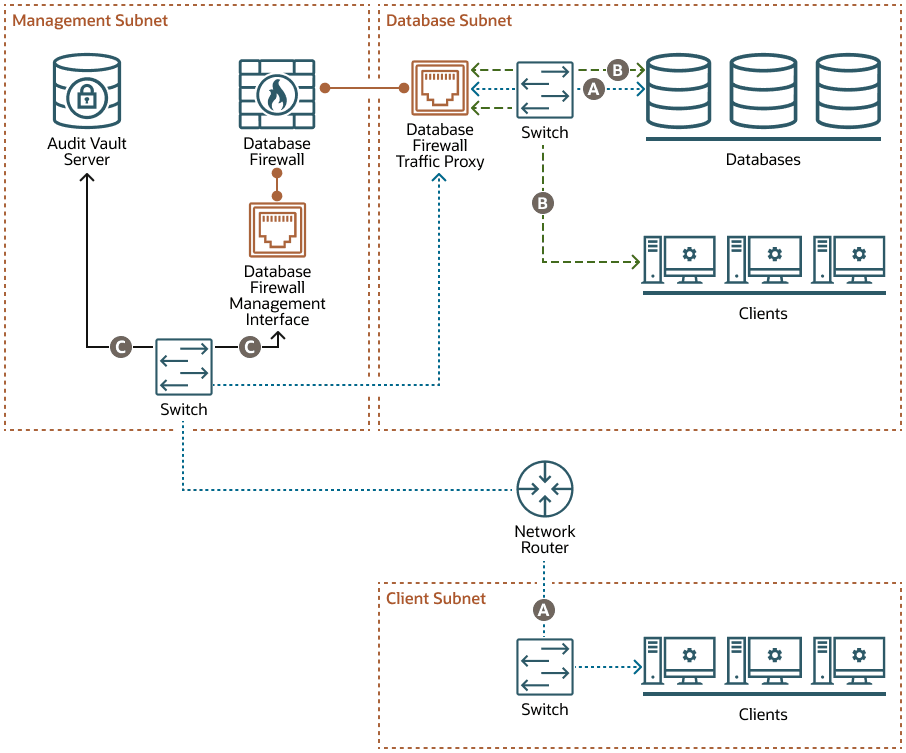
Description of the illustration dbfw-proxy-network-separation-using-dedicated-nic.png
When you deploy the Database Firewall as a proxy without network separation using a dedicated NIC, the Database Firewall has two NICs:
-
The Database Firewall traffic proxy NIC handles traffic from all clients to the databases. This NIC is deployed in the database subnet.
-
The Database Firewall management interface handles communication between the Database Firewall and the Audit Vault Server. This NIC is deployed in the management subnet.
The example in this diagram has three subnets:
-
The management subnet contains the Audit Vault Server, the Database Firewall, the Database Firewall management interface, and a switch.
-
The client subnet contains three clients and a switch.
-
The database subnet contains three databases, three clients, a switch, and the Database Firewall traffic proxy.
The following letter callouts describe how traffic flows to and from the Database Firewall in the diagram:
-
A: In the client subnet, traffic travels from the clients through a switch to the network router. The router sends the traffic to the switch in the management subnet, which forwards the traffic to the Database Firewall traffic proxy in the database subnet. From there the traffic travels to the databases through the switch in the database subnet. The database responses return to the clients through the same path.
-
B: In the database subnet, traffic travels from the clients through the switch in the database subnet to the Database Firewall traffic proxy in the database subnet. From there the traffic travels to the databases through the switch in the database subnet. The database responses return to the clients through the same path.
-
C: The Database Firewall extracts and analyzes SQL data from the client traffic and sends it through the Database Firewall management interface to the switch in the management subnet and then to the Audit Vault Server, based on the Database Firewall policy.
Proxy With Network Separation
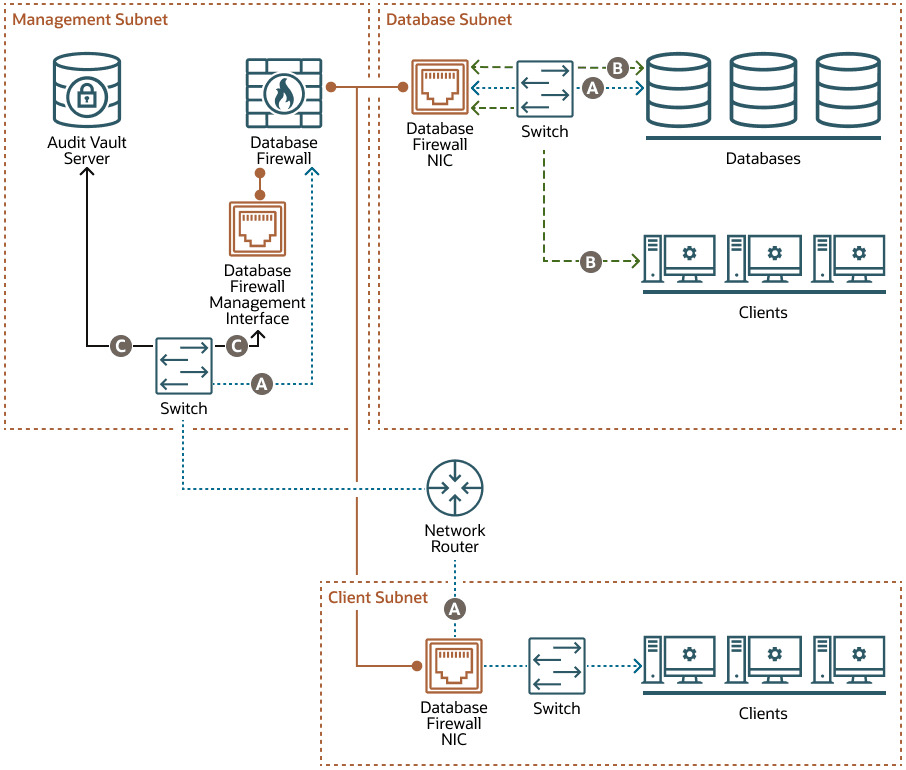
When you deploy the Database Firewall as a proxy with network separation, the Database Firewall has a minimum of three NICs:
-
Each client subnet has a Database Firewall NIC that handles all traffic to and from the clients in that subnet.
-
The database subnet has a Database Firewall NIC that handles all traffic to the databases, as well as traffic from any clients in the database subnet.
-
The Database Firewall management interface handles communication between the Database Firewall and the Audit Vault Server. This NIC is deployed in the management subnet.
The example in this diagram has three subnets:
-
The management subnet contains the Audit Vault Server, the Database Firewall, the Database Firewall management interface, and a switch.
-
The client subnet contains three clients, a switch, and a Database Firewall NIC.
-
The database subnet contains three databases, three clients, a switch, and a Database Firewall NIC.
The following letter callouts describe how traffic flows to and from the Database Firewall in the diagram:
-
A: In the client subnet, traffic travels from the clients through a switch to the Database Firewall NIC in the client subnet and then to the network router. The router sends the traffic to the switch in the management subnet, which forwards the traffic to the Database Firewall. From there the traffic travels to the databases through the NIC and switch in the database subnet. The database responses return to the clients through the same path.
-
B: In the database subnet, traffic travels from the clients through the switch in the database subnet to the Database Firewall NIC in the database subnet. From there the traffic travels to the databases through the switch in the database subnet. The database responses return to the clients through the same path.
-
C: The Database Firewall extracts and analyzes SQL data from the client traffic and sends it through the Database Firewall management interface to the switch in the management subnet and then to the Audit Vault Server, based on the Database Firewall policy.
Monitoring (Host Monitor)
In Monitoring (Host Monitor) mode, the Database Firewall monitors and alerts on SQL traffic, but it can’t block or substitute SQL statements.
To use Monitoring (Host Monitor) mode, you install the Audit Vault Agent and Host Monitor Agent on the host machine that’s running the target database. The Host Monitor Agent captures traffic from the network interface card (NIC) on the host machine and securely forwards it to the Database Firewall.
Note: You can add any NIC (with an IP address configured) on the Database Firewall to the monitoring point. See Creating a Monitoring Point for the Host Monitor Agent.
Monitoring (Host Monitor) mode is helpful if the network topology prevents deployment of other Database Firewall modes. Host monitoring captures only the relevant traffic, whereas Monitoring (Out-of-Band) mode captures all the network traffic. Monitoring (Host Monitor) mode can monitor SQL traffic using the Host Monitor Agent deployed on the database server when there are multiple network paths from clients to the database host.
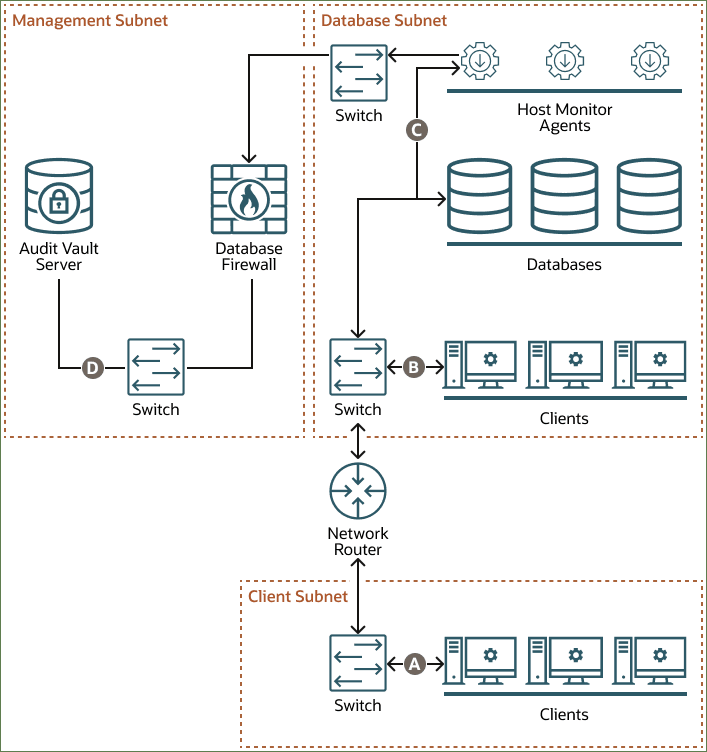
Description of the illustration dbfw-monitoring-host-monitor.png
The example in the diagram has three subnets: client, database, and management. The client subnet contains three clients that connect to the network router through a switch in the client subnet. The database subnet contains three databases and three Host Monitor Agents. The Host Monitor Agents connect to the Database Firewall through a switch in the database subnet. The database subnet also contains three clients that connect to a second switch in the database subnet. That switch connects to the databases and to the network router. The management subnet contains the Database Firewall and the Audit Vault Server, which connect to each other through a switch in the management subnet.
The following points refer to the letter callouts in the diagram:
-
A: The clients in the client subnet connect directly to the database through the network router and a switch in the database subnet.
-
B: The clients in the database subnet connect directly to the database through the switch in the database subnet.
-
C: The Host Monitor Agents record traffic between the clients and the databases and forward the traffic to the Database Firewall through a switch in the database subnet.
-
D: The Database Firewall extracts and analyzes SQL data from the client traffic and sends it through the switch in the management subnet to the Audit Vault Server, based on the Database Firewall policy.
Monitoring (Out-of-Band)
In Monitoring (Out-of-Band) mode, the Database Firewall monitors and alerts on SQL traffic, but it can’t block or substitute SQL statements.
You can use several technologies to copy database traffic to the Database Firewall, including (but not limited to) SPAN ports, network taps, and packet replicators.
Monitoring (Out-of-Band) mode is the simplest deployment mode overall for a non-blocking policy requirement. There is no additional load on the database or the clients. The Database Firewall does not introduce any latency or a single point of failure.
Oracle Database Security Central (Oracle DBSecCentral) supports high availability in this deployment mode.
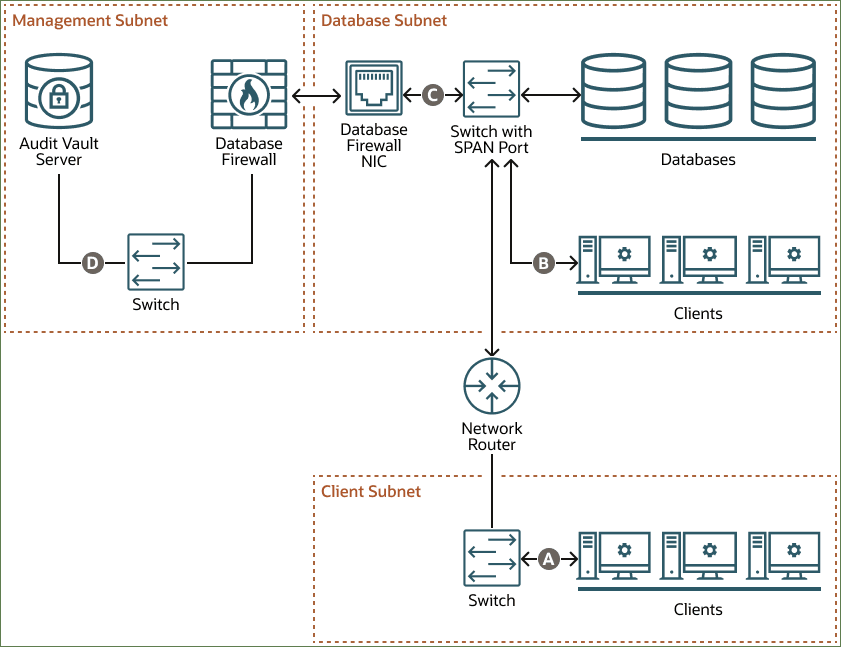
Description of the illustration dbfw-monitoring-band.png
The example in the diagram has three subnets: client, database, and management. The client subnet contains three clients that connect to the network router through a switch in the client subnet. The database subnet contains three databases that connect directly to the Database Firewall through a switch with a SPAN port and then a Database Firewall NIC in the database subnet. The database subnet also contains three clients that, along with the network router, connect to the same switch with a SPAN port. The management subnet contains the Database Firewall and the Audit Vault Server, which connect to each other through a switch in the management subnet.
The following points refer to the letter callouts in the diagram:
-
A: The clients in the client subnet connect directly to the database through the network router and the switch with the SPAN port in the database subnet.
-
B: The clients in the database subnet connect directly to the database through the switch with the SPAN port in the database subnet.
-
C: The Database Firewall monitors database activity through the Database Firewall NIC, which connects to a SPAN port on the switch in the database subnet.
-
D: The Database Firewall extracts and analyzes SQL data from the client traffic and sends it through the switch in the management subnet to the Audit Vault Server, based on the Database Firewall policy.