Java-Based Collection Plug-in Utility APIs
In addition to the Collection Framework, the Oracle Audit Vault API includes Java utility APIs that make the task of writing a collector easier.
About Connection to Database Sources Using ConnectionManager API
All of the Oracle Database Security Central components (collectors, agents, and server) that are written in Java must use the ConnectionManager API to manage their connections to databases.
You use the ConnectionManager API to manage connections to source databases, such as Oracle Database, Microsoft SQL Server, Sybase Adaptive Server, and IBM DB
2.
Benefits of Using the ConnectionManager API
-
It reduces the resource usage on the database server.
-
It makes client-side operations more graceful, so clients do not hang or die abruptly.
-
It provides better performance.
You must instantiate a concrete implementation of the connection manager with the appropriate parameters required for setting up a connection pool. Several constructors are available for use. All optional parameters that are not supplied by the caller take default Oracle Audit Vault-specific values, as follows:
-
CONNECTION_FACTORY_CLASSNAME=oracle.jdbc.pool.OracleDataSource -
MIN_POOL_SIZE=0 -
INACTIVE_CONNECTION_TIMEOUT=1800 -
INITIAL_POOL_SIZE=0 -
VALIDATE_CONNECTION_ON_BORROW=true
Example of Using the ConnectionManager API to Connect to Database Sources
See how to use the ConnectionManager API to manage Oracle Database Security Central Java component connections to databases.
The ConnectionManager API is based on the acquire, use, and release model for managing the database connections. All of the Oracle Database Security Central components (collectors, agents, and server) that are written in Java must use the ConnectionManager API to manage their connections to databases.
The caller is expected to complete these steps in the order shown:
-
Create an instance of ConnectionManager API.
-
Get a connection to a database.
-
Use the connection
-
Release the connection back to the pool.
-
Repeat steps 2 through 4 as many times as needed.
-
Destroy the Connection Manager instance.
Example 18 Using the Connection Manager to Handle Connection Pooling
//Connection Manager
ConnectionManager cManager = null;

try {
  /*
   * Connection Pool Properties.
   * Set the pool properties such as URL
   * Initial pool size, Min pool size, etc.
   * The set of supported connection pool properties are
   * documented in the Oracle UCP documentation
   */
  Properties pProps = new Properties();
  pProps.put(URL, "jdbc:oracle:thin:@hostname:port:sid");

  /*
   * Connection Properties
   *
   * Set the connection properties here.
   * The set of connection properties that can be set
   * depends on the driver.  To enable SSL using the
   * the oracle jdbc driver, you need to set the following
   * Properties cProps = new Properties();
   * String walletLoc =    "/path/to/walletdirectory/cwallet.sso";
   * cProps.setProperty("oracle.net.authentication_services","(TCPS)");
   * cProps.setProperty("javax.net.ssl.trustStore", walletLoc);
   * cProps.setProperty("oracle.net.ssl_server_dn_match", "true")  ;
   * cProps.setProperty("javax.net.ssl.trustStoreType","SSO");
   * cProps.setProperty("javax.net.ssl.keyStore", walletLoc);
   * cProps.setProperty("javax.net.ssl.keyStoreType","SSO");
   */
  Properties cProps = new Properties();

  cManager =  new ConnectionManagerImpl(pProps, cProps);

  String username;
  char[] passwd;
  Connection conn = null;

  /* Do something */
  ...

  /* Retrieve and set the username and password for user1 */
  username = "user1";
  passwd   = "user1passwd".toCharArray();

  /* Get a connection as "user1"*/
  conn = cManager.getConnection(username, passwd);


  /* Use the "user1" connection and do something useful */
  ...

  /* Release the connection */
  cManager.releaseConnection(conn);

  /* Retrieve and set the username and password for user2 */
  username = "user2";
  passwd   = "user2passwd".toCharArray();

  /* Get a connection as "user2" */
  conn = cManager.getConnection(username, passwd);


  /* Use the "user2" connection and do something useful */
  ...

  /* Release the connection */
  cManager.releaseConnection(conn);

} catch (Exception e) {
  /* Take appropriate action here */

} finally {
  if (cManager != null) {
    try {
      cManager.destroy();
    } catch (AuditException ae) {
      /* Take appropriate action here */
    }
}
The ConnectionManager API is designed so that a caller can acquire and release database connections using different user credentials at any point in time. For example, a caller can acquire a connection using alice’s database credentials, and then later on acquire a connection with robert’s database credentials using the same connection manager.
Note:
Ensure that the caller does not do the following:
-
Keep a reference to the connection locally (through an instance or class variable).
-
Hold on to the connection for a long time.
These requirements enable the connection pool to automatically recover connections that have the following behaviors:
-
They have exceeded the
TIME_TO_LIVEtime limit. -
They have abandoned connections, that is, connections that have not been in use for a while.
-
There are connections that have been borrowed too many times. This requirement ensures that they to avoid resource leaks.
Related Topics
Using the Windows Event Log Access API
To parse Microsoft Windows event logs, you can use the Microsoft Windows EventLog API.
The Windows EventLog API is a wrapper on Windows APIs that access the Windows Event Log. This API is available only on the Windows platform, for collectors that need to extract audit records.
The following diagram shows the classes that you can use to parse the Windows event logs.
Figure 3: Structure of Windows Event Logs
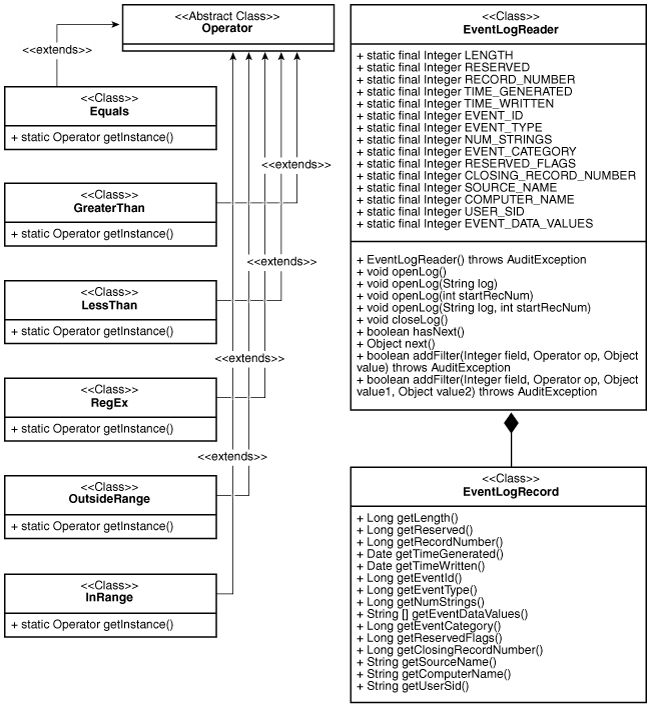
Description of the illustration sigdv106b.png
The EventLogRecord class contains one record in the event log. The EventLogReader class helps to fetch event log records one by one. Operator classes help filter the event log records. An operator works on a particular field of event log record and determines whether the record is to be filtered based on the value of the field. For example, you can use the Equals operator to filter all event log records where the value of the field does not equal the value specified. The InRange and OutsideRange operators are ternary operators. The rest are binary operators.
To collect event log records, follow these steps:
-
Create the
EventLogReaderinstance.For example, to open the application event log:
EventLogReader eventLogReader = new EventLogReader();
eventLogReader.openLog()
To open other event logs such security or system event logs, use the overloaded method
openLog(String log). For example, to open a security event log:EventLogReader eventLogReader = new EventLogReader(); eventLogReader.openLog("Security");To open an application event log from a specific record number, use the
openLog(int startRecNum)overloaded method. For example, to open an application event log from audit record number1234:EventLogReader eventLogReader = new EventLogReader(); eventLogReader.openLog(1234);To open security or system event logs from a specific record number, use the overloaded method,
openLog(String log, int startRecNum). For example, to open a security event log from record number4321:EventLogReader eventLogReader = new EventLogReader(); eventLogReader.openLog("Security",4321); -
Add the appropriate filters.
For example, to bind an equals filter to the
SourceNamefield, so that theEventLogReaderonly receives records that have the source nameMSSQL$SQLEXPRESS:eventLogReader.addFilter(EventLogReader.SOURCE_NAME, Equals.getInstance(), "MSSQL$SQLEXPRESS");To get event records between
Timestamp,m_lowerBoundTime, andm_upperBoundTime, use following filters:m_eventLogReader.addFilter(EventLogReader.TIME_GENERATED, GreaterThan.getInstance(), m_lowerBoundTime); m_eventLogReader.addFilter(EventLogReader.TIME_GENERATED, LessThan.getInstance(), m_upperBoundTime); -
Fetch and process the
EventLogRecord.The following example code obtains the next
EventLogRecord, and extracts various fields from it.if(eventLogReader.hasNext()) { EventLogRecord record = (EventLogRecord)eventLogReader.next(); Long eventID = record.getEventId(); String userID = record.getUserSid(); String hostName = record.getComputerName(); ... } -
Close the
EventLogReaderinstance.When the collector is stopped, use the following code to close down the
EventLogReaderinstance:eventLogReader.closeLog();
Related Topics
Using Windows EventMetaData API
To obtain metadata of events, you can use this Microsoft Windows Metadata Java API procedure.
Microsoft Windows provides a new API that can obtain metadata of events from version 2008 and on. Given a publisher name, this API obtains metadata for each event. The following figure illustrates how the Windows Metadata Java is a wrapper over the Windows API.
Figure 4: EventMetaData_Classes
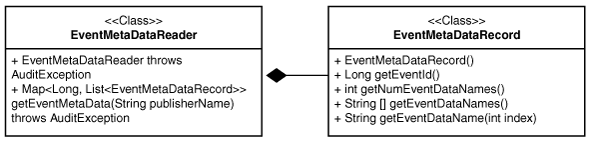
Description of the illustration sigdv107a.png
The EventMetaDataRecord contains the metadata of one event. The EventMetaDataReader helps to fetch event metadata records one by one. Use this API as follows:
-
Create an instance of
EventMetaDataReader.EventMetaDataReader eventMetaDataReader = new EventMetaDataReader(); -
Obtain metadata of all events for a publisher.
Map<Long, List<EventMetaDataRecord>> eventLogRecordMap = eventMetaDataReader getEventMetaData("Microsoft-Windows-Security-Auditing"); -
Obtain the metadata list of a particular event from the map.
List<EventMetaDataRecord> eventRecordList = m_eventRecordMap get(m_eventLogRecord.getEventId()); -
Obtain metadata from the list, and obtain event data names from it.
EventMetaDataRecord eventMetaDataRecord = eventRecordList.get(i);
for(int i=0; i<eventMetaDataRecord.getNumEventDataNames(); i++) {
   String eventDataName = eventMetaDataRecord.getEventDataName(i);
   ....
}
Using the AVLogger API to Log Messages
To log errors, warnings, informational, and debug messages into the Oracle Database Security Central logs, you can use the AVLogger API.
Example 19 Using the AVLogger API
import oracle.av.platform.common.util.AVLogger;
import oracle.av.platform.common.exception.AuditException;
import oracle.av.platform.common.AuditErrorCodes;

public class Test
{
  public static void main(String[] args)  {
     /* Logger objects */
     AVLogger myModule = null;
     try {
       /* get Logger instances; this will auto-create the logger instance */
       /* if one does not exist */
       myModule = AVLogger.getLogger("someModule");
       /* print INFO level message */
       /* check log level if you are concatenating strings to avoid expensive */
       /* string operations */
       if(myModule.isInfoEnabled()) {
           avServer.logInfo("Testing INFO level message...." + "another String" +
             "one more string");
       }
       /* No need to check the log level if there is no string concatenation */
       myModule.logInfo("Testing INFO level message for another component....");
       /* changing the log level dynamically */
       myModule.setLogLevel(AVLogger.AV_LOG_LEVEL_DEBUG);
       myModule.logWarn("Testing WARN level message ....");
       myModule.logDebug("Testing DEBUG level message ....");
       /* Reset the log level back to INFO */
       myModule.setLogLevel(AVLogger.AV_LOG_LEVEL_INFO);
       /* Testing Exceptions: For now on, all exceptions will have */
       /* an OAV-XXXX error code printed out automatically as long as */
       /* they derive from AuditException object */
       throw new AuditException (ErrorCodes.INTERNAL_ERROR, null, null);
     } catch (Exception e) {
       myModule.logError(e);
     }
  }
}
Related Topics
Using the Oracle XML Developer’s Kit to Parse XML Files
If you are developing collections, then you can use the Oracle XML Developer’s Kit to parse XML files and extract audit records from them.
The Oracle XML Developer’s Kit is included. and available to use to develop collections.
See Also: Oracle XML Developer’s Kit Programmer’s Guide for detailed information.