Query Parameters Dialog
The Query Parameter Dialog appears whenever SQL statements or PL/SQL blocks that contain parameter placeholders are executed within the SQL and PL/SQL File Editor. A parameter placeholder is identified by a colon followed by any arbitrary identifier (for example, :ID or :1 ).
Once one or more parameter values are entered into the dialog and the OK button is pressed, the SQL statement or PL/SQL block is executed using the parameter values entered.
Starting the Query Parameters Dialog
To use the Query Parameters Dialog, open the SQL and PL/SQL File Editor. Enter a SQL statement or a PL/SQL block that contains a parameter placeholder. Then execute the statement by right-clicking the SQL and PL/SQL File Editor and choosing Execute SQL.
The Query Parameters Dialog appears as follows:
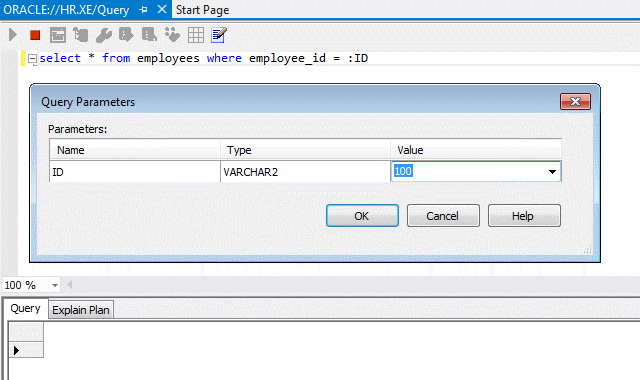
Using the Query Parameters Dialog
The Query Parameters Dialog has the following controls:
| Control | Description |
|---|---|
|
Name |
Displays name of the parameter placeholder. |
|
Type |
Displays the external data type of the parameter. This is the data type ODT uses when storing and passing the value to Oracle Database. The default type, |
|
Value |
Enter the value for the parameter or select |
|
OK |
Closes this dialog and executes the SQL or PL/SQL using the parameter values provided. |
|
Cancel |
Closes this dialog and cancels the execution of the SQL or PL/SQL. |
|
Help |
Opens this help page |