PL/SQL Compiler Settings Options Page
This section describes the compiler options found on the PL/SQL Compiler Settings page.
SeeOracle Database PL/SQL Language Reference for detailed information regarding these settings.
About PL/SQL Compiler Settings
The PL/SQL compiler settings page allows you to set the default compile settings that are used when you select the compile or compile debug menu item in Server Explorer. These settings are also used from the PL/SQL Editor.
The settings defined in this options page normally carry forward from one Visual Studio session to another.
The PL/SQL Compiler Settings option page also provides a check box to allow you specify whether or not to use these parameters for compile or compile debug operations. A checked box indicates that the parameters specified in this options page are used for compile and compile debug operations. An unchecked box indicates that the code object is compiled using the setting defined in the database session.
Note: These compiler settings only apply to compiling from Server Explorer and the PL/SQL Editor. They do not apply to the SQL*Plus script editor.
Accessing PL/SQL Compiler Settings
To access the PL/SQL Compiler Settings Page, select Options… from the Tools menu. From the Options menu, select Oracle Developer Tools. Then select PL/SQL Compiler Settings.
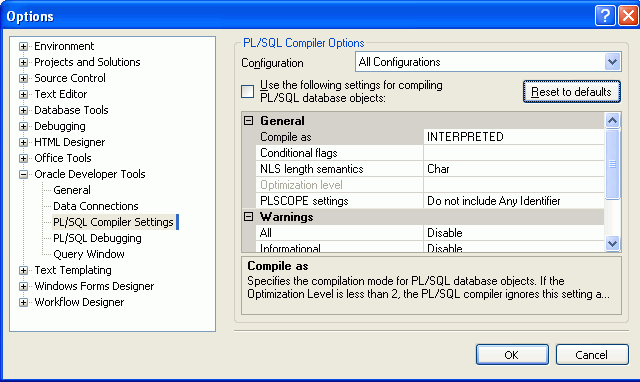
Description of the illustration plsql_compilerall.gif
Using PL/SQL Compiler Settings
The controls of the PL/SQL Compiler Settings are as follows:
| Control | Descriptions |
|---|---|
| Configuration | Select Compile or Compile Debug, or All Configurations (both) to indicate which compile configurations the settings on this page apply to. |
| Use the following settings for compiling PL/SQL database objects | Enable the settings on this page. The PL/SQL database objects are compiled with these settings. If this is unchecked (the default), then they are compiled with the parameters settings of the session. |
| Reset to defaults | Resets to the compile settings to defaults. |
| Compile As | Select the PLSQL_CODE_TYPE parameter, either NATIVE or INTERPRETED (default). |
| Conditional Flags | Enter the conditional compilation flags to represent the PLSQL_CCFLAGS parameter. Default is an empty string. |
| NLS length semantics | Select either Byte or Char (Default). |
| Optimization Level | Indicate the PLSQL_OPITIMIZE_LEVEL parameter. Available values are: 0 and 1 (default) for Compile Debug, 2 and 3 (default) for Compile. |
| PLSCOPE settings | Select either Include All Identifiers or Do not include Any Identifier (Default). |
| All | Specify if all warnings are to be ENABLED, DISABLED (default), or treated as an ERROR. |
| Severe | Specify if SEVERE warnings are to be ENABLED, DISABLED (default), or treated as an ERROR. |
| Informational | Specify if INFORMATIONAL warnings are to be ENABLED, DISABLED (default), or treated as an ERROR. |
| Performance | Specify if PERFORMANCE warnings are to be ENABLED, DISABLED (default), or treated as an ERROR. |
| Others | Specify if specific warning types are to be ENABLED, DISABLED (default), or treated as an ERROR. You can enter different combinations of values. |
| (description window) | Displays information about the compile option selected. |
| OK | Saves settings. |
| Cancel | Cancels settings. |