Oracle Database Project Run On Dialog
If you right-click on a script in the Oracle Database Project, and select Run On, then the Run On dialog box launches.
A dialog box similar to the following appears:
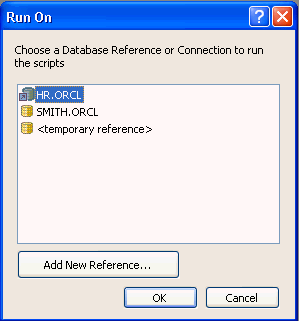
Description of the illustration odbproject_run_on_dialog.gif
You can choose which connection to use in the dialog box.
The controls in Oracle Database Project Run On dialog are as follows:
| Control | Description |
|---|---|
| Connections List | Lists the following connections
|
| Add New Reference | Displays the Add Connection Dialog box so that you can create a new database connection. The newly added connection is listed as the last item in the displayed list of connections. |
| OK | Runs the selected scripts using the connection information from the selected connection. Enabled only when a connection is selected. |
| Cancel | Closes the dialog. |
See Also About Oracle Database Project | About Running Oracle SQL Scripts