Using SQL*Loader to Load the Table
You can use SQL*Loader to load a table in batches.
Perform the following steps to load your table in batches with SQL*Loader:
-
Determine your queries.
Determine what criteria are likely to be retrieved. In this example, you determine that all queries search the title column for item descriptions, and most queries order by price. Later on, when you use the
CATSEARCHoperator, specify the terms for the text column and the criteria for the structured clause. -
Create the subindex to order by price.
For Oracle Text to serve these queries efficiently, you need a subindex for the price column, because your queries are ordered by price.
Therefore, create an index set called
auction_setand add a subindex for the price column:EXEC CTX_DDL.CREATE_INDEX_SET('auction_iset'); EXEC CTX_DDL.ADD_INDEX('auction_iset','price'); /* subindex A*/ -
Create the
CTXCATindex.Create the combined catalog index on the
AUCTIONtable with theCREATEINDEXstatement:CREATE INDEX auction_titlex ON AUCTION(title) INDEXTYPE IS CTXSYS.CTXCAT PARAMETERS ('index set auction_iset');The following figure shows how the
CTXCATindex and its subindex relate to the columns.Figure 1: Auction table schema and CTXCAT index
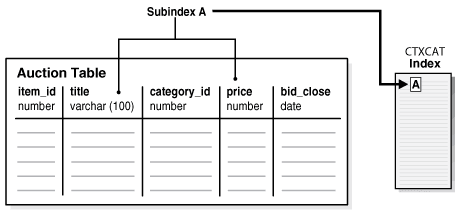
Description of the illustration ccapp_pb_019a.png
-
Query your table with
CATSEARCH.After you create the
CTXCATindex on theAUCTIONtable, query this index with theCATSEARCHoperator.First, set the output format to make the output readable:
COLUMN title FORMAT a40;Next, run the query:
SELECT title, price FROM auction WHERE CATSEARCH(title, 'CAMERA', 'order by price')> 0; TITLE PRICE --------------- ---------- PENTAX CAMERA 200 CANON CAMERA 250 OLYMPUS CAMERA 300 NIKON CAMERA 400 SELECT title, price FROM auction WHERE CATSEARCH(title, 'CAMERA', 'price <= 300')>0; TITLE PRICE --------------- ---------- PENTAX CAMERA 200 CANON CAMERA 250 OLYMPUS CAMERA 300 -
Update your table.
Update your catalog table by adding new rows. When you do so, the
CTXCATindex is automatically synchronized to reflect the change.For example, add the following new rows to the table and then rerun the query:
INSERT INTO AUCTION VALUES(5, 'FUJI CAMERA', 1, 350, '28-OCT-2002'); INSERT INTO AUCTION VALUES(6, 'SONY CAMERA', 1, 310, '28-OCT-2002'); SELECT title, price FROM auction WHERE CATSEARCH(title, 'CAMERA', 'order by price')> 0; TITLE PRICE ----------------------------------- ---------- PENTAX CAMERA 200 CANON CAMERA 250 OLYMPUS CAMERA 300 SONY CAMERA 310 FUJI CAMERA 350 NIKON CAMERA 400 6 rows selected.Note how the added rows show up immediately in the query.
See Also: “Building the PSP Web Application” for an example of how to use SQL*Loader to load a text table from a data file