Advanced and Optional Configurations
Oracle Database 19c provides secure defaults and flexible optional controls. Configure only mandatory and recommended settings first. Explicit protocol, cipher, certificate, or revocation policy can block clients that do not support the selected values, so review these settings after every database or client update.
-
Transport Layer Security Encryption Combined with Authentication Methods
You can configure Oracle Database to use TLS concurrently with all authentication mechanisms such as database user names and passwords, RADIUS, Kerberos, PKI certificates, MS-EI, and OCI IAM. -
Private Key/Certificate Selection
You can have multiple private key/certificate pairs stored in either the Oracle wallet or a system certificate store to use for certificates. This is sometimes necessary when different databases will assign different client credentials for mTLS, such as for Autonomous Database. -
Enable Weak DN Matching
TheTLS_ALLOW_WEAK_DN_MATCHparameter control reverts the DN matching behavior to prior database versions. -
Specifying TLS Protocol and TLS Cipher Suites
Oracle Database 19c supports TLS protocol versions 1.2 and 1.3 and their associated cipher suites for Transport Layer Security (TLS). -
Certificate Validation with Certificate Revocation Lists
Oracle provides tools that enable you to validate certificates using certificate revocation lists. -
Optional Parameters for Transport Layer Security
The server-side TLS configuration is applicable to all connections serviced by the server. These are specified in the server-side configuration files sqlnet.ora for the Database server and listener.ora for the Database listener. -
Mutual Transport Layer Security (mTLS)
In traditional Transport Layer Security (TLS), only the server authenticates to the client by presenting its certificate. With mutual Transport Layer Security (mTLS), both the server and the client present their certificates so that they are mutually authenticated. -
Oracle Wallet Location
Certificates used for TLS are stored in the Oracle wallet. There are several default locations where the wallet can be placed. The location of the wallet can also be configured with the wallet location parameters on the client and listener. TheWALLET_ROOTsystem parameter should be used for the database server wallet location.
Transport Layer Security Encryption Combined with Authentication Methods
You can configure Oracle Database to use TLS concurrently with all authentication mechanisms such as database user names and passwords, RADIUS, Kerberos, PKI certificates, MS-EI, and OCI IAM.
Architecture: Oracle Database and Transport Layer Security
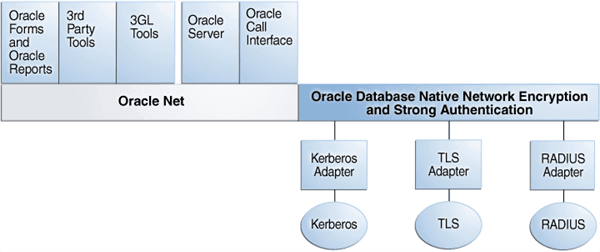
The Oracle Net Services with Authentication Adapters diagram, displays the Oracle Database implementation of Transport Layer Security architecture, shows that Oracle Databases operates at the session layer on top of TLS and uses TCP/IP at the transport layer. The session layer is a network layer that provides the services needed by the presentation layer entities that enable them to organize and synchronize their dialogue and manage their data exchange. This layer establishes, manages, and terminates network sessions between the client and server. The transport layer is a networking layer that maintains end-to-end reliability through data flow control and error recovery methods.
This separation of functionality lets you employ TLS concurrently with other supported protocols.
Figure 1: Oracle Net Services with Authentication Adapters
How Transport Layer Security Works with Other Authentication Methods
Transport Layer Security can be used with other authentication methods that Oracle Database supports.
The following image illustrates a configuration in which Transport Layer Security is used in combination with another authentication method.
Figure 2: Transport Layer Security in Relation to Other Authentication Methods
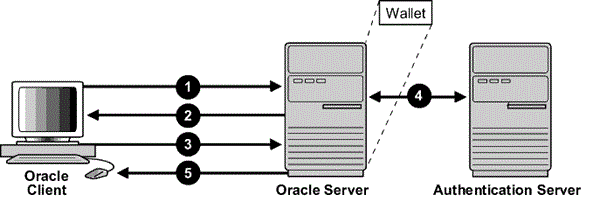
In this example, Transport Layer Security is used to establish an encrypted network connection between the client and server, and an alternative authentication method is used to authenticate the client into the database. The process is as follows:
-
The client seeks to connect to the Oracle database server.
-
Transport Layer Security performs a handshake during which the server authenticates itself to the client and both the client and server establish which cipher suite to use.
-
Once the Transport Layer Security handshake is successfully completed, the user seeks access to the database.
-
The Oracle database server authenticates the user with the authentication server using a non-TLS authentication method such as a password, Kerberos, RADIUS, or a cloud identity token (Oracle Cloud Infrastructure (OCI) Identity and Access Management (IAM), Microsoft Azure AD).
-
Upon validation by the authentication method, the Oracle database server grants access and authorization to the user, and then the user can access the database securely by using TLS.
Related Topics
Private Key/Certificate Selection
You can have multiple private key/certificate pairs stored in either the Oracle wallet or a system certificate store to use for certificates. This is sometimes necessary when different databases will assign different client credentials for mTLS, such as for Autonomous Database.
You can only specify the private key/certificate to be used with Windows MCS and Oracle Wallets.
You will need to specify the correct private key/certificate to use for a database connection. By setting the certificate selection parameters for client authentication on Windows, the MSCAPI certificate selection box will not appear, and the matching certificate is automatically used for Transport Layer Security.
While it is more likely that the client will need to select a specific private key/certificate from MCS or the wallet, the server and listener may also need to select a specific certificate for use if there is more than one in the wallet.
-
Setting the TLS_CERTIFICATE_ALIAS Parameter You can use the
TLS_CERTIFICATE_ALIASparameter to specify the alias of the client certificate. -
Setting the TLS_CERTIFICATE_THUMBPRINT Parameter You can use the
TLS_CERTIFICATE_THUMBPRINTto specify the thumbprint of the client certificate. -
Setting the TLS_EXTENDED_KEY_USAGE Parameter You can use the
TLS_EXTENDED_KEY_USAGEparameter to specify the extended key usage of the client certificate.
Setting the TLS_CERTIFICATE_ALIAS Parameter
You can use the TLS_CERTIFICATE_ALIAS parameter to specify the alias of the client certificate.
Note: To bring Oracle parameters in accord with the actual encryption and authentication methods for network connections, Oracle is deprecating all connect parameters prefixed with SSL_ in favor of parameters prefixed with TLS_. During this deprecation period, if both TLS_CERTIFICATE_ALIAS and SSL_CERTIFICATE_ALIAS parameters are configured, then the SSL_CERTIFICATE_ALIAS parameter is ignored.
- To get the alias name value, run the following
orapkicommand:
orapki wallet display -wallet wallet_directory -pwd wallet_password -completeThe output will look similar to the following. See the `Alias` field.
<pre class="copy"><code>User Certificates: Alias: sslClient Subject: CN=ssl ClientIssuer: CN=sslRoot,C=US Not Before: Thu Jul 18 22:29:17 UTC 2024 Not After: Sun Jul 16 22:29:17 UTC 2034 Serial Number: 01 Key Length: 2048 MD5 digest: 06:DD:79:AF:E6:D6:70:CE:C3:98:DE:8C:D7:FC:7E:C2 SHA-256 digest: 09:B2:EC:FE:A1:B8:C3:F3:F5:A7:DC:C6:00:26:86:BE:39:54:16:93:B6:A8:42:CC:69:24:0F:B5:59:43:3F:AA SHA-1 digest: 51:25:6F:45:F8:64:E5:CB:9E:56:D2:F2:0C:5C:A6:D5:61:DA:DB:FE</code></pre>
-
Set the
Aliasvalue using theTLS_CERTIFICATE_ALIASparameter.For example, for
tnsnames.ora:net_service_name= (DESCRIPTION= (ADDRESS=(PROTOCOL=tcps)(HOST=sales-svr)(PORT=1522)) (SECURITY=(TLS_CERTIFICATE_ALIAS=sslClient)) )This example shows how to set
TLS_CERTIFICATE_ALIASin thesqlnet.orafile:TLS_CERTIFICATE_ALIAS=sslClient
Related Topics
Setting the TLS_CERTIFICATE_THUMBPRINT Parameter
You can use the TLS_CERTIFICATE_THUMBPRINT to specify the thumbprint of the client certificate.
Note: To bring Oracle parameters in accord with the actual encryption and authentication methods for network connections, Oracle is deprecating all connect parameters prefixed with SSL_ in favor of parameters prefixed with TLS_. During this deprecation period, if both TLS_CERTIFICATE_THUMBPRINT and SSL_CERTIFICATE_THUMBPRINT parameters are configured, then the SSL_CERTIFICATE_THUMBPRINT parameter is ignored.
The value of the parameter is the SHA-1 or SHA-256 thumbprint of the client certificate, in the algorithm:hash format
-
To get the thumbprint value, run the following
orapkicommand:orapki wallet display -wallet wallet_directory -pwd wallet_password -completeThe output will look similar to the following. See the
SHA-1 digestorSHA-256 digestfield for the thumbprint value.User Certificates: Alias: sslClient Subject: CN=ssl ClientIssuer: CN=sslRoot,C=US Not Before: Thu Jul 18 22:29:17 UTC 2024 Not After: Sun Jul 16 22:29:17 UTC 2034 Serial Number: 01 Key Length: 2048 MD5 digest: 06:DD:79:AF:E6:D6:70:CE:C3:98:DE:8C:D7:FC:7E:C2 SHA-256 digest: 09:B2:EC:FE:A1:B8:C3:F3:F5:A7:DC:C6:00:26:86:BE:39:54:16:93:B6:A8:42:CC:69:24:0F:B5:59:43:3F:AA SHA-1 digest: 51:25:6F:45:F8:64:E5:CB:9E:56:D2:F2:0C:5C:A6:D5:61:DA:DB:FE -
Set this value using the
TLS_CERTIFICATE_THUMBPRINTparameter. The following example shows how to set it in thetnsnames.orafile.For example, in the
tnsname.orafile:net_service_name= (DESCRIPTION= (ADDRESS=(PROTOCOL=tcps)(HOST=sales-svr)(PORT=1522)) (SECURITY=(TLS_CERTIFICATE_THUMBPRINT=SHA1:1B:11:01:5A:B1:2C:20:B2:12:34:3E:04:7B:83:47:DE:70:2E:4E:11)) )This example shows how to set
TLS_CERTIFICATE_THUMBPRINTin thesqlnet.orafile:TLS_CERTIFICATE_THUMBPRINT=SHA256:B38A5B1A036383922B5DE15361EE03940A56B456417E4124419B88EBC61E1123
Related Topics
Setting the TLS_EXTENDED_KEY_USAGE Parameter
You can use the TLS_EXTENDED_KEY_USAGE parameter to specify the extended key usage of the client certificate.
Note: To bring Oracle parameters in accord with the actual encryption and authentication methods for network connections, Oracle is deprecating all connect parameters prefixed with SSL_ in favor of parameters prefixed with TLS_. During this deprecation period, if both TLS_EXTENDED_KEY_USAGE and SSL_EXTENDED_KEY_USAGE parameters are configured, then the SSL_EXTENDED_KEY_USAGE parameter is ignored.
You should set the SQLNET.TLS_EXTENDED_KEY_USAGE parameter if you have multiple certificates in the security module, but there is only one certificate with extended key usage field of client authentication, and this certificate is the one you want to use to authenticate to the database.
- For example, in the
sqlnet.orafile:
TLS_EXTENDED_KEY_USAGE = "client authentication"You can find the Extended Key Usage from the certificate using orapki:
orapki cert display -cert <certificate> -completeRelated Topics
Enable Weak DN Matching
The TLS_ALLOW_WEAK_DN_MATCH parameter control reverts the DN matching behavior to prior database versions.
Note: To bring Oracle parameters in accord with the actual encryption and authentication methods for network connections, Oracle is deprecating all connect parameters prefixed with SSL_ in favor of parameters prefixed with TLS_. During this deprecation period, if both the TLS_ and SSL_ versions of a parameter are configured, then the SSL_ version is ignored.
The behavior of the TLS_SERVER_DN_MATCH parameter has changed. See the announcement in Updates to Oracle Database Security 19c.
For full DN matching, TLS_SERVER_CERT_DN is compared with the certificate in the listener wallet; the comparison is independent of the certificate in the database server wallet. For partial DN matching, use the HOST value in the connect descriptor. The certificate common name (CN) must match that value, and the corresponding certificate configuration must be present in both the listener and database server wallets. The SERVICE_NAME value is not used for partial DN matching. To revert to the earlier behavior, set TLS_ALLOW_WEAK_DN_MATCH=TRUE. The default is FALSE.
You can set TLS_ALLOW_WEAK_DN_MATCH as follows:
-
TRUEenablesTLS_SERVER_DN_MATCHto check the database server certificate (but not the listener) and enable the service name to be used for partial DN matching. The search order on the client side is as follows: first, the client sqlnet.ora or connect string host name value is compared against the certificate CN, then the list of names in the subject alternative name (SAN) field. Then the client sqlnet.ora or connect string service_name value is compared against the CN and the list of names in the SAN. -
FALSE(the default) disablesTLS_SERVER_DN_MATCHfrom checking service name matching. Instead, matching on the client side is based on a search for theHOSTvalue in the certificate DN, and if that is not available, then in the subject alternative name (SAN) field (but not the service name).
If you used the service name for partial DN matching previously, then you must either get a new certificate or set TLS_ALLOW_WEAK_DN_MATCH to TRUE to revert to the previous 19c behavior. You are most likely using the same certificate for both the database server and listener, but if you are not, then you will either need to do one of the following:
-
Get a new certificate (use the
orapki wallet addcommand for self-signed certificates). -
Change or remove the DN matching strategy.
-
Set the
TLS_ALLOW_WEAK_DN_MATCHparameter toTRUEto revertTLS_SERVER_DN_MATCHto its older behavior.
When you set TLS_ALLOW_WEAK_DN_MATCH to TRUE, note the following:
-
When the client performs a full DN match (
TLS_SERVER_DN_MATCH=TRUE,TLS_SERVER_CERT_DN="certificate_DN"), the certificate DN in the listener wallet must match theTLS_SERVER_CERT_DNvalue. -
When the client performs a partial DN match (
TLS_SERVER_DN_MATCH=TRUE,TLS_SERVER_CERT_DNis not set), Oracle Database compares the connect stringHOSTvalue to the certificate common name (CN) and subject alternative name (SAN) fields. The corresponding certificate configuration must be present in both the listener and database server wallets.
Specifying TLS Protocol and TLS Cipher Suites
Oracle Database 19c supports TLS protocol versions 1.2 and 1.3 and their associated cipher suites for Transport Layer Security (TLS).
Oracle provides the configuration parameters TLS_VERSION and TLS_CIPHER_SUITES to configure the specific protocol version and cipher suites. However, Oracle recommends that you do not specify these parameters unless required. Omitting these values facilitate auto-detection of the strongest common TLS version (which ensures that the highest available version is selected) and their associated cipher suites.
-
Configuring TLS Protocol Versions The
TLS_VERSIONandTLS_DISABLE_VERSIONparameters define the protocol version of TLS that is enforced at the end point of the component where they are specified. -
Configuring TLS Cipher Suites A cipher suite is a set of authentication, encryption, and data integrity algorithms used for exchanging messages between network entities.
-
Configuring TLS Key Exchange Algorithms You can specify the TLS key exchange algorithm by setting the
TLS_KEY_EXCHANGE_GROUPSparameter insqlnet.oraorlistener.ora.
Configuring TLS Protocol Versions
The TLS_VERSION and TLS_DISABLE_VERSION parameters define the protocol version of TLS that is enforced at the end point of the component where they are specified.
TLS_VERSION and TLS_DISABLE_VERSION can be specified with the database server, the listener, the client, or a combination of these components. If the TLS protocol version is specified in more than one of these locations, then at least one version must be common across all of the components. Otherwise, the connection will be rejected. Also, if a TLS protocol version is specified that is not supported by another component, then the connection request will also be rejected.
You can set the TLS_VERSION and TLS_DISABLE_VERSION parameters in the client or server sqlnet.ora or the listener.ora file.
TLS_VERSION Parameter
Note: To bring Oracle parameters in accord with the actual encryption and authentication methods for network connections, Oracle is deprecating all connect parameters prefixed with SSL_ in favor of parameters prefixed with TLS_. During this deprecation period, if both TLS_VERSION and SSL_VERSION parameters are configured, then the SSL_VERSION parameter is ignored.
In the server sqlnet.ora file, set the TLS_VERSION parameter to indicate the supported TLS versions on the server.
For the legacy cryptographic provider, valid values are undetermined (the default), 1.0, 1.1, and 1.2. For the next-generation cryptographic provider, valid values are 1.2 and 1.3. Separate multiple entries with “or”. For example:
TLS_VERSION=(1.2 or 1.3)Append a + to the values to specify the minimum version. For example:
TLS_VERSION=(1.2+)Will allow TLS1.2 and above.
If TLS_VERSION and TLS_DISABLE_VERSION are not set, or TLS_VERSION set to undetermined, all supported TLS versions are enabled.
Tip: Oracle recommends that you do not specify these parameters so that the highest version is auto-detected between server and client.
For environments where you want to enforce TLS 1.3 explicitly, you may specify the protocol version as follows:
TLS_VERSION=(1.3)TLS_DISABLE_VERSION Parameter
In the server sqlnet.ora file, set the TLS_DISABLE_VERSION parameter to indicate the TLS versions to not allow on the server.
Valid values are 1.2 and 1.3. Separate multiple entries with “or”. For example:
TLS_DISABLE_VERSION=(1.2 or 1.3)Will not allow TLS1.2 and TLS1.3.
Configuring TLS Cipher Suites
A cipher suite is a set of authentication, encryption, and data integrity algorithms used for exchanging messages between network entities.
During a Transport Layer Security handshake, two entities negotiate to select a cipher suite they will use when transmitting messages to each other through the network.
When you install Oracle Database, the Transport Layer Security cipher suites are set for you by default and negotiated in the order they are listed from the strongest cipher suite. You can override the default order by setting the TLS_CIPHER_SUITES parameter. Ensure that you enclose the TLS_CIPHER_SUITES parameter setting in parentheses (for example, TLS_CIPHER_SUITES=(TLS_AES_256_GCM_SHA384)). Otherwise, the cipher suite setting will not parse correctly.
Note: To bring Oracle parameters in accord with the actual encryption and authentication methods for network connections, Oracle is deprecating all connect parameters prefixed with SSL_ in favor of parameters prefixed with TLS_. During this deprecation period, if both TLS_CIPHER_SUITES and SSL_CIPHER_SUITES parameters are configured, then the SSL_CIPHER_SUITES parameter is ignored.
You can prioritize the cipher suites. When the client negotiates with servers to determine which cipher suite to use, it follows the prioritization you set. When you prioritize the cipher suites, consider the following:
-
Compatibility: The server and client must be configured to use compatible cipher suites for a successful connection.
-
Cipher priority and strength: Prioritize cipher suites starting with the strongest and moving to the weakest to ensure the highest level of security possible.
-
The level of security you want to use: Use this to prevent older clients with weaker cipher suites from connecting to the database
-
Strong TLS Cipher Suites Oracle provides strong Transport Layer Security (TLS) cipher suites by default.
-
Deprecated TLS Cipher Suites To accommodate legacy products, Oracle provides TLS cipher suites which are considered less secure. Those ciphers are deprecated and disabled by default. The deprecated ciphers supported by Oracle are shown in the table below.
-
Enabling Weak Cipher Suites You can enable deprecated cipher suites by setting the
TLS_ENABLE_WEAK_CIPHERSparameter. For the connections to be successful with the weak cipher suites, all three components (client, listener, and server) need to have the weak cipher suites enabled.
Strong TLS Cipher Suites
Oracle provides strong Transport Layer Security (TLS) cipher suites by default. The default ciphers supported by Oracle are shown in the table below.
Table 6 Approved TLS Cipher Suites
| Cipher Suite | Authentication | Encryption | Data Integrity | TLS Compatibility |
|---|---|---|---|---|
| TLS_AES_128_CCM_SHA256 | ECDHE_RSA, DHE_RSA, ECDHE_ECDSA | AES 128 CCM | SHA256 (SHA 2) | TLS 1.3 |
| TLS_AES_128_GCM_SHA256 | ECDHE_RSA, DHE_RSA, ECDHE_ECDSA | AES 128 GCM | SHA256 (SHA-2) | TLS 1.3 |
| TLS_AES_256_GCM_SHA384 | ECDHE_RSA, DHE_RSA, ECDHE_ECDSA | AES 256 GCM | SHA384 (SHA-2) | TLS 1.3 |
| TLS_CHACHA20_POLY1305_SHA256 (non-FIPS only) | ECDHE_RSA, DHE_RSA, ECDHE_ECDSA | CHACHA20 POLY1305 | SHA256 (SHA-2) | TLS 1.3 |
| TLS_DHE_RSA_WITH_AES_128_GCM_SHA256 | DHE_RSA | AES 128 GCM | SHA256 (SHA-2) | TLS 1.2 |
| TLS_DHE_RSA_WITH_AES_256_GCM_SHA384 | DHE_RSA | AES 256 GCM | SHA384 (SHA-2) | TLS 1.2 |
| TLS_ECDHE_ECDSA_WITH_AES_128_GCM_SHA256 | ECDHE_ECDSA | AES 128 GCM | SHA256 (SHA-2) | TLS 1.2 |
| TLS_ECDHE_ECDSA_WITH_AES_256_GCM_SHA384 | ECDHE_ECDSA | AES 256 GCM | SHA384 (SHA-2) | TLS 1.2 |
| TLS_ECDHE_RSA_WITH_AES_128_GCM_SHA256 | ECDHE_RSA | AES 128 GCM | SHA256 (SHA-2) | TLS 1.2 |
| TLS_ECDHE_RSA_WITH_AES_256_GCM_SHA384 | ECDHE_RSA | AES 256 GCM | SHA384 (SHA-2) | TLS 1.2 |
Deprecated TLS Cipher Suites
To accommodate legacy products, Oracle provides TLS cipher suites which are considered less secure. Those ciphers are deprecated and disabled by default. The deprecated ciphers supported by Oracle are shown in the table below.
Table 7 Deprecated TLS Cipher Suites
| Cipher Suite | Authentication | Encryption | Data Integrity | TLS Compatibility |
|---|---|---|---|---|
| TLS_DHE_RSA_WITH_AES_128_CBC_SHA256 | DHE_RSA | AES 128 CBC | SHA256 (SHA-2) | TLS 1.2 |
| TLS_DHE_RSA_WITH_AES_256_CBC_SHA | DHE_RSA | AES 256 CBC | SHA (SHA-1) | TLS 1.2 |
| TLS_DHE_RSA_WITH_AES_256_CBC_SHA256 | DHE_RSA | AES 256 CBC | SHA256 (SHA-2) | TLS 1.2 |
| TLS_ECDHE_ECDSA_WITH_AES_128_CBC_SHA | ECDHE_ECDSA | AES 128 CBC | SHA (SHA-1) | TLS 1.2 |
| TLS_ECDHE_ECDSA_WITH_AES_128_CBC_SHA | ECDHE_ECDSA | AES 128 CBC | SHA (SHA-1) | TLS 1.2 |
| TLS_ECDHE_ECDSA_WITH_AES_128_CBC_SHA256 | ECDHE_ECDSA | AES 128 CBC | SHA256 (SHA-2) | TLS 1.2 |
| TLS_ECDHE_ECDSA_WITH_AES_256_CBC_SHA | ECDHE_ECDSA | AES 256 CBC | SHA (SHA-1) | TLS 1.2 |
| TLS_ECDHE_ECDSA_WITH_AES_256_CBC_SHA384 | ECDHE_ECDSA | AES 256 CBC | SHA384 (SHA-2) | TLS 1.2 |
| TLS_ECDHE_RSA_WITH_AES_128_CBC_SHA | ECDHE_RSA | AES 128 CBC | SHA (SHA-1) | TLS 1.2 |
| TLS_ECDHE_RSA_WITH_AES_128_CBC_SHA256 | ECDHE_RSA | AES 128 CBC | SHA256 (SHA-2) | TLS 1.2 |
| TLS_ECDHE_RSA_WITH_AES_256_CBC_SHA | ECDHE_RSA | AES 256 CBC | SHA (SHA-1) | TLS 1.2 |
| TLS_ECDHE_RSA_WITH_AES_256_CBC_SHA384 | ECDHE_RSA | AES 256 CBC | SHA384 (SHA-2) | TLS 1.2 |
| TLS_RSA_WITH_AES_128_CBC_SHA | RSA | AES 128 CBC | SHA (SHA-1) | TLS 1.2 |
| TLS_RSA_WITH_AES_128_CBC_SHA256 | RSA | AES 128 CBC | SHA256 (SHA-2) | TLS 1.2 |
| TLS_RSA_WITH_AES_128_GCM_SHA256 | RSA | AES 128 GCM | SHA256 (SHA-2) | TLS 1.2 |
| TLS_RSA_WITH_AES_256_CBC_SHA | RSA | AES 256 CBC | SHA (SHA-1) | TLS 1.2 |
| TLS_RSA_WITH_AES_256_CBC_SHA256 | RSA | AES 256 CBC | SHA256 (SHA-2) | TLS 1.2 |
| TLS_RSA_WITH_AES_256_GCM_SHA384 | RSA | AES 256 GCM | SHA384 (SHA-2) | TLS 1.2 |
Enabling Weak Cipher Suites
You can enable deprecated cipher suites by setting the TLS_ENABLE_WEAK_CIPHERS parameter. For the connections to be successful with the weak cipher suites, all three components (client, listener, and server) need to have the weak cipher suites enabled.
Note: To bring Oracle parameters in accord with the actual encryption and authentication methods for network connections, Oracle is deprecating all connect parameters prefixed with SSL_ in favor of parameters prefixed with TLS_. During this deprecation period, if both TLS_ENABLE_WEAK_CIPHERS and SSL_ENABLE_WEAK_CIPHERS parameters are configured, then the SSL_ENABLE_WEAK_CIPHERS parameter is ignored.
In this specification, value can be one of the following:
-
FALSE(orOFF,NO,0) disables the weak ciphers. The setting is the default. If you try to use a weak cipher, then depending on where you are, the following errors appear:-
In the database server:
ORA-28860: Fatal SSL error -
In the database client:
ORA-29039: There are no matching cipher suites.
-
-
TRUE(orON,YES,1) enables the weak ciphers.
For example, to enable the deprecated cipher suites,
TLS_ENABLE_WEAK_CIPHERS=TRUEConfiguring TLS Key Exchange Algorithms
You can specify the TLS key exchange algorithm by setting the TLS_KEY_EXCHANGE_GROUPSparameter in sqlnet.ora or listener.ora.
The Oracle Net Services parameter SSL_DISABLE_WEAK_EC_CURVES is deprecated in Oracle Database 19c. As a result, the TLS_KEY_EXCHANGE_GROUPS parameter should be used to replace it.
-
Login to the database server or the client server.
-
Edit the
sqlnet.oraorlistener.orafile to include theTLS_KEY_EXCHANGE_GROUPSparameter.The default location of the
sqlnet.orafile is in the$ORACLE_HOME/network/admindirectory.See TLS_KEY_EXCHANGE_GROUPS in Oracle Database Net Services Reference for more information.
Related Topics
Certificate Validation with Certificate Revocation Lists
Oracle provides tools that enable you to validate certificates using certificate revocation lists.
-
About Certificate Validation with Certificate Revocation Lists The process of determining whether a given certificate can be used in a given context is referred to as certificate validation.
-
What CRLs Should You Use? You should have CRLs for all of the trust points that you honor.
-
How CRL Checking Works Oracle Database checks the certificate revocation status against CRLs.
-
Configuring Certificate Validation with Certificate Revocation Lists You can edit the
sqlnet.orafile to configure certificate validation with certificate revocation lists. -
Certificate Revocation List Management Certificate revocation list management entails ensuring that the CRLs are the correct format before you enable certificate revocation checking.
-
Troubleshooting CRL Certificate Validation To determine whether certificates are being validated against CRLs, you can enable Oracle Net tracing.
-
Oracle Net Tracing File Error Messages Associated with Certificate Validation Oracle generates trace messages that are relevant to certificate validation.
About Certificate Validation with Certificate Revocation Lists
The process of determining whether a given certificate can be used in a given context is referred to as certificate validation.
Certificate validation includes determining that the following takes place:
-
A trusted certificate authority (CA) has digitally signed the certificate
-
The certificate’s digital signature corresponds to the independently-calculated hash value of the certificate itself and the certificate signer’s (CA’s) public key
-
The certificate has not expired
-
The certificate has not been revoked
The Transport Layer Security network layer automatically performs the first three validation checks, but you must configure certificate revocation list (CRL) checking to ensure that certificates have not been revoked. CRLs are signed data structures that contain a list of revoked certificates. They are usually issued and signed by the same entity who issued the original certificate.
What CRLs Should You Use?
You should have CRLs for all of the trust points that you honor.
The trust points are the trusted certificates from a third party identity that is qualified with a level of trust.
Typically, the certificate authorities you trust are called trust points.
How CRL Checking Works
Oracle Database checks the certificate revocation status against CRLs.
These CRLs are located in file system directories, Oracle Internet Directory, or downloaded from the location specified in the CRL Distribution Point (CRL DP) extension on the certificate.
Typically, CRL definitions are valid for a few days. If you store your CRLs on the local file system or in the directory, then you must update them regularly. If you use a CRL Distribution Point (CRL DP), then CRLs are downloaded each time a certificate is used, so there is no need to regularly refresh the CRLs.
The server searches for CRLs in the following locations in the order listed. When the system finds a CRL that matches the certificate CA’s DN, it stops searching.
-
Local file system
The server checks the
sqlnet.orafile for theTLS_CRL_FILEparameter first, followed by theTLS_CRL_PATHparameter. If these two parameters are not specified, then the server checks the wallet location for any CRLs.
Note: If you store CRLs on your local file system, then you must use the orapki utility to periodically update them (for example, renaming CRLs with a hash value for certificate validation).
-
Oracle Internet Directory
If the server cannot locate the CRL on the local file system and directory connection information has been configured in an
ldap.orafile, then the server searches in the directory. It searches the CRL subtree by using the CA’s distinguished name (DN) and the DN of the CRL subtree.The server must have a properly configured
ldap.orafile to search for CRLs in the directory. It cannot use the Domain Name System (DNS) discovery feature of Oracle Internet Directory. Also note that if you store CRLs in the directory, then you must use theorapkiutility to periodically update them. -
CRL DP
If the CA specifies a location in the CRL DP X.509, version 3, certificate extension when the certificate is issued, then the appropriate CRL that contains revocation information for that certificate is downloaded. Currently, Oracle Database supports downloading CRLs over LDAP.
Note the following:
-
For performance reasons, only user certificates are checked.
-
Oracle recommends that you store CRLs in the directory rather than the local file system.
-
Related Topics
Configuring Certificate Validation with Certificate Revocation Lists
You can edit the sqlnet.ora file to configure certificate validation with certificate revocation lists.
-
About Configuring Certificate Validation with Certificate Revocation Lists The
TLS_CERT_REVOCATIONparameter must be set toREQUIREDorREQUESTEDin thesqlnet.orafile to enable certificate revocation status checking. -
Enabling Certificate Revocation Status Checking for the Client or Server You can enable certificate revocation status checking for a client or a server.
-
Disabling Certificate Revocation Status Checking You can disable certificate revocation status checking.
About Configuring Certificate Validation with Certificate Revocation Lists
The TLS_CERT_REVOCATION parameter must be set to REQUIRED or REQUESTED in the sqlnet.ora file to enable certificate revocation status checking.
Note: To bring Oracle parameters in accord with the actual encryption and authentication methods for network connections, Oracle is deprecating all connect parameters prefixed with SSL_ in favor of parameters prefixed with TLS_. During this deprecation period, if both TLS_CERT_REVOCATION and SSL_CERT_REVOCATION parameters are configured, then the SSL_CERT_REVOCATION parameter is ignored.
By default this parameter is set to NONE indicating that certificate revocation status checking is turned off.
Note: If you want to store CRLs on your local file system or in Oracle Internet Directory, then you must use the command line utility, orapki, to rename CRLs in your file system or upload them to the directory.
Related Topics
Enabling Certificate Revocation Status Checking for the Client or Server
You can enable certificate revocation status checking for a client or a server.
-
Log in to the Oracle Database server.
-
Modify the
TLS_CERT_REVOCATIONparameter in thesqlnet.orafile.TLS_CERT_REVOCATION=valueIn this specification,
valuecan be either of the following settings:-
requiredrequires certificate revocation status checking. The TLS connection is rejected if a certificate is revoked or no CRL is found. TLS connections are accepted only if it can be verified that the certificate has not been revoked. -
requestedperforms certificate revocation status checking if a CRL is available. The TLS connection is rejected if a certificate is revoked. TLS connections are accepted if no CRL is found or if the certificate has not been revoked. For performance reasons, only user certificates are checked for revocation.
-
-
Optionally, modify the
TLS_CERT_VALIDATION_MODEparameter in thesqlnet.orafile.TLS_CERT_VALIDATION=valueIn this specification,
valuecan be either of the following settings:-
strictwould enforce stricter checks on CA certificate validation following RFC 5280. -
non-strictis the default value and means that the CA certificate validations would be relaxed and would not follow all constraints of RFC 5280.
-
-
If CRLs are stored on your local file system, then set one or both of the following
sqlnet.oraparameters that specify where they are stored.Note: To bring Oracle parameters in accord with the actual encryption and authentication methods for network connections, Oracle is deprecating all connect parameters prefixed with
SSL_in favor of parameters prefixed withTLS_. During this deprecation period, if both theTLS_andSSL_versions of a parameter are configured, then theSSL_version is ignored.-
TLS_CRL_PATHsets the path to the directory where CRLs are stored. If you omit this setting, then the default is the wallet directory. Both DER-encoded (binary format) and PEM-encoded (BASE64) CRLs are supported. If you want to store CRLs in a local file system directory, then you must use theorapkiutility to rename them so the system can locate them. -
TLS_CRL_FILEsets the path to a comprehensive CRL file (where PEM-encoded (BASE64) CRLs are concatenated in order of preference in one file). Ensure that the file is present in the specified location, or else the application will not be able to start.
-
-
If you want to fetch CRLs from Oracle Internet Directory, then edit the
ldap.orafile to include the directory server and port information.When configuring your
ldap.orafile, you should specify only a non-TLS port for the directory. CRL download is done as part of the TLS protocol, and making a TLS connection within a TLS connection is not supported.Oracle Database CRL functionality will not work if the Oracle Internet Directory non-TLS port is disabled.
-
Repeat these steps for the Oracle Database client
sqlnet.orafile.
Related Topics
Disabling Certificate Revocation Status Checking
You can disable certificate revocation status checking.
-
Log in to the Oracle Database server.
-
Modify the
TLS_CERT_REVOCATIONparameter in thesqlnet.orafile as follows:TLS_CERT_REVOCATION=NONE -
Repeat this step for the Oracle Database client.
Related Topics
Certificate Revocation List Management
Certificate revocation list management entails ensuring that the CRLs are the correct format before you enable certificate revocation checking.
-
About Certificate Revocation List Management Oracle Database provides a command-line utility,
orapki, that you can use to manage certificate revocation lists (CRL). -
Displaying orapki Help for Commands That Manage CRLs You can display all the
orapkicommands that are available for managing CRLs. -
Renaming CRLs with a Hash Value for Certificate Validation When the system validates a certificate, it must locate the CRL issued by the CA who created the certificate.
-
Uploading CRLs to Oracle Internet Directory Publishing CRLs in the directory enables CRL validation throughout your enterprise, eliminating the need for individual applications to configure their own CRLs.
-
Listing CRLs Stored in Oracle Internet Directory You can display a list of all CRLs stored in the directory with
orapki, which is useful for browsing to locate a particular CRL to view or download to your local computer. -
Viewing CRLs in Oracle Internet Directory Oracle Internet Directory CRLs are available in a summarized format; you also can request a listing of revoked certificates for a CRL.
-
Deleting CRLs from Oracle Internet Directory The user who deletes CRLs from the directory by using
orapkimust be a member of the directory groupCRLAdmins.
About Certificate Revocation List Management
Oracle Database provides a command-line utility, orapki, that you can use to manage certificate revocation lists (CRL).
Before you can enable certificate revocation status checking, you must ensure that the CRLs you receive from the CAs you use are in a form (renamed with a hash value) or in a location (uploaded to the directory) where your computer can use them.
You can also use LDAP command-line tools to manage CRLs in Oracle Internet Directory.
Note: CRLs must be updated at regular intervals (before they expire) for successful validation. You can automate this task by using orapki commands in a script
Displaying orapki Help for Commands That Manage CRLs
You can display all the orapki commands that are available for managing CRLs.
- To display all the
orapkiavailable CRL management commands and their options, enter the following at the command line:
orapki crl helpNote: Using the -summary, -complete, or -wallet command options is always optional. A command will still run if these command options are not specified.
Renaming CRLs with a Hash Value for Certificate Validation
When the system validates a certificate, it must locate the CRL issued by the CA who created the certificate.
The system locates the appropriate CRL by matching the issuer name in the certificate with the issuer name in the CRL.
When you specify a CRL storage location for the Certificate Revocation Lists Path field in Oracle Net Manager, which sets the TLS_CRL_PATH parameter in the sqlnet.ora file, use the orapki utility to rename CRLs with a hash value that represents the issuer’s name. Creating the hash value enables the server to load the CRLs.
On UNIX operating systems, orapki creates a symbolic link to the CRL. On Windows operating systems, it creates a copy of the CRL file. In either case, the symbolic link or the copy created by orapki are named with a hash value of the issuer’s name. Then when the system validates a certificate, the same hash function is used to calculate the link (or copy) name so the appropriate CRL can be loaded.
-
Depending on the operating system, enter one of the following commands to rename CRLs stored in the file system:
- To rename CRLs stored in UNIX file systems:
orapki crl hash -crl crl_filename [-wallet wallet_location] -symlink crl_directory [-summary]- To rename CRLs stored in Windows file systems:
orapki crl hash -crl crl_filename [-wallet wallet_location] -copy crl_directory [-summary]In this specification, crl_filename is the name of the CRL file, wallet_location is the location of a wallet that contains the certificate of the CA that issued the CRL, and crl_directory is the directory where the CRL is located.
Using -wallet and -summary are optional. Specifying -wallet causes the tool to verify the validity of the CRL against the CA’s certificate prior to renaming the CRL. Specifying the -summary option causes the tool to display the CRL issuer’s name.
Uploading CRLs to Oracle Internet Directory
Publishing CRLs in the directory enables CRL validation throughout your enterprise, eliminating the need for individual applications to configure their own CRLs.
All applications can use the CRLs stored in the directory where they can be centrally managed, greatly reducing the administrative overhead of CRL management and use. The user who uploads CRLs to the directory by using orapki must be a member of the directory group CRLAdmins (cn=CRLAdmins,cn=groups,%s_OracleContextDN%). This is a privileged operation because these CRLs are accessible to the entire enterprise. Contact your directory administrator to get added to this administrative directory group.
- To upload CRLs to the directory, enter the following at the command line:
orapki crl upload -crl crl_location -ldap hostname:ssl_port -user username [-wallet wallet_location] [-summary]In this specification, crl_location is the file name or URL where the CRL is located, hostname and ssl_port (TLS port with no authentication) are for the system on which your directory is installed, username is the directory user who has permission to add CRLs to the CRL subtree, and wallet_location is the location of a wallet that contains the certificate of the CA that issued the CRL.
Using -wallet and -summary are optional. Specifying -wallet causes the tool to verify the validity of the CRL against the CA’s certificate prior to uploading it to the directory. Specifying the -summary option causes the tool to print the CRL issuer’s name and the LDAP entry where the CRL is stored in the directory.
The following example illustrates uploading a CRL with the orapki utility:
orapki crl upload -crl /home/user1/wallet/crldir/crl.txt -ldap host
1.example.com:3533 -user cn=orcladmin
Note:
-
The
orapkiutility will prompt you for the directory password when you perform this operation. -
Ensure that you specify the directory SSL port on which the Diffie-Hellman-based TLS server is running. This is the TLS port that does not perform authentication. Neither the server authentication nor the mutual authentication TLS ports are supported by the
orapkiutility.
Listing CRLs Stored in Oracle Internet Directory
You can display a list of all CRLs stored in the directory with orapki, which is useful for browsing to locate a particular CRL to view or download to your local computer.
This command displays the CA who issued the CRL (Issuer) and its location (DN) in the CRL subtree of your directory.
- To list CRLs in Oracle Internet Directory, enter the following at the command line:
orapki crl list -ldap hostname:ssl_portwhere the hostname and ssl_port are for the system on which your directory is installed.
Note: This is the directory SSL port with no authentication as described in the preceding section. Uploading CRLs to Oracle Internet Directory
Viewing CRLs in Oracle Internet Directory
Oracle Internet Directory CRLs are available in a summarized format; you also can request a listing of revoked certificates for a CRL.
You can view CRLs stored in Oracle Internet Directory in a summarized format or you can request a complete listing of revoked certificates for a CRL. A summary listing provides the CRL issuer’s name and its validity period. A complete listing provides a list of all revoked certificates contained in the CRL.
- To view a summary listing of a CRL in Oracle Internet Directory, enter the following at the command line:
orapki crl display -crl crl_location [-wallet wallet_location] -summaryIn this specification, crl_location is the location of the CRL in the directory. It is convenient to paste the CRL location from the list that displays when you use the orapki crl list command.
To view a list of all revoked certificates contained in a specified CRL, which is stored in Oracle Internet Directory, you can enter the following at the command line:
orapki crl display -crl crl_location [-wallet wallet_location] -completeFor example, the following orapki command:
orapki crl display -crl $T_WORK/pki/wlt_crl/nzcrl.txt -wallet $T_WORK/pki/wlt_crl -completeproduces the following output, which lists the CRL issuer’s DN, its publication date, date of its next update, and the revoked certificates it contains:
issuer = CN=root,C=us, thisUpdate = Sun Nov 16 10:56:58 PST 2003, nextUpdate = Mon Sep 30 11:56:58 PDT 2013, revokedCertificates = {(serialNo = 153328337133459399575438325845117876415, revocationDate - Sun Nov 16 10:56:58 PST 2003)}
CRL is valid
Using the -wallet option causes the orapki crl display command to validate the CRL against the CA’s certificate.
Depending on the size of your CRL, choosing the -complete option may take a long time to display.
You can also use Oracle Directory Manager, a graphical user interface tool that is provided with Oracle Internet Directory, to view CRLs in the directory. CRLs are stored in the following directory location:
cn=CRLValidation,cn=Validation,cn=PKI,cn=Products,cn=OracleContextRelated Topics
Deleting CRLs from Oracle Internet Directory
The user who deletes CRLs from the directory by using orapki must be a member of the directory group CRLAdmins.
- To delete CRLs from the directory, enter the following at the command line:
orapki crl delete -issuer issuer_name -ldap host:ssl_port -user username [-summary]In this specification, issuer_name is the name of the CA who issued the CRL, the hostname and ssl_port are for the system on which your directory is installed, and username is the directory user who has permission to delete CRLs from the CRL subtree. Ensure that this must be a directory SSL port with no authentication.
Using the -summary option causes the tool to print the CRL LDAP entry that was deleted.
For example, the following orapki command:
orapki crl delete -issuer "CN=root,C=us" -ldap machine1:3500 -user cn=orcladmin -summaryproduces the following output, which lists the location of the deleted CRL in the directory:
Deleted CRL at cn=root cd45860c.rN,cn=CRLValidation,cn=Validation,cn=PKI,cn=Products,cn=OracleContextRelated Topics
Troubleshooting CRL Certificate Validation
To determine whether certificates are being validated against CRLs, you can enable Oracle Net tracing.
When a revoked certificate is validated by using CRLs, then you will see the following entries in the Oracle Net tracing file without error messages logged between entry and exit:
nzcrlVCS_VerifyCRLSignature: entry
nzcrlVCS_VerifyCRLSignature: exit

nzcrlVCD_VerifyCRLDate: entry
nzcrlVCD_VerifyCRLDate: exit

nzcrlCCS_CheckCertStatus: entry
nzcrlCCS_CheckCertStatus: Certificate is listed in CRL
nzcrlCCS_CheckCertStatus: exit
Note: Note that when certificate validation fails, the peer in the SSL handshake sees an ORA-29024: Certificate Validation Failure.
Related Topics
Oracle Net Tracing File Error Messages Associated with Certificate Validation
Oracle generates trace messages that are relevant to certificate validation.
These trace messages may be logged between the entry and exit entries in the Oracle Net tracing file. Oracle SSL looks for CRLs in multiple locations, so there may be multiple errors in the trace.
You can check the following list of possible error messages for information about how to resolve them.
CRL signature verification failed
Cause: The CRL signature cannot be verified.
Action: Ensure that the downloaded CRL is issued by the peer’s CA and that the CRL was not corrupted when it was downloaded. Note that the orapki utility verifies the CRL before renaming it with a hash value or before uploading it to the directory.
See Certificate Revocation List Management for information about using orapki for CRL management.
CRL date verification failed
Cause: The current time is later than the time listed in the next update field. You should not see this error if CRL DP is used. The system searches for the CRL in the following order:
-
File system
-
Oracle Internet Directory
-
CRL DP
The first CRL found in this search may not be the latest.
Action: Update the CRL with the most recent copy.
CRL could not be found
Cause: The CRL could not be found at the configured locations. This will return error ORA-29024 if the configuration specifies that certificate validation is required.
Action: Ensure that the CRL locations specified in the configuration are correct by performing the following steps:
- Use Oracle Net Manager to check if the correct CRL location is configured. Refer to
Configuring Certificate Validation with Certificate Revocation Lists
-
If necessary, use the
orapkiutility to configure CRLs for system use as follows:-
For CRLs stored on your local file system, refer to Renaming CRLs with a Hash Value for Certificate Validation
-
CRLs stored in the directory, refer to Uploading CRLs to Oracle Internet Directory
-
Oracle Internet Directory host name or port number not set
Cause: Oracle Internet Directory connection information is not set. Note that this is not an irrecoverable error. The search continues with CRL DP.
Action: If you want to store the CRLs in Oracle Internet Directory, then use Oracle Net Configuration Assistant to create and configure an ldap.ora file for your Oracle home.
Fetch CRL from CRL DP: No CRLs found
Cause: The CRL could not be fetched by using the CRL Distribution Point (CRL DP). This happens if the certificate does not have a location specified in its CRL DP extension, or if the URL specified in the CRL DP extension is incorrect.
Action: Ensure that your certificate authority publishes the CRL to the URL that is specified in the certificate’s CRL DP extension.
Manually download the CRL. Then depending on whether you want to store it on your local file system or in Oracle Internet Directory, perform the following steps:
If you want to store the CRL on your local file system:
- Use Oracle Net Manager to specify the path to the CRL directory or file. Refer to
Configuring Certificate Validation with Certificate Revocation Lists
- Use the
orapkiutility to configure the CRL for system use. Refer to
Renaming CRLs with a Hash Value for Certificate Validation
If you want to store the CRL in Oracle Internet Directory:
-
Use Oracle Net Configuration Assistant to create and configure an
ldap.orafile with directory connection information. -
Use the
orapkiutility to upload the CRL to the directory. Refer to
Uploading CRLs to Oracle Internet Directory
Optional Parameters for Transport Layer Security
The server-side TLS configuration is applicable to all connections serviced by the server. These are specified in the server-side configuration files sqlnet.ora for the Database server and listener.ora for the Database listener.
The client-side TLS configuration can be connection-specific or applied to all connections via sqlnet.ora. There are two ways to configure a Transport Layer Security (TLS) parameter for clients.
-
Static: these are parameters specified in the configuration file
sqlnet.oraand uniformly applied to all connections made by the client. -
Dynamic: If desired, certain TLS parameters may be specified directly in the TNS connect string to override the same or similar parameter in
sqlnet.ora.
| Parameter | Description | Server | Listener | Static Client | Dynamic Client |
|---|---|---|---|---|---|
HTTPS_CLIENT_AUTHENTICATION |
Specifies whether a client is authenticated using TLS for HTTPS connections | Yes | Yes | Yes | Yes |
TLS_CLIENT_AUTHENTICATION |
Specifies whether a client is authenticated using TLS or mTLS | Yes | Yes | Yes | Yes |
WALLET_LOCATION |
Specify the TLS wallet location. | Yes | Yes | Yes | Yes |
For Oracle Database server, Oracle recommends that you use the WALLET_ROOT system parameter instead of using WALLET_LOCATION.
Table 3 TLS Parameters For Selecting User
| Parameter | Description | Server | Listener | Static Client | Dynamic Client |
|---|---|---|---|---|---|
TLS_CERTIFICATE_ALIAS |
Specifies the certificate based on its alias. | Yes | Yes | Yes | Yes |
TLS_EXTENDED_KEY_USAGE |
Specifies the certificate based on its key usage value. | Yes | Yes | Yes | Yes |
TLS_CERTIFICATE_THUMBPRINT |
Specifies the certificate based on its thumbprint. | Yes | Yes | Yes | Yes |
Note: To bring Oracle parameters in accord with the actual encryption and authentication methods for network connections, Oracle is deprecating all connect parameters prefixed with SSL_ in favor of parameters prefixed with TLS_. During this deprecation period, if both the TLS_ and SSL_ versions of parameters are configured, then the SSL_ parameter is ignored.
Note: Selecting a client-side user certificate is only applicable when working with user certificates in Windows MCS and in Oracle wallets.
Table 4 TLS Certificate DN Matching Parameters
| Parameter | Description | Server | Listener | Static Client | Dynamic Client |
|---|---|---|---|---|---|
TLS_ALLOW_WEAK_DN_MATCH |
Allows the earlier weaker distinguished name (DN) matching behavior during server-side certificate validation | No | No | Yes | Yes |
TLS_SERVER_CERT_DN |
Specifies the distinguished name (DN) of the database server | No | No | No | Yes |
TLS_SERVER_DN_MATCH |
Enforces client-side validation of server through distinguished name (DN) matching | No | No | Yes | Yes |
TLS_CERT_VALIDATION_MODE |
Specifies if stricter checks as per RFC 5280 are enforced. | No | No | Yes | No |
Note: To bring Oracle parameters in accord with the actual encryption and authentication methods for network connections, Oracle is deprecating all connect parameters prefixed with SSL_ in favor of parameters prefixed with TLS_. During this deprecation period, if both the TLS_ and SSL_ versions of parameters are configured, then the SSL_ parameter is ignored.
Table 5 TLS Protocol and Cipher Suite
| Parameter | Description | Server | Listener | Static Client | Dynamic Client |
|---|---|---|---|---|---|
TLS_CIPHER_SUITES |
Specifies the TLS cipher suites allowed for TLS connections | Yes | Yes | Yes | Yes |
TLS_ENABLE_WEAK_CIPHERS |
Enables deprecated TLS cipher suites | Yes | Yes | Yes | Yes |
TLS_VERSION |
Specifies the TLS protocol to use in a connection | Yes | Yes | Yes | Yes |
TLS_DISABLE_VERSION |
Specifies what, if any, TLS protocols are disallowed in a connection. | Yes | Yes | Yes | Yes |
Note: To bring Oracle parameters in accord with the actual encryption and authentication methods for network connections, Oracle is deprecating all connect parameters prefixed with SSL_ in favor of parameters prefixed with TLS_. During this deprecation period, if both the TLS_ and SSL_ versions of parameters are configured, then the SSL_ parameter is ignored.
Oracle Wallet Location
Certificates used for TLS are stored in the Oracle wallet. There are several default locations where the wallet can be placed. The location of the wallet can also be configured with the wallet location parameters on the client and listener. The WALLET_ROOT system parameter should be used for the database server wallet location.
-
Configuring Wallet Location for the Client The client’s wallet location can be configured using the parameter
WALLET_LOCATION. When the ` WALLET_LOCATIONparameter is configured insqlnet.ora, it applies to all connections. If a connection-specific wallet is needed,WALLET_LOCATIONfor the connection can be configured in the connect string, which overridesWALLET_LOCATIONinsqlnet.ora`. -
Configuring Wallet Location for the Listener Wallet location for the listener can be configured using the
WALLET_LOCATIONparameter inlistener.ora. -
Configuring PDB Wallet Location for server The multi-tenant architecture enables an Oracle database to function as a multi-tenant container database (CDB) that includes zero, one, or many customer-created pluggable databases (PDBs).
-
Oracle Wallet Search Order Oracle Database provides several routes for finding the wallet on a server in a Transport Layer Security (TLS) environment.
Configuring Wallet Location for the Client
The client’s wallet location can be configured using the parameter WALLET_LOCATION. When the ` WALLET_LOCATION parameter is configured in sqlnet.ora, it applies to all connections. If a connection-specific wallet is needed, WALLET_LOCATION for the connection can be configured in the connect string, which overrides WALLET_LOCATION in sqlnet.ora`.
On certain platforms, a wallet is not required when setting up a client for one-way TLS authentication, and the wallet location is not required in the configuration. Oracle Database can utilize Trusted CA certificates installed on the system to support one-way TLS. Refer to the earlier topic, “Transport Layer Security Connections without a Client Wallet,” for more details and a list of supported platforms.
Static configuration example (sqlnet.ora)
WALLET_LOCATION =
(SOURCE=
  (METHOD=File)
  (METHOD_DATA=
     (DIRECTORY=your_wallet_dir)
      )
)
Dynamic (pre-connection) configuration example (tnsnames.ora)
svc_name=(DESCRIPTION=
            (ADDRESS=(...))
            (CONNECT_DATA=(...))
            (SECURITY=
                (WALLET_LOCATION=your_wallet_dir)
            )
          )
Configuring Wallet Location for the Listener
Wallet location for the listener can be configured using the WALLET_LOCATION parameter in listener.ora.
WALLET_LOCATION can be specified for each listener in listener.ora.
For example,
LISTENER =
    (DESCRIPTION=
        (ADDRESS=
            (PROTOCOL=tcps)
            (HOST=)
            (PORT=5678))
        (SECURITY=
            (WALLET_LOCATION=dir1)))

LISTENER2 =
    (DESCRIPTION=
        (ADDRESS=
            (PROTOCOL=tcps)
            (HOST=)
            (PORT=5679))
        (SECURITY=
            (WALLET_LOCATION=dir2)))
Configuring PDB Wallet Location for server
The multi-tenant architecture enables an Oracle database to function as a multi-tenant container database (CDB) that includes zero, one, or many customer-created pluggable databases (PDBs).
CDB$ROOT and each PDB can have its own local wallet which can be configured with the WALLET_ROOT system parameter defined in the init.ora file.
For example, for the CDB root container (this does not appply to all containers in the CDB):
WALLET_ROOT/tlsFor example, for the PDB:
WALLET_ROOT/<pdb_GUID>/tlsOracle Wallet Search Order
Oracle Database provides several routes for finding the wallet on a server in a Transport Layer Security (TLS) environment.
How the Oracle Database Server locates wallets for use in TLS
The Oracle Database server locates the wallet by searching in the following locations in the specified order. If the database has one or more pluggable databases (PDB), the value for pdb_GUID must be replaced with the global identifier (GUID) of the PDB.
-
Location defined by the
WALLET_ROOTsystem parameter in theinit.orafile:-
WALLET_ROOT/<pdb_ID>/tlsfor PDB -
WALLET_ROOT/tlsfor the CDB root container,CDB$ROOT
-
-
Location defined by the
WALLET_LOCATIONin thesqlnet.orafile:WALLET_LOCATION
-
Location defined by the
$TNS_ADMINenvironment variable. This is the only directory location that will be checked, not any sub-directory underneath this location. -
Default wallet location:
-
Linux:
/etc/ORACLE/WALLETS/user_nameThis is the only directory location that will be checked, not any sub-directory underneath this location.
-
Windows:
C:\Users\user_name\ORACLE\WALLETSThis is the only directory location that will be checked, not any sub-directory underneath this location.
-
-
If a single wallet is needed for some or all of the CDB container databases, then place the wallet in
TNS_ADMINor the default wallet location. Then the PDB will default to that location when it can’t find a wallet underWALLET_ROOT.
How the Oracle Database Listener locates wallets for use in TLS
The Oracle Database Listener locates the wallet location by searching in these locations, in the specified order:
-
Location defined by the
WALLET_LOCATIONparameter in thelistener.orafile -
Location defined by the
$TNS_ADMINenvironment variable -
Default wallet location:
-
Linux:
/etc/ORACLE/WALLETS/user_name -
Windows:
C:\Users\user_name\ORACLE\WALLETS
-
How the Oracle Database Client locates wallets for use in TLS
Oracle Database Client locates the wallet by searching in these locations, in the specified order:
-
Location defined by the
WALLET_LOCATIONparameter in the connection string -
Location defined by the
WALLET_LOCATIONparameter in thesqlnet.orafile -
Location defined by the
$TNS_ADMINenvironment variable -
Default wallet location:
-
Linux:
/etc/ORACLE/WALLETS/user_name -
Windows:
C:\Users\user_name\ORACLE\WALLETS
-
-
System certificate store
When one-way TLS authentication is desired, Oracle Database Client can use the trusted CA certificates present in the system certificate store. If the client has a need to support client authentication on the connections, it must setup a wallet containing its own certificate along with required trusted CA certificates.
The default certificate store location depends on the platform. At present, Oracle Database supports this method natively on Microsoft Windows and Linux.
For Windows, it is in the Microsoft Certificate Store for Microsoft Windows.
For Linux, its locations are as follows:
-
RHEL/Oracle Linux:
/etc/pki/tls/cert.pem -
Debian/Ubuntu/Gentoo:
/etc/ssl/certs/ca-certificates.crt -
Fedora/RHEL:
/etc/pki/tls/certs/ca-bundle.crt -
OpenSUSE:
/etc/ssl/ca-bundle.pem -
OpenELEC:
/etc/pki/tls/cacert.pem -
CentOS/RHEL7:
/etc/pki/ca-trust/extracted/pem/tls-ca-bundle.pem -
Alpine Linux:
/etc/ssl/cert.pem
-
For non-Linux and non-Windows systems, if the PEM file is not in one of the locations listed above for Linux systems, then you must either copy the PEM file to one of these default Linux locations or create a symlink from the PEM file to one of these locations. The file must be a PEM file.
Note: You cannot change the default location of the certificate store.