Certificate Validation with Certificate Revocation Lists
Oracle provides tools that enable you to validate certificates using certificate revocation lists.
-
About Certificate Validation with Certificate Revocation Lists
The process of determining whether a given certificate can be used in a given context is referred to as certificate validation. -
What CRLs Should You Use?
You should have CRLs for all of the trust points that you honor. -
How CRL Checking Works
Oracle Database checks the certificate revocation status against CRLs. -
Configuring Certificate Validation with Certificate Revocation Lists
You can edit thesqlnet.orafile to configure certificate validation with certificate revocation lists. -
Certificate Revocation List Management
Certificate revocation list management entails ensuring that the CRLs are the correct format before you enable certificate revocation checking. -
Troubleshooting CRL Certificate Validation
To determine whether certificates are being validated against CRLs, you can enable Oracle Net tracing. -
Oracle Net Tracing File Error Messages Associated with Certificate Validation
Oracle generates trace messages that are relevant to certificate validation.
About Certificate Validation with Certificate Revocation Lists
The process of determining whether a given certificate can be used in a given context is referred to as certificate validation.
Certificate validation includes determining that the following takes place:
-
A trusted certificate authority (CA) has digitally signed the certificate
-
The certificate’s digital signature corresponds to the independently-calculated hash value of the certificate itself and the certificate signer’s (CA’s) public key
-
The certificate has not expired
-
The certificate has not been revoked
The Transport Layer Security network layer automatically performs the first three validation checks, but you must configure certificate revocation list (CRL) checking to ensure that certificates have not been revoked. CRLs are signed data structures that contain a list of revoked certificates. They are usually issued and signed by the same entity who issued the original certificate.
What CRLs Should You Use?
You should have CRLs for all of the trust points that you honor.
The trust points are the trusted certificates from a third party identity that is qualified with a level of trust.
Typically, the certificate authorities you trust are called trust points.
How CRL Checking Works
Oracle Database checks the certificate revocation status against CRLs.
These CRLs are located in file system directories, Oracle Internet Directory, or downloaded from the location specified in the CRL Distribution Point (CRL DP) extension on the certificate.
Typically, CRL definitions are valid for a few days. If you store your CRLs on the local file system or in the directory, then you must update them regularly. If you use a CRL Distribution Point (CRL DP), then CRLs are downloaded each time a certificate is used, so there is no need to regularly refresh the CRLs.
The server searches for CRLs in the following locations in the order listed. When the system finds a CRL that matches the certificate CA’s DN, it stops searching.
-
Local file system
The system checks the
sqlnet.orafile for theSSL_CRL_FILEparameter first, followed by theSSL_CRL_PATHparameter. If these two parameters are not specified, then the system checks the wallet location for any CRLs.Note: if you store CRLs on your local file system, then you must use the
orapkiutility to periodically update them (for example, renaming CRLs with a hash value for certificate validation). -
Oracle Internet Directory
If the server cannot locate the CRL on the local file system and directory connection information has been configured in an
ldap.orafile, then the server searches in the directory. It searches the CRL subtree by using the CA’s distinguished name (DN) and the DN of the CRL subtree.The server must have a properly configured
ldap.orafile to search for CRLs in the directory. It cannot use the Domain Name System (DNS) discovery feature of Oracle Internet Directory. Also note that if you store CRLs in the directory, then you must use theorapkiutility to periodically update them. -
CRL DP
If the CA specifies a location in the CRL DP X.509, version 3, certificate extension when the certificate is issued, then the appropriate CRL that contains revocation information for that certificate is downloaded. Currently, Oracle Database supports downloading CRLs over LDAP.
Note the following:
-
For performance reasons, only user certificates are checked.
-
Oracle recommends that you store CRLs in the directory rather than the local file system.
-
Configuring Certificate Validation with Certificate Revocation Lists
You can edit the sqlnet.ora file to configure certificate validation with certificate revocation lists.
-
About Configuring Certificate Validation with Certificate Revocation Lists
TheSSL_CERT_REVOCATIONparameter must be set toREQUIREDorREQUESTEDin thesqlnet.orafile to enable certificate revocation status checking. -
Enabling Certificate Revocation Status Checking for the Client or Server
You can enable certificate the revocation status checking for a client or a server. -
Disabling Certificate Revocation Status Checking
You can disable certificate revocation status checking.
About Configuring Certificate Validation with Certificate Revocation Lists
The SSL_CERT_REVOCATION parameter must be set to REQUIRED or REQUESTED in the sqlnet.ora file to enable certificate revocation status checking.
The SSL_CERT_REVOCATION parameter must be set to REQUIRED or REQUESTED in the sqlnet.ora file to enable certificate revocation status checking.
By default this parameter is set to NONE indicating that certificate revocation status checking is turned off.
Note: If you want to store CRLs on your local file system or in Oracle Internet Directory, then you must use the command line utility, orapki, to rename CRLs in your file system or upload them to the directory.
1.md#GUID-5C041B1A-F2D0-48B0-847F-F89C928ACCBF)
Enabling Certificate Revocation Status Checking for the Client or Server
You can enable certificate the revocation status checking for a client or a server.
-
Start Oracle Net Manager.
- (UNIX) From $ORACLE_HOME
/bin, enter the following command at the command line:
- (UNIX) From $ORACLE_HOME
netmgr- (Windows) Select **Start**, **Programs**, **Oracle - HOME_NAME**, **Configuration and Migration Tools**, then **Net Manager**.
-
Expand Oracle Net Configuration, and from Local, select Profile.
-
From the Naming list, select Network Security.
The Network Security tabbed window appears.
-
Select the SSL tab.
-
Select one of the following options from the Revocation Check list:
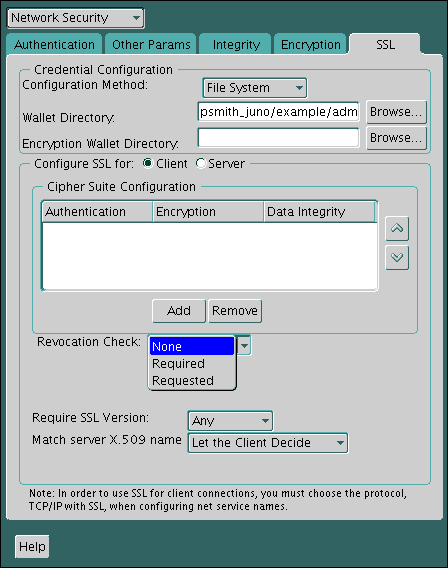
Description of the illustration ssl0006.gif
-
Required:Requires certificate revocation status checking. The TLS connection is rejected if a certificate is revoked or no CRL is found. TLS connections are accepted only if it can be verified that the certificate has not been revoked.
-
Requested: Performs certificate revocation status checking if a CRL is available. The TLS connection is rejected if a certificate is revoked. TLS connections are accepted if no CRL is found or if the certificate has not been revoked.
For performance reasons, only user certificates are checked for revocation.
-
-
(Optional) If CRLs are stored on your local file system, then set one or both of the following fields that specify where they are stored. These fields are available only when Revocation Check is set to Required or REQUESTED.
-
Certificate Revocation Lists Path: Enter the path to the directory where CRLs are stored or click Browse to find it by searching the file system. Specifying this path sets the
SSL_CRL_PATHparameter in thesqlnet.orafile. If a path is not specified for this parameter, then the default is the wallet directory. Both DER-encoded (binary format) and PEM-encoded (BASE64) CRLs are supported. -
Certificate Revocation Lists File: Enter the path to a comprehensive CRL file (where PEM-encoded (BASE64) CRLs are concatenated in order of preference in one file) or click Browse to find it by searching the file system. Specifying this file sets the
SSL_CRL_FILEparameter in thesqlnet.orafile. If this parameter is set, then the file must be present in the specified location, or else the application will error out during startup.If you want to store CRLs in a local file system directory by setting the Certificate Revocation Lists Path, then you must use the
orapkiutility to rename them so the system can locate them.
-
-
(Optional) If CRLs are fetched from Oracle Internet Directory, then directory server and port information must be specified in an
ldap.orafile.When configuring your
ldap.orafile, you should specify only a non-TLS port for the directory. CRL download is done as part of the TLS protocol, and making a TLS connection within a TLS connection is not supported.Oracle Database CRL functionality will not work if the Oracle Internet Directory non-TLS port is disabled.
-
Select File, Save Network Configuration. The
sqlnet.orafile is updated.
Disabling Certificate Revocation Status Checking
You can disable certificate revocation status checking.
-
Start Oracle Net Manager.
- (UNIX) From $ORACLE_HOME
/bin, enter the following command at the command line:
- (UNIX) From $ORACLE_HOME
netmgr- (Windows) Select **Start**, **Programs**, **Oracle - HOME_NAME**, **Configuration and Migration Tools**, then **Net Manager**.
-
Expand Oracle Net Configuration, and from Local, select Profile.
-
From the Naming list, select Network Security.
The Network Security tabbed window appears.
-
Select the SSL tab.
-
Select NONE from the Revocation Check list.
-
From the File menu, select Save Network Configuration.
The
sqlnet.orafile is updated with the following entry:
SSL_CERT_REVOCATION=NONECertificate Revocation List Management
Certificate revocation list management entails ensuring that the CRLs are the correct format before you enable certificate revocation checking.
-
About Certificate Revocation List Management
Oracle Database provides a command-line utility,orapki, that you can use to manage certificates. -
Displaying orapki Help for Commands That Manage CRLs
You can display all theorapkicommands that are available for managing CRLs. -
Renaming CRLs with a Hash Value for Certificate Validation
When the system validates a certificate, it must locate the CRL issued by the CA who created the certificate. -
Uploading CRLs to Oracle Internet Directory
Publishing CRLs in the directory enables CRL validation throughout your enterprise, eliminating the need for individual applications to configure their own CRLs. -
Listing CRLs Stored in Oracle Internet Directory
You can display a list of all CRLs stored in the directory withorapki, which is useful for browsing to locate a particular CRL to view or download to your local computer. -
Viewing CRLs in Oracle Internet Directory
Oracle Internet Directory CRLS are available in a summarized format; you also can request a listing of revoked certificates for a CRL. -
Deleting CRLs from Oracle Internet Directory
The user who deletes CRLs from the directory by usingorapkimust be a member of the directory groupCRLAdmins.
About Certificate Revocation List Management
Oracle Database provides a command-line utility, orapki, that you can use to manage certificates.
Before you can enable certificate revocation status checking, you must ensure that the CRLs you receive from the CAs you use are in a form (renamed with a hash value) or in a location (uploaded to the directory) where your computer can use them.
You can also use LDAP command-line tools to manage CRLs in Oracle Internet Directory.
Note: CRLs must be updated at regular intervals (before they expire) for successful validation. You can automate this task by using orapki commands in a script
Displaying orapki Help for Commands That Manage CRLs
You can display all the orapki commands that are available for managing CRLs.
- To display all the
orapkiavailable CRL management commands and their options, enter the following at the command line:
orapki crl helpNote: Using the -summary, -complete, or -wallet command options is always optional. A command will still run if these command options are not specified.
Renaming CRLs with a Hash Value for Certificate Validation
When the system validates a certificate, it must locate the CRL issued by the CA who created the certificate.
The system locates the appropriate CRL by matching the issuer name in the certificate with the issuer name in the CRL.
When you specify a CRL storage location for the Certificate Revocation Lists Path field in Oracle Net Manager, which sets the SSL_CRL_PATH parameter in the sqlnet.ora file, use the orapki utility to rename CRLs with a hash value that represents the issuer’s name. Creating the hash value enables the server to load the CRLs.
On UNIX operating systems, orapki creates a symbolic link to the CRL. On Windows operating systems, it creates a copy of the CRL file. In either case, the symbolic link or the copy created by orapki are named with a hash value of the issuer’s name. Then when the system validates a certificate, the same hash function is used to calculate the link (or copy) name so the appropriate CRL can be loaded.
-
Depending on the operating system, enter one of the following commands to rename CRLs stored in the file system:
- To rename CRLs stored in UNIX file systems:
orapki crl hash -crl crl_filename [-wallet wallet_location] -symlink crl_directory [-summary]- To rename CRLs stored in Windows file systems:
orapki crl hash -crl crl_filename [-wallet wallet_location] -copy crl_directory [-summary]In this specification, crl_filename is the name of the CRL file, wallet_location is the location of a wallet that contains the certificate of the CA that issued the CRL, and crl_directory is the directory where the CRL is located.
Using -wallet and -summary are optional. Specifying -wallet causes the tool to verify the validity of the CRL against the CA’s certificate prior to renaming the CRL. Specifying the -summary option causes the tool to display the CRL issuer’s name.
Uploading CRLs to Oracle Internet Directory
Publishing CRLs in the directory enables CRL validation throughout your enterprise, eliminating the need for individual applications to configure their own CRLs.
All applications can use the CRLs stored in the directory where they can be centrally managed, greatly reducing the administrative overhead of CRL management and use. The user who uploads CRLs to the directory by using orapki must be a member of the directory group CRLAdmins (cn=CRLAdmins,cn=groups,%s_OracleContextDN%). This is a privileged operation because these CRLs are accessible to the entire enterprise. Contact your directory administrator to get added to this administrative directory group.
- To upload CRLs to the directory, enter the following at the command line:
orapki crl upload -crl crl_location -ldap hostname:ssl_port -user username [-wallet wallet_location] [-summary]In this specification, crl_location is the file name or URL where the CRL is located, hostname and ssl_port (TLS port with no authentication) are for the system on which your directory is installed, username is the directory user who has permission to add CRLs to the CRL subtree, and wallet_location is the location of a wallet that contains the certificate of the CA that issued the CRL.
Using -wallet and -summary are optional. Specifying -wallet causes the tool to verify the validity of the CRL against the CA’s certificate prior to uploading it to the directory. Specifying the -summary option causes the tool to print the CRL issuer’s name and the LDAP entry where the CRL is stored in the directory.
The following example illustrates uploading a CRL with the orapki utility:
orapki crl upload -crl /home/user1/wallet/crldir/crl.txt -ldap host
1.example.com:3533 -user cn=orcladmin
<div class="infoboxnote" markdown="1">
**Note:**
- The `orapki` utility will prompt you for the directory password when you perform this operation.
- Ensure that you specify the directory SSL port on which the Diffie-Hellman-based TLS server is running. This is the TLS port that does not perform authentication. Neither the server authentication nor the mutual authentication TLS ports are supported by the `orapki` utility.
</div>
Listing CRLs Stored in Oracle Internet Directory
You can display a list of all CRLs stored in the directory with orapki, which is useful for browsing to locate a particular CRL to view or download to your local computer.
This command displays the CA who issued the CRL (Issuer) and its location (DN) in the CRL subtree of your directory.
- To list CRLs in Oracle Internet Directory, enter the following at the command line:
orapki crl list -ldap hostname:ssl_portwhere the hostname and ssl_port are for the system on which your directory is installed. Note that this is the directory SSL port with no authentication as described in the preceding section.
Viewing CRLs in Oracle Internet Directory
Oracle Internet Directory CRLS are available in a summarized format; you also can request a listing of revoked certificates for a CRL.
You can view CRLs stored in Oracle Internet Directory in a summarized format or you can request a complete listing of revoked certificates for a CRL. A summary listing provides the CRL issuer’s name and its validity period. A complete listing provides a list of all revoked certificates contained in the CRL.
- To view a summary listing of a CRL in Oracle Internet Directory, enter the following at the command line:
orapki crl display -crl crl_location [-wallet wallet_location] -summaryIn this specification, crl_location is the location of the CRL in the directory. It is convenient to paste the CRL location from the list that displays when you use the orapki crl list command.
To view a list of all revoked certificates contained in a specified CRL, which is stored in Oracle Internet Directory, you can enter the following at the command line:
orapki crl display -crl crl_location [-wallet wallet_location] -completeFor example, the following orapki command:
orapki crl display -crl $T_WORK/pki/wlt_crl/nzcrl.txt -wallet $T_WORK/pki/wlt_crl -completeproduces the following output, which lists the CRL issuer’s DN, its publication date, date of its next update, and the revoked certificates it contains:
issuer = CN=root,C=us, thisUpdate = Sun Nov 16 10:56:58 PST 2003, nextUpdate = Mon Sep 30 11:56:58 PDT 2013, revokedCertificates = {(serialNo = 153328337133459399575438325845117876415, revocationDate - Sun Nov 16 10:56:58 PST 2003)}
CRL is valid
Using the -wallet option causes the orapki crl display command to validate the CRL against the CA’s certificate.
Depending on the size of your CRL, choosing the -complete option may take a long time to display.
You can also use Oracle Directory Manager, a graphical user interface tool that is provided with Oracle Internet Directory, to view CRLs in the directory. CRLs are stored in the following directory location:
cn=CRLValidation,cn=Validation,cn=PKI,cn=Products,cn=OracleContextDeleting CRLs from Oracle Internet Directory
The user who deletes CRLs from the directory by using orapki must be a member of the directory group CRLAdmins.
- To delete CRLs from the directory, enter the following at the command line:
orapki crl delete -issuer issuer_name -ldap host:ssl_port -user username [-summary]In this specification, issuer_name is the name of the CA who issued the CRL, the hostname and ssl_port are for the system on which your directory is installed, and username is the directory user who has permission to delete CRLs from the CRL subtree. Ensure that this must be a directory SSL port with no authentication.
Using the -summary option causes the tool to print the CRL LDAP entry that was deleted.
For example, the following orapki command:
orapki crl delete -issuer "CN=root,C=us" -ldap machine1:3500 -user cn=orcladmin -summaryproduces the following output, which lists the location of the deleted CRL in the directory:
Deleted CRL at cn=root cd45860c.rN,cn=CRLValidation,cn=Validation,cn=PKI,cn=Products,cn=OracleContextTroubleshooting CRL Certificate Validation
To determine whether certificates are being validated against CRLs, you can enable Oracle Net tracing.
When a revoked certificate is validated by using CRLs, then you will see the following entries in the Oracle Net tracing file without error messages logged between entry and exit:
nzcrlVCS_VerifyCRLSignature: entry
nzcrlVCS_VerifyCRLSignature: exit

nzcrlVCD_VerifyCRLDate: entry
nzcrlVCD_VerifyCRLDate: exit

nzcrlCCS_CheckCertStatus: entry
nzcrlCCS_CheckCertStatus: Certificate is listed in CRL
nzcrlCCS_CheckCertStatus: exit
Note: Note that when certificate validation fails, the peer in the SSL handshake sees an ORA-29024: Certificate Validation Failure.
Oracle Net Tracing File Error Messages Associated with Certificate Validation
Oracle generates trace messages that are relevant to certificate validation.
These trace messages may be logged between the entry and exit entries in the Oracle Net tracing file. Oracle SSL looks for CRLs in multiple locations, so there may be multiple errors in the trace.
You can check the following list of possible error messages for information about how to resolve them.
CRL signature verification failed with RSA status
Cause: The CRL signature cannot be verified.
Action: Ensure that the downloaded CRL is issued by the peer’s CA and that the CRL was not corrupted when it was downloaded. Note that the orapki utility verifies the CRL before renaming it with a hash value or before uploading it to the directory.
See Certificate Revocation List Management for information about using orapki for CRL management.
CRL date verification failed with RSA status
Cause: The current time is later than the time listed in the next update field. You should not see this error if CRL DP is used. The systems searches for the CRL in the following order:
-
File system
-
Oracle Internet Directory
-
CRL DP
The first CRL found in this search may not be the latest.
Action: Update the CRL with the most recent copy.
CRL could not be found
Cause: The CRL could not be found at the configured locations. This will return error ORA-29024 if the configuration specifies that certificate validation is require.
Action: Ensure that the CRL locations specified in the configuration are correct by performing the following steps:
-
Use Oracle Net Manager to check if the correct CRL location is configured. Refer to Configuring Certificate Validation with Certificate Revocation Lists
-
If necessary, use the
orapkiutility to configure CRLs for system use as follows:-
For CRLs stored on your local file system, refer to Renaming CRLs with a Hash Value for Certificate Validation
-
CRLs stored in the directory, refer to Uploading CRLs to Oracle Internet Directory
-
Oracle Internet Directory host name or port number not set
Cause: Oracle Internet Directory connection information is not set. Note that this is not a fatal error. The search continues with CRL DP.
Action: If you want to store the CRLs in Oracle Internet Directory, then use Oracle Net Configuration Assistant to create and configure an ldap.ora file for your Oracle home.
Fetch CRL from CRL DP: No CRLs found
Cause: The CRL could not be fetched by using the CRL Distribution Point (CRL DP). This happens if the certificate does not have a location specified in its CRL DP extension, or if the URL specified in the CRL DP extension is incorrect.
Action: Ensure that your certificate authority publishes the CRL to the URL that is specified in the certificate’s CRL DP extension.
Manually download the CRL. Then depending on whether you want to store it on your local file system or in Oracle Internet Directory, perform the following steps:
If you want to store the CRL on your local file system:
-
Use Oracle Net Manager to specify the path to the CRL directory or file. Refer to Configuring Certificate Validation with Certificate Revocation Lists
-
Use the
orapkiutility to configure the CRL for system use. Refer to Renaming CRLs with a Hash Value for Certificate Validation
If you want to store the CRL in Oracle Internet Directory:
-
Use Oracle Net Configuration Assistant to create and configure an
ldap.orafile with directory connection information. -
Use the
orapkiutility to upload the CRL to the directory. Refer to Uploading CRLs to Oracle Internet Directory
Related Topics
- Renaming CRLs with a Hash Value for Certificate Validation
- Renaming CRLs with a Hash Value for Certificate Validation
- [Certificate Revocation List Management](certificate-validation-certificate-revocation-lists
- Oracle Net Tracing File Error Messages Associated with Certificate Validation
- Listing CRLs Stored in Oracle Internet Directory
- Oracle Net Tracing File Error Messages Associated with Certificate Validation
- Oracle Database Net Services Administrator’s Guide