Configuration of Data Encryption and Integrity
The script content on this page is for navigation purposes only and does not alter the content in any way.
Oracle Database native Oracle Net Services encryption and integrity presumes the prior installation of Oracle Net Services.
-
About Activating Encryption and Integrity
In any network connection, both the client and server can support multiple encryption algorithms and integrity algorithms. -
About Negotiating Encryption and Integrity
Thesqlnet.orafile on systems using data encryption and integrity must contain some or all theREJECTED,ACCEPTED,REQUESTED, andREQUIREDparameters. -
Configuring Encryption and Integrity Parameters Using Oracle Net Manager
You can set up or change encryption and integrity parameter settings using Oracle Net Manager.
About Activating Encryption and Integrity
In any network connection, both the client and server can support multiple encryption algorithms and integrity algorithms.
When a connection is made, the server selects which algorithm to use, if any, from those algorithms specified in the sqlnet.ora files.The server searches for a match between the algorithms available on both the client and the server, and picks the first algorithm in its own list that also appears in the client list. If one side of the connection does not specify an algorithm list, all the algorithms installed on that side are acceptable. The connection fails with error message ORA-12650 if either side specifies an algorithm that is not installed.
Encryption and integrity parameters are defined by modifying a sqlnet.ora file on the clients and the servers on the network.
You can choose to configure any or all of the available encryption algorithms, and either or both of the available integrity algorithms. Only one encryption algorithm and one integrity algorithm are used for each connect session.
Note: Oracle Database selects the first encryption algorithm and the first integrity algorithm enabled on the client and the server. Oracle recommends that you select algorithms and key lengths in the order in which you prefer negotiation, choosing the strongest key length first.
About Negotiating Encryption and Integrity
The sqlnet.ora file on systems using data encryption and integrity must contain some or all the REJECTED, ACCEPTED, REQUESTED, and REQUIRED parameters.
-
About the Values for Negotiating Encryption and Integrity
Oracle Net Manager can be used to specify four possible values for the encryption and integrity configuration parameters. -
REJECTED Configuration Parameter
TheREJECTEDvalue disables the security service, even if the other side requires this service. -
ACCEPTED Configuration Parameter
TheACCEPTEDvalue enables the security service if the other side requires or requests the service. -
REQUESTED Configuration Parameter
TheREQUESTEDvalue enables the security service if the other side permits this service. -
REQUIRED Configuration Parameter
TheREQUIREDvalue enables the security service or preclude the connection.
About the Values for Negotiating Encryption and Integrity
Oracle Net Manager can be used to specify four possible values for the encryption and integrity configuration parameters.
The following four values are listed in the order of increasing security, and they must be used in the profile file (sqlnet.ora) for the client and server of the systems that are using encryption and integrity.
The value REJECTED provides the minimum amount of security between client and server communications, and the value REQUIRED provides the maximum amount of network security:
-
REJECTED -
ACCEPTED -
REQUESTED -
REQUIRED
The default value for each of the parameters is ACCEPTED.
Oracle Database servers and clients are set to ACCEPT encrypted connections out of the box. This means that you can enable the desired encryption and integrity settings for a connection pair by configuring just one side of the connection, server-side or client-side.
So, for example, if there are many Oracle clients connecting to an Oracle database, you can configure the required encryption and integrity settings for all these connections by making the appropriate sqlnet.ora changes at the server end. You do not need to implement configuration changes for each client separately.
The following table shows whether the security service is enabled, based on a combination of client and server configuration parameters. If either the server or client has specified REQUIRED, the lack of a common algorithm causes the connection to fail.Otherwise, if the service is enabled, lack of a common service algorithm results in the service being disabled.
| Client Setting | Server Setting | Encryption and Data Negotiation |
|---|---|---|
REJECTED |
REJECTED |
OFF |
ACCEPTED |
REJECTED |
OFF |
REQUESTED |
REJECTED |
OFF |
REQUIRED |
REJECTED |
Connection fails |
REJECTED |
ACCEPTED |
OFF |
ACCEPTED |
ACCEPTED |
OFF1 |
REQUESTED |
ACCEPTED |
ON |
REQUIRED |
ACCEPTED |
ON |
REJECTED |
REQUESTED |
OFF |
ACCEPTED |
REQUESTED |
ON |
REQUESTED |
REQUESTED |
ON |
REQUIRED |
REQUESTED |
ON |
REJECTED |
REQUIRED |
Connection fails |
ACCEPTED |
REQUIRED |
ON |
REQUESTED |
REQUIRED |
ON |
REQUIRED |
REQUIRED |
ON |
REJECTED Configuration Parameter
The REJECTED value disables the security service, even if the other side requires this service.
In this scenario, this side of the connection specifies that the security service is not permitted. If the other side is set to REQUIRED, the connection terminates with error message ORA-12650. If the other side is set to REQUESTED, ACCEPTED, or REJECTED, the connection continues without error and without the security service enabled.
ACCEPTED Configuration Parameter
The ACCEPTED value enables the security service if the other side requires or requests the service.
In this scenario, this side of the connection does not require the security service, but it is enabled if the other side is set to REQUIRED or REQUESTED. If the other side is set to REQUIRED or REQUESTED, and an encryption or integrity algorithm match is found, the connection continues without error and with the security service enabled. If the other side is set to REQUIRED and no algorithm match is found, the connection terminates with error message ORA-12650.
If the other side is set to REQUESTED and no algorithm match is found, or if the other side is set to ACCEPTED or REJECTED, the connection continues without error and without the security service enabled.
REQUESTED Configuration Parameter
The REQUESTED value enables the security service if the other side permits this service.
In this scenario, this side of the connection specifies that the security service is desired but not required. The security service is enabled if the other side specifies ACCEPTED, REQUESTED, or REQUIRED. There must be a matching algorithm available on the other side, otherwise the service is not enabled. If the other side specifies REQUIRED and there is no matching algorithm, the connection fails.
REQUIRED Configuration Parameter
The REQUIRED value enables the security service or preclude the connection.
In this scenario, this side of the connection specifies that the security service must be enabled. The connection fails if the other side specifies REJECTED or if there is no compatible algorithm on the other side.
Configuring Encryption and Integrity Parameters Using Oracle Net Manager
You can set up or change encryption and integrity parameter settings using Oracle Net Manager.
-
Configuring Encryption on the Client and the Server
Use Oracle Net Manager to configure encryption on the client and on the server. -
Configuring Integrity on the Client and the Server
You can use Oracle Net Manager to configure network integrity on both the client and the server. -
Enabling Both Oracle Native Encryption and SSL Authentication for Different Users Concurrently
Depending on theSQLNET.ENCRYPTION_CLIENTandSQLNET.ENCRYPTION_SERVERsettings, you can configure Oracle Database to allow both Oracle native encryption and SSL authentication for different users concurrently.
Configuring Encryption on the Client and the Server
Use Oracle Net Manager to configure encryption on the client and on the server.
-
Start Oracle Net Manager.
- (UNIX) From $ORACLE_HOME
/bin, enter the following command at the command line:
- (UNIX) From $ORACLE_HOME
netmgr- (Windows) Select **Start**, **Programs**, **Oracle - HOME_NAME**, **Configuration and Migration Tools**, then **Net Manager**.
-
Expand Oracle Net Configuration, and from Local, select Profile.
-
From the Naming list, select Network Security.
The Network Security tabbed window appears.
-
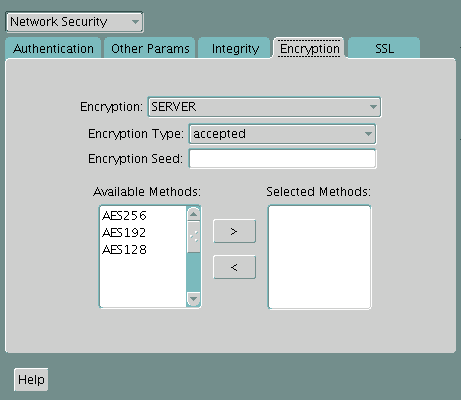
Select the Encryption tab.
-
Select CLIENT or SERVER option from the Encryption box.
-
From the Encryption Type list, select one of the following:
-
REQUESTED
-
REQUIRED
-
ACCEPTED
-
REJECTED
-
-
(Optional) In the Encryption Seed field, enter between 10 and 70 random characters. The encryption seed for the client should not be the same as that for the server.
-
Select an encryption algorithm in the Available Methods list. Move it to the Selected Methods list by choosing the right arrow (>). Repeat for each additional method you want to use.
-
Select File, Save Network Configuration. The
sqlnet.orafile is updated. -
Repeat this procedure to configure encryption on the other system. The
sqlnet.orafile on the two systems should contain the following entries:- On the server:
SQLNET.ENCRYPTION_SERVER = [accepted | rejected | requested | required]
SQLNET.ENCRYPTION_TYPES_SERVER = (valid_encryption_algorithm [,valid_encryption_algorithm])
- On the client:
SQLNET.ENCRYPTION_CLIENT = [accepted | rejected | requested | required]
SQLNET.ENCRYPTION_TYPES_CLIENT = (valid_encryption_algorithm [,valid_encryption_algorithm])
The following table lists valid encryption algorithms and their associated legal values.
| Algorithm Name | Legal Value |
|---|---|
| AES 256-bit key | AES256 |
| AES 192-bit key | AES192 |
| AES 128-bit key | AES128 |
Configuring Integrity on the Client and the Server
You can use Oracle Net Manager to configure network integrity on both the client and the server.
-
Start Oracle Net Manager.
-
(UNIX) From $ORACLE_HOME
/bin, enter the following command at the command line:netmgr -
(Windows) Select Start, Programs, Oracle - HOME_NAME, Configuration and Migration Tools, then Net Manager.
-
-
Expand Oracle Net Configuration, and from Local, select Profile.
-
From the Naming list, select Network Security.
The Network Security tabbed window appears.
-
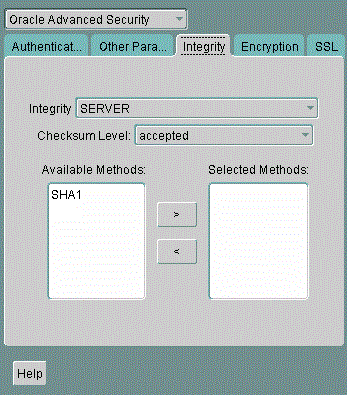
Select the Integritytab.
-
Depending upon which system you are configuring, select the Server or Client from the Integrity box.
-
From the Checksum Level list, select one of the following checksum level values:
-
REQUESTED
-
REQUIRED
-
ACCEPTED
-
REJECTED
-
-
Select an integrity algorithm in the Available Methods list. Move it to the Selected Methods list by choosing the right arrow (>). Repeat for each additional method you want to use.
-
Select File, Save Network Configuration.
The
sqlnet.orafile is updated. -
Repeat this procedure to configure integrity on the other system.
The
sqlnet.orafile on the two systems should contain the following entries:-
On the server:
SQLNET.CRYPTO_CHECKSUM_SERVER = [accepted | rejected | requested | required] SQLNET.CRYPTO_CHECKSUM_TYPES_SERVER = (valid_crypto_checksum_algorithm [,valid_crypto_checksum_algorithm]) -
On the client:
SQLNET.CRYPTO_CHECKSUM_CLIENT = [accepted | rejected | requested | required]
SQLNET.CRYPTO_CHECKSUM_TYPES_CLIENT = (valid_crypto_checksum_algorithm [,valid_crypto_checksum_algorithm])
Valid integrity/checksum algorithms that you can use are as follows:
-
SHA1
-
SHA256
-
SHA384
-
SHA512
-
Enabling Both Oracle Native Encryption and SSL Authentication for Different Users Concurrently
Depending on the SQLNET.ENCRYPTION_CLIENT and SQLNET.ENCRYPTION_SERVER settings, you can configure Oracle Database to allow both Oracle native encryption and SSL authentication for different users concurrently.
-
About Enabling Both Oracle Native Encryption and SSL Authentication for Different Users Concurrently
By default, Oracle Database does not allow both Oracle native encryption and Transport Layer Security (SSL) authentication for different users concurrently. -
Configuring Both Oracle Native Encryption and SSL Authentication for Different Users Concurrently
Use theIGNORE_ANO_ENCRYPTION_FOR_TCPSparameter to enable the concurrent use of both Oracle native encryption and Transport Layer Security (SSL) authentication.
About Enabling Both Oracle Native Encryption and SSL Authentication for Different Users Concurrently
By default, Oracle Database does not allow both Oracle native encryption and Transport Layer Security (SSL) authentication for different users concurrently.
The use of both Oracle native encryption (also called Advanced Networking Option (ANO) encryption) and TLS authentication together is called double encryption.
There are cases in which both a TCP and TCPS listener must be configured, so that some users can connect to the server using a user name and password, and others can validate to the server by using a TLS certificate. In these situations, you must configure both password-based authentication and TLS authentication. A workaround in previous releases was to set the SQLNET.ENCRYPTION_SERVER parameter to requested. If your requirements are that SQLNET.ENCRYPTION_SERVER be set to required, then you can set the IGNORE_ANO_ENCRYPTION_FOR_TCPS parameter in both SQLNET.ENCRYPTION_CLIENT and SQLNET.ENCRYPTION_SERVER to TRUE. By default, it is set to FALSE.
Setting IGNORE_ANO_ENCRYPTION_FOR_TCPS to TRUE forces the client to ignore the value that is set for the SQLNET.ENCRYPTION_CLIENT parameter for all outgoing TCPS connections. This parameter allows the database to ignore the SQLNET.ENCRYPTION_CLIENT or SQLNET.ENCRYPTION_SERVER setting when there is a conflict between the use of a TCPS client and when these two parameters are set to required.
Configuring Both Oracle Native Encryption and SSL Authentication for Different Users Concurrently
Use the IGNORE_ANO_ENCRYPTION_FOR_TCPS parameter to enable the concurrent use of both Oracle native encryption and Transport Layer Security (SSL) authentication.
On the server, you must set IGNORE_ANO_ENCRYPTION_FOR_TCPS in the sqlnet.ora file, and on the client, you can set it in either the sqlnet.ora file or the tnsnames.ora file.
-
Log in to the database server
-
Go to the location of the
sqlnet.orafile.By default,
sqlnet.orais in theORACLE_BASE/network/admindirectory. Thesqlnet.orafile can also be stored in the directory specified by theTNS_ADMINenvironment variable. -
In
sqlnet.ora, check if the currentSQLNET.ENCRYPTION_SERVERsetting isrequiredorrequested. -
If
SQLNET.ENCRYPTION_SERVERis set to required, then add theSQLNET.IGNORE_ANO_ENCRYPTION_FOR_TCPStosqlnet.oraand then set it toTRUE.IGNORE_ANO_ENCRYPTION_FOR_TCPS=TRUE -
Save and exit
sqlnet.ora. -
Log in to the client.
For the client, you can set the value in either the
sqlnet.orafile or thetnsnames.orafile.-
Setting the value in
sqlnet.ora: Check if theSQLNET.ENCRYPTION_CLIENTparameter is set torequired. IfSQLNET.ENCRYPTION_CLIENT, then edit thesqlnet.orafile to have the following setting:IGNORE_ANO_ENCRYPTION_FOR_TCPS=TRUE -
Setting the value in
tnsnames.ora: By default,tnsnames.orais in the same location assqlnet.ora. IfSQLNET.ENCRYPTION_CLIENTis set torequiredinsqlnet.ora, then in theSECURITYportion of theTNS_ALIASsetting, setIGNORE_ANO_ENCRYPTION_FOR_TCPS=TRUE. For example:test_tls= (DESCRIPTION = (ADDRESS=(PROTOCOL=tcps)(HOST=)(PORT=1750)) (CONNECT_DATA=(SID=^ORACLE_SID^)) (SECURITY=(IGNORE_ANO_ENCRYPTION_FOR_TCPS=TRUE)) )
-
Related Topics
- Valid encryption algorithms are listed later in this topic.
- Oracle Database Advanced Security Guide for a listing of available integrity algorithms
- Data Encryption and Integrity Parameters
- Oracle Database Advanced Security Guide
-
This value defaults to
OFF. Cryptography and data integrity are not enabled until the user changes this parameter by using Oracle Net Manager or by modifying thesqlnet.orafile. ↩