Creating User Accounts
A user account can have restrictions such as profiles, a default role, and tablespace restrictions.
-
About Common Users and Local Users
In a multitenant environment, CDB common users and application common have access to their respective containers, and local users are specific to a PDB. -
Who Can Create User Accounts?
Users who has been granted theCREATE USERsystem privilege can create user accounts, including user accounts to be used as proxy users. -
Creating a New User Account That Has Minimum Database Privileges
When you create a new user account, you should enable this user to access the database. -
Restrictions on Creating the User Name for a New Account
When you specify a name for a user account, be aware of restrictions such as naming conventions and whether the name is unique. -
Assignment of User Passwords
TheIDENTIFIED BYclause of theCREATE USERstatement assigns the user a password. -
Default Tablespace for the User
A default tablespace stores objects that users create. -
Tablespace Quotas for a User
The tablespace quota defines how much space to provide for a user’s tablespace. -
Temporary Tablespaces for the User
A temporary tablespace contains transient data that persists only for the duration of a user session. -
Profiles for the User
A profile is a set of limits, defined by attributes, on database resources and password access to the database. -
Creation of a Common User or a Local User
TheCREATE USERSQL statement can be used to create both common (CDB and application) users and local users. -
Creating a Default Role for the User
A default role is automatically enabled for a user when the user creates a session.
About Common Users and Local Users
In a multitenant environment, CDB common users and application common have access to their respective containers, and local users are specific to a PDB.
-
About Common Users
Oracle provides two types of common users: CDB common users and application common users. -
How Plugging in PDBs Affects CDB Common Users
Plugging a non-CDB into a CDB as a PDB affects both Oracle-supplied administrative and user-created accounts and privileges. -
About Local Users
In a multitenant environment, a local user is a database user that exists only in a single PDB.
About Common Users
Oracle provides two types of common users: CDB common users and application common users.
A CDB common user is a database user whose single identity and password are known in the CDB root and in every existing and future pluggable database (PDB), including any application roots. All Oracle-supplied administrative user accounts, such as SYS and SYSTEM, are CDB common users and can navigate across the system container. CDB common users can have different privileges in different PDBs. For example, the user SYSTEM can switch between PDBs and use the privileges that are granted to SYSTEM in the current PDB. However, if one of the PDBs is Oracle Database Vault-enabled, then the Database Vault restrictions, such as SYSTEM not being allowed to create user accounts, apply to SYSTEM when this user is connected to that PDB. Oracle does not recommend that you change the privileges of the Oracle-supplied CDB common users.
A CDB common user can perform all tasks that an application common user can perform, provided that appropriate privileges have been granted to that user.
An application common user is a user account that is created in an application root, and is common only within this application container. In other words, the application common user does not have access to the entire CDB environment like CDB common users. An application common user is responsible for activities such as creating (which includes plugging), opening, closing, unplugging, and dropping application PDBs. This user can create application common objects in the application root. You can create an application common user only when you are connected to an application root. The ability for users to access the application common objects is subject to the same privileges as local and CDB common objects. For example, a local user in a PDB that is associated with an application root has access to only the objects in that PDB for which the user has privileges. In the application root itself, you can commonly grant a privilege on a CDB common object that will apply across the application container.
Both of these types of common users are responsible for managing the common objects in their respective roots. If the CDB common user or the application common user has the appropriate privileges, then this user can perform operations in PDBs as well, such as granting privileges to local users. These users can also locally grant common users different privileges in each container.
Both CDB and application common users can perform the following activities:
-
Granting privileges to common users or common roles. That is, a CDB common user can grant a privilege to a common user or role, and the scope within which this privilege applies is determined by the container (CDB root, application root, or PDB) in which the statement is issued and whether the privilege is granted commonly (in the CDB root or the application root). A CDB common user connected to an application root can commonly grant a privilege on a CDB common object, and that privilege will apply across the application container.
The following diagram illustrates the access hierarchy with CDB common users, application common users, and local users:
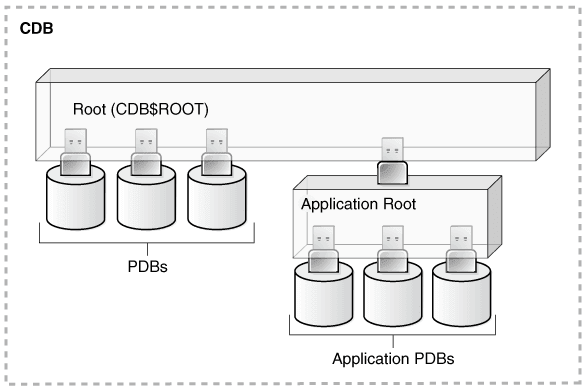
Description of the illustration dbseg_vm_011a.png
CDB common users are defined in the CDB root and may be able to access all PDBs within the CDB, including application roots and their application PDBs. Application common users are defined in the application root and have access to the PDBs that belong to the application container. Local users in either the CDB PDBs or the application PDBs have access only to the PDBs in which the local user resides.
-
The state of a PDB can be altered by a suitably privileged user who can issue the
ALTER PLUGGABLE DATABASEstatement from the CDB root, from an application root (if a PDB is an application PDB that belongs to the application container), or from a PDB itself.
One difference between CDB common users and application common users is that only a CDB common user can run an ALTER DATABASE statement that specifies the recovery clauses that apply to the entire CDB.
How Plugging in PDBs Affects CDB Common Users
Plugging a non-CDB into a CDB as a PDB affects both Oracle-supplied administrative and user-created accounts and privileges.
This affects the passwords of these CDB common user accounts, and privileges of all accounts in the newly plugged-in database.
The following actions take place:
-
The Oracle-supplied administrative accounts are merged with the existing common user accounts.
-
User-created accounts are merged with the existing user-created common user accounts.
-
The passwords of the existing CDB common user accounts take precedence over the passwords for the accounts from the non-CDB.
-
If you had modified the privileges of a user account in its original non-CDB, then these privileges are saved, but they only apply to the PDB that was created when the PDB was plugged into the CDB, as locally granted privileges. For example, suppose you had granted the user
SYSTEMa role calledhr_mgrin the non-CDBdb1. After thedb1database has been added to a CDB, thenSYSTEMcan only use thehr_mgrrole in thedb1PDB, and not in any other PDBs.
The following two scenarios are possible when you plug a PDB (for example, pdb_1) from one CDB (cdb_1) to a another CDB (cdb_2):
-
cdb_1has the common userc##cdb1_user.cdb_2does not have this user.c##cdb1_userremains inPDB_1but this account is locked. To resurrect this account, you must closepdb_1, recreate common userc##cdb1_userin the root ofcdb_2, and then re-openpdb_1. -
cdb_1andcdb_2both have common userc##common_user.Both
c##common_useraccounts are merged.c##common_userretains its password incdb_2. Any privileges assigned to it incdb_2but not incdb_1are retained locally inpdb_1.
About Local Users
In a multitenant environment, a local user is a database user that exists only in a single PDB.
Local users can have administrative privileges, but these privileges apply only in the PDB in which the local user account was created. A local user account has the following characteristics, which distinguishes it from common user accounts:
-
Local user accounts cannot create common user accounts or commonly grant them privileges. A common user with the appropriate privileges can create and modify common or local user accounts and grant and revoke privileges, commonly or locally. A local user can create and modify local user accounts or locally grant privileges to common or local users in a given PDB.
-
You can grant local user accounts common roles. However, the privileges associated with the common role only apply to the local user’s PDB.
-
The local user account must be unique only within its PDB.
-
With the appropriate privileges, a local user can access objects in a common user’s schema. For example, a local user can access a table within the schema of a common user if the common user has granted the local user privileges to access it.
-
You can editions-enable a local user account but not a common user account.
Who Can Create User Accounts?
Users who has been granted the CREATE USER system privilege can create user accounts, including user accounts to be used as proxy users.
Because the CREATE USER system privilege is a powerful privilege, a database administrator or security administrator is usually the only user who has this system privilege.
If you want to create users who themselves have the privilege to create users, then include the WITH ADMIN OPTION clause in the GRANT statement. For example:
GRANT CREATE USER TO lbrown WITH ADMIN OPTION;As with all user accounts to whom you grant privileges, grant these privileges to trusted users only.
In a multitenant environment, you must have the commonly granted CREATE USER system privilege to create common user accounts. To create local user accounts, you must have a commonly granted CREATE USER privilege or a locally granted CREATE USER privilege in the PDB in which the local user account will be created.
Note:
As a security administrator, you should create your own roles and assign only those privileges that are needed. For example, many users formerly granted the CONNECT privilege did not need the additional privileges CONNECT used to provide. Instead, only CREATE SESSION was actually needed. By default, the SET CONTAINER privilege is granted to CONNECT role.
Creating organization-specific roles gives an organization detailed control of the privileges it assigns, and protects it in case Oracle Database changes the roles that it defines in future releases.
Creating a New User Account That Has Minimum Database Privileges
When you create a new user account, you should enable this user to access the database.
-
Use the
CREATE USERstatement to create a new user account.For example:
CREATE USER jward
 IDENTIFIED BY password
 DEFAULT TABLESPACE example
 QUOTA 10M ON example
 TEMPORARY TABLESPACE temp
 QUOTA 5M ON system
 PASSWORD EXPIRE;
Follow the guidelines in [Minimum Requirements for Passwords](minimum-requirements-passwords.html#GUID-AA1AA635-1CD5-422E-B8CA-681ED7C253CA) to replace *password* with a password that is secure.
This example creates a local user account and specifies the user password, default tablespace, temporary tablespace where temporary segments are created, tablespace quotas, and profile.
- At minimum, grant the user the
CREATE SESSIONprivilege so that the user can access the database instance.
GRANT CREATE SESSION TO jward;A newly created user cannot connect to the database until he or she has the `CREATE SESSION` privilege. If the user must access Oracle Enterprise Manager, then you should also grant the user the `SELECT ANY DICTIONARY` privilege.
Restrictions on Creating the User Name for a New Account
When you specify a name for a user account, be aware of restrictions such as naming conventions and whether the name is unique.
-
Uniqueness of User Names
Each user has an associated schema; within a schema, each schema object must have a unique name. -
User Names in a Multitenant Environment
Within each PDB, a user name must be unique with respect to other user names and roles in that PDB. -
Case Sensitivity for User Names
How you create a user name controls the case sensitivity in which the user name is stored in the database.
Uniqueness of User Names
Each user has an associated schema; within a schema, each schema object must have a unique name.
Oracle Database will prevent you from creating a user name if it is already exists. You can check existing names by querying the USERNAME column of the DBA_USERS data dictionary view.
User Names in a Multitenant Environment
Within each PDB, a user name must be unique with respect to other user names and roles in that PDB.
Note the following restrictions:
-
For common user names, names for user-created common users must begin with a common user prefix. By default, for CDB common users, this prefix is
C##. For application common users, this prefix is an empty string. This means that there are no restrictions on the name that can be assigned to an application common user other than that it cannot start with the prefix reserved for CDB common users. For example, you could name a CDB common userc##hr_adminand an application common userhr_admin.The
COMMON_USER_PREFIXparameter inCDB$ROOTdefines the common user prefix. You can change this setting, but do so only with great care. -
For local user names, the name cannot start with
C##(orc##) -
A user and a role cannot have the same name.
Case Sensitivity for User Names
How you create a user name controls the case sensitivity in which the user name is stored in the database.
For example:
**CREATE USER jward**
 IDENTIFIED BY password
 DEFAULT TABLESPACE data_ts
 QUOTA 100M ON test_ts
 QUOTA 500K ON data_ts
 TEMPORARY TABLESPACE temp_ts
 PROFILE clerk
 CONTAINER = CURRENT;
User jward is stored in the database in upper-case letters. For example:
SELECT USERNAME FROM ALL_USERS;

USERNAME
---------
JWARD
...
However, if you enclose the user name in double quotation marks, then the name is stored using the case sensitivity that you used for the name. For example:
CREATE USER "jward" IDENTIFIED BY password;So, when you query the ALL_USERS data dictionary view, you will find that the user account is stored using the case that you used to create it.
SELECT USERNAME FROM ALL_USERS;

USERNAME
---------
jward
...
User JWARD and user jward are both stored in the database as separate user accounts. Later on, if you must modify or drop the user that you had created using double quotation marks, then you must enclose the user name in double quotation marks.
For example:
DROP USER "jward";Assignment of User Passwords
The IDENTIFIED BY clause of the CREATE USER statement assigns the user a password.
Ensure that you create a secure password.
CREATE USER jward
 **IDENTIFIED BY****password**
 DEFAULT TABLESPACE data_ts
 QUOTA 100M ON test_ts
 QUOTA 500K ON data_ts
 TEMPORARY TABLESPACE temp_ts
 PROFILE clerk
 CONTAINER = CURRENT;
Default Tablespace for the User
A default tablespace stores objects that users create.
-
About Assigning a Default Tablespace for a User
Each user should have a default tablespace. -
DEFAULT TABLESPACE Clause for Assigning a Default Tablespace
TheDEFAULT TABLESPACEclause in theCREATE USERstatement assigns a default tablespace to the user.
About Assigning a Default Tablespace for a User
Each user should have a default tablespace.
When a schema object is created in the user’s schema and the DDL statement does not specify a tablespace to contain the object, the Oracle Database stores the object in the user’s default tablespace.
Tablespaces enable you to separate user data from system data, such as the data that is stored in the SYSTEM tablespace. You use the CREATE USER or ALTER USER statement to assign a default tablespace to a user. The default setting for the default tablespaces of all users is the SYSTEM tablespace. If a user does not create objects, and has no privileges to do so, then this default setting is fine. However, if a user is likely to create any type of object, then you should specifically assign the user a default tablespace, such as the USERS tablespace. Using a tablespace other than SYSTEM reduces contention between data dictionary objects and user objects for the same data files. In general, do not store user data in the SYSTEM tablespace.
You can use the CREATE TABLESPACE SQL statement to create a permanent default tablespace other than SYSTEM at the time of database creation, to be used as the database default for permanent objects. By separating the user data from the system data, you reduce the likelihood of problems with the SYSTEM tablespace, which can in some circumstances cause the entire database to become nonfunctional. This default permanent tablespace is not used by system users, that is, SYS, SYSTEM, and OUTLN, whose default permanent tablespace is SYSTEM. A tablespace designated as the default permanent tablespace cannot be dropped. To accomplish this goal, you must first designate another tablespace as the default permanent tablespace. You can use the ALTER TABLESPACE SQL statement to alter the default permanent tablespace to another tablespace. Be aware that this will affect all users or objects created after the ALTER DDL statement is executed.
You can also set a user default tablespace during user creation, and change it later with the ALTER USER statement. Changing the user default tablespace affects only objects created after the setting is changed.
When you specify the default tablespace for a user, also specify a quota on that tablespace.
DEFAULT TABLESPACE Clause for Assigning a Default Tablespace
The DEFAULT TABLESPACE clause in the CREATE USER statement assigns a default tablespace to the user.
In the following CREATE USER statement, the default tablespace for local user jward is data_ts:
CREATE USER jward
 IDENTIFIED BY password
 **DEFAULT TABLESPACE data_ts**
 QUOTA 100M ON test_ts
 QUOTA 500K ON data_ts
 TEMPORARY TABLESPACE temp_ts
 PROFILE clerk
 CONTAINER = CURRENT;
Tablespace Quotas for a User
The tablespace quota defines how much space to provide for a user’s tablespace.
-
About Assigning a Tablespace Quota for a User
You can assign each user a tablespace quota for any tablespace, except a temporary tablespace. -
CREATE USER Statement for Assigning a Tablespace Quota
TheQUOTAclause of theCREATE USERstatement assigns the quotas for a tablespace. -
Restriction of the Quota Limits for User Objects in a Tablespace
You can restrict the quota limits for user objects in a tablespace so that the current quota is zero. -
Grants to Users for the UNLIMITED TABLESPACE System Privilege
To permit a user to use an unlimited amount of any tablespace in the database, grant the user theUNLIMITED TABLESPACEsystem privilege.
About Assigning a Tablespace Quota for a User
You can assign each user a tablespace quota for any tablespace, except a temporary tablespace.
Assigning a quota accomplishes the following:
-
Users with privileges to create certain types of objects can create those objects in the specified tablespace.
-
Oracle Database limits the amount of space that can be allocated for storage of a user’s objects within the specified tablespace to the amount of the quota.
By default, a user has no quota on any tablespace in the database. If the user has the privilege to create a schema object, then you must assign a quota to allow the user to create objects. At a minimum, assign users a quota for the default tablespace, and additional quotas for other tablespaces in which they can create objects. The maximum amount of space that you can assign for a tablespace is 2 TB. If you need more space, then specify UNLIMITED for the QUOTA clause.
You can assign a user either individual quotas for a specific amount of disk space in each tablespace or an unlimited amount of disk space in all tablespaces. Specific quotas prevent a user’s objects from using too much space in the database.
You can assign quotas to a user tablespace when you create the user, or add or change quotas later. (You can find existing user quotas by querying the USER_TS_QUOTAS view.) If a new quota is less than the old one, then the following conditions remain true:
-
If a user has already exceeded a new tablespace quota, then the objects of a user in the tablespace cannot be allocated more space until the combined space of these objects is less than the new quota.
-
If a user has not exceeded a new tablespace quota, or if the space used by the objects of the user in the tablespace falls under a new tablespace quota, then the user’s objects can be allocated space up to the new quota.
CREATE USER Statement for Assigning a Tablespace Quota
The QUOTA clause of the CREATE USER statement assigns the quotas for a tablespace.
The following CREATE USER statement assigns quotas for the test_ts and data_ts tablespaces:
CREATE USER jward
 IDENTIFIED BY password
 DEFAULT TABLESPACE data_ts
 **QUOTA 500K ON data_ts**
 **QUOTA 100M ON test_ts**
 TEMPORARY TABLESPACE temp_ts
 PROFILE clerk
 CONTAINER = CURRENT;
Restriction of the Quota Limits for User Objects in a Tablespace
You can restrict the quota limits for user objects in a tablespace so that the current quota is zero.
To restrict the quote limits, use the ALTER USER SQL statement.
After a quota of zero is assigned, the objects of the user in the tablespace remain, and the user can still create new objects, but the existing objects will not be allocated any new space. For example, you could not insert data into one of this user’s existing tables. The operation will fail with an ORA-1536 space quota exceeded for tablespace %s error.
Grants to Users for the UNLIMITED TABLESPACE System Privilege
To permit a user to use an unlimited amount of any tablespace in the database, grant the user the UNLIMITED TABLESPACE system privilege.
The UNLIMITED TABLESPACE privilege overrides all explicit tablespace quotas for the user. If you later revoke the privilege, then you must explicitly grant quotas to individual tablespaces. You can grant this privilege only to users, not to roles.
Before granting the UNLIMITED TABLESPACE system privilege, consider the consequences of doing so.
Advantage:
- You can grant a user unlimited access to all tablespaces of a database with one statement.
Disadvantages:
-
The privilege overrides all explicit tablespace quotas for the user.
-
You cannot selectively revoke tablespace access from a user with the
UNLIMITED TABLESPACEprivilege. You can grant selective or restricted access only after revoking the privilege.
Temporary Tablespaces for the User
A temporary tablespace contains transient data that persists only for the duration of a user session.
-
About Assigning a Temporary Tablespace for a User
You should assign each user a temporary tablespace. -
TEMPORARY TABLESPACE Clause for Assigning a Temporary Tablespace
TheTEMPORARY TABLESPACEclause in theCREATE USERstatement assigns a user a temporary tablespace.
About Assigning a Temporary Tablespace for a User
You should assign each user a temporary tablespace.
When a user executes a SQL statement that requires a temporary segment, Oracle Database stores the segment in the temporary tablespace of the user. These temporary segments are created by the system when performing sort or join operations. Temporary segments are owned by SYS, which has resource privileges in all tablespaces.
To create a temporary tablespace, you can use the CREATE TEMPORARY TABLESPACE SQL statement.
If you do not explicitly assign the user a temporary tablespace, then Oracle Database assigns the user the default temporary tablespace that was specified at database creation, or by an ALTER DATABASE statement at a later time. If there is no default temporary tablespace explicitly assigned, then the default is the SYSTEM tablespace or another permanent default established by the system administrator. Assigning a tablespace to be used specifically as a temporary tablespace eliminates file contention among temporary segments and other types of segments.
Note: If your SYSTEM tablespace is locally managed, then users must be assigned a specific default (locally managed) temporary tablespace. They may not be allowed to default to using the SYSTEM tablespace because temporary objects cannot be placed in locally managed permanent tablespaces.
You can set the temporary tablespace for a user at user creation, and change it later using the ALTER USER statement. You can also establish tablespace groups instead of assigning individual temporary tablespaces.
TEMPORARY TABLESPACE Clause for Assigning a Temporary Tablespace
The TEMPORARY TABLESPACE clause in the CREATE USER statement assigns a user a temporary tablespace.
In the following example, the temporary tablespace of jward is temp_ts, a tablespace created explicitly to contain only temporary segments.
CREATE USER jward
 IDENTIFIED BY password
 DEFAULT TABLESPACE data_ts
 QUOTA 100M ON test_ts
 QUOTA 500K ON data_ts
 **TEMPORARY TABLESPACE temp_ts**
 PROFILE clerk
 CONTAINER = CURRENT;
Profiles for the User
A profile is a set of limits, defined by attributes, on database resources and password access to the database.
The profile can be applied to multiple users, enabling them to share these attributes.
You can specify a profile when you create a user. The PROFILE clause of the CREATE USER statement assigns a user a profile. If you do not specify a profile, then Oracle Database assigns the user a default profile.
For example:
CREATE USER jward
 IDENTIFIED BY password
 DEFAULT TABLESPACE data_ts
 QUOTA 100M ON test_ts
 QUOTA 500K ON data_ts
 TEMPORARY TABLESPACE temp_ts
**PROFILE clerk**
 CONTAINER = CURRENT;
In a multitenant environment, different profiles can be assigned to a common user in the root and in a PDB. When the common user logs in to the PDB, a profile whose setting applies to the session depends on whether the settings are password-related or resource-related.
-
Password-related profile settings are fetched from the profile that is assigned to the common user in the root. For example, suppose you assign a common profile
c##prof(in whichFAILED_LOGIN_ATTEMPTSis set to1) to common userc##adminin the root. In a PDB that user is assigned a local profilelocal_prof(in whichFAILED_LOGIN_ATTEMPTSis set to6.) Common userc##adminis allowed only one failed login attempt when he or she tries to log in to the PDB whereloc_profis assigned to him. -
Resource-related profile settings specified in the profile assigned to a user in a PDB get used without consulting resource-related settings in a profile assigned to the common user in the root. For example, if the profile
local_profthat is assigned to userc##adminin a PDB hasSESSIONS_PER_USERset to2, thenc##adminis only allowed only 2 concurrent sessions when he or she logs in to the PDBloc_profis assigned to him, regardless of value of this setting in a profile assigned to him in the root.
Creation of a Common User or a Local User
The CREATE USER SQL statement can be used to create both common (CDB and application) users and local users.
-
About Creating Common User Accounts
Be aware of common user account restrictions such as where they can be created, naming conventions, and objects stored in their schemas. -
CREATE USER Statement for Creating a Common User Account
TheCREATE USERstatementCONTAINER=ALLclause can be used to create a common user account. -
About Creating Local User Accounts
Be aware of local user account restrictions such as where they can be created, naming conventions, and objects stored in their schemas. -
CREATE USER Statement for Creating a Local User Account
TheCREATE USERstatementCONTAINERclause can be used to create a local user account.
About Creating Common User Accounts
Be aware of common user account restrictions such as where they can be created, naming conventions, and objects stored in their schemas.
To create a common user account, follow these rules:
-
To create a CDB common user, you must be connected to the CDB root and have the commonly granted
CREATE USERsystem privilege. -
To create an application common user, you must be connected to the application root and have the commonly granted
CREATE USERsystem privilege. -
You can run the
CREATE USER ... CONTAINER = ALLstatement to create an application common user in the application root. Afterward, you must synchronize the application so that this user can be visible in the application PDB. For example, for an application namedsaas_sales_app:
ALTER PLUGGABLE DATABASE APPLICATION saas_sales_app SYNC;-
The name that you give the common user who connects to the CDB root must begin with the prefix that is defined in the
COMMON_USER_PREFIXparameter in the CDB root, which by default isC##. (You can modify this parameter, but only do so with great caution.) It must contain only ASCII or EBCDIC characters. This naming requirement does not apply to the names of existing Oracle-supplied user accounts, such asSYSorSYSTEM. To find the names of existing user accounts, query theALL_USERS,CDB_USERS,DBA_USERS, andUSER_USERSdata dictionary views. -
The name that you give the common user who connects to the application root must follow the naming conventions for standard user accounts. By default, the
COMMON_USER_PREFIXparameter in the application root is set to an empty string. In other words, you can create a user namedhr_adminin the application root but not a user namedc##hr_admin. -
To explicitly designate a user account as a CDB or an application common user, in the
CREATE USERstatement, specify theCONTAINER=ALLclause. If you are logged into the CDB or application root, and if you omit theCONTAINERclause from yourCREATE USERstatement, then theCONTAINER=ALLclause is implied. -
Do not create objects in the schemas of common users for a CDB. Instead, you can create application common objects. These are objects whose metadata, and in case of data links or extended data links, data, is shared between all application PDBs that belong to the application container. You must create the application common object in the root of an application container.
-
If you specify the
DEFAULT TABLESPACE,TEMPORARY TABLESPACE,QUOTA...ON, andPROFILEclauses in theCREATE USERstatement for a CDB or an application common user account, then you must ensure that these objects—tablespaces, tablespace groups, and profiles—exist in all containers of the CDB for a CDB common user, or in the application root and all PDBs of an application container for an application common user.
CREATE USER Statement for Creating a Common User Account
The CREATE USER statement CONTAINER=ALL clause can be used to create a common user account.
You must be in the CDB root to create a CDB common user account and the application root to create an application common user account.
The following example shows how to create a CDB common user account from the CDB root by using the CONTAINER clause, and then granting the user the SET CONTAINER and CREATE SESSION privileges. Common users must have the SET CONTAINER system privilege to navigate between containers. When you create the account, there is a single common password for this common user across all containers.
CONNECT SYSTEM
Enter password: password
Connected.

CREATE USER c##hr_admin
IDENTIFIED BY password
DEFAULT TABLESPACE data_ts
QUOTA 100M ON test_ts
QUOTA 500K ON data_ts
TEMPORARY TABLESPACE temp_ts
**CONTAINER = ALL;**

GRANT SET CONTAINER, CREATE SESSION TO c##hr_admin
CONTAINER = ALL;
The next example shows how to create an application common user in the application root (app_root) by using the CONTAINER clause, and then granting the user the SET CONTAINER, and CREATE SESSION system privileges. Finally, to synchronize this user so that it is visible in the application PDBs, the ALTER PLUGGABLE DATABASE APPLICATION APP$CON SYNC statement is run.
CONNECT SYSTEM@app_root
Enter password: password
Connected.

CREATE USER app_admin
IDENTIFIED BY password
DEFAULT TABLESPACE data_ts
QUOTA 100M ON temp_ts
QUOTA 500K ON data_ts
TEMPORARY TABLESPACE temp_ts
**CONTAINER = ALL;**

GRANT SET CONTAINER, CREATE SESSION TO app_admin CONTAINER = ALL;

CONNECT SYSTEM@app_hr_pdb
Enter password: password
Connected.

ALTER PLUGGABLE DATABASE APPLICATION APP$CON SYNC;
About Creating Local User Accounts
Be aware of local user account restrictions such as where they can be created, naming conventions, and objects stored in their schemas.
To create a local user account, follow these rules:
-
To create a local user account, you must be connected to the PDB in which you want to create the account, and have the
CREATE USERprivilege. -
The name that you give the local user must not start with a prefix that is reserved for common users, which by default is
C##for CDB common users. -
You can include
CONTAINER=CURRENTin theCREATE USERstatement to specify the user as a local user. If you are connected to a PDB and omit this clause, then theCONTAINER=CURRENTclause is implied. -
You cannot have common users and local users with the same name. However, you can use the same name for local users in different PDBs. To find the names of existing user accounts, query the
ALL_USERS,CDB_USERS,DBA_USERS, andUSER_USERSdata dictionary views. -
Both common and local users connected to a PDB can create local user accounts, as long as they have the appropriate privileges.
CREATE USER Statement for Creating a Local User Account
The CREATE USER statement CONTAINER clause can be used to create a local user account.
You must create the local user account in the PDB where you want this account to reside.
The following example shows how to create a local user account using the CONTAINER clause.
CONNECT SYSTEM@pdb_name
Enter password: password
Connected.

CREATE USER kmurray
 IDENTIFIED BY password
 DEFAULT TABLESPACE data_ts
 QUOTA 100M ON test_ts
 QUOTA 500K ON data_ts
 TEMPORARY TABLESPACE temp_ts
 PROFILE hr_profile
**CONTAINER = CURRENT;**
Creating a Default Role for the User
A default role is automatically enabled for a user when the user creates a session.
You can assign a user zero or more default roles. You cannot set default roles for a user in the CREATE USER statement. When you first create a user, the default role setting for the user is ALL, which causes all roles subsequently granted to the user to be default roles.
- Use the
ALTER USERstatement to change the default roles for the user.
For example:
GRANT USER rdale clerk_mgr;

ALTER USER rdale DEFAULT ROLE clerk_mgr;
Before a role can be made the default role for a user, that user must have been already granted the role.
Related Topics
- About Creating Common User Accounts
- About Commonly and Locally Granted Privileges for more information about how privileges work in with PDBs
- Oracle Database Concepts for more conceptual information about CDB common users and application common users
- About Creating Local User Accounts
- Oracle Database Concepts
- Configuring Privilege and Role Authorization
- Creation of a Common User or a Local User
- Assignment of User Passwords
- Default Tablespace for the User
- Tablespace Quotas for a User
- Temporary Tablespaces for the User
- Profiles for the User
- Creation of a Common User or a Local User
- Guidelines for Securing Passwords
- Configuring Multi-Factor Authentication
- Oracle Database Administrator’s Guide
- Managing Resources with Profiles
- About Common Users
- Creating a Common User Account in Enterprise Manager
- About Local Users
- Managing User Roles