Ensuring Against Password Security Threats by Using the 12C Password Version
The 12C password version enables users to create complex passwords that meet compliance standards.
-
About the 12C Version of the Password Hash
The12Cpassword hash protects against password-based security threats by including support for mixed case passwords. -
Oracle Database 12C Password Version Configuration Guidelines
By default, Oracle Database generates two versions of the password hash:11Gand12C. -
Configuring Oracle Database to Use the 12C Password Version Exclusively
You should set theSQLNET.ALLOWED_LOGON_VERSION_SERVERparameter to12aso that only the12Cpassword hash version is used. -
How Server and Client Logon Versions Affect Database Links
TheSQLNET.ALLOWED_LOGON_VERSION_SERVERandSQLNET.ALLOWED_LOGON_VERSION_CLIENTparameters can accommodate connections between databases and clients of different releases. -
Configuring Oracle Database Clients to Use the 12C Password Version Exclusively
An intruder may try to provision a fake server to downgrade authentication and trick the client into using a weaker password hash version.
About the 12C Version of the Password Hash
The 12C password hash protects against password-based security threats by including support for mixed case passwords.
The cryptographic hash function used for generating the 12C version of the password hash is based on a de-optimized algorithm involving Password-Based Key Derivation Function 2 (PBKDF2) and the SHA-512 cryptographic hash functions. The PBKDF2 algorithm introduces computational asymmetry in the challenge that faces an intruder who is trying to recover the original password when in possession of the 12C version of the password hash. The 12C password generation performs a SHA-512 hash of the PBKDF2 output as its last step. This two-step approach used in the 12C password version generation allows server CPU resources to be conserved when the client has the O7L_MR capability. This is because during the password verification phase of the O5LOGON authentication, the server only needs to perform a single SHA-512 hash of a value transmitted by the O7L_MR capable client, rather than having to repeat the entire PBKDF2 calculation on the password itself.
In addition, the 12C password version adds a salt to the password when it is hashed, which provides additional protection. The 12C password version enables your users to create far more complex passwords. The 12C password version’s use of salt, its use of PBKDF2 de-optimization, and its support for mixed-case passwords makes it more expensive for an intruder to perform dictionary or brute force attacks on the 12C password version in an attempt to recover the user’s password. Oracle recommends that you use the 12C version of the password hash.
The password hash values are considered to be extremely sensitive, because they are used as a “shared secret” between the server and person who is logging in. If an intruder learns this secret, then the protection of the authentication is immediately and severely compromised. Remember that administrative users who have account management privileges, administrative users who have the SYSDBA administrative privilege, or even users who have the EXP_FULL_DATABASE role can immediately access the password hash values. Therefore, this type of administrative user must be trustworthy if the integrity of the database password-based authentication is to be preserved. If you cannot trust these administrators, then it is better to deploy a directory server (such as Oracle Database Enterprise User Security) so that the password hash values remain within the Enterprise User Security directory and are never accessible to anyone except the Enterprise User Security administrator.
Oracle Database 12C Password Version Configuration Guidelines
By default, Oracle Database generates two versions of the password hash: 11G and 12C.
The version of the password hash that Oracle Database uses to authenticate a given client depends on the client’s ability, and the settings for the SQLNET.ALLOWED_LOGON_VERSION_CLIENT and SQLNET.ALLOWED_LOGON_VERSION_SERVER parameters. See the column “Ability Required of the Client” in the “SQLNET.ALLOWED_LOGON_VERSION_SERVER Settings” table in the SQLNET.ALLOWED_LOGON_VERSION_SERVER parameter description in Oracle Database Net Services Reference for detailed information about how the client authentication works with password versions.
The 10G password version, which was generated in Oracle Database 10g, is not case sensitive. Both the 11G and 12C password versions are case sensitive.
In Oracle Database 12g release 2 (
12.2), the sqlnet.ora parameter SQLNET.ALLOWED_LOGON_VERSION_SERVER defaults to 12, which is Exclusive Mode and prevents the use of the 10G password version, and the SQLNET.ALLOWED_LOGON_VERSION_CLIENT parameter defaults to 11. For new accounts, when the client is Oracle Database 12c, then Oracle Database uses the 12C password version exclusively with clients that are running the Oracle Database 12c release software. For accounts that were created before Oracle Database release 12c, logins will succeed as long as the client has the O5L_NP ability, because an 11G password version normally exists for accounts created in earlier releases such as Oracle Database release 11g. For a very old account (for example, from Oracle Database release 10g), the user’s password may need to be reset, in order to create a SHA-1 password version for the account. To configure this server to generate only the 12C password version whenever a new account is created or an existing account password is changed, then set the SQLNET.ALLOWED_LOGON_VERSION_SERVER parameter to 12a. However, if you want your applications to be compatible with older clients, then ensure that SQLNET.ALLOWED_LOGON_VERSION_SERVER is set to 12, which is the default.
How you set the SQLNET.ALLOWED_LOGON_VERSION_SERVER parameter depends on the balance of security and interoperability with older clients that your system requires. You can control the levels of security as follows:
-
Greatest level of compatibility: To configure the server to generate all three versions of the password hash (the
12Cpassword version, the11Gpassword version, and the DES-based10Gpassword version), whenever a new account is created or an existing account password is changed, set theSQLNET.ALLOWED_LOGON_VERSION_SERVERparameter to the value11or lower. (Be aware that earlier releases used the value8as the default.) -
Recommended level of security: To configure the server to generate both the
12Cpassword version and the11Gpassword version (but not the10Gpassword version), whenever a new account is created or an existing account password is changed, set theSQLNET.ALLOWED_LOGON_VERSION_SERVERparameter to the value12. -
Highest level of security: To configure the server to generate only the
12Cpassword version whenever a new account is created or an existing account password is changed, set theSQLNET.ALLOWED_LOGON_VERSION_SERVERparameter to the value12a.
During authentication, the following scenarios are possible, based on the kinds of password versions that exist for the account, and on the version of the client software being used:
- Accounts with only the 10G version of the password hash: If you want to force the server to generate the newer versions of the password hash for older accounts, an administrator must expire the password for any account that has only the
10Gpassword version (and none of the more secure password versions,11Gor12C). You must generate these password versions because the database depends on using these password versions to provide stronger security. You can find these users as follows.
SELECT USERNAME FROM DBA_USERS
WHERE PASSWORD_VERSIONS LIKE '%10G%
AND USERNAME <> 'ANONYMOUS';
And then expire each account as follows:
ALTER USER username PASSWORD EXPIRE;After you have expired each account, notify these users to log in, in which case they will be prompted to change their password. The version of the client determines the password version that is used. The setting of the SQLNET.ALLOWED_LOGON_VERSION_SERVER parameter determines the password versions that are generated. If the client has the O7L_MR ability (Oracle Database release 12c), then the 12C password version is used to authenticate. If the client has the O5L_NP ability but not the O7L_MR ability (such as Oracle Database release 11g clients), then the 11G password version is used to authenticate. You should upgrade all clients to Oracle Database release 12c so that the 12C password version can be used exclusively to authenticate. (By default, Oracle Database release 11.2.0.3 and later clients have the O5L_NP ability, which enables the 11G password version to be used exclusively. If you have an earlier Oracle Database client, then you must install the CPUOct2012 patch.)
When an account password is expired and the ALLOWED_LOGON_VERSION_SERVER parameter is set to 12 or 12a, then the 10G password version is removed and only one or both of the new password versions are created, depending on how the parameter is set, as follows:
-
If
ALLOWED_LOGON_VERSION_SERVERis set to12(the default), then both the11Gand12Cversions of the password hash are generated. -
If
ALLOWED_LOGON_VERSION_SERVERis set to12a, then only the12Cversion of the password hash is generated.
For more details, see the “Generated Password Version” column in the table in the “Usage Notes” section for the SQLNET.ALLOWED_LOGON_VERSION_SERVER parameter in Oracle Database Net Services Reference.
-
Accounts with both 10G and 11G versions of the password hash: For users who are using a Release 10g or later client, the user logins will succeed because the
11Gversion of the password hash is used. However, to use the latest version, expire these passwords, as described in the previous bulleted item for accounts. -
Accounts with only the 11G version of the password hash: The authentication uses the
11Gversion of the password hash. To use the latest version, expire the passwords, as described in the first bulleted item.
The Oracle Database 12c default configuration for SQLNET.ALLOWED_LOGON_VERSION_SERVER is 12, which means that it is compatible with Oracle Database 12c release 2 (12.2) authentication protocols and later products that use OCI-based drivers, including SQL*Plus, ODBC, Oracle .NET, Oracle Forms, and various third-party Oracle Database adapters. It is also compatible with JDBC type-4 (thin) versions that have had the CPUOct2012 bundle patch applied or starting with Oracle Database 11g, and Oracle Database Client interface (OCI)-based drivers starting in Oracle Database 10g release 10.2. Be aware that earlier releases of the OCI client drivers cannot authenticate to an Oracle database using password-based authentication.
Configuring Oracle Database to Use the 12C Password Version Exclusively
You should set the SQLNET.ALLOWED_LOGON_VERSION_SERVER parameter to 12a so that only the 12C password hash version is used.
The 12C password version is the most restrictive and secure of the password hash versions, and for this reason, Oracle recommends that you use only this password version. By default, SQLNET.ALLOWED_LOGON_VERSION_SERVER is set to 12, which enables both the 11G and 12C password versions to be used. (Both the SQLNET.ALLOWED_LOGON_VERSION_SERVER values 12 and 12a are considered Exclusive Mode, which prevents the use of the earlier 10G password version.) If you have upgraded from a previous release, or if SQLNET.ALLOWED_LOGON_VERSION_SERVER is set to 12 or another setting that was used in previous releases, then you should reconfigure this parameter, because intruders will attempt to downgrade the authentication to use weaker password versions. The table later in this topic shows the effect of the SQLNET.ALLOWED_LOGON_VERSION_SERVER setting on password version generation.
Be aware that you can use the 12C password version exclusively only if you use Oracle Database 12c release 12.1.0.2 or later clients. Before you change the SQLNET.ALLOWED_LOGON_VERSION_SERVER parameter to 12a, check the versions of the database clients that are connected to the server.
-
Log in to SQL*Plus as an administrative user who has the
ALTER USERsystem privilege. -
Perform the following SQL query to find the password versions of your users.
SELECT USERNAME,PASSWORD_VERSIONS FROM DBA_USERS;-
Expire the account of each user who does not have the
12Cpassword version.For example, assuming user
blakeis still using a10Gpassword version:
ALTER USER blake PASSWORD EXPIRE;The next time that these users log in, they will be forced to change their passwords, which enables the server to generate the password versions required for Exclusive Mode.
-
Remind users to log in within a reasonable period of time (such as 30 days).
When they log in, they will be prompted to change their password, ensuring that the password versions required for authentication in Exclusive Mode are generated by the server. (For more information about how Exclusive Mode works, see the usage notes for the
SQLNET.ALLOWED_LOGON_VERSION_SERVERparameter in Oracle Database Net Services Reference.) -
Manually change the passwords for accounts that are used in test scripts or batch jobs so that they exactly match the passwords used by these test scripts or batch jobs, including the password’s case.
-
Enable the Exclusive Mode configuration as follows:
-
Create a back up copy of the
sqlnet.oraparameter file.By default, this file is located in the
$ORACLE_HOME/network/admindirectory on UNIX operating systems and the%ORACLE_HOME%\network\admindirectory on Microsoft Windows operating systems.Be aware that in a Multitenant environment, the settings in the
sqlnet.orafile apply to all PDBs. -
Set the
SQLNET.ALLOWED_LOGON_VERSION_SERVERparameter, using the following table for guidance.
The following table shows the effect of the
SQLNET.ALLOWED_LOGON_VERSION_SERVERsetting on password version generation.SQLNET.ALLOWED_LOGON_VERSION_SERVER Setting 8 11 12 12a Server runs in Exclusive Mode? No No Yes Yes Generate the 10Gpassword version?Yes Yes No No Generate the 11Gpassword version?Yes Yes Yes No Generate the 12Cpassword version?Yes Yes Yes Yes If you only use Oracle Database 12c release 12.1.0.2 or later clients, then set
SQLNET.ALLOWED_LOGON_VERSION_SERVERto12a.The higher the setting, the more restrictive the use of password versions, as follows:
-
A setting of
12a, the most restrictive and secure setting, only permits the12Cpassword version. -
A setting of
12permits both the11Gand12Cpassword versions to be used for authentication. -
A setting of
8permits the most password versions:10G,11G, and12C.
For detailed information about the
SQLNET.ALLOWED_LOGON_VERSION_SERVERparameter, see Oracle Database Net Services Reference.Note: If your system hosts a fixed database link to a target database that runs an earlier release, then you can set the
SQLNET.ALLOWED_LOGON_VERSION_CLIENTparameter, as described in How Server and Client Logon Versions Affect Database Links.- Save the
sqlnet.orafile.
-
How Server and Client Logon Versions Affect Database Links
The SQLNET.ALLOWED_LOGON_VERSION_SERVER and SQLNET.ALLOWED_LOGON_VERSION_CLIENT parameters can accommodate connections between databases and clients of different releases.
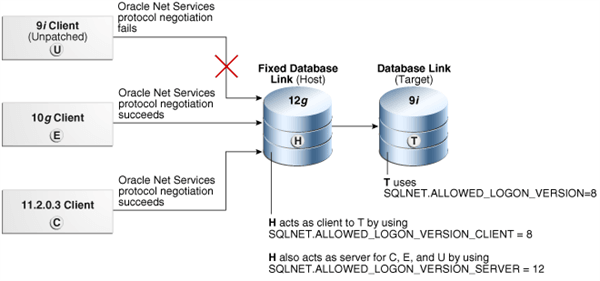
The following diagram illustrates how connections between databases and clients of different releases work. The SQLNET.ALLOWED_LOGON_VERSION_CLIENT parameter affects the “client allowed logon version” aspect of a server that hosts the database link H. This setting enables H to connect through database links to older servers, such as those running Oracle 9i (T), yet still refuse connections from older unpatched clients (U). When this happens, the Oracle Net Services protocol negotiation fails, which raises an ORA-28040: No matching authentication protocol error message in this client, which is attempting to authenticate using the Oracle 9I software. The Oracle Net Services protocol negotiation for Oracle Database 10g release 10.2 client E succeeds because this release incorporates the critical patch update CPUOct2012. The Oracle Net Services protocol negotiation for Release 11.2.0.3 client C succeeds because it uses a secure password version.
Description of the illustration dbseg_vm_001.png
This scenario uses the following settings for the system that hosts the database link H:
SQLNET.ALLOWED_LOGON_VERSION_CLIENT=8
SQLNET.ALLOWED_LOGON_VERSION_SERVER=12
Note that the remote Oracle Database T has the following setting:
SQLNET.ALLOWED_LOGON_VERSION=8If the release of the remote Oracle Database T does not meet or exceed the value defined by the SQLNET.ALLOWED_LOGON_VERSION_CLIENT parameter set for the host H, then queries over the fixed database link would fail during authentication of the database link user, resulting in an ORA-28040: No matching authentication protocol error when an end-user attempts to access a table over the database link.
  <div class="infoboxnote" markdown="1">

  **Note:**

  If you are using an older Oracle Database client (such as Oracle Database 11*g* release 11.1.0.7), then Oracle strongly recommends that you upgrade to use the critical patch update CPUOct2012.

  </div>
Configuring Oracle Database Clients to Use the 12C Password Version Exclusively
An intruder may try to provision a fake server to downgrade authentication and trick the client into using a weaker password hash version.
-
To prevent the use of the
10Gpassword version, or both the10Gand11Gpassword versions, after you configure the server, configure the clients to run in Exclusive Mode, as follows:- To use the client Exclusive Mode setting to permit both the
11Gand12Cpassword versions:
- To use the client Exclusive Mode setting to permit both the
SQLNET.ALLOWED_LOGON_VERSION_CLIENT = 12- To use the more restrictive client Exclusive Mode setting to permit only the
12Cpassword version (this setting permits the client to connect only to Oracle Database 12c release 1 (12.1.0.2) and later servers):
SQLNET.ALLOWED_LOGON_VERSION_CLIENT = 12aIf the server and the client are both installed on the same computer, then ensure that the TNS_ADMIN environment variable for each points to the correct directory for its respective Oracle Net Services configuration files. If the variable is the same for both, then the server could use the client’s SQLNET.ALLOWED_LOGON_VERSION_CLIENT setting instead.
If you are using older Oracle Database clients (such as Oracle Database 11g release 11.1.0.7), then you should apply CPU Oct2012 or later to these clients. This patch provides the O5L_NP ability. Unless you apply this patch, users will be unable to log in.
Related Topics
- Oracle Database Net Services Reference
- Oracle Database Net Services Reference for more information about the
SQLNET.ALLOWED_LOGON_VERSION_CLIENTparameter - http://www.oracle.com/technetwork/topics/security/cpuoct2012-1515893.html for more information about CPUOct2012
- The following Oracle Technology Network site for more information about CPUOct2012: http://www.oracle.com/technetwork/topics/security/cpuoct2012-1515893.html