How to Securely Use Database Links with Kerberos and Microsoft Active Directory
When using Windows Active Directory, the ` KERBEROS5_DELEGATION_MODE sqlnet.ora` parameter introduced in Oracle AI Database 23.26.1 and Oracle Database 19.30 allows you to constrain ticket granting ticket (TGT) forwarding. This allows for a more secure configuration, but requires additional configuration in Active Directory if you use database links.
The KERBEROS5_DELEGATION_MODE parameter only applies when the key distribution center (KDC) is Microsoft Active Directory. It can be set to either UNCONSTRAINED or CONSTRAINED.
Within Active Directory you can also set delegation to constrained or unconstrained. When delegation in Active Directory is constrained, you will likely need to add your database’s service principal name (SPN) to the list of allowed delegations.
KERBEROS5_DELEGATION_MODE=UNCONSTRAINED
Setting KERBEROS5_DELEGATION_MODE=UNCONSTRAINED is the default configuration. When set to UNCONSTRAINED, TGT forwarding is not restricted.
However, if the client is using the Microsoft’s Windows-specific MSLSA credential cache, which can be found on Windows 11 (22H2) and Windows Server 2025, a Windows feature called Credential Guard blocks TGT forwarding regardless of the KERBEROS5_DELEGATION_MODE parameter.
In older configurations of Windows database clients using MSLSA, check the value of the AllowTgtSessionKey registry key to determine if TGT forwarding was restricted. If set to 0 then TGT forwarding will also be restricted.
Active Directory delegation is unconstrained
When Active Directory delegation is unconstrained, TGT forwarding is unrestricted. However, as mentioned above it is likely to be blocked by Microsoft Credential Guard or the setting of AllowTgtSessionKey which would cause database link connections to fail.
Active Directory delegation is constrained
When Active Directory delegation is constrained and the database has been added to the allow list in Active Directory following the steps in Microsoft’s documentation, How to configure Kerberos Constrained Delegation for Web Enrollment proxy pages, then a database link connection will work as Active Directory will accept the TGT. You will want to make sure the configuration for the service account that issued the database server’s keytab file looks similar to the following:
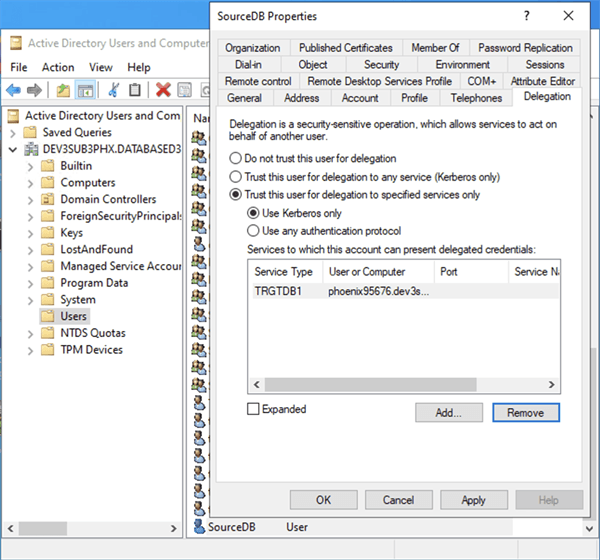
Description of the illustration active_directory_kerberos.png
If the database is not properly added to the allow list in Active Directory, then Active Directory will block the TGT and a database link connection will fail.
KERBEROS5_DELEGATION_MODE=CONSTRAINED Setting KERBEROS5_DELEGATION_MODE=CONSTRAINED is the more secure configuration as it prevents TGT forwarding to the server.
However, when TGT forwarding is constrained, it prevents CONNECT USER database links from working which are common for Active Directory and Kerberos authenticated sessions. For database links to work you will need to add the database to the allow list in Active Directory.
If Active Directory delegation is constrained and the database has already been added to the allow list in Active Directory following the steps in Microsoft’s documentation, How to configure Kerberos Constrained Delegation for Web Enrollment proxy pages, then you only need to set KERBEROS5_DELEGATION_MODE=CONSTRAINED in the sqlnet.ora file.
Tip: Oracle recommends setting the delegation to constrained in both Active Directory and sqlnet.ora for the most secure configuration.
If Active Directory delegation is not yet set to constrained or the database has not been added to the allow list in Active Directory follow the steps for configuring constrained delegation for the first time: 1. Temporarily set KERBEROS5_DELEGATION_MODE=UNCONSTRAINED in sqlnet.ora.
For more information see [KERBEROS5_DELEGATION_MODE](olink:NETRF-GUID-8F659C4E-F9FB-47DD-9528-F8DC42FC7452) in *Oracle Database Net Services Reference*.
-
Follow the steps in Microsoft’s documentation, How to configure Kerberos Constrained Delegation for Web Enrollment proxy pages, to add the database as a trusted user for delegation. You will want to make sure the configuration for the service account that issued the database server’s keytab file looks similar to the following:\
Description of the illustration active_directory_kerberos.png
-
Confirm the database was properly added to the allow list in Active Directory.
-
Set
KERBEROS5_DELEGATION_MODE=CONSTRAINEDinsqlnet.ora.This results in a secure connection while still allowing for connection through database links.
For more information see KERBEROS5_DELEGATION_MODE in Oracle Database Net Services Reference.
If the database is not properly added to the allow list in Active Directory, then a database link connection will fail as TGT forwarding is restricted by both the client and server.