Introduction to Authenticating and Authorizing IAM Users for Oracle DBaaS
Before you begin authenticating and authorizing IAM users for an Oracle DBaaS instance, you should understand the overall process.
-
About Authenticating and Authorizing IAM Users for Oracle DBaaS
Users for the Oracle DBaaS instance can be centrally managed in Oracle Cloud Infrastructure (OCI) Identity and Access Management (IAM). -
Architecture of the IAM Integration with Oracle DBaaS
The architecture for the IAM integration with an Oracle DBaaS instance depends on whether the IAM user is using an Oracle Cloud Infrastructure (OCI) IAM database password verifier or an OCI IAM token to authenticate or connect to the DBaaS instance. -
IAM Users and Groups to Map with Oracle DBaaS
IAM users must be mapped to a schema, either an exclusive mapping of a database schema to an IAM user or to a database shared schema that is mapped to an IAM group the user is a member of.
About Authenticating and Authorizing IAM Users for Oracle DBaaS
Users for the Oracle DBaaS instance can be centrally managed in Oracle Cloud Infrastructure (OCI) Identity and Access Management (IAM).
You can perform this integration in the following Oracle Database environments:
-
Oracle Autonomous Database Serverless
-
Oracle Autonomous Database on Dedicated Exadata Infrastructure
-
Oracle Autonomous Database on Exadata Cloud@Customer
-
Oracle Exadata Database Service on Dedicated Infrastructure
-
Oracle Exadata Database Service on Cloud@Customer
-
Oracle Base Database Service Note: Oracle Cloud Infrastructure (OCI) IAM authentication is only available for OCI Database services, such as Oracle Base Database Service, Oracle Exadata Database Service, and Oracle Autonomous Database, that operate in a PDB/CDB (multitenant) configuration. It is not available for 19c databases configured in single-container mode, nor is it available on-premises or for databases operating on OCI compute instances.
The instructions for configuring IAM use the term “Oracle DBaaS” to encompass these environments.
Note:
Oracle Database supports the Oracle DBaaS integration for OCI IAM with identity domains as well as the legacy IAM, which does not include identity domains. Both default and non-default domain users and groups are supported when using IAM with identity domains.
Oracle Database only supports Oracle DBaaS integration for OCI IAM with local IAM users when they use legacy IAM tenancies. Federated users are supported when using IAM with identity domains.
The DBaaS integration with OCI IAM does not support users with administrative privileges (SYSDBA, SYSOPER, SYSBACKUP, SYSDG, SYSKM, and SYSRAC). However, these privileges are supported when using IAM database passwords, but only when the database is open.
An Oracle Database administrator works with an OCI IAM administrator to manage the authentication and authorization of OCI IAM users who need to connect to the Oracle DBaaS instance. The types of Oracle DBaaS instance that IAM users can connect to are Oracle Autonomous Database Serverless, Oracle Autonomous Database on Dedicated Exadata Infrastructure, and Oracle Base Database Service.
This type of connection enables the IAM user to access the Oracle DBaaS. These users typically log in with a user name and password (for example, using SQL*Plus). Alternatively, a user can log in with IAM Single-Sign On (SSO) credentials with a token when accessing the DBaaS instance. The choice to use IAM password authentication or the IAM SSO token authentication depends on the use case and user preference.
Legacy applications using existing supported database clients can migrate seamlessly to using an IAM user name and password. They can also use the IAM database gradual password rollover feature to set a second database password in IAM and update the application passwords without downtime.
Tools and applications that are updated to support IAM tokens can authenticate users directly with IAM and pass the database access token to the DBaaS instance. Existing database tools such as SQL*Plus can use the IAM database password to authenticate with the database directly using existing password login protocol or the database client can request a database token (db-token) from OCI IAM using the IAM user name and IAM database password and send the db-token to the database for IAM user access. The database client can only request a db-token in exchange for the IAM user name and IAM database password. All other IAM credentials (API-key, instance principal, resource principal, security token, delegation token) will require the db-token to be requested by the application or helper client like OCI CLI. A database access token (db-token) is a scoped proof-of-possession (POP) token and comes with a public key. Before the db-token is sent to the database, the database client signs the db-token with the private key that is associated with token’s public key. It provides “proof” that the sender of the token is the rightful holder of the token. The scope can optionally be included as part of the request for the db-token to reduce the scope of what the db-token can be used for. The default scope for the db-token is the entire tenancy but compartment and individual databases can also be defined as the scope. See the get description in OCI CLI Command Reference for more information.
IAM users and OCI applications can request a database token from IAM by using one of the following methods:
-
Using an existing, valid security (session) token
-
Using an IAM recognized API-key
-
Using a delegation token within an OCI cloud shell
-
Using an OCI instance principal for an application on OCI compute instance
-
Using an OCI resource principal for an application with a resource principal
-
Using an IAM user name and IAM database password (can only be requested by database client)
The general process of enabling an IAM user to connect to an Oracle DBaaS instance is as follows:
-
The IAM administrator creates and manages the IAM user accounts and groups, adding IAM users to appropriate IAM groups based on their tasks.
-
On the Oracle DBaaS instance, the database administrator enables the connection between the Oracle DBaaS and the IAM endpoint.
If the database is Oracle Autonomous Database on Dedicated Exadata Infrastructure, then the IAM connection for new PDBs is automatically enabled. Check the Oracle DBaaS documentation for details.
-
On the Oracle DBaaS server, the database administrator enables the authorization of the IAM users by performing the following types of mappings:
-
Mapping an IAM group to a shared Oracle Database global user account
-
Mapping an IAM group to an Oracle Database global role
-
Exclusively mapping the IAM user to an Oracle Database global user
The IAM user must be mapped to one schema, either exclusively or to a shared schema. They can optionally be members in an IAM group that is mapped to one or more global roles.
-
-
The following use cases are some common scenarios to connect to the Oracle DBaaS with centralized IAM authentication and authorization:
-
Connecting using SQL*Plus to the Oracle DBaaS using an IAM user name and IAM database password.
-
Using SQL*Plus to connect using an IAM SSO token.
-
Using SQLcl to connect to the Oracle DBaaS using the IAM password or IAM token.
-
Using SQL*Plus within the Oracle Cloud Infrastructure (OCI) Cloud Shell to connect to the Oracle DBaaS using the IAM password or IAM SSO token. Authenticating and authorization with IAM will take additional time as opposed to authenticating to a local database user account (non-global).
-
Architecture of the IAM Integration with Oracle DBaaS
The architecture for the IAM integration with an Oracle DBaaS instance depends on whether the IAM user is using an Oracle Cloud Infrastructure (OCI) IAM database password verifier or an OCI IAM token to authenticate or connect to the DBaaS instance.
The following diagram illustrates how using an Oracle Cloud Infrastructure (OCI) IAM database password verifier to authenticate with the Oracle DBaaS works:
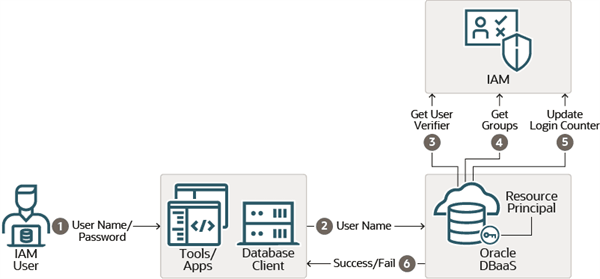 1. The IAM user logs in to a tool or application client that is associated with the Oracle Database client. This user logs in with their IAM user name and IAM database password, which begins the authentication process. The user can use any database client that is at least Oracle Database release12.1.0.2. Earlier versions of the database client do not support the
 12C database verifier.
Description of the illustration password-verifier-iam.png
-
The IAM user connection request is sent through the database client.
-
After the IAM user name is sent to the Oracle DBaaS instance, the database requests the user’s Oracle Cloud Infrastructure (OCI) IAM database password verifier from IAM. (The IAM user profile stores the IAM database password verifier.) This verifier is a hashed version of the password, not clear text. If the password verifier from IAM matches the password verifier generated by the database client, then the user is authenticated. The Oracle DBaaS instance uses a resource principal to communicate with IAM. The resource principal is the Oracle DBaaS identity that is recognized by IAM and used by the database to securely communicate with IAM.
-
When the authentication succeeds, the Oracle DBaaS instance retrieves the IAM user groups. If the IAM user is mapped to an Oracle Database schema and the user has not been locked out of their OCI account, then the IAM user successfully accesses the database. The user is also granted any global roles that are mapped to a group the user is a member of.
-
The Oracle Cloud Infrastructure (OCI) login counter tracks logins for both the OCI console and OCI database passwords. A successful database login using the IAM database password will reset this counter.
-
Based on the outcome of the preceding steps, the IAM user database access attempt either succeeds or fails.
The following diagram illustrates the start of actions that take place when an IAM user or an Oracle Cloud Infrastructure (OCI) application accesses the Oracle DBaaS instance using an OCI IAM token:
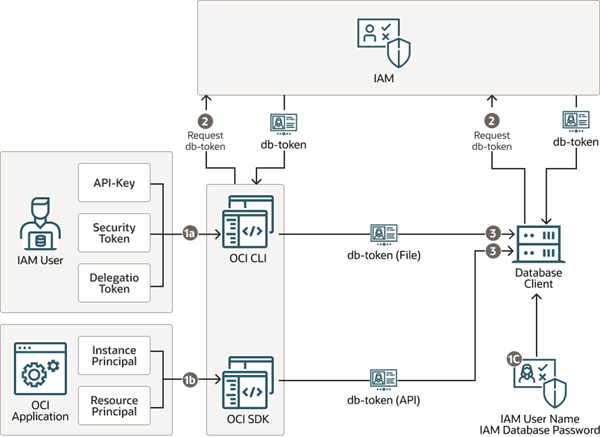 1. Access to the database requires one of the following:
Description of the illustration token-iam.png
- **1a:** From an IAM user, the user must have an `API-key` stored in their local system or have a security token from signing into OCI recently. An `API-key`, security token, delegation token, instance principal, can be used with the OCI CLI. If a current and valid security token is not available, then the user can be prompted to authenticate with OCI IAM. (See [User Credentials](https://docs.oracle.com/en-us/iaas/Content/Identity/Concepts/usercredentials.htm) for information about the available user credentials.) In an OCI cloud shell environment, a delegation token will be available.

- **1b:** For an OCI application, the application must have be configured to have an instance principal or a resource principal. All key types (`API-key`, security token, delegation token, instance principal, and resource principal) can be used with the OCI SDK.

- **1c:** You can configure the database client to request a `db-token` from IAM by using the IAM user name and IAM database password. Only the database client can use this type of token to access the database. The database client cannot request a `db-token` using any other credential.
-
The application, OCI CLI, or the database client makes a call to IAM requesting the
db-tokenusing one of the principal credentials. Only thedb-tokencan be used to access the Oracle DBaaS. Requesting adb-tokencan be done by an application written with the Oracle Cloud Infrastructure (OCI) public SDK to connect with OCI IAM. (See Software Development Kits and Command Line Interface.) If an application cannot be changed to connect directly with OCI IAM using the OCI public SDK, then a helper tool such as the OCI command line interface (OCI CLI) can be used to retrieve thedb-tokenfor the user. The database client can also be configured to request adb-tokenusing the IAM user name and IAM database password. -
An application or tool that has been updated to work with IAM can then pass the
db-tokendirectly to the database client through the client API as an attribute. If an application cannot be updated to get thedb-tokendirectly, then a helper tool such as OCI CLI can put thedb-tokeninto the default or specified location in the local directory. TheTOKEN_AUTH=OCI_TOKENsetting in the connect string or thesqlnet.orafile enables the database client to retrieve thedb-tokenfrom the default or specified file location. A user can request a token at the OCI CLI by running theoci iam db-token getcommand and specifying their profile, which stores their user account credentials. For example:oci iam db-token get --profile PeterFitchThe directory location for the
db-tokenand the corresponding private key should only have enough permission for the OCI CLI to write the files to the location and the database client to retrieve these files (for example, just read and write by the process user). Because the token and key allow access to the database, they should be protected within the file system.
The following diagram illustrates the continuation of the OCI IAM token authentication process:
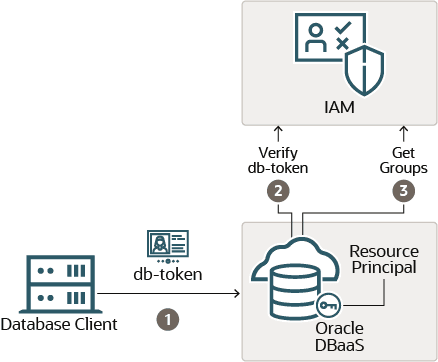 1. The
 db-token is signed and sent to the Oracle DBaaS instance. TLS must be enabled on the database client-server link as well as DN matching. (When you use the Autonomous Database wallet files to connect to the Autonomous Database instance, TLS and DNS matching is already set for you.) DN matching is on by default with the JDBC driver, but will need to be configured for the OCI-C database client (and instant client). A db-token that the database client retrieves by using an IAM user name and IAM database password does not come with a private key and is not be signed by the database client.
Description of the illustration token-iam-2.png
-
The Oracle DBaaS instance will request the IAM public key, if a valid copy is not already available locally. This key will be used to validate that the
db-tokenwas sent by IAM. The Oracle DBaaS instance uses a resource principal to communicate with IAM. -
After this authorization step completes successfully, the Oracle DBaaS instance will request the IAM user’s groups from IAM. This action will map the user to a global schema and also to map the user to any global roles that the user is a member of. After the IAM user has successfully completed these steps, the user has access to the Oracle DBaaS instance.
IAM SSO token-based authentication requires that you download the latest Oracle Database 19c (19.16) clients.
IAM Users and Groups to Map with Oracle DBaaS
IAM users must be mapped to a schema, either an exclusive mapping of a database schema to an IAM user or to a database shared schema that is mapped to an IAM group the user is a member of.
An IAM user must be mapped to a database schema to successfully complete the login and authorization steps. An IAM user can be directly mapped to a database schema if the IAM user needs to maintain their own schema objects (exclusive mapping). More commonly, an IAM user is a member of an IAM group that is mapped to a database schema (shared schema mapping). Shared schema mapping allows multiple IAM users to share the same schema so a new database schema is not required to be created every time a new user joins the organization. This operational efficiency allows database administrators to focus on database application maintenance, performance, and tuning tasks instead of configuring new users, updating privileges and roles, and removing accounts.
Database administrators for a group of databases can be members of an IAM group (for example, sales application developers for a sales application are in an IAM group called sales_app_dev_group). In this scenario, all the related databases can map the shared schema to the sales_app_dev_group group. Database global roles cannot be granted to a schema; they can only be mapped to an IAM group. Global roles can differentiate IAM user privileges when multiple IAM users are mapped to the same shared schema.
Remember that an IAM user must be mapped exclusively to a database schema or to a shared schema so that the IAM user can access the Oracle DBaaS instance.
Related Topics
- Oracle Autonomous Database Serverless
- Oracle Autonomous Database on Dedicated Exadata Infrastructure
- Oracle Autonomous Database on Exadata Cloud@Customer
- Oracle Exadata Database Service on Dedicated Infrastructure
- Oracle Exadata Database Service on Cloud@Customer
- Oracle Base Database Service
- Enabling External Authentication for Oracle DBaaS
- Using Oracle Autonomous Database Serverless