Introduction to Centrally Managed Users with Microsoft Active Directory
Centrally managed users (CMU) provides a simpler integration with Microsoft Active Directory to allow centralized authentication and authorization of users.
-
About the Oracle Database-Microsoft Active Directory Integration
Centrally managed users provides a simpler integration with Microsoft Active Directory to allow centralized authentication and authorization of users. -
How Centrally Managed Users with Microsoft Active Directory Works
The integration works by mapping Microsoft Active Directory users and groups directly to Oracle database users and roles. -
Centrally Managed User-Microsoft Active Directory Architecture
The CMU with Active Directory architecture enables Oracle Database users and roles to be managed in Active Directory. -
Supported Authentication Methods
The Oracle Database-Microsoft Active Directory integration supports three common authentication methods. -
Users Supported by Centrally Managed Users with Microsoft Active Directory
CMU with Active Directory supports exclusively mapped users, users mapped to shared schemas, and administrative users. -
How the Oracle Multitenant Option Affects Centrally Managed Users
Multitenant database users in pluggable databases (PDBs) can connect to a central Microsoft Active Directory or, if required, users in an individual PDB can connect to a different Microsoft Active Directory. -
Centrally Managed Users with Database Links
CMU supports both fixed user database links and connected user database links, but not current user database links.
About the Oracle Database-Microsoft Active Directory Integration
Centrally managed users provides a simpler integration with Microsoft Active Directory to allow centralized authentication and authorization of users.
The minimum version requirement for Active Directory server operating system is Microsoft Windows Server 2012. This minimum supported version will be updated when Microsoft drops support for older releases.
This integration enables organizations to use Active Directory to centrally manage users and roles in multiple Oracle databases with a single directory along with other Information Technology services. Active Directory users can authenticate to the Oracle database by using credentials that are stored in Active Directory. Active Directory users can also be associated with database users (schemas) and roles by using Active Directory groups. Microsoft Active Directory users can be mapped to exclusive or shared Oracle Database users (schemas), and be associated with database roles through their group membership in the directory. Active Directory account policies such as password expiration time and lockout after a specified number of failed login attempts are honored by the Oracle Database when users login.
Before Oracle Database 18c release 1 (18.1), database user authentication and authorization could be integrated with Active Directory by configuring Oracle Enterprise User Security and installing and configuring Oracle Internet Directory (or Oracle Universal Directory). This architecture is still available and will continue to be used by users who must use the Oracle enterprise domain and current user database link between trusted databases, complex enterprise roles, and having a single place for auditing database access privileges and roles.
The majority of organizations do not have these complex requirements. Instead, they can use centrally managed users (CMUs) with Active Directory. This integration is designed for organizations who prefer to use Active Directory as their centralized identity management solution. Oracle Net Naming Services continues to work as it did before with directory services.
Organizations can use Kerberos, PKI, or password authentication with CMU with Active Directory. Use of CMU with Active Directory is backward compatible with currently supported Oracle Database clients. This means that LDAP bind operations are not used for password authentication and you will need to add an Oracle filter to Active Directory along with an extension to the Active Directory schema to store password verifiers. Organizations using Kerberos or PKI will not need to add the filter or extend Active Directory schema.
The Oracle Database-Active Directory integration is particularly beneficial for the following types of users:
-
Users who are currently using strong authentication such as Kerberos or Public Key Infrastructure (PKI). These users already use a centralized identity management system
-
Users who currently use Oracle Enterprise User Security, Oracle Internet Directory, Oracle Unified Directory, Oracle Virtual Directory, and need to integrate with Active Directory.
How Centrally Managed Users with Microsoft Active Directory Works
The integration works by mapping Microsoft Active Directory users and groups directly to Oracle database users and roles.
In order for the Oracle Database CMU with Active Directory integration to work, the Oracle database must be able to login to a service account specifically created for the database in Active Directory. The database uses this service account to query Active Directory for user and group information when a user logs into the database. This Active Directory service account must have all the privileges required to query the user and group information as well as being able to write updates related to the password policies in Active Directory (for example, failed login attempts, clear failed login attempts). Users can authenticate using passwords, Kerberos, or PKI and either be assigned to an exclusive schema or a shared schema. Mapping of an Active Directory user to a shared schema is determined by the association of the user to an Active Directory group that is mapped to the shared schema. Active Directory groups can also be mapped to database global roles. An Active Directory security administrator can assign a user to groups that are mapped to shared database global users (schemas) and/or database global roles, and hence update privileges and roles that are assigned to the Active Directory user in a database.
Centrally Managed User-Microsoft Active Directory Architecture
The CMU with Active Directory architecture enables Oracle Database users and roles to be managed in Active Directory.
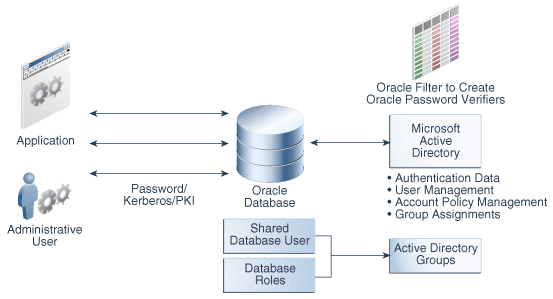
The following figure illustrates the Oracle Database CMU feature. In this figure, users, either through applications as non-administrative users or administrative users, connect to the Oracle database with either password, Kerberos, or public key infrastructure (PKI) authentication. The database connection to Active Directory enables these users and roles to be mapped with Active Directory users and groups. If you plan to use password authentication, then you must install an Oracle filter in Active Directory. You can use an Oracle provided utility to install the Oracle filter that will generate Oracle password verifiers for individual users as needed. The utility can also be used to extend the Active Directory schema to hold the Oracle password verifiers. With Oracle Database centrally managed users, an Active Directory administrator can control the authentication, user management, account policies, and group assignments of Active Directory users and groups who have been mapped to Oracle Database users and roles.
Description of the illustration dbseg_pb_001b.png
Supported Authentication Methods
The Oracle Database-Microsoft Active Directory integration supports three common authentication methods.
These authentication methods are as follows:
-
Password authentication
-
Kerberos authentication
-
Public key infrastructure (PKI) authentication (certificate-based authentication)
Users Supported by Centrally Managed Users with Microsoft Active Directory
CMU with Active Directory supports exclusively mapped users, users mapped to shared schemas, and administrative users.
These users are as follows:
-
Directory users that access an Oracle database using a shared schema.
This type of directory user can connect to a shared schema in the database by being part of a directory group that is mapped to the shared schema (database user). Using shared schemas allows centralized Active Directory management of database users and is the recommended best practices over using exclusive schemas (described next). Even if there is only one user associated with a schema (for example, an administrator responsible for database backup), it is easier to manage adding another backup administrator or removing the existing administrator by making changes only in Active Directory instead of making changes in all associated databases as well.
Users will be given additional privileges appropriate to their task using global roles that are mapped to groups in Active Directory. With this design, a user can change his or her tasks within an organization and have new database privileges through a new group in Active Directory.
Active Directory users could accidentally (or on purpose) be a member of multiple groups in Active Directory that are mapped to different shared schemas on the same database. The user could also have an exclusive mapping to a database schema. In cases where the user has multiple possible schema mappings when they login, the following precedence rules apply:
-
If an exclusive mapping exists for a user, then that mapping takes precedence over any other shared mappings.
-
If multiple shared schema mappings exist for a user, then the shared user mapping with lowest schema ID (
USER_ID) takes precedence.
Oracle recommends only having one possible mapping per user so unexpected schema mappings do not occur.
-
-
Exclusively mapped global users who are regular Oracle Database users in two- and three-tier applications, or users who have direct privilege grants in the database.
Oracle recommends that you grant privileges to these users through global roles. This type of privilege grant facilitates authorization management by centrally managing privileges and roles for a user instead of having to log in into each database to update privileges and roles for the user.
-
Administrative global users, who have the following administrative privileges:
SYSDBA,SYSOPER,SYSBACKUP,SYSDG,SYSKM, andSYSRAC.You cannot grant these administrative privileges through global roles. To authorize an Active Directory user with these administrative privileges, you must map the directory user to a database user (exclusively or with a shared schema) that has the system administrative privilege already granted to the database user account.
How the Oracle Multitenant Option Affects Centrally Managed Users
Multitenant database users in pluggable databases (PDBs) can connect to a central Microsoft Active Directory or, if required, users in an individual PDB can connect to a different Microsoft Active Directory.
All PDBs and the root container in a multitenant database can have a shared configuration, so that the entire CDB can authenticate and authorize users against a single Active Directory server, mulitple Active Directory servers in one Windows domain, or multiple Active Directory servers in trusted Windows domains, based on the shared configuration. Alternatively, individual PDBs can authenticate and authorize users against different Active Directory servers in the same Windows domain or different (trusted or un-trusted) Windows domains, based on their individual configurations.
Centrally Managed Users with Database Links
CMU supports both fixed user database links and connected user database links, but not current user database links.
There is no special requirement for CMU-Active Directory users to use the fixed user database links. CMU-Active Directory users using password, Kerberos, or PKI authentication can use fixed user database links as regular database users do. Kerberos authentication works the same with Oracle Database strong authentication with database links. For more information, see My Oracle Support note 1370327.1.
For CMU-Active Directory users to use connected user database links, only password authentication is supported, and both source and target databases must be configured with CMU-Active Directory to allow the same Active Directory user to log in both databases using password authentication.