Managing Gradual Database Password Rollover for Applications
A gradual database password rollover enables the database password of an application to be updated while avoiding application downtime while the new password is propagated to application clients, by allowing the older password to remain valid for a specified period.
-
About Managing Gradual Database Password Rollover for Applications
You can configure a gradual database password rollover process to begin for database application clients when the database administrator changes the database password for the application. -
Password Change Life Cycle During a Gradual Database Password Rollover
After a password is created or changed, it follows a life cycle and grace period in four phases. -
Enabling the Gradual Database Password Rollover
To enable the gradual database password rollover, you must configure thePASSWORD_ROLLOVER_TIMEuser profile parameter. -
Changing a Password to Begin the Gradual Database Password Rollover Period
After you have set a non-zeroPASSWORD_ROLLOVER_TIMEvalue, change the user’s password and update the password with all the applications. -
Changing a Password During the Gradual Database Password Rollover Period
After the rollover period has begun, you can still change the password. -
Ending the Password Rollover Period
There are multiple ways in which you can end the password rollover period. -
Database Behavior During the Gradual Password Rollover Period
Users can perform their standard password changes and logins during the password rollover period. -
Database Server Behavior After the Password Rollover Period Ends
Oracle Database performs clean-up operations after the gradual database password rollover period ends. -
Guideline for Handling Compromised Passwords
If a database account password is suspected of being compromised, then you should change the password immediately. -
How Gradual Database Password Rollover Works During Oracle Data Pump Exports
When a user is exported while they are in the password rollover period, only the verifier corresponding to their new password is exported. -
Using Gradual Database Password Rollover in an Oracle Data Guard Environment
In an Oracle Data Guard environment, you must set theADG_ACCOUNT_INFO_TRACKINGenvironment variable toGLOBALto use gradual database password rollover. -
Finding Users Who Still Use Their Old Passwords
You can perform a query that makes use of theAUTHENTICATION_TYPEfield for aLOGINaudit record to find users who still use their old passwords.
About Managing Gradual Database Password Rollover for Applications
You can configure a gradual database password rollover process to begin for database application clients when the database administrator changes the database password for the application.
When the database or application administrator changes the password for the application in the database, the applications must be updated with the new database password. Setting the PASSWORD_ROLLOVER_TIME parameter in the user’s profile enables a password change to take place without having to risk downtime or application outages that could occur as a result of an application attempting to use an outdated password. The password rollover takes place seamlessly from the server and works with all existing supported client versions.
The gradual database password rollover feature is designed for database accounts (service accounts) for applications. The application could be a single server (database client) or scaled out to multiple servers with multiple database clients. It is not designed for administrative users; hence, administrative users are restricted from using this feature, no matter which profile they are associated with. You cannot grant administrative privileges to users who have a password rollover-enabled profile.
You can configure the gradual database password rollover for native password-authenticated user connections. If you convert a password database account to a NO AUTHENTICATION account, then Oracle Database deletes the password and verifiers that are associated with this account. When a password-authenticated user account is converted to a GLOBAL, an EXTERNAL or a NO AUTHENTICATION account, then the user implicitly exits the password rollover period. Gradual password rollover supports the 11g password version and later.
You also can configure the gradual database password rollover for environments that use connected user database links. In this case, when you configure the gradual database password rollover, ensure that you also put the target account into rollover on the target of the connected user database link, and then roll over the target accounts on these links as well. To put the target account into rollover, you would use this syntax:
ALTER USER username IDENTIFIED BY same_new_rollover_password;You cannot configure the gradual database password rollover for the following kinds of connections:
-
Direct logins for Oracle Real Application Security users
-
Kerberos-, certificate-, or RADIUS-based externally authenticated connections
-
Centrally managed user (CMU) connections
-
Administrative connections that use external password files
-
The Oracle Data Guard connection between the primary and the standby
Password Change Life Cycle During a Gradual Database Password Rollover
After a password is created or changed, it follows a life cycle and grace period in four phases.
The following diagram shows the life cycle of the password lifetime and grace period.
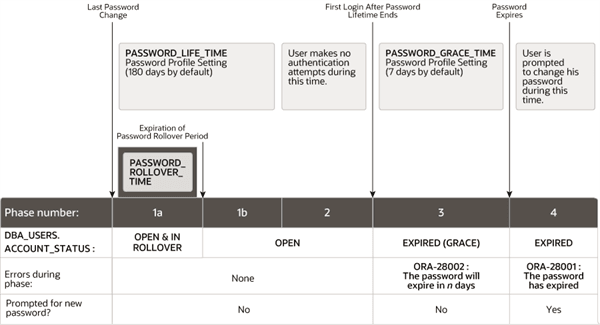
Description of the illustration password_rollover_cycle.png
In this figure:
-
Phase 1: The password lifetime begins after the user account is created or when the password has been changed. When the password of an existing account is changed, and the user’s profile has a non-zero
PASSWORD_ROLLOVER_TIMEvalue, then the password lifetime is composed of two phases, 1a and 1b:- Phase 1a begins with the password change. During Phase 1a, the user can log in using either the old password or the new password. The duration of phase 1a is normally
PASSWORD_ROLLOVER_TIME, but if the administrator was able to update the password in all client applications sooner than this, they can decide to end the password rollover period sooner by issuing the following command, which makes the new password the only one that is accepted.
- Phase 1a begins with the password change. During Phase 1a, the user can log in using either the old password or the new password. The duration of phase 1a is normally
ALTER USER username EXPIRE PASSWORD ROLLOVER PERIOD;-
Phase 1b corresponds to the time remaining after the password rollover period expires until the end of
PASSWORD_LIFE_TIME. During Phase 1b, the user can log in using only the new password. -
Phase 2: This phase represents the period of time after the password lifetime ends but before the user logs in again with the correct password. The correct credentials are needed for Oracle Database to update the account status. Otherwise, the account status will remain unchanged. Oracle Database does not have any background process to update the account status. All changes to the account status are driven by the Oracle Database server process on behalf of authenticated users.
-
Phase 3: When the user finally does log in, the grace period begins. Oracle Database then updates the
DBA_USERS.EXPIRY_DATEcolumn to a new value using the current time plus the value of thePASSWORD_GRACE_TIMEsetting from the account’s password profile. At this point, the user receives anORA-28002warning message about the password expiring in the near future (for example,ORA-28002 The password will expire within 7daysifPASSWORD_GRACE_TIMEis set to7days), but the user can still log in without changing the password. TheDBA_USERS.EXPIRY_DATEcolumn shows the time in the future when the user will be prompted to change their password. -
Phase 4: After the grace period (Phase 3) ends, the
ORA-28001: The password has expirederror appears, and the user is prompted to change the password after entering the current, correct password before the authentication can proceed. If the user has an Oracle Active Data Guard configuration, where there is a primary and a stand-by database, and the authentication attempt is made on the standby database (which is a read-only database), then theORA-28032: Your password has expired and the database is set to read-onlyerror appears. The user should log into the primary database and change the password there.
During any of these four phases, you can query the DBA_USERS data dictionary view to find the user’s account status in the DBA_USERS.ACCOUNT_STATUS column.
In the following example, the profile assigned to johndoe includes the specification of a grace period: PASSWORD_GRACE_TIME = 3 (the recommended value). The first time johndoe tries to log in to the database after 90 days (this can be any day after the 90th day, that is, the 91st day, 100th day, or another day), he receives a warning message that his password will expire in 3 days. If 3 days pass, and if he does not change his password, then the password expires. After this, he receives a prompt to change his password on any attempt to log in.
CREATE PROFILE prof LIMIT
 FAILED_LOGIN_ATTEMPTS 4
 PASSWORD_LIFE_TIME 90
 PASSWORD_GRACE_TIME 3;

ALTER USER johndoe PROFILE prof;
A database administrator or a user who has the ALTER USER system privilege can explicitly expire a password by using the CREATE USER and ALTER USER statements. The following statement creates a user with an expired password. This setting forces the user to change the password before the user can log in to the database.
CREATE USER jbrown
 IDENTIFIED BY password
 ...
 PASSWORD EXPIRE;
There is no “password unexpire” clause for the CREATE USER statement, but an account can be “unexpired” by changing the password on the account.
Enabling the Gradual Database Password Rollover
To enable the gradual database password rollover, you must configure the PASSWORD_ROLLOVER_TIME user profile parameter.
-
To configure the gradual database password rollover, set the
PASSWORD_ROLLOVER_TIMEparameter in theCREATE PROFILEorALTER PROFILEstatement.For example, to set the gradual password rollover time period to 1 day:
CREATE PROFILE prof LIMIT
 ...
 PASSWORD_ROLLOVER_TIME 1;
Note the following:
-
You specify the rollover time period in days, but you can specify hours if you want. For example, enter
1/24to specify 1 hour, or6/24(or1/4) to specify 6 hours. -
The minimum value for an active rollover time is 1 hour. The maximum value is 60 days or the lower value of the
PASSWORD_LIFE_TIMEorPASSWORD_GRACE_TIMEparameter. IfPASSWORD_GRACE_TIMEis set to0(zero), then it will be ignored with respect to any limits withPASSWORD_ROLLOVER_TIME. The following table describes these limits:Profile Name PASSWORD_LIFE_TIME PASSWORD_GRACE_TIME PASSWORD_ROLLOVER_TIME Default 180 7 Minimum: 1/24 (1 hour); Maximum: 7 days ORA_STIG_PROFILE60 5 Minimum: 1/24 (1 hour); Maximum: 5 days User Custom Profile 365 90 Minimum: 1/24 (1 hour); Maximum: 60 days -
The default setting for
PASSWORD_ROLLOVER_TIMEis0orNULL, which disables it. -
To find database accounts that are currently in the password rollover process, query the
ACCOUNT_STATUScolumn of theDBA_USERSdata dictionary view. The status will beIN ROLLOVER. -
The password rollover period begins the moment the administrator changes the password for the database account.
-
Changing a Password to Begin the Gradual Database Password Rollover Period
After you have set a non-zero PASSWORD_ROLLOVER_TIME value, change the user’s password and update the password with all the applications.
Use the ALTER USER statement to provision a new rollover password for the application. After the user’s new password is provisioned in the database, you can update the password on the application servers. You must complete the password updates before the PASSWORD_ROLLOVER_TIME period ends.
You can check the user’s password rollover status by querying the ACCOUNT_STATUS column of the DBA_USERS data dictionary view. A user account that is within the rollover period will have a status of IN ROLLOVER.
-
Use the
CREATE USERandALTER USERstatements to configure the user, the associated profile, and the password rollover period.CREATE USERallows the administrator to create a new application service account that is associated with a profile with password rollover.ALTER USERis more likely where an existing user is associated with a new or modified profile. To alter the profile, use theALTER PROFILEstatement.The following example
CREATE USERcreates a new useru1with passwordp1and a profileprof1, withPASSWORD_ROLLOVER_TIMEconfigured. TheALTER USERstatement changes the user’s password to begin password rollover period. To check the user status, query theDBA_USERSdata dictionary view.-
Create the profile
prof1.CREATE PROFILE prof1 LIMIT PASSWORD_ROLLOVER_TIME 1; -
Create the user
u1and associate this user with theprof1profile.CREATE USER u1 IDENTIFIED BY p1 PROFILE prof1; -
Alter the user’s password.
ALTER USER u1 IDENTIFIED BY p2; -
Query the
DBA_USERdata dictionary view to check the user’s rollover status.SELECT USERNAME, ACCOUNT_STATUS FROM DBA_USERS WHERE USERNAME = 'U1'; USERNAME ACCOUNT_STATUS -------- ------------------ U1 OPEN & IN ROLLOVER
-
Changing a Password During the Gradual Database Password Rollover Period
After the rollover period has begun, you can still change the password.
For example, suppose you inadvertently mistype the password. The following procedure enables you to correct the password even though the rollover process has already begun.
-
To change a password after the rollover process has begun, use the
ALTER USERstatement, with or without theREPLACEclause.For example, suppose user
u1has the original passwordp1,p2is the new password that started the rollover process, and you want to switch to using another passwordp3instead of passwordp2. Any of the following statements work:ALTER USER u1 IDENTIFIED BY p3; ALTER USER u1 IDENTIFIED BY p3 REPLACE p1; ALTER USER u1 IDENTIFIED BY p3 REPLACE p2;
After you have changed the password to p3, the user can log in using either p1 or p3. An attempt to log in using p2 returns an ORA-1017 Invalid Username/Password error, and is recorded as a failed login attempt. Similarly, after a subsequent password change from p3 to p4 during the rollover period, the user can log in using either p1 or p4. Attempts to log in using either p2 or p3 will return an ORA-1017 Invalid Username/Password error, and are recorded as failed login attempts.
The rollover start time is fixed the first time a user changes their password. The start time is not affected by further password changes during the password rollover period. This design limits the length of time the old password can be used to the PASSWORD_ROLLOVER_TIME period after the password is changed outside of the password rollover period.
Ending the Password Rollover Period
There are multiple ways in which you can end the password rollover period.
For example, suppose p1 is the original password for user u1, and p2 is the new password that has been updated to all clients.
-
Use one of the following methods to end the password rollover period:
-
Let the password rollover period expire on its own. For example, if the password rollover period is 1 day, wait for 1 day and the password rollover period will expire automatically.
-
As either the user or an administrator, execute the following statement to manually end the password rollover period:
ALTER USER u1 EXPIRE PASSWORD ROLLOVER PERIOD; -
As an administrator, expire the password by executing the
ALTER USER username PASSWORD EXPIREstatement. The next time the user logs in, he or she will be required to change their password.
-
Beginning with the first connection attempt after the password rollover period expires, Oracle Database drops the earlier password p1. Any attempt to login using the old password p1 returns an ORA-1017 Invalid Username/Password error, and is recorded as a failed login attempt. In effect, connections after the rollover period are authenticated with only the new password, and connections that are attempted with the old password are recorded as failed login attempts. The failed login attempts could lock an account after a sufficient number of consecutive logon attempts with the old password.
Connection attempts to read-only database servers after PASSWORD_ROLLOVER_TIME expires will require new password (p2). The password change to p2 will be made effective for all database clients.
Database Behavior During the Gradual Password Rollover Period
Users can perform their standard password changes and logins during the password rollover period.
The following database behavior is implemented during the rollover period:
-
The user can log in to the database using either the new or the old password. This effectively increases the lifetime of the old password by the time set with
PASSWORD_ROLLOVER_TIME. -
Passwords can be changed by using the following methods:
-
An administrator or the user changes his or her own password by using the
ALTER USERstatement. -
The user changes his or her own password by using the SQL*Plus
passwordcommand. -
The user’s password is programmatically changed when the Oracle Call Interface (Oracle OCI)
OCIPasswordChangefunction is executed.
-
-
Oracle Database does not send any special messages to the database clients that indicate that the user account is in the password rollover period. This design avoids any errors from applications that may not be equipped to handle error and warning messages when a user logs in.
-
Too many failed login attempts move the user account into a timed lock state, depending on the value of profile limit
PASSWORD_LOCK_TIME. After the timed lock period expires, the state of the password rollover period determines what happens when the user attempts to log in. -
User administrators can perform other password lifecyle related actions as usual, such as
ACCOUNT LOCK,ACCOUNT UNLOCK,EXPIRE PASSWORDoperations. -
The password limits that have been set by the
PASSWORD_REUSE_TIMEandPASSWORD_REUSE_MAXin the user profile continue to be honored during the rollover period. Any password changes during the rollover period are validated against password change history and added into the password change history. -
Expiring a user account does not affect the password rollover status. As with locked accounts, Oracle Database maintains the password verifiers in their current state. The user can log in using either old or new password (
p1orp2). However, after the user successfully changes their password (top3), the user is allowed to log in only using the newest password (p3). Both the old passwords are treated as expired. -
Oracle Data Pump exports the password hashes (also known as verifiers) for the latest password for user accounts in the password rollover period. For example, if a user
u1has an old passwordp1and new passwordp2, then Oracle Data Pump exports password hashes for passwordp2only.
Database Server Behavior After the Password Rollover Period Ends
Oracle Database performs clean-up operations after the gradual database password rollover period ends.
After the password rollover period expires, only the new password is allowed and the old password stops working. Attempting to use the old password returns an ORA-1017 Invalid Username/Password error, and is recorded as a failed login attempt. Connections after the password rollover period will only use the new password, and attempts to use the previous passwords will fail for both read-only and read-write databases. Failed login attempts could lock the user account depending on how many consecutive login attempts have been made to use the old password, based on the FAILED_LOGIN_ATTEMPTS limit in the password profile.
Guideline for Handling Compromised Passwords
If a database account password is suspected of being compromised, then you should change the password immediately.
You can perform this change without going through a password rollover period by using the ALTER USER statement in one execution to both change and expire the old password, instead of executing two commands sequentially. This option is preferred over changing the PASSWORD_ROLLOVER_TIME in the associated user profile, because other accounts will then be affected.
Use the following syntax to change and expire the old password:
ALTER USER user_name IDENTIFIED BY new_password EXPIRE PASSWORD ROLLOVER PERIOD;How Gradual Database Password Rollover Works During Oracle Data Pump Exports
When a user is exported while they are in the password rollover period, only the verifier corresponding to their new password is exported.
The verifier that corresponds to their old password is not included in the Oracle Data Pump dump file. After the user is imported, only the new password can be used to authenticate.
Using Gradual Database Password Rollover in an Oracle Data Guard Environment
In an Oracle Data Guard environment, you must set the ADG_ACCOUNT_INFO_TRACKING environment variable to GLOBAL to use gradual database password rollover.
ADG_ACCOUNT_INFO_TRACKING=GLOBALOtherwise, any initial logons that are performed on the Oracle Data Guard standby by a user who is using the rolled over password after the PASSWORD_ROLLOVER_TIME expiration will result in an ORA-16000: database or pluggable database open for read-only access error.
Finding Users Who Still Use Their Old Passwords
You can perform a query that makes use of the AUTHENTICATION_TYPE field for a LOGIN audit record to find users who still use their old passwords.
The unified audit trail can identify which users are still connecting to the database using an old password. The AUTHENTICATION_TYPE field for a LOGON audit record can show if the old verifier was used. This information enables you to find applications that have not been updated with gradual database password rollover to use the new password. The LOGON audit record indicates which application server must be updated.
-
Connect to the database as a user who has the
AUDIT_VIEWERorAUDIT_MGMTrole. -
Execute the following query:
SELECT DBUSERNAME, AUTHENTICATION_TYPE, OS_USERNAME, USERHOST, EVENT_TIMESTAMP
FROM UNIFIED_AUDIT_TRAIL
WHERE ACTION_NAME='LOGON' AND EVENT_TIMESTAMP > SYSDATE-1
AND REGEXP_LIKE(AUTHENTICATION_TYPE, '(VERIFIER=.*?-OLD)');
If there are users who are still using their old password, then output similar to the following appears:
DBUSERNAME    AUTHENTICATION_TYPE                                                                                                                                              OS_USERNAME    USERHOST    EVENT_TIMESTAMP
_____________ ________________________________________________________________________________________________________________________________________________________________ ______________ ___________ __________________________________
APP_USER      (TYPE=(DATABASE));(CLIENT ADDRESS=((PROTOCOL=tcp)(HOST=192.0.2.225)(PORT=24938)));(LOGON_INFO=((VERIFIER=12C-OLD)(CLIENT_CAPABILITIES=O5L_NP,O7L_MR,O8L_LI)));    oracle         db211       14-JAN-21 08.56.34.724172000 PM
APP_USER      (TYPE=(DATABASE));(CLIENT ADDRESS=((PROTOCOL=tcp)(HOST=192.0.2.225)(PORT=24983)));(LOGON_INFO=((VERIFIER=12C-OLD)(CLIENT_CAPABILITIES=O5L_NP,O7L_MR,O8L_LI)));    oracle         db211       14-JAN-21 09.01.18.938008000 PM
APP_USER      (TYPE=(DATABASE));(CLIENT ADDRESS=((PROTOCOL=tcp)(HOST=192.0.2.226)(PORT=48727)));(LOGON_INFO=((VERIFIER=12C-OLD)(CLIENT_CAPABILITIES=O5L_NP,O7L_MR,O8L_LI)));    oracle         db212       14-JAN-21 10.10.48.042817000 PM
APP_USER      (TYPE=(DATABASE));(CLIENT ADDRESS=((PROTOCOL=tcp)(HOST=192.0.2.226)(PORT=48745)));(LOGON_INFO=((VERIFIER=12C-OLD)(CLIENT_CAPABILITIES=O5L_NP,O7L_MR,O8L_LI)));    oracle         db212       14-JAN-21 10.12.53.609965000 PM
APP_USER      (TYPE=(DATABASE));(CLIENT ADDRESS=((PROTOCOL=tcp)(HOST=192.0.2.226)(PORT=48751)));(LOGON_INFO=((VERIFIER=12C-OLD)(CLIENT_CAPABILITIES=O5L_NP,O7L_MR,O8L_LI)));    oracle         db212       14-JAN-21 10.13.41.112194000 PM