Operational Flow for SQL*Plus Client Connection in PowerShell to Oracle Database
The connection between the Azure user, Azure AD, and the Oracle database relies on the passing of the OAuth2 token throughout these components.
This example shows the use of the Resource Owner Password Credential (ROPC) flow with a public client. See the Microsoft Azure article Microsoft identity platform and OAuth 2.0 Resource Owner Password Credentials for detailed information about ROPC.
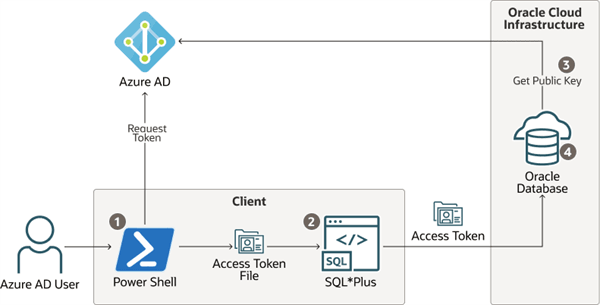 1. The Azure user requests an Azure AD access token for the database in PowerShell and the returned token is written into a file called
 token at a file location.
Description of the illustration azure_connection_flow.png
-
The Azure user connects to the database using
/slash login. Either thesqlnet.oraortnsnames.oraconnection string tells the instant client that an Azure ADOAuth2token is needed and to retrieve it from a specified file location. The access token is sent to the database. -
The database verifies that the access token came from Azure AD (using the Azure AD public key) and then checks the token for additional claims.
-
The database finds the schema mapping (exclusive or shared) and creates the session. The database will also grant any global roles that the Azure user is also assigned to through an app role.