RADIUS Authentication Modes
The RADIUS server can authenticate users using technologies such as FIDO and text message authentication codes. In addition, Oracle Database supports synchronous and challenge-response (async) authentication modes.
-
Synchronous Authentication Mode
In the synchronous mode, the user enters both the password and the second factor in the password field at the same time. This method is preferable when you use a command line interface when a GUI challenge window cannot be opened. -
Challenge-Response (Asynchronous) Authentication Mode
When the system uses the asynchronous mode, the user does not need to enter a user name and password at the SQL*Plus CONNECT string.
Synchronous Authentication Mode
In the synchronous mode, the user enters both the password and the second factor in the password field at the same time. This method is preferable when you use a command line interface when a GUI challenge window cannot be opened.
-
Sequence for Synchronous Authentication Mode
The sequence of synchronous authentication mode is comprised of six steps. -
Example: Synchronous Authentication with Tokens
With token authentication, each user has a token card that displays a dynamic number that changes every sixty seconds.
Sequence for Synchronous Authentication Mode
The sequence of synchronous authentication mode is comprised of six steps.
The following figure shows the sequence in which synchronous authentication occurs.
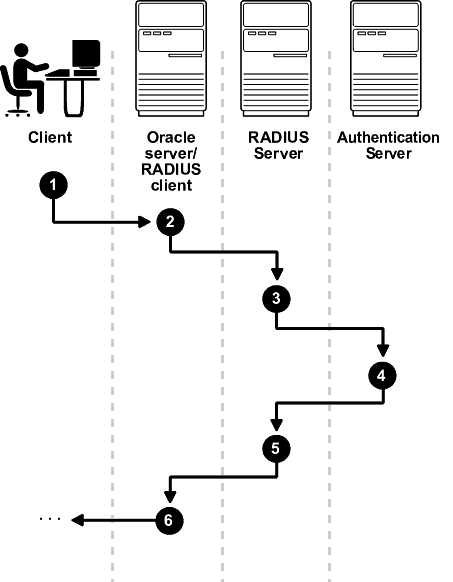
The following steps describe the synchronous authentication sequence:
-
A user logs in by entering a connect string, pass code, or other value. The client system passes this data to the Oracle database server. The pass code is frequently the password followed by the numbers in a token or text. Both credential factors are sent at the same time.
-
The Oracle database server, acting as the RADIUS client, passes the data from the Oracle client to the RADIUS server.
-
The RADIUS server passes the data to the appropriate authentication server.
-
The authentication server sends either an Access Accept or an Access Reject message back to the RADIUS server.
-
The RADIUS server passes this response to the Oracle database server/RADIUS client.
-
The Oracle database server/RADIUS client passes the response back to the Oracle client.
Example: Synchronous Authentication with Tokens
With token authentication, each user has a token card that displays a dynamic number that changes every sixty seconds.
To gain access to the Oracle database server/RADIUS client, the user enters a valid pass code that includes both a personal identification number (PIN) and the dynamic number currently displayed on the user’s token. The Oracle database server passes this authentication information from the Oracle client to the RADIUS server, which in this case is the authentication server for validation. The user is now authenticated and able to access the appropriate tables and applications.
Challenge-Response (Asynchronous) Authentication Mode
When the system uses the asynchronous mode, the user does not need to enter a user name and password at the SQL*Plus CONNECT string.
-
Sequence for Challenge-Response (Asynchronous) Authentication Mode
The sequence for challenge-response (asynchronous) authentication mode is comprised of 12 steps. -
Example: Asynchronous Authentication with Smart Cards
With smart card authentication, the user logs in by inserting the smart card into a smart card reader that reads the smart card. -
Example: Asynchronous Authentication with Tokens
One type of token that is used with asynchronous authentication has a keypad and display.
Sequence for Challenge-Response (Asynchronous) Authentication Mode
The sequence for challenge-response (asynchronous) authentication mode is comprised of 12 steps. Note: Challenge-response (Asynchronous) authentication mode is not supported with OCI-C client database clients on the Microsoft Windows platform. This includes all thick clients that use OCI-C clients.
The following figure shows the sequence in which challenge-response (asynchronous) authentication occurs. If the RADIUS server is the authentication server, then Steps 3, 4, and 5, and Steps 9, 10, and 11 are combined.
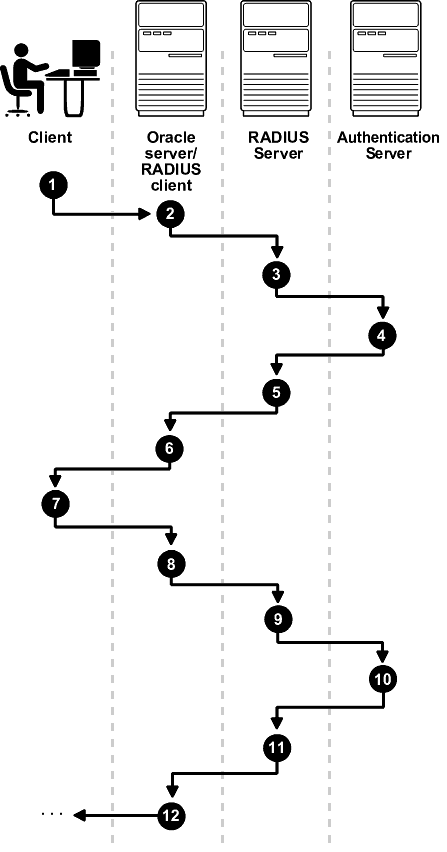
Description of the illustration asoag011.gif
The following steps describe the asynchronous authentication sequence:
-
A user initiates a connection to an Oracle database server. The client system passes the data to the Oracle database server.
-
The Oracle database server, acting as the RADIUS client, passes the data from the Oracle client to the RADIUS server.
-
The RADIUS server passes the data to the appropriate authentication server or authenticates the user against its own local database.
-
The authentication server sends a challenge, such as a random number, to the RADIUS server.
-
The RADIUS server passes the challenge to the Oracle database server/RADIUS client.
-
The Oracle database server/RADIUS client, in turn, passes it to the Oracle client. A graphical user interface presents the challenge to the user. Oracle provides a JAVA GUI code example that you can modify for your use to present the challenge. See the
netradius.jarandnetradius8.jarfiles in the$ORACLE_HOME/network/jlibdirectory. (Thenetradius8.jarfile is the latest.) -
The user provides a response to the challenge. To formulate a response, the user can, for example, enter the received challenge into the token card. The token card provides a dynamic password that is entered into the graphical user interface. The Oracle client passes the user’s response to the Oracle database server/RADIUS client.
-
The Oracle database server/RADIUS client sends the user’s response to the RADIUS server.
-
The RADIUS server passes the user’s response to the appropriate authentication server for validation.
-
The authentication server sends either an Access Accept or an Access Reject message back to the RADIUS server.
-
The RADIUS server passes the response to the Oracle database server/RADIUS client.
-
The Oracle database server/RADIUS client passes the response to the Oracle client.
Example: Asynchronous Authentication with Smart Cards
With smart card authentication, the user logs in by inserting the smart card into a smart card reader that reads the smart card.
The smart card is a plastic card, like a credit card, with an embedded integrated circuit for storing information.
The Oracle client sends the login information contained in the smart card to the authentication server by way of the Oracle database server/RADIUS client and the RADIUS server. The authentication server sends back a challenge to the Oracle client, by way of the RADIUS server and the Oracle database server, prompting the user for authentication information. The information could be, for example, a PIN as well as additional authentication information contained on the smart card.
The Oracle client sends the user’s response to the authentication server by way of the Oracle database server and the RADIUS server. If the user has entered a valid number, the authentication server sends an acceptpacket back to the Oracle client by way of the RADIUS server and the Oracle database server. The user is now authenticated and authorized to access the appropriate tables and applications. If the user has entered incorrect information, the authentication server sends back a message rejecting user’s access.
Example: Asynchronous Authentication with Tokens
One type of token that is used with asynchronous authentication has a keypad and display.
When the user seeks access to an Oracle database server by entering a password, the information is passed to the appropriate authentication server by way of the Oracle database server/RADIUS client and the RADIUS server. The authentication server sends back a challenge to the client, by way of the RADIUS server and the Oracle database server. The user types that challenge into the token, and the token displays a number for the user to send in response.
The Oracle client then sends the user’s response to the authentication server by way of the Oracle database server and the RADIUS server. If the user has typed a valid number, the authentication server sends an accept packet back to the Oracle client by way of the RADIUS server and the Oracle database server. The user is now authenticated and authorized to access the appropriate tables and applications. If the user has entered an incorrect response, the authentication server sends back a message rejecting the user’s access.