About User Roles
User roles are useful in a variety of situations, such as restricting DDL usage.
-
What Are User Roles?
A user role is a named group of related privileges that you can grant as a group to users or other roles. -
The Functionality of Roles
Roles are useful for quickly and easily granting permissions to users. -
Properties of Roles and Why They Are Advantageous
Roles have special properties that make their management very easy, such reduced privilege administration. -
Typical Uses of Roles
In general, you create a role to manage privileges. -
Common Uses of Application Roles
You can use application roles to control privileges to use applications. -
Common Uses of User Roles
You can create a user role for a group of database users with common privilege grant requirements. -
How Roles Affect the Scope of a User’s Privileges
Each role and user has its own unique security domain. -
How Roles Work in PL/SQL Blocks
Role behavior in a PL/SQL block is determined by the type of block and by definer’s rights or invoker’s rights. -
How Roles Aid or Restrict DDL Usage
A user requires one or more privileges to successfully execute a DDL statement, depending on the statement. -
How Operating Systems Can Aid Roles
In some environments, you can administer database security using the operating system. -
How Roles Work in a Distributed Environment
In a distributed database environment, all necessary roles must be set as the default role for a distributed (remote) session.
What Are User Roles?
A user role is a named group of related privileges that you can grant as a group to users or other roles.
Managing and controlling privileges is easier when you use roles.
Within a database, each role name must be unique, different from all user names and all other role names. Unlike schema objects, roles are not contained in any schema. Therefore, a user who creates a role can be dropped with no effect on the role.
The Functionality of Roles
Roles are useful for quickly and easily granting permissions to users.
Although you can use Oracle Database-defined roles, you have more control and continuity if you create your own roles that contain only the privileges pertaining to your requirements. Oracle may change or remove the privileges in an Oracle Database-defined role.
Roles have the following functionality:
-
A role can be granted system or object privileges.
-
Any role can be granted to any database user.
-
Each role granted to a user is, at a given time, either enabled or disabled. A user’s security domain includes the privileges of all roles currently enabled for the user and excludes the privileges of any roles currently disabled for the user. Oracle Database allows database applications and users to enable and disable roles to provide selective availability of privileges.
-
A role can be granted to other roles. However, a role cannot be granted to itself and cannot be granted circularly. For example, role
role1cannot be granted to rolerole2if rolerole2has previously been granted to rolerole1. -
If a role is not password authenticated or a secure application role, then you can grant the role indirectly to the user. An indirectly granted role is a role granted to the user through another role that has already been granted to this user. For example, suppose you grant user
psmiththerole1role. Then you grant therole2androle3roles to therole1role. Rolesrole2androle3are now underrole1. This meanspsmithhas been indirectly granted the rolesrole2androle3, in addition to the direct grant ofrole1. Enabling the directrole1forpsmithenables the indirect rolesrole2androle3for this user as well. -
Optionally, you can make a directly granted role a default role. You enable or disable the default role status of a directly granted role by using the
DEFAULT ROLEclause of theALTER USERstatement. Ensure that theDEFAULT ROLEclause refers only to roles that have been directly granted to the user. To find the directly granted roles for a user, query theDBA_ROLE_PRIVSdata dictionary view. This view does not include the user’s indirectly granted roles. To find roles that are granted to other roles, query theROLE_ROLE_PRIVSview. -
If the role is password authenticated or a secure application role, then you cannot grant it indirectly to the user, nor can you make it a default role. You only can grant this type of role directly to the user. Typically, you enable password authenticated or secure application roles by using the
SET ROLEstatement.
Properties of Roles and Why They Are Advantageous
Roles have special properties that make their management very easy, such reduced privilege administration. The following table describes the properties of roles that enable easier privilege management within a database.
| Property | Description |
|---|---|
| Reduced privilege administration | Rather than granting the same set of privileges explicitly to several users, you can grant the privileges for a group of related users to a role, and then only the role must be granted to each member of the group. |
| Dynamic privilege management | If the privileges of a group must change, then only the privileges of the role need to be modified. The security domains of all users granted the group’s role automatically reflect the changes made to the role. |
| Selective availability of privileges | You can selectively enable or disable the roles granted to a user. This allows specific control of a user’s privileges in any given situation. |
| Application awareness | The data dictionary records which roles exist, so you can design applications to query the dictionary and automatically enable (or disable) selective roles when a user attempts to execute the application by way of a given user name. |
| Application-specific security | You can protect role use with a password. Applications can be created specifically to enable a role when supplied the correct password. Users cannot enable the role if they do not know the password. |
Database administrators often create roles for a database application. You should grant a secure application role all privileges necessary to run the application. You then can grant the secure application role to other roles or users. An application can have several different roles, each granted a different set of privileges that allow for more or less data access while using the application.
The DBA can create a role with a password to prevent unauthorized use of the privileges granted to the role. Typically, an application is designed so that when it starts, it enables the proper role. As a result, an application user does not need to know the password for an application role.
Typical Uses of Roles
In general, you create a role to manage privileges.
Reasons are as follows:
-
To manage the privileges for a database application
-
To manage the privileges for a user group
The following diagram describes the two uses of roles.
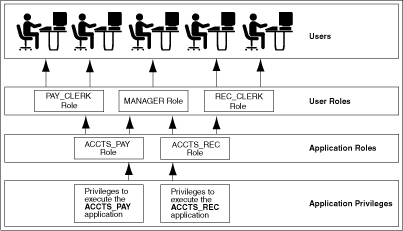
Description of the illustration cncpt082.gif
Common Uses of Application Roles
You can use application roles to control privileges to use applications.
You should grant an application role all privileges necessary to run a given database application. Then, grant the secure application role to other roles or to specific users.
An application can have several different roles, with each role assigned a different set of privileges that allow for more or less data access while using the application.
Common Uses of User Roles
You can create a user role for a group of database users with common privilege grant requirements.
You can manage user privileges by granting secure application roles and privileges to the user role and then granting the user role to appropriate users.
How Roles Affect the Scope of a User’s Privileges
Each role and user has its own unique security domain.
The security domain of a role includes the privileges granted to the role plus those privileges granted to any roles that are granted to the role.
The security domain of a user includes privileges on all schema objects in the corresponding schema, the privileges granted to the user, and the privileges of roles granted to the user that are currently enabled. (A role can be simultaneously enabled for one user and disabled for another.) This domain also includes the privileges and roles granted to the role PUBLIC. The PUBLIC role represents all users in the database.
How Roles Work in PL/SQL Blocks
Role behavior in a PL/SQL block is determined by the type of block and by definer’s rights or invoker’s rights.
-
Roles Used in Named Blocks with Definer’s Rights
All roles are disabled in any named PL/SQL block that executes with definer’s rights. -
Roles Used in Named Blocks with Invoker’s Rights and Anonymous PL/SQL Blocks
Named PL/SQL blocks that execute with invoker’s rights and anonymous PL/SQL blocks are executed based on privileges granted through enabled roles.
Roles Used in Named Blocks with Definer’s Rights
All roles are disabled in any named PL/SQL block that executes with definer’s rights.
Examples of named PL/SQL blocks are stored procedures, functions, and triggers.
Roles are not used for privilege checking and you cannot set roles within a definer’s rights procedure.
The SESSION_ROLES data dictionary view shows all roles that are currently enabled and if a PL/SQL block executes with definer’s rights. If a named PL/SQL block that executes with definer’s rights queries SESSION_ROLES, then the query does not return any rows.
Roles Used in Named Blocks with Invoker’s Rights and Anonymous PL/SQL Blocks
Named PL/SQL blocks that execute with invoker’s rights and anonymous PL/SQL blocks are executed based on privileges granted through enabled roles.
Current roles are used for privilege checking within an invoker’s rights PL/SQL block. You can use dynamic SQL to set a role in the session.
How Roles Aid or Restrict DDL Usage
A user requires one or more privileges to successfully execute a DDL statement, depending on the statement.
For example, to create a table, the user must have the CREATE TABLE or CREATE ANY TABLE system privilege.
To create a view of a table that belongs to another user, the creator must have the CREATE VIEW or CREATE ANY VIEW system privilege and either the SELECT object privilege for the table or the SELECT ANY TABLE system privilege.
Oracle Database avoids the dependencies on privileges received by way of roles by restricting the use of specific privileges in certain DDL statements. The following rules describe these privilege restrictions concerning DDL statements:
-
All system privileges and object privileges that permit a user to perform a DDL operation are usable when received through a role. For example:
-
System privileges:
CREATETABLE,CREATEVIEW,andCREATEPROCEDUREprivileges -
Object privileges:
ALTERandINDEXprivileges for a tableYou cannot use the
REFERENCESobject privilege for a table to define the foreign key of a table if the privilege is received through a role.
-
-
All system privileges and object privileges that allow a user to perform a DML operation that is required to issue a DDL statement are not usable when received through a role. The security domain does not contain roles when a
CREATE VIEWstatement is used. For example, a user who is granted theSELECTANYTABLEsystem privilege or theSELECTobject privilege for a table through a role cannot use either of these privileges to create a view on a table that belongs to another user. This is because views are definer’s rights objects, so when creating them you cannot use any privileges (neither system privileges or object privileges) granted to you through a role. If the privilege is granted directly to you, then you can use the privilege. However, if the privilege is revoked at a later time, then the view definition becomes invalid (“contains errors”) and must recompiled before it can be used again.
The following example further clarifies the permitted and restricted uses of privileges received through roles.
Assume that a user is:
-
Granted a role that has the
CREATEVIEWsystem privilege -
Directly granted a role that has the
SELECTobject privilege for theemployeestable -
Directly granted the
SELECTobject privilege for thedepartmentstable
Given these directly and indirectly granted privileges:
-
The user can issue
SELECTstatements on both theemployeesanddepartmentstables. -
Although the user has both the
CREATEVIEWandSELECTprivilege for theemployeestable through a role, the user cannot create a view on theemployeestable, because theSELECTobject privilege for theemployeestable was granted through a role. -
The user can create a view on the
departmentstable, because the user has theCREATEVIEWprivilege through a role and theSELECTprivilege for thedepartmentstable directly.
How Operating Systems Can Aid Roles
In some environments, you can administer database security using the operating system.
The operating system can be used to grant and revoke database roles and to manage their password authentication. This capability is not available on all operating systems.
How Roles Work in a Distributed Environment
In a distributed database environment, all necessary roles must be set as the default role for a distributed (remote) session.
These roles cannot be enabled when the user connects to a remote database from within a local database session. For example, the user cannot execute a remote procedure that attempts to enable a role at the remote site.
Related Topics
- Managing Common Roles and Local Roles
- Common Uses of User Roles
- Common Uses of Application Roles
- Common Uses of User Roles
- Oracle Database Reference for more information about the
SESSION_ROLESdata dictionary view - Oracle Database PL/SQL Packages and Types Reference for an explanation of how invoker's and definer's rights can be used for name resolution and privilege checking
- Oracle Database PL/SQL Packages and Types Reference for information about dynamic SQL in PL/SQL
- Your operating system-specific Oracle Database documentation for details about managing roles through the operating system
- Oracle Database Heterogeneous Connectivity User’s Guide