Benefits of MAA Platinum and Diamond Reference Architectures
Oracle MAA offers two Oracle GoldenGate-based MAA reference architectures:
- Platinum Tier Option 2: Never-Down Architecture
- Diamond Tier Option 2: Extreme Availability.
Both architectures combine Oracle Exadata, Oracle Real Application Clusters (Oracle RAC), Oracle Active Data Guard with Fast-Start Failover, Oracle GoldenGate replication, and application failover practices. Diamond Tier Option 2 builds on Platinum Tier Option 2 and adds the Oracle AI Database 26ai, Oracle GoldenGate 26ai, availability, automation, and deployment requirements.
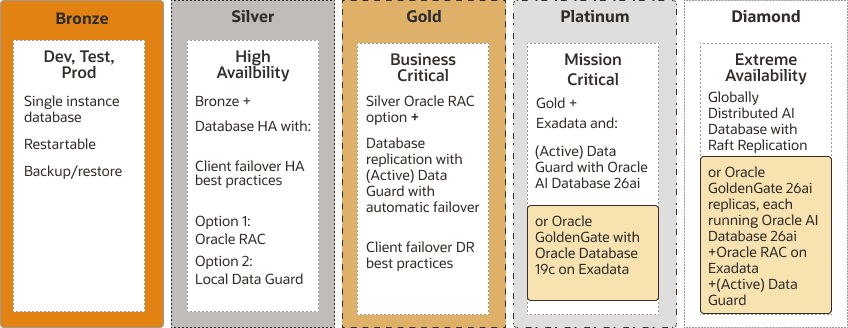
| Dimension | Platinum Tier Option 2 | Diamond Tier Option 2 |
|---|---|---|
| Architecture | Never-Down Architecture | Extreme Availability |
| Database baseline | Oracle Database 19c or higher | Oracle AI Database 26ai or higher |
| Oracle GoldenGate | Active-active replication using Oracle GoldenGate 19c or higher | Active-active replication using Oracle GoldenGate 26ai or higher |
| Database platform | Oracle Exadata with Oracle RAC | Oracle Exadata with Oracle RAC |
| Data protection | Oracle Active Data Guard with Fast-Start Failover protecting each GoldenGate replica | Oracle Active Data Guard with Fast-Start Failover protecting each GoldenGate replica |
| GoldenGate Hub | MAA GoldenGate Hub configuration and best practices | Same MAA GoldenGate Hub configuration and best practices |
| Availability objective | Near-zero or zero downtime and zero or near-zero data loss | Enhanced availability targets using Oracle AI Database 26ai and Oracle GoldenGate 26ai capabilities |
Platinum Tier Option 2 and Diamond Tier Option 2 share the following objectives:
- RTO = zero or near-zero for all local failures using the Oracle Exadata Database Machine platform with its inherent Oracle RAC, full-stack redundancy, and failover capabilities. The Exadata platform is essential for achieving the lowest application brownouts and meeting near-zero brownouts for local failures, providing additional data protection, and enabling intelligent sick-failure prevention, detection, and repair. See MAA Platinum and MAA Diamond: Oracle RAC and Exadata.
- RTO = zero or near-zero for disasters, such as database, cluster, data center, or regional failures, achieved by redirecting the application to an active Oracle GoldenGate source or target
- Zero downtime maintenance for software and hardware updates using Oracle RAC, Exadata Database Machine platform, and MAA application switchover practices. See Configuring Continuous Availability for Applications
- Zero downtime database upgrade or application upgrade by redirecting the application to an upgraded Oracle GoldenGate source or target database
- RPO can be zero or near-zero by adjusting Oracle Data Guard protection mode and redo transport (SYNC, FAST SYNC, FAR SYNC, or ASYNC). To achieve zero data loss, use Data Guard Fast-Start Failover (FSFO) with Maximum Availability protection mode. To bound data loss to achieve near zero RPO while eliminating any performance impact on the primary database, use Data Guard Fast-Start Failover with Maximum Performance protection mode and set FastStartFailoverLagLimit.
- With automatic Data Guard failover, GoldenGate replicas resynchronize quickly and consistently after a disaster.
- For every Extract associated with a Data Guard-protected source database, configure TRANLOGOPTIONS HANDLEDLFAILOVER, and configure FAILOVERTARGETDESTID when required by the topology. These settings prevent Extract from processing redo beyond the protected standby point and reduce the risk of logical divergence after a data-loss Data Guard failover. Following a Data Guard role transition, Oracle GoldenGate can restart from its last successful checkpoint when the required redo remains available. These settings do not, by themselves, guarantee that re-instantiation will never be required.
- Platinum Tier Option 2 uses Oracle Database 19c or higher and Oracle GoldenGate 19c or higher. Diamond Tier Option 2 uses Oracle AI Database 26ai or higher and Oracle GoldenGate 26ai or higher to support its enhanced availability, automation, and AI capabilities. The Oracle GoldenGate Maximum Availability Hub on OCI Marketplace and the on-premises MAA GGHub automation provide validated deployment and configuration baselines; they do not replace solution-specific certification, security, networking, monitoring, and operational validation.
| Event | Platinum Tier Option 2 Target RTO | Diamond Tier Option 2 Target RTO | Target RPO |
|---|---|---|---|
| Recoverable node or instance failure | Less than 10 seconds1 | Less than 3 seconds1 | Zero |
| Disasters, including corruptions and regional failures | Zero2 | Zero2 | Enabling Data Guard Fast-Start Failover (FSFO) is a requirement to achieve low RPO and enables GoldenGate replicas to resynchronize quickly and consistently after a disaster. Target RPOs are zero using Maximum Availability Protection Mode with Data Guard FSFO and near zero using Maximum Performance Protection Mode with Data Guard FSFO. Configure TRANLOGOPTIONS HANDLEDLFAILOVER and FAILOVERTARGETDESTID when required by the topology. These settings reduce the risk of logical divergence after a data-loss Data Guard failover. |
| Most common software and hardware updates | Zero1 | Zero1 | Zero |
| Major database upgrade or application upgrade | Zero2 | Zero2 | Zero |
*Note:- The MAA tier-level service objectives represent the required availability envelope across all architecture options within each tier. An individual architecture option can meet or exceed these objectives based on its validated configuration, but it cannot have a less stringent objective than the tier it represents.
Enabling features shared by Platinum Tier Option 2 and Diamond Tier Option 2 include:
- Oracle Real Application Clusters and Exadata Database Machine Platform. Exadata Database Machine Platform can be on-premises, in Oracle Cloud Infrastructure, or in Oracle’s hyperscale cloud partners, such as the case with Exadata Database Service on Dedicated Infrastructure (ExaDB-D), or Oracle Exadata Database Service on Cloud@Customer (ExaDB-C@C) for the source and target databases
- Oracle Active Data Guard with Fast-Start Failover to bound data loss and automatically fail over to the standby in case of database, cluster, or data center failures. The standby databases are typically in separate Fault Domains (FDs) with separate power supplies, residing in separate data centers, Availability Domains (ADs), or Availability Zones (AZs), with independent power and network. The standby databases can also reside across regions if regional fault isolation is required.
- Oracle GoldenGate provides active-active replication between two or more read/write database systems that applications can use during planned or unplanned outages. Each replica can be open read/write, but this does not make unrestricted concurrent updates to the same logical data safe. Partition write workloads and use connection affinity to avoid conflicts wherever possible. If concurrent updates to the same data can occur, configure and test a supported conflict detection and resolution method before directing application writes to multiple replicas. The replicas can reside in the same region, across availability domains, or across regions.
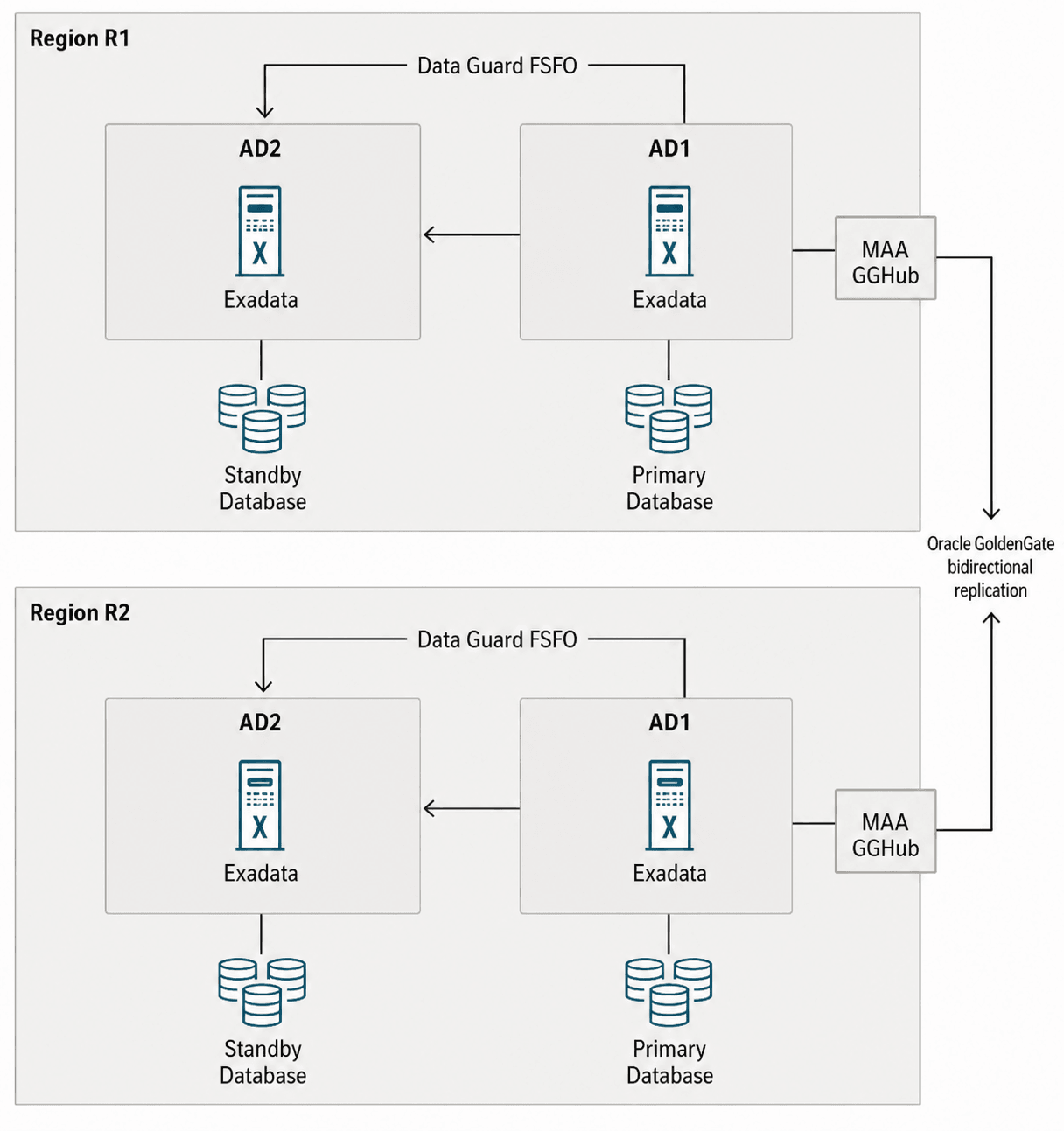
The following figure illustrates Platinum Tier Option 2 and Diamond Tier Option 2 with two Oracle GoldenGate replicas in separate regions. Both replicas are open read/write, subject to the workload-partitioning and conflict-management policies described in this chapter. Oracle GoldenGate replicates data between the replicas, and an Oracle Active Data Guard standby in another availability domain protects each primary database.
With Data Guard Fast-Start Failover (FSFO), the standby database automatically becomes the new primary after a primary database, cluster, or availability domain failure. With MAA Oracle GoldenGate configuration best practices implemented, replication resumes between the source and target databases after a Data Guard role transition when required connectivity and redo are available. Each database resides on an Oracle Exadata platform with built-in Oracle Real Application Clusters (Oracle RAC), system and storage redundancy, and low-brownout failover capabilities.
Recommended MAA GoldenGate Hub
The same MAA GGHub architecture and best practices apply to Platinum Tier Option 2 and Diamond Tier Option 2. Select the deployment model that matches the target environment:
- Oracle GoldenGate Maximum Availability Hub on OCI Marketplace. Use the Marketplace deployment for an OCI-based GGHub foundation.
- On-premises MAA GoldenGate Hub using MAA Ansible automation. Deploy Oracle GoldenGate on dedicated, non-database hosts with Oracle Clusterware and Oracle ACFS as documented in the on-premises GGHub chapters.
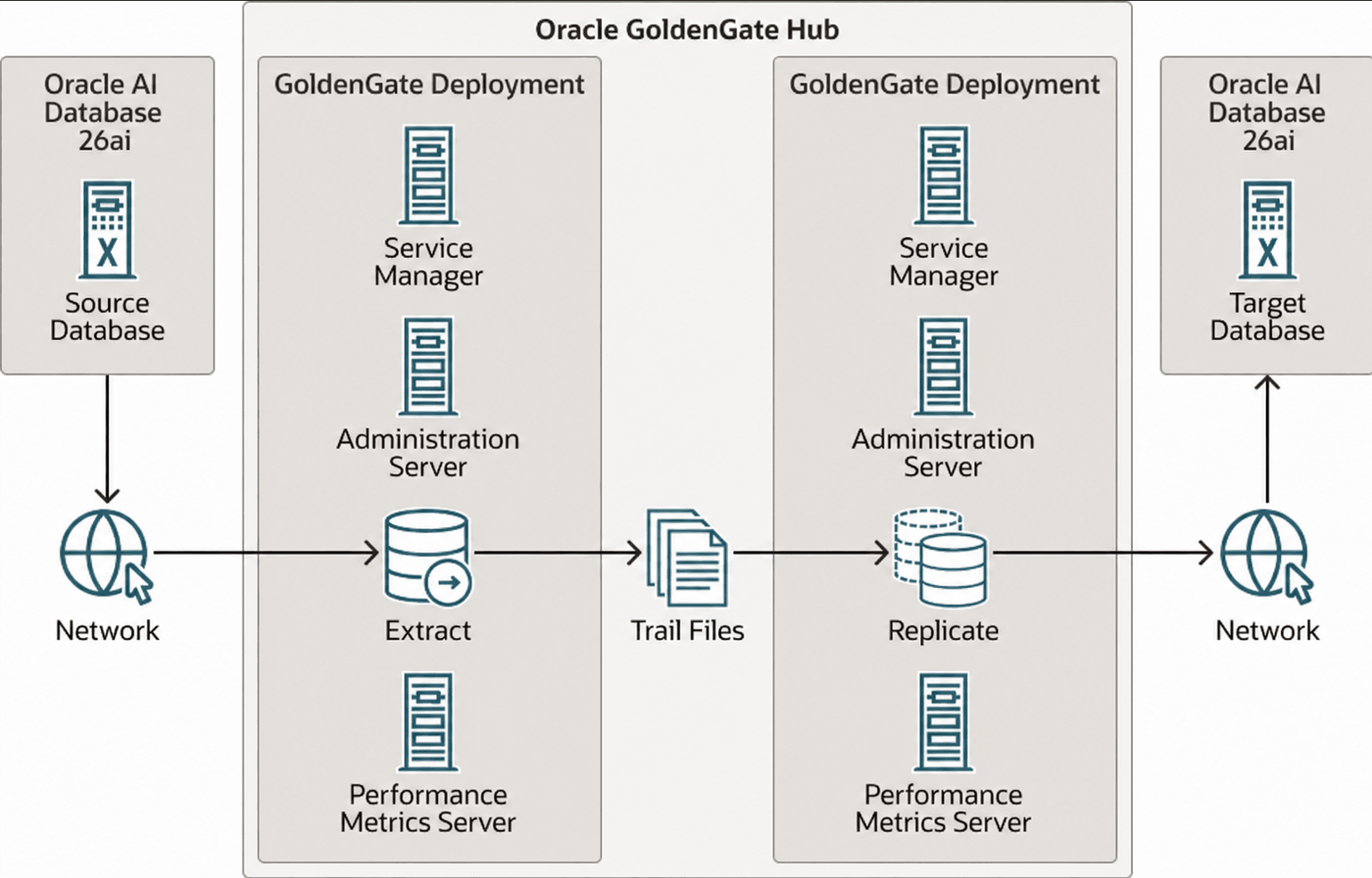
A GGHub provides the following advantages:
- Offloads and simplifies Oracle GoldenGate software installation, configuration, and lifecycle management from source and target Oracle Exadata database systems.
- Significantly reduces Oracle GoldenGate resource (memory, CPU, and IOPS) use on the source and target database systems and offloads to GGHub.
- Provides high availability through a two-node cluster and supports disaster recovery by using Oracle ACFS replication to an equivalent GGHub in a separate cluster, when that topology applies.
- Consolidates Oracle GoldenGate configurations and software deployments for multiple independent Oracle GoldenGate architectures.
- Uses automation to implement a validated MAA deployment and configuration baseline. Validate product certification, security, networking, monitoring, and operational procedures for the selected topology.
Before deploying in cloud or multicloud environments, verify the current certification and topology guidance in Oracle AI Database Cloud Best Practices.
The following figure highlights the primary GGHub components and their high-level interactions with Oracle databases.
How to Implement the MAA Platinum and Diamond Solution
To implement Platinum Tier Option 2 or Diamond Tier Option 2, review and leverage documentation referenced in the following steps.
The Platinum and Diamond architecture consists of
- Primary Databases residing on Oracle Real Application Clusters and Exadata Database Machine Platform. Exadata Database Machine Platform can be on-premises, in Oracle Cloud Infrastructure, or in Oracle’s hyperscale cloud partners, such as the case with Exadata Database Service on Dedicated Infrastructure (ExaDB-D), or Oracle Exadata Database Service on Cloud@Customer (ExaDB-C@C) for the source and target databases
- Standby Databases using Oracle Active Data Guard with Fast-Start Failover to bound data loss and automatically fail over to the standby in case of database, cluster, or data center failures. The standby databases are typically in separate Fault Domains (FDs) with separate power supplies, residing in separate data centers, Availability Domains (ADs), or Availability Zones (AZs), with independent power and network. The standby databases can also reside across regions if regional fault isolation is required.
- Oracle GoldenGate provides active-active replication between two or more read/write primary database systems that applications can use during planned or unplanned outages. Each replica can be open read/write, but this does not make unrestricted concurrent updates to the same logical data safe. Partition write workloads and use connection affinity to avoid conflicts wherever possible. If concurrent updates to the same data can occur, configure and test a supported conflict detection and resolution method before directing application writes to multiple replicas. The replicas can reside in the same region, across availability domains, or across regions.
Step 1 below describes the two Oracle GoldenGate deployment options.
Step 1 - Choose an Oracle GoldenGate Deployment
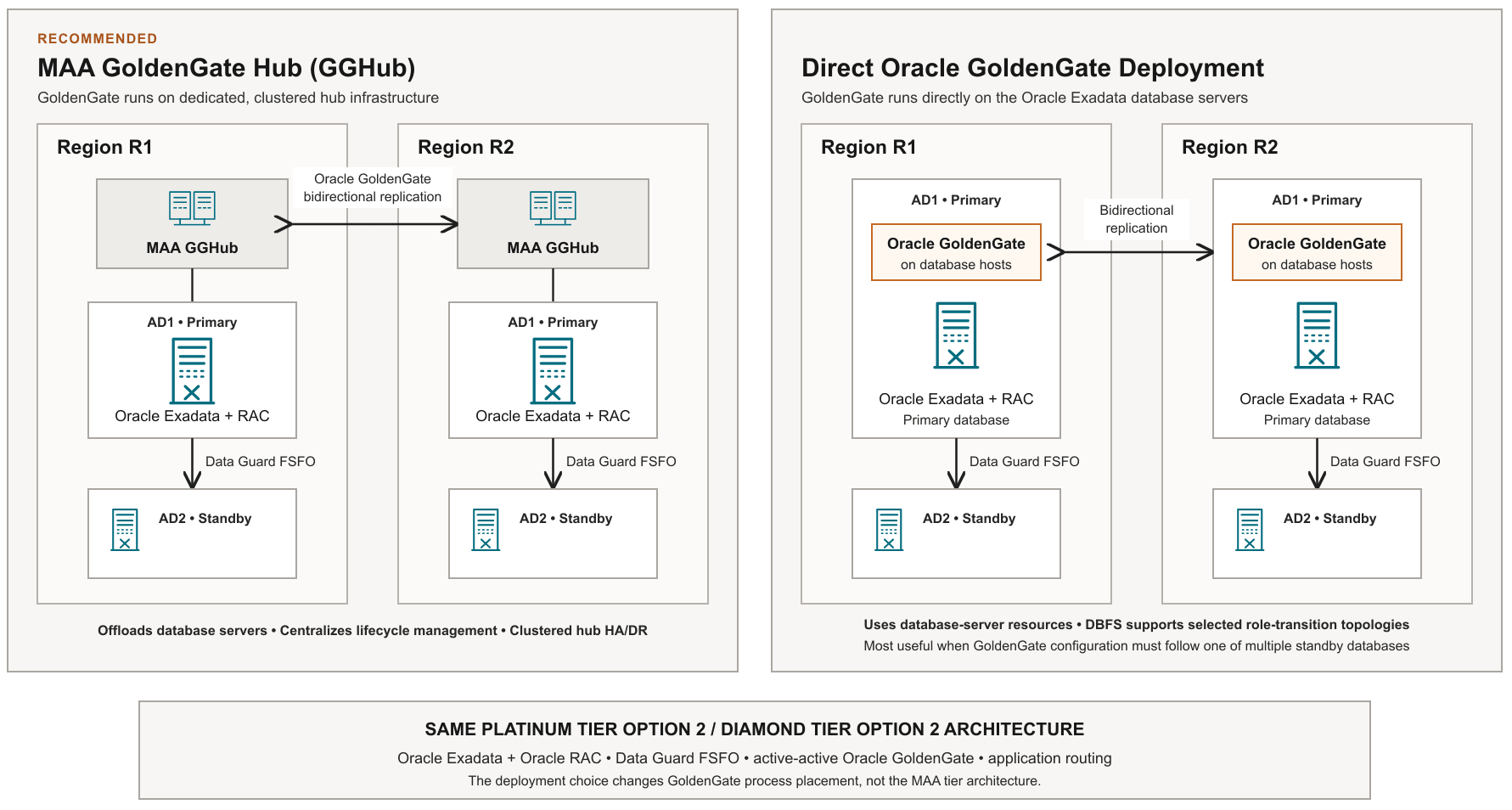
Choose the recommended MAA GGHub deployment or deploy Oracle GoldenGate directly on the source and target Oracle Exadata database servers.
Oracle GoldenGate Deployment Models
1. MAA GoldenGate Hub (GGHub)
- Oracle GoldenGate Maximum Availability Hub on OCI Marketplace. Use the Marketplace deployment for an OCI-based GGHub foundation.
- On-premises MAA GoldenGate Hub using MAA Ansible automation. Deploy Oracle GoldenGate on dedicated, non-database hosts with Oracle Clusterware and Oracle ACFS as documented in the on-premises GGHub chapters.
This is the recommended deployment model. Use the same MAA GGHub architecture and best practices for Platinum Tier Option 2 and Diamond Tier Option 2. For OCI, use Oracle GoldenGate Maximum Availability Hub on OCI Marketplace or the applicable cloud GGHub guidance:
- Cloud Within Region: Configuring Oracle GoldenGate Hub
- Cloud Across Regions: Configuring Oracle GoldenGate Hub
For on-premises or multicloud deployments using non-database virtual machines with Oracle Clusterware, use the on-premises MAA GGHub guidance and MAA Ansible automation:
2. Direct Oracle GoldenGate deployment
- When a hub is not selected, deploy Oracle GoldenGate on the source and target database servers and follow the applicable Oracle RAC and Oracle Active Data Guard configuration best practices.
- This option is also applicable for Multi-Cloud deployments with Oracle DB@AWS, Oracle DB@Azure and Oracle DB@GCP when Oracle GoldenGate Maximum Availability Hub on OCI Marketplace or On-premises MAA GoldenGate Hub using MAA Ansible automation are not available or applicable
Deploy Oracle GoldenGate directly on Oracle Exadata database servers for On-premises, Oracle Cloud, Oracle Multi-Cloud (Oracle DB@AWS, Oracle DB@Azure and Oracle DB@GCP) or hybrid cloud
- OnPremises and Cloud: Oracle GoldenGate Microservices Architecture on Oracle Exadata Configuration Best Practices
- OnPremises and Cloud: Oracle GoldenGate Microservices Architecture Integrated with Active Data Guard
Step 2 - Configure Conflict Avoidance, Detection, and Resolution
Active-active Oracle GoldenGate replication requires an explicit conflict-management design. A database being open read/write does not mean that applications can safely update the same logical data concurrently on multiple replicas.
- Prefer conflict avoidance by partitioning writes by geography, customer, key range, or workload.
- Use connection affinity or stickiness so that related transactions continue to use the intended write replica.
- When the same data can be updated concurrently, configure a supported conflict detection and resolution method, such as automatic conflict detection and resolution (Auto-CDR) or a suitable manual COMPARECOLS and RESOLVECONFLICT configuration. Meet the applicable prerequisites, including globally unique primary-key values, required supplemental logging, and a compatible Replicat configuration.
- Test insert, update, delete, primary-key, and unique-key conflicts; replication lag; failure and recovery; and coordinated database, DDL, and application changes.
- Monitor detected and resolved conflicts and maintain operational procedures for unresolved conflicts.
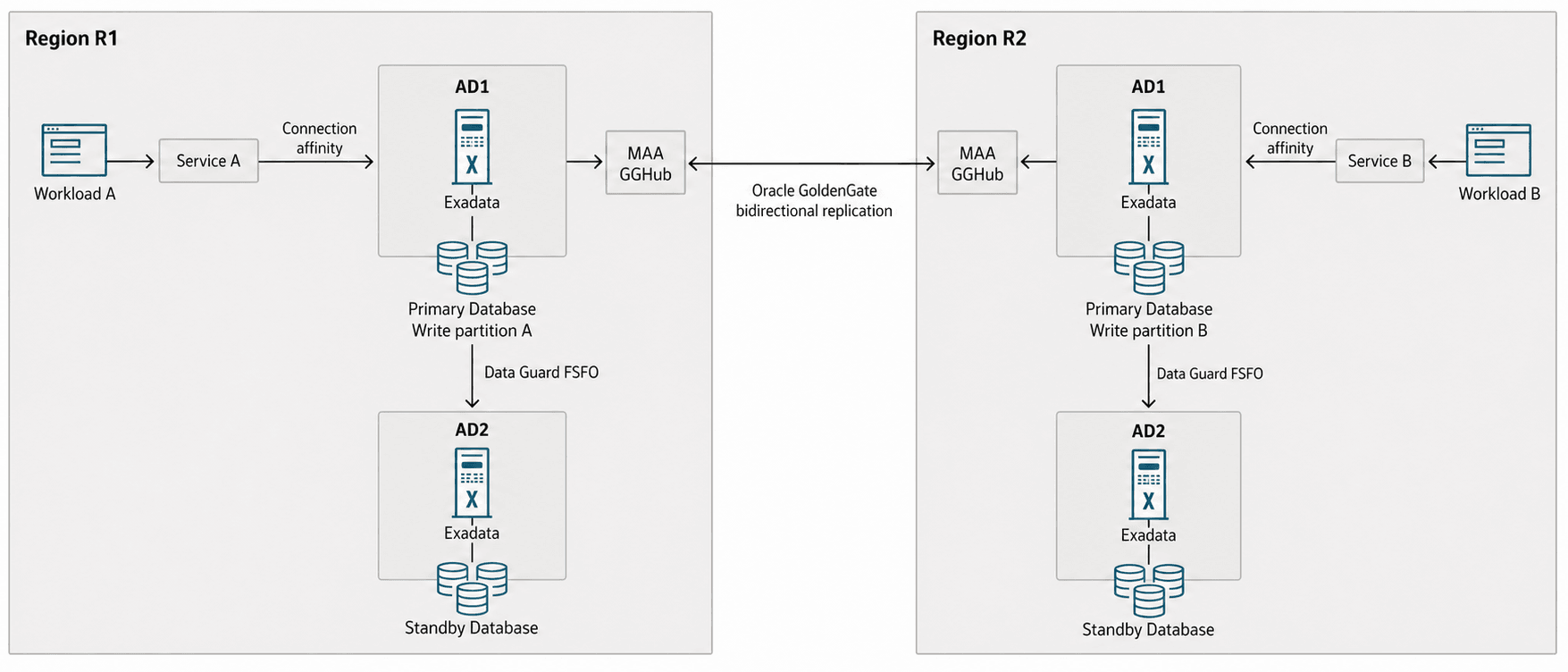
See Oracle GoldenGate Active-Active Guidance for Developers and Administrators and Making Local-Only Changes in an Active-Active Oracle GoldenGate Configuration for additional details.
Step 3 - Implement Application Failover
Application routing is only one part of failover readiness. Configure and test the following practices for zero- or near-zero-downtime objectives:
- Use database services for workload management and topology-aware placement. Do not connect applications directly to database instances.
- Use high-availability connection strings and current, supported drivers and connection pools that consume Fast Application Notification (FAN) events.
- Use connection draining for planned maintenance.
- Use Application Continuity or Transparent Application Continuity where supported to replay eligible work within an Oracle RAC or Oracle Data Guard configuration. These capabilities do not replace routing and transaction-outcome handling between Oracle GoldenGate replicas.
- Define how the application handles session state, in-flight transactions, transaction outcome, retries, and idempotency.
- Before directing writes to another replica, verify database-service readiness, acceptable replication lag, and compliance with the workload-partitioning and conflict-resolution policy.
- Test planned switchovers and unplanned database, cluster, site, and region failures with production-representative workloads.
Oracle Global Data Services can provide centralized service management, inter-database service failover, replication-lag-aware routing, role-based services, and FAN across replicated databases. Applications must still separate read-only, read-mostly, and read/write services as required by the workload design, and the routing policy must enforce the conflict-management model. See Overview of Oracle GoldenGate Best Practices for additional details.
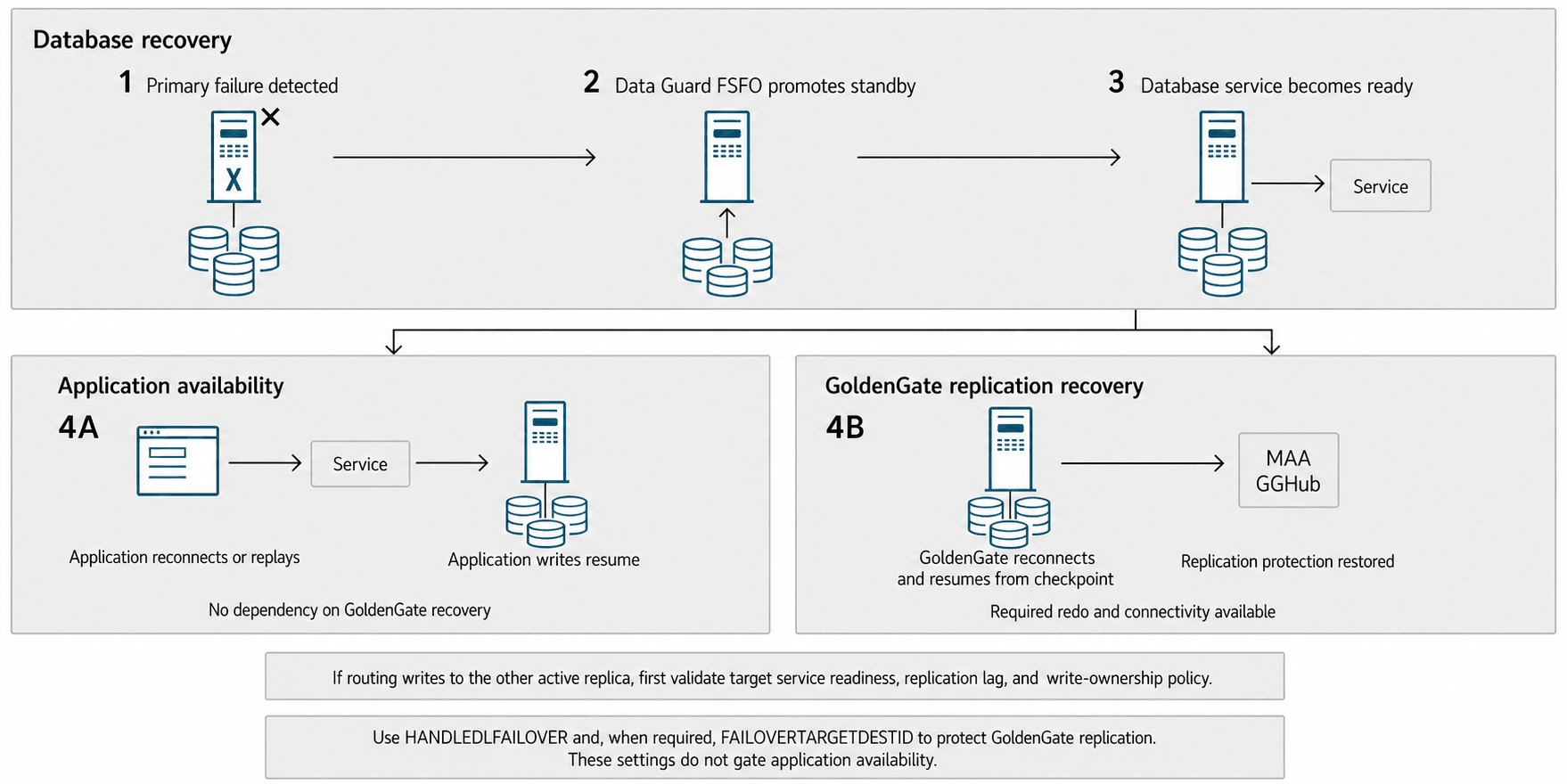
A custom application-routing solution can be used instead of Oracle Global Data Services, provided that it applies the same service-readiness, replication-lag, workload-partitioning, and transaction-outcome safeguards. Also apply Continuous Availability for Applications.
-
To achieve zero downtime or lowest impact for online processing, apply Continuous Availability for Applications. For long-running transactions, such as batch operations, it is recommended that you defer them outside the planned maintenance window. ↩ ↩2 ↩3 ↩4
-
Application failover is customized or managed with Global Data Services. For long-running transactions, such as batch operations, it is recommended that you defer them outside the planned maintenance window. ↩ ↩2 ↩3 ↩4