ALTER FLASHBACK ARCHIVE
Purpose
Use the ALTER FLASHBACK ARCHIVE statement for these operations:
-
Designate a flashback archive as the default flashback archive for the system
-
Add a tablespace for use by the flashback archive
-
Change the quota of a tablespace used by the flashback archive
-
Remove a tablespace from use by the flashback archive
-
Change the retention period of the flashback archive
-
Purge the flashback archive of old data that is no longer needed See Also: Oracle Database Development Guide and CREATE FLASHBACK ARCHIVE for more information on using Flashback Time Travel
Prerequisites
You must have the FLASHBACK ARCHIVE ADMINISTER system privilege to alter a flashback archive in any way. You must also have appropriate privileges on the affected tablespaces to add, modify, or remove a flashback archive tablespace.
Syntax
alter_flashback_archive::= 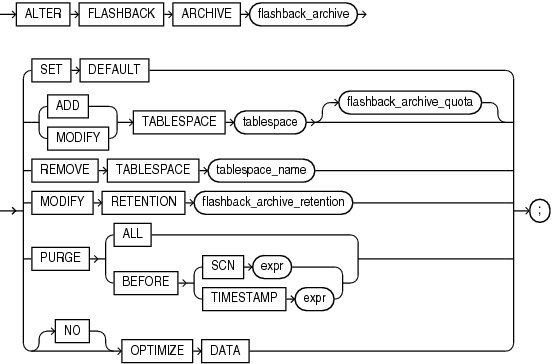
Description of the illustration alter_flashback_archive.eps
flashback_archive_quota::= 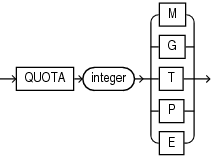
Description of the illustration flashback_archive_quota.eps
flashback_archive_retention::= 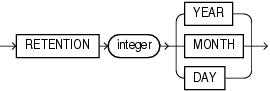
Description of the illustration flashback_archive_retention.eps
Semantics
flashback_archive
Specify the name of an existing flashback archive.
SET DEFAULT
You must be logged in as SYSDBA to specify this clause. Use this clause to designate this flashback archive as the default flashback archive for the system. When a CREATE TABLE or ALTER TABLE statement specifies the flashback_archive_clause without specifying a flashback archive name, the database uses the default flashback archive to store data from that table.
This statement overrides any previous designation of a different flashback archive as the default.
See Also: The CREATE TABLE flashback_archive_clause for more information
ADD TABLESPACE
Use this clause to add a tablespace to the flashback archive. You can use the flashback_archive_quota clause to specify the amount of space that can be used by the flashback archive in the new tablespace. If you omit that clause, then the flashback archive has unlimited space in the newly added tablespace.
MODIFY TABLESPACE
Use this clause to change the tablespace quota of a tablespace already used by the flashback archive.
REMOVE TABLESPACE
Use this clause to remove a tablespace from use by the flashback archive. You cannot remove the last remaining tablespace used by the flashback archive.
If the tablespace to be removed contains any data within the retention period of the flashback archive, then that data will be dropped as well. Therefore, you should move your data to another tablespace before removing the tablespace with this clause.
MODIFY RETENTION
Use this clause to change the retention period of the flashback archive.
PURGE
Use this clause to purge data from the flashback archive.
-
Specify
PURGEALLto remove all data from the flashback archive. This historical information can be retrieved using a flashback query only if the SCN or timestamp specified in the flashback query is within the undo retention duration. -
Specify
PURGEBEFORESCNto remove all data from the flashback archive before the specified system change number. -
Specify
PURGEBEFORETIMESTAMPto remove all data from the flashback archive before the specified timestamp.
[NO] OPTIMIZE DATA
This clause has the same semantics as the [NO] OPTIMIZE DATA clause of CREATE FLASHBACK ARCHIVE.
See Also: CREATE FLASHBACK ARCHIVE for information on creating flashback archives and for some simple examples of using flashback archives