CLUSTER_SET
Syntax
cluster_set::=

Description of the illustration cluster_set.gif
Description of the illustration cluster_set.eps
Analytic Syntax
cluster_set_analytic::=

Description of the illustration cluster_set_analytic.gif
Description of the illustration cluster_set_analytic.eps
mining_attribute_clause::=
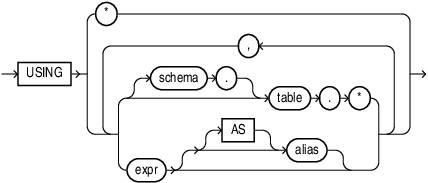
Description of the illustration mining_attribute_clause.gif
Description of the illustration mining_attribute_clause.eps
mining_analytic_clause::=

Description of the illustration mining_analytic_clause.gif
Description of the illustration mining_analytic_clause.eps
See Also: Analytic Functions for information on the syntax, semantics, and restrictions of mining_analytic_clause
Purpose
CLUSTER_SET returns a set of cluster ID and probability pairs for each row in the selection. The return value is a varray of objects with field names CLUSTER_ID and PROBABILITY. The cluster identifier is an Oracle NUMBER; the probability is BINARY_DOUBLE.
topN and cutoff
You can specify topN and cutoff to limit the number of clusters returned by the function. By default, both topN and cutoff are null and all clusters are returned.
-
topN is the N most probable clusters. If multiple clusters share the Nth probability, then the function chooses one of them.
-
cutoff is a probability threshold. Only clusters with probability greater than or equal to cutoff are returned. To filter by cutoff only, specify
NULLfor topN.
To return up to the N most probable clusters that are greater than or equal to cutoff, specify both topN and cutoff.
Syntax Choice
CLUSTER_SET can score the data in one of two ways: It can apply a mining model object to the data, or it can dynamically mine the data by executing an analytic clause that builds and applies one or more transient mining models. Choose Syntax or Analytic Syntax:
-
Syntax — Use the first syntax to score the data with a pre-defined model. Supply the name of a clustering model.
-
Analytic Syntax — Use the analytic syntax to score the data without a pre-defined model. Include
INTOn, where n is the number of clusters to compute, and mining_analytic_clause, which specifies if the data should be partitioned for multiple model builds. The mining_analytic_clause supports a query_partition_clause and an order_by_clause. (See analytic_clause::=.)
The syntax of the CLUSTER_SET function can use an optional GROUPING hint when scoring a partitioned model. See GROUPING Hint.
mining_attribute_clause
mining_attribute_clause identifies the column attributes to use as predictors for scoring. When the function is invoked with the analytic syntax, these predictors are also used for building the transient models. The mining_attribute_clause behaves as described for the PREDICTION function. (See mining_attribute_clause::=.)
See Also:
-
Oracle Data Mining User’s Guide for information about scoring.
-
Oracle Data Mining Concepts for information about clustering.
Note: The following example is excerpted from the Data Mining sample programs. For more information about the sample programs, see in Oracle Data Mining User’s Guide.
Example
This example lists the attributes that have the greatest impact (more that 20% probability) on cluster assignment for customer ID 100955. The query invokes the CLUSTER_DETAILS and CLUSTER_SET functions, which apply the clustering model em_sh_clus_sample.
SELECT S.cluster_id, probability prob,
       CLUSTER_DETAILS(em_sh_clus_sample, S.cluster_id, 5 USING T.*) det
FROM
  (SELECT v.*, CLUSTER_SET(em_sh_clus_sample, NULL, 0.2 USING *) pset
    FROM mining_data_apply_v v
   WHERE cust_id = 100955) T,
  TABLE(T.pset) S
ORDER BY 2 DESC;

CLUSTER_ID  PROB DET
---------- ----- ------------------------------------------------------------------------------
        14 .6761 <Details algorithm="Expectation Maximization" cluster="14">
                 <Attribute name="AGE" actualValue="51" weight=".676" rank="1"/>
                 <Attribute name="HOME_THEATER_PACKAGE" actualValue="1" weight=".557" rank="2"/>
                 <Attribute name="FLAT_PANEL_MONITOR" actualValue="0" weight=".412" rank="3"/>
                 <Attribute name="Y_BOX_GAMES" actualValue="0" weight=".171" rank="4"/>
                 <Attribute name="BOOKKEEPING_APPLICATION" actualValue="1" weight="-.003"rank="5"/>
                 </Details>

         3 .3227 <Details algorithm="Expectation Maximization" cluster="3">
                 <Attribute name="YRS_RESIDENCE" actualValue="3" weight=".323" rank="1"/>
                 <Attribute name="BULK_PACK_DISKETTES" actualValue="1" weight=".265" rank="2"/>
                 <Attribute name="EDUCATION" actualValue="HS-grad" weight=".172" rank="3"/>
                 <Attribute name="AFFINITY_CARD" actualValue="0" weight=".125" rank="4"/>
                 <Attribute name="OCCUPATION" actualValue="Crafts" weight=".055" rank="5"/>
                 </Details>