ALTER TABLESPACE SET
Note: This SQL statement is valid only if you are using Oracle Sharding. For more information on Oracle Sharding, refer to Oracle Database Administrator’s Guide.
Purpose
Use the ALTER TABLESPACE SET statement to change an attribute of an existing tablespace set. The attribute change is applied to all tablespaces in the tablespace set.
See Also: CREATE TABLESPACE SET and DROP TABLESPACE SET
Prerequisites
You must be connected to a shard catalog database as an SDB user.
If you have the ALTER TABLESPACE system privilege, then you can perform any ALTER TABLESPACE SET operation. If you have the MANAGE TABLESPACE system privilege, then you can only perform the following operations:
-
Take all tablespaces in a tablespace set online or offline
-
Begin or end a backup
-
Make all tablespaces in a tablespace set read only or read write
-
Set the default logging mode of all tablespaces in a tablespace set to
LOGGINGorNOLOGGING -
Put all tablespaces in a tablespace set in force logging mode or take them out of force logging mode
-
Resize all data files for a tablespace set
-
Enable or disable autoextension of all data files for a tablespace set
Before you can make a tablespace set read only, the following conditions must be met:
-
The tablespaces in the tablespace set must be online.
-
The tablespace set must not contain any active rollback segments. Additionally, because the rollback segments of a read-only tablespace set are not accessible, Oracle recommends that you drop the rollback segments before you make a tablespace set read only.
-
The tablespace set must not be involved in an open backup, because the end of a backup updates the header file of all data files in the tablespace set.
Syntax
alter_tablespace_set::=

Description of the illustration alter_tablespace_set.gif
alter_tablespace_attrs::=
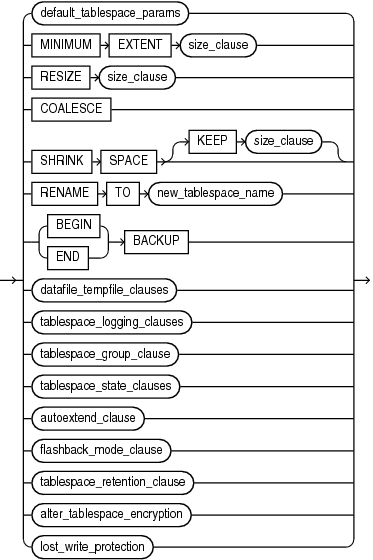
Description of the illustration alter_tablespace_attrs.gif
(See the following clauses of ALTER TABLESPACE: default_tablespace_params::=, size_clause::=, datafile_tempfile_clauses::=, tablespace_logging_clauses::=, tablespace_state_clauses::=, autoextend_clause::=, alter_tablespace_encryption::=)
Semantics
tablespace_set
Specify the name of the tablespace set to be altered.
alter_tablespace_attrs
Use this clause to change an attribute for all tablespaces in the tablespace set.
The subclauses of alter_tablespace_attrs have the same semantics here as for the ALTER TABLESPACE statement, with the following exceptions:
-
You cannot specify the following subclauses for tablespace sets:
-
MINIMUMEXTENTsize_clause -
SHRINKSPACE[ KEEPsize_clause] -
tablespace_group_clause
-
flashback_mode_clause
-
tablespace_retention_clause
-
-
For the datafile_tempfile_clauses, only the following subclauses are supported for tablespace sets:
-
RENAMEDATAFILE -
DATAFILE{ONLINE|OFFLINE}
-
-
For the tablespace_state_clauses, the
PERMANENTandTEMPORARYsubclauses are not supported for tablespace sets.
See Also: alter_tablespace_attrs in the documentation on ALTER TABLESPACE for the full semantics of this clause
Examples
Altering a Tablespace Set: Example
The following statement puts all tablespaces in tablespace set ts1 in force logging mode:
ALTER TABLESPACE SET ts1
  FORCE LOGGING;