TIME_BUCKET (datetime)
Syntax

Description of the illustration time_bucket.gif
timebucket_optional_clause::=
Description of the illustration timebucket_optional_clause.gif
Purpose
Use TIME_BUCKET(datetime) to obtain the datetime over an interval that you specify.
TIME_BUCKET has three required arguments, and two optional arguments .
-
The first argument datetime is the input to the bucket.
The third argument origin is an anchor to which all buckets are aligned.
datetime and origin can be
DATE,TIMESTAMP,TIMESTAMP WITH TIMEZONE,TIMESTAMP WITH LOCAL TIMEZONE,EPOCH TIME,BINARY_FLOAT,BINARY_DOUBLE,CHAR, expression, or a bind variable.EPOCH TIMEis represented by Oracle typeNUMBER, which is the number of seconds that have elapsed since 00:00:00 UTC on 1 January 1970. The supportedEPOCH TIMErange is fromSB8MINVAL(- 9223372036854775808, inclusive) toSB8MAXVAL(9223372036854775807, inclusive).There are implicit conversions for datetime and origin:
-
If it is
BINARY_FLOATorBINARY_DOUBLE, it will be converted toNUMBERimplicitly. Note that you must account for the loss in precision from implicit conversions. -
If it is
CHAR, it will be converted toTIMESTAMPimplicitly. Note thatCHARshould match the sessionNLS_TIMESTAMP_FORMAT. Otherwise an error is raised.
Fractional second is supported only if datetime and origin are
EPOCH TIME,BINARY_FLOATorBINARY_DOUBLE.The valid range for datetime and origin is from
-4712-01-01 00:00:00inclusive to9999-12-31 23:59:59:00inclusive. -
-
The second argument stride is a positive Oracle
INTERVAL, ISO 8601 time interval string, expression or bind variable. Fractional second is supported only if datetime and origin areEPOCH TIME,BINARY_FLOATorBINARY_DOUBLE.Oracle
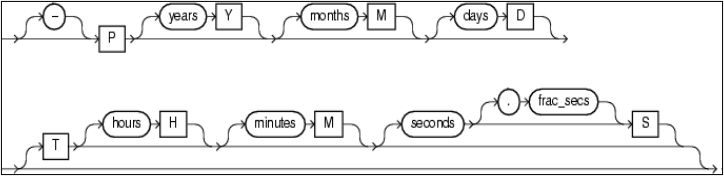
INTERVALhas two types of valid intervals:INTERVAL YEAR TO MONTHandINTERVAL DAY TO SECOND. If year or month is specified, all other units are ignored, if specified.For the ISO 8601 time interval string, years, months, days, hours, minutes and seconds are integers between
0and999999999.frac_secsis the fractional part of seconds between.0and.999999999.The ISO 8601 time interval string that you specify should match the definition of Oracle
INTERVAL.Pis required, and no blanks are allowed in the value. If you specifyT, then you must specify at least one ofhours,minutes, orseconds.hoursare based on 24-hour time.For example,
P100DT05Hindicates 100 days and 5 hours.P1Y2M‘indicates 1 year and 2 months.P1M1DT5H30M30Sis equivalent toP1Mwhich indicates 1 month.The syntax of the ISO 8601 time interval string:
Description of the illustration iso_8601_time_interval_string.png
Use only postive values for stride. (Although the Oracle
INTERVALand ISO 8601 time interval string can be positive or negative.)If datetime or origin is
EPOCH TIME,BINARY_FLOATorBINARY_DOUBLE, then stride cannot containYEARorMONTH. This is because month is variable and could be one of28,29,30or31. -
The fourth argument is optional and specifies whether the start or the end of the time bucket is returned. Specify
STARTto return the start value of the time bucket orENDto return the end value . The values are case-insensitive. The default value isSTART. -
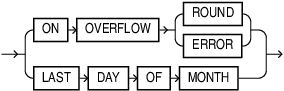
The fifth argument is optional and controls how the buckets (strides) are determined.
ON OVERFLOW ROUND(default): The buckets will be cut on the same day as origin in the corresponding month. For a month that does not have that day, the bucket is rounded to the last day of the month.ON OVERFLOW ERROR: The buckets will be cut on the same day as origin in the corresponding month. For a month that does not have that day will error out.LAST DAY OF MONTH: If origin is the last day of the month and stride only containsMONTHand/orYEAR, the buckets will be cut on the corresponding last day of the month.For example, if origin is
'1991-11-30'and stride is'P1M', then:-
For
ON OVERFLOW ROUND, the start of each bucket will be:..., 1991-11-30, 1991-12-30, 1992-01-30, 1992-02-29, 1992-03-30, 1992-04-30,... -
For
ON OVERFLOW ERROR, the start of each bucket will be:..., 1991-11-30, 1991-12-30, 1992-01-30, error (or 1992-02-30), 1992-03-30, 1992-04-30,... -
For
LAST DAY OF MONTH, the start of each bucket will be:..., 1991-11-30, 1991-12-31, 1992-01-31, 1992-02-29, 1992-03-31, 1992-04-30, ...
-
Rules
-
The end of each bucket is the same as the beginning of the following bucket. For example, if the bucket is 2 years and the start of the slice is
2000-01-01, then the end of the bucket will be2002-01- 01, not2001-12-31. In other words, the bucket contains datetime greater than or equal to the start and less than (but not equal to) the end. -
In general,
STARTof a bucket is always less thanENDof the bucket. But for the bucket on the two sides of the valid time range,STARTcan be equal toEND. -
origin and datetime can be positive or negative as long as it is in the valid range. Errors are raised if origin or datetime is outside of the valid range, or if the return value is outside of the valid range.
-
If the input value is of type
TIMESTAMP WITH TIME ZONEorTIMESTAMP WITH LOCAL TIME ZONE, then a time bucket might cross the daylight saving time boundaries. In this case, the duration of the time bucket is still the same as any other time bucket. -
If origin and datetime are
TIMESTAMP WITH TIME ZONEorTIMESTAMP WITH LOCAL TIME ZONE, all arithmetic calculations are based in UTC time.
For details on dependencies with NLS_LANGUAGE and NLS_CALENDAR see Database Globalization Support Guide
Examples
The following examples use the NLS_DATE_FORMAT YYYY-MM-DD. Set the date format with ALTER SESSION:
ALTER SESSION SET NLS_DATE_FORMAT='YYYY-MM-DD';Example 1
SELECT TIME_BUCKET (DATE '2022-06-29', INTERVAL '5' YEAR, DATE '2000-01-01', START);The result is:
2020-01-01The 5-year time bucket that contains 2022-06-29 is from 2020-01-01(start) to 2025- 01-01(end). The fourth argument START is used, so the start of the time bucket 2020-01-01 is returned.
Example 2
The following two queries are equivalent:
SELECT TIME_BUCKET ( DATE '-2022-06-29', 'P5M', DATE '-2022-01-01', END );Or:
SELECT TIME_BUCKET ( DATE '-2022-06-29', INTERVAL '5' MONTH, DATE '-2022-01-01', END);The result is:
-2022-11-01The 5-month time bucket that contains -2022-06-29 is from 2022-06-01(start) to -2022- 11-01(end). The fourth argument END is used, so the end of the time bucket 2022-11-01 is returned.
Example 3
SELECT TIME_BUCKET ( DATE '2005-03-10', 'P1Y', DATE '2004-02-29' ON OVERFLOW ERROR );The result is:
ORA-01839: date not valid for month specifiedThe one-year time bucket that contains '2005-03-10' is from error (or '2005-02-29') (start) to error (or '2006-02-29') (end). Default fourth argument START is used, so the start of the time bucket should be returned which is an error.
Example 4
SELECT TIME_BUCKET ( DATE '2005-03-10', 'P1Y', DATE '2004-02-29' ON OVERFLOW ROUND );The result is:
2005-02-28The one-year time bucket that contains '2005-03-10' is from '2005-02-28'(start) to '2006- 02-28'(end) since February 29 is rounded to February 28. Default fourth argument START is used, so the start of the time bucket is returned: '2005-02-28'.
Example 5
SELECT TIME_BUCKET ( DATE '2004-04-02', 'P1Y', DATE '2003-02-28' LAST DAY OF MONTH );The result is:
2004-02-29The one-year time bucket that contains '2003-02-28' is from '2004-02-29'(start) to '2005- 02-28'(end) since '2004-02-28' is rounded to the last day of that month which is '2004-02-29'. Default fourth argument START is used, so the start of the time bucket is returned: '2004-02- 29'.