Importing and Exporting Optimizer Statistics
You can export and import optimizer statistics from the data dictionary to user-defined statistics tables. You can also copy statistics from one database to another database.
About Transporting Optimizer Statistics
When you transport optimizer statistics between databases, you must use DBMS_STATS to copy the statistics to and from a staging table, and tools to make the table contents accessible to the destination database.
Purpose of Transporting Optimizer Statistics
Importing and exporting are especially useful for testing an application using production statistics.
Developers often want to tune query plans in a realistic environment before deploying applications. A typical scenario would be to use DBMS_STATS.EXPORT_SCHEMA_STATS to export schema statistics from a production database to a test database.
How Transporting Optimizer Statistics Works
The typical transport operation uses a combination of DBMS_STATS and file transfer utilities.
The following figure illustrates the process using Oracle Data Pump and ftp.
Figure 1: Transporting Optimizer Statistics
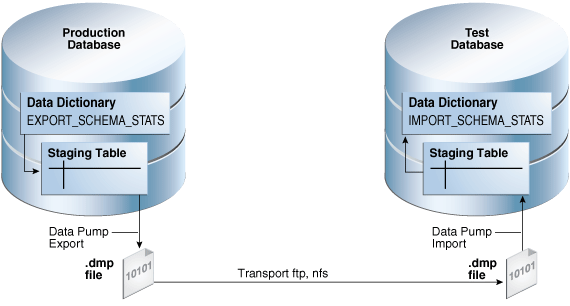
Description of the illustration tgsql_vm_021.png
The basic steps are as follows:
-
In the production database, copy the statistics from the data dictionary to a staging table using
DBMS_STATS.EXPORT_SCHEMA_STATS. -
Export the statistics from the staging table to a
.dmpfile using Oracle Data Pump. -
Transfer the
.dmpfile from the production host to the test host using a transfer tool such asftp. -
In the test database, import the statistics from the
.dmpfile to a staging table using Oracle Data Pump. -
Copy the statistics from the staging table to the data dictionary using
DBMS_STATS.IMPORT_SCHEMA_STATS.
User Interface for Importing and Exporting Optimizer Statistics
DBMS_STATS provides the interface for importing and exporting statistics for schemas and tables.
The following subprograms in DBMS_STATS enable you to export schemas and different types of tables.
Table 1 Subprograms for Exporting Schema and Table Statistics
| Subprogram | Description |
|---|---|
EXPORT_DATABASE_STATS |
This procedure exports statistics for all objects in the database and stores them in the user statistics tables identified by statown.stattab. |
EXPORT_DICTIONARY_STATS |
This procedure exports statistics for all data dictionary schemas (SYS, SYSTEM, and RDBMS component schemas) and stores them in the user statistics table identified by stattab. |
EXPORT_FIXED_OBJECT_STATS |
This procedure exports statistics for fixed tables and stores them in the user statistics table identified by stattab. |
EXPORT_SCHEMA_STATS |
This procedure exports statistics for all objects in the schema identified by By default, the |
EXPORT_TABLE_STATS |
This procedure exports statistics for a specified table (including associated index statistics) and stores them in the user statistics table identified by By default, the |
The following subprograms in DBMS_STATS enable you to import schemas and different types of tables.
Table 2 Subprograms for Importing Optimizer Statistics
| Subprogram | Description |
|---|---|
IMPORT_DATABASE_STATS |
This procedure imports statistics for all objects in the database from the user statistics table and stores them in the data dictionary. |
IMPORT_DICTIONARY_STATS |
This procedure imports statistics for all data dictionary schemas (SYS, SYSTEM, and RDBMS component schemas) from the user statistics table and stores them in the dictionary. |
IMPORT_FIXED_OBJECT_STATS |
This procedure imports statistics for fixed tables from the user statistics table and stores them in the data dictionary. |
IMPORT_SCHEMA_STATS |
This procedure imports statistics for all objects in the schema identified by By default, the |
IMPORT_TABLE_STATS |
This procedure import statistics for a specified table from the user statistics table identified by By default, the |
See Also: Oracle AI Database PL/SQL Packages and Types Reference to learn about DBMS_STATS
Transporting Optimizer Statistics to a Test Database: Tutorial
You can transport schema statistics from a production database to a test database using Oracle Data Pump.
Prerequisites and Restrictions
When preparing to export optimizer statistics, note the following:
-
Before exporting statistics, you must create a table to hold the statistics. The procedure
DBMS_STATS.CREATE_STAT_TABLEcreates the statistics table. -
The optimizer does not use statistics stored in a user-owned table. The only statistics used by the optimizer are the statistics stored in the data dictionary. To make the optimizer use statistics in user-defined tables, import these statistics into the data dictionary using the
DBMS_STATSimport procedure.
Note: Exporting and importing statistics using DBMS_STATS is a distinct operation from using Data Pump Export and Import.
Assumptions
This tutorial assumes the following:
-
You want to generate representative
shschema statistics on a production database and useDBMS_STATSto import them into a test database. -
Administrative user
dba1exists on both production and test databases. -
You intend to create table
opt_statsto store the schema statistics. -
You intend to use Oracle Data Pump to export and import table
opt_stats.
To generate schema statistics and import them into a separate database:
-
On the production host, start SQL*Plus and connect to the production database as administrator
dba1. -
Create a table to hold the production statistics.
For example, execute the following PL/SQL program to create user statistics table
opt_stats:BEGIN DBMS_STATS.CREATE_STAT_TABLE ( ownname => 'dba1' , stattab => 'opt_stats' ); END; / -
Gather schema statistics.
For example, manually gather schema statistics as follows:
-- generate representative workload EXEC DBMS_STATS.GATHER_SCHEMA_STATS('SH'); -
Use
DBMS_STATSto export the statistics.For example, retrieve schema statistics and store them in the
opt_statstable created previously:BEGIN DBMS_STATS.EXPORT_SCHEMA_STATS ( ownname => 'dba1' , stattab => 'opt_stats' ); END; / -
Use Oracle Data Pump to export the contents of the statistics table.
For example, run the
expdpcommand at the operating schema prompt:expdp dba1 DIRECTORY=dpump_dir1 DUMPFILE=stat.dmp TABLES=opt_stats -
Transfer the dump file to the test database host.
-
Log in to the test host, and then use Oracle Data Pump to import the contents of the statistics table.
For example, run the
impdpcommand at the operating schema prompt:impdp dba1 DIRECTORY=dpump_dir1 DUMPFILE=stat.dmp TABLES=opt_stats -
On the test host, start SQL*Plus and connect to the test database as administrator
dba1. -
Use
DBMS_STATSto import statistics from the user statistics table and store them in the data dictionary.The following PL/SQL program imports schema statistics from table
opt_statsinto the data dictionary:BEGIN DBMS_STATS.IMPORT_SCHEMA_STATS( ownname => 'dba1' , stattab => 'opt_stats' ); END; /
See Also:
-
Oracle AI Database PL/SQL Packages and Types Reference to learn about the
DBMS_STATS.CREATE_STAT_TABLEfunction -
Oracle AI Database PL/SQL Packages and Types Reference for an overview of the statistics transfer functions
-
Oracle AI Database Utilities to learn about Oracle Data Pump