About Ubiquitous Search and Ubiquitous Search Indexes
Ubiquitous search enables you to perform full-text and range-based queries across multiple objects within an entire schema. You can use a ubiquitous search index (or simply a DBMS_SEARCH index) to perform ubiquitous searches.
A ubiquitous search index is a JSON SEARCH INDEX type with predefined set of preferences and settings that are enabled for performing full-text search on tables, views, or JSON Duality views. You use the DBMS_SEARCH PL/SQL package to create, manage, and query these indexes.
You can create a DBMS_SEARCH index on tables or views over schemas that you have SELECT privileges on. You can add data sources, that is tables and views, into this index (without the need to materialize the views). All the columns in the specified sources are indexed and available for full-text or range-based search.
Why Choose a Ubiquitous Search Index?
This indexing technique lets you create indexes across multiple objects, add or remove data sources, and perform full-text or range-based searches within a single data source or across multiple sources using the same index. This simplifies the indexing tasks that previously (prior to Oracle AI Database 26ai) required you to create multiple individual indexes and manually combine various data sources using the MULTI_COLUMN_DATASTORE or USER_DATASTORE procedures along with materialized views. Previously, this also required additional methods, such as triggers, to ensure that the index remained synchronized with DML operations.
With a simplified set of DBMS_SEARCH APIs, you can perform ubiquitous searches across the database as follows:
-
Create index:
The
DBMS_SEARCH.CREATE_INDEXAPI allows you to create aDBMS_SEARCHindex.By default, this index is created with key indexing preferences, such as
BASIC_WORDLISTto allow wildcard search andSEARCH_ONto allow both full-text and range-search queries. These indexes are asynchronously maintained in the background at predefined intervals, and thus you do not need to explicitly run theSYNC_INDEXandOPTIMIZE_INDEXoperations on such indexes. -
Manage data sources:
You can define which tables or views should be indexed by adding them as data sources into your index.
The
DBMS_SEARCH.ADD_SOURCEAPI allows you to automatically add one or more data sources (such as tables, views, or duality views) from different schemas to this index.The
DBMS_SEARCH.REMOVE_SOURCEAPI allows you to remove a source and all its associated data from the index. -
View combined indexed data:
The
DBMS_SEARCH.GET_DOCUMENTAPI allows you to view a virtual document that is indexed, which displays metadata values as indexed for each row of all your data sources. -
Query multiple objects:
The
DBMS_SEARCH.FINDAPI allows you to retrieve a hitlist of all documents based on the specified filter conditions.
This index creates background jobs at predefined intervals to synchronize the DML changes and optimize the index using the AUTO_DAILY mode on all data sources. You do not need to explicitly run the SYNC_INDEX and OPTIMIZE_INDEX operations on this index.
Ubiquitous Search Index Creation Overview
You create a DBMS_SEARCH index by simply specifying an index name and then adding various data sources to it. This is illustrated in the following diagram:
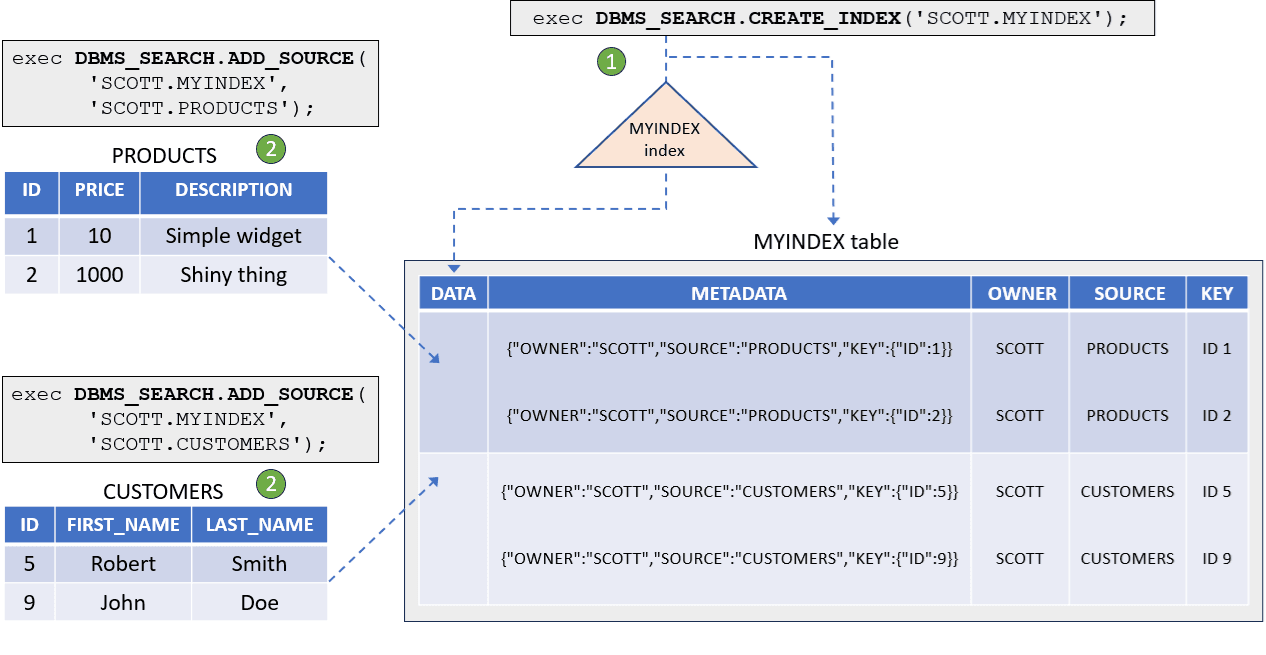
Description of the illustration ubiquitous_search_index.png
-
The first command (
DBMS_SEARCH.CREATE_INDEXprocedure) creates an index table as[schema].index_name. A ubiquitous search index, also named[schema].index_name, is created on theDATAcolumn of the index table. Note that the index table name matches your index name.Here, the schema owner name (
SCOTT) is specified along with the index name (MYINDEX) asSCOTT.MYINDEX. -
The second command (
DBMS_SEARCH.ADD_SOURCEprocedure) adds one or more data sources such as tables, views, or duality views from different schemas.Here, this procedure combines contents from all the columns of the
PRODUCTSandCUSTOMERStables in Scott’s schema into theMYINDEXtable.
The MYINDEX table contains the following columns:
-
DATA (JSON datatype):
This is an empty column, and is a placeholder for querying the
DBMS_SEARCHindex. You add your data sources into theDATAcolumn. You can then run PL/SQL queries against thisDATAcolumn using theCONTAINS(),JSON_TEXTCONTAINS(), andJSON_EXISTSoperators.The
DATAcolumn creates a JSON representation of the following form for each indexed row of the table or view that is added as a data source to this index:{"OWNER": { "TABLE_NAME":{"COLUMN1_NAME":"COLUMN1_VALUE",...} } }Note that the
DATAcolumn does not store actual data. Instead, the data resides in the original base tables. This index references your data source tables to create a virtual indexed JSON document on the fly. After the data is fetched and indexed, this column is effectively emptied to avoid duplication. -
METADATA (JSON datatype):
The
METADATAcolumn helps theDBMS_SEARCHindex to uniquely identify each row of the table or view that is indexed. After adding data sources to this index, you can see that theMETADATAcolumn stores a JSON representation of the following form for each indexed row of your data source:{ "OWNER" : "Table_Owner or View_Owner", "SOURCE" : "Table_Name or View_Name", "KEY" : "{PrimaryKey_COLUMN_i" : PrimaryKey_VALUE_i} }OWNERspecifies the owner of the table or view added as a data source into this index.SOURCEspecifies the table name or view name of the data source.KEYis composed of all the primary key columns of the data source table. If the table does not have a primary key, then aROWIDis used instead. However, Oracle strongly recommends defining a primary key.As the diagram illustrates, the
METADATAcolumn stores corresponding JSON entries of the following form for each indexed row:For the
PRODUCTStable:{"OWNER":"SCOTT","SOURCE":"PRODUCTS","KEY":{"ID":1}} {"OWNER":"SCOTT","SOURCE":"PRODUCTS","KEY":{"ID":2}}For the
CUSTOMERStable:{"OWNER":"SCOTT","SOURCE":"CUSTOMERS","KEY":{"ID":5}} {"OWNER":"SCOTT","SOURCE":"CUSTOMERS","KEY":{"ID":9}}Note: The
DBMS_SEARCHindex stores all supported SQL data types (includingObject Typecolumns) as JSON objects, except for theXMLTYPEandLONGdata types. Therefore, you cannot add a table or view as data source if it has a column with theXMLTYPEorLONGdata type. -
OWNER, SOURCE, KEY (VARCHAR2 datatype):
Each JSON key of the
METADATAcolumn, that is,OWNER,SOURCE, andKEY, is also a separate virtual column in theMYINDEXtable.Note that the
MYINDEXtable is partitioned byOWNERandSOURCE. When querying a particular data source, you can add aWHEREclause condition on theOWNERandSOURCEvirtual columns to restrict your query search to a specific partition of that source using partition pruning.Note: All the data sources (such as table, view, or each table in the view definition) that are added to the
DBMS_SEARCHindex must include at least onePrimary Keycolumn. Each table that is part of a view source having a foreign key must also have theForeign Keyconstraint, referencing the relevant primary keys defined on the table. If the source table does not have a primary key, then aROWIDis used instead.
Query Indexed Data
As discussed earlier, you can use the DBMS_SEARCH.GET_DOCUMENT procedure to view all the contents extracted from the original base tables by querying a virtual document. This document contains a JSON representation for each indexed row of a table or view that is added as data source to your index.
The syntax for DBMS_SEARCH.GET_DOCUMENT is:
SELECT DBMS_SEARCH.GET_DOCUMENT('[schema].index_name', METADATA)
 from [schema].index_name;
For example, using our earlier PRODUCTS and CUSTOMERS source tables scenario, the following statement returns a virtual document with combined metadata values as indexed in the MYINDEX index:
SELECT DBMS_SEARCH.GET_DOCUMENT('SCOTT.MYINDEX',METADATA)
  from SCOTT.MYINDEX;

DBMS_SEARCH.GET_DOCUMENT('SCOTT.MYINDEX', METADATA)
-----------------------------------------------------------------
{
  "SCOTT" :
  {
    "PRODUCTS" :
    {
      "ID"          : 1,
      "PRICE"       : 10,
      "DESCRIPTION" : "simple widget"
    }
  }
}
{
  "SCOTT" :
  {
    "PRODUCTS" :
    {
      "ID"          : 2,
      "PRICE"       : 2000,
      "DESCRIPTION" : "shiny thing"
    }
  }
}
{
  "SCOTT" :
  {
    "CUSTOMERS" :
    {
      "ID"         : 5,
      "FIRSTNAME"  : "Robert",
      "LASTNAME"   : "Smith"
    }
  }
}
{
  "SCOTT" :
  {
    "CUSTOMERS" :
    {
      "ID"         : 9,
      "FIRSTNAME"  : "John",
      "LASTNAME"   : "Doe"
    }
  }
}
You can now run queries against your index using the CONTAINS, JSON_TEXTCONTAINS, and JSON_EXISTS operators.
DBMS_SEARCH Dictionary Views
You can use the following dictionary views to examine your ubiquitous search indexes:
-
USER_DBMS_SEARCH_INDEXES: To query information about the indexes that are created in a user’s schema. -
ALL_DBMS_SEARCH_INDEXES: To query information about all existing indexes, corresponding to each index owner. -
USER_DBMS_SEARCH_INDEX_SOURCES: To query information about the data sources that are added to indexes, created in a user’s schema. -
ALL_DBMS_SEARCH_INDEX_SOURCES: To query information about all existing data sources added to indexes, corresponding to each index owner.
Related Topics