About Configuring Client Connections to Entra ID
There are three different ways for an Oracle AI Database client to use an Entra ID OAuth2 token to send to the database for access.
-
Connect to Entra ID endpoint directly and retrieve the token for the user (interactive flow).
-
Retrieve the token from a file location (all supported Entra ID flows).
-
Pass the token to the client by using the client API (all supported Entra ID flows).
Oracle AI Database supports several Entra ID flows for different use cases. You should review the details of each flow in the Microsoft documentation. Each database client can support different flows with different versions. Details of these types are available in the JDBC, ODP.NET, and other platform-specific client documentation for the supported Entra ID flows for the client. This section focuses on the use of the OCI and Instant Clients, which are also called thick clients.
The types of available flows are as follows:
-
The interactive flow (also known as the OAuth2 authz flow) is the primary flow used by human actors. This flow requires an environment that can open a browser so that the user to enter their Entra ID credentials.
-
The device code flow is supported by some clients, but not currently with the OCI and Instant Clients. This type of flow is also for human actors but for environments that cannot open a browser.
-
The managed identity flow is for applications that run on Azure compute nodes and have access to the managed identity for the node.
-
The client credential flow is designed for applications, especially if they are not running in an Azure environment.
-
The Resource Owner Password Credential (ROPC) flow is not recommended for production use.
When a user must access the database as a human actor, Oracle recommends that you configure the interactive flow and configure the database client to retrieve the token directly from Entra ID. An application will need to use the client credential flow. Commonly, the application will use a script that is run periodically to retrieve a token from Entra ID and place it into a file location for the database client to use. If the application can be modified to integrate with the Entra ID SDK, then it can alternatively use the SDK to retrieve the token and pass it to the client using the client API.
You should choose the client connection method that works best with your use case. This guide provides examples of connecting SQL*Plus with different methods of getting an Entra ID OAuth2 access token. All Oracle Database release 19c clients can accept a token that is passed as a file or through the client API. The JDBC-thin, Instant Client, and ODP.net drivers also accept the token through the database client API from an application. Tools such as PowerShell or Azure CLI can retrieve the Entra ID OAuth2 access token for use by the client driver. To retrieve an Entra ID token, the client must be registered through the Entra ID app (application) registration process. Registering the client is similar to registering the Oracle Database server with Entra ID using the app registration. Both the database and client must be registered with Entra ID.
The database must be registered so the client can get permission to get an access token for the database. The client must be registered so that Entra ID can recognize a trusted client is asking for an access token.
See the following Microsoft Azure articles for more information about connecting clients to Entra ID:
-
Quickstart: Configure a client application to access a web API
-
Get Entra ID tokens by using the Microsoft Authentication Library
Related Topics
Operational Flow for SQL*Plus Client Connection to Oracle AI Database Using Microsoft Entra ID OAuth2 Token
The connection between the Azure user, Entra ID, and an Oracle AI Database relies on the passing of the OAuth2 token throughout these three components.
There are three ways for an Oracle Database client to send an Entra ID OAuth2 token to an Oracle AI Database.
-
Through the Oracle Database client
-
By specifying a file location
-
Using the Oracle Database client API
Using an Oracle Database Client to Send the Entra ID OAuth2 Token to the Oracle AI Database
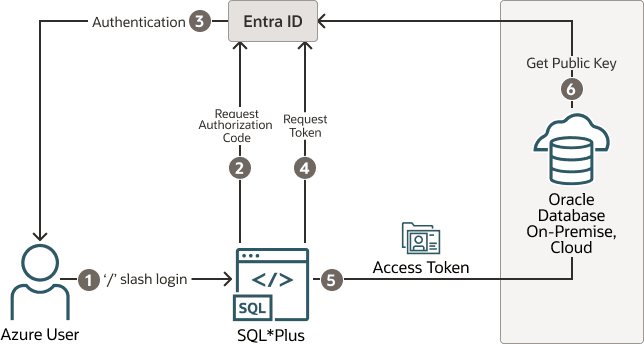
The Oracle Database client can request an OAuth2 token directly from the Entra ID endpoint. This method simplifies the required configuration. The following diagram shows the use of the interactive flow with a public client. The interactive flow is also called the OAuth2 authorization flow. See the Microsoft identity platform and OAuth2.0 authorization code flow Microsoft article for detailed information about the authorization flow.
Figure 3: Entra ID OAuth2 Tokens Sent to theOracle AI DatabaseUsing Client
Description of the illustration entra_client_token.png
-
The user uses a
/slash login to use the Azure SSO login. The connect string (orsqlnet.ora) includes all the parameters that are required for the Oracle Database client to get a token for the user. -
The Oracle Database client connects with the Entra ID endpoint to request an authorization code.
-
If the user has not logged in with Entra ID, then a browser window opens and requests the user to enter their Azure SSO credentials.
-
The Oracle Database client requests an
OAuth2access token using the authorization code. -
When the Oracle Database client receives the
OAuth2access token, it sends this token to the Oracle AI Database. -
The Oracle AI Database verifies that the access token came from Entra ID (using the Entra ID public key) and then checks the token for additional claims. Next, the database finds the schema mapping (exclusive or shared) and creates the session. The database will also grant any global roles that the Azure user is also assigned to through an app role.
Specifying a File Location to Send the Entra ID OAuth2 Token to the Oracle AI Database
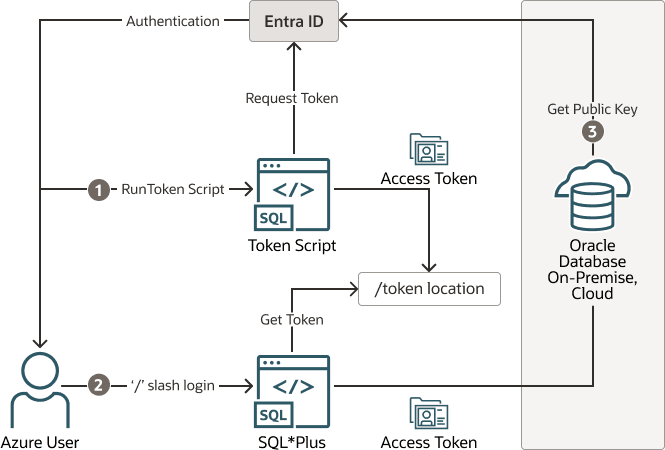
The following diagram illustrates how a file location can be used to send the Entra ID OAuth2 token to an Oracle AI Database.
Figure 4: Entra ID OAuth2 Tokens Sent to theOracle AI DatabaseUsing File Location
Description of the illustration entra_client_file_loc.png
-
The Azure user requests an Entra ID access token for the database using a script and the returned token is written into a file called
tokenat a file location. The Azure user may be requested to authenticate with Entra ID at this time. -
The Azure user connects to the database using the
/slash login. Either thesqlnet.oraortnsnames.oraconnection string tells the Oracle Instant Client that an Entra IDOAuth2token is needed and to retrieve it from a specified file location. The access token is then sent to the Oracle AI Database. -
The Oracle AI Database verifies that the access token came from Entra ID (using the Entra ID public key) and then checks the token for additional claims. The database then finds the schema mapping (exclusive or shared) and creates the database session. The database will also grant any global roles that the Azure user is also assigned to through an app role.
Using the Oracle Database Client API to Send the Entra ID OAuth2 Token to the Oracle AI Database
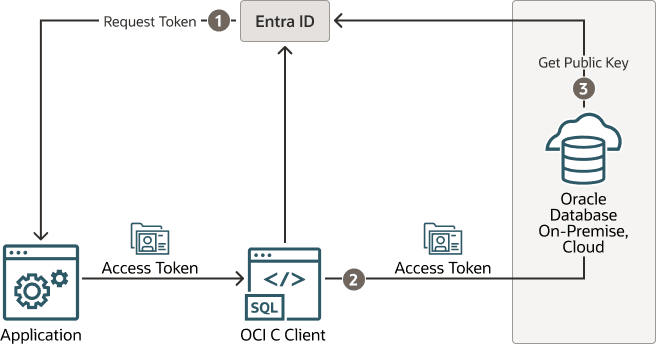
The following diagram illustrates how the Oracle Database Client API can be used to send the Entra ID OAuth2 Token to the Oracle AI Database.
Figure 5: Entra ID OAuth2 Tokens Sent to theOracle AI DatabaseUsing the Client API
Description of the illustration entra_client_api.png
-
The application requests an Entra ID access token for the Oracle AI Database using a script. The returned token is then sent to the database client using the client API. The token can represent the user (on-behalf-of token flow) or the application (client credential flow)
-
The Oracle Database client sends the access token to the Oracle AI Database.
-
The Oracle AI Database verifies that the access token came from Entra ID (using the Entra ID public key) and then checks the token for additional claims. The database finds the schema mapping (exclusive or shared) and creates the session. The database will also grant any global roles that the application or user is assigned to through an app role.