Initializing Database Session-Based Application Contexts Globally
When a database session-based application is stored in a centralized location, it can be used globally from an LDAP directory.
-
About Initializing Database Session-Based Application Contexts Globally
You can use a centralized location to store the database session-based application context of the user. -
Database Session-Based Application Contexts with LDAP
An application context that is initialized globally uses LDAP, a standard, extensible, and efficient directory access protocol. -
How Globally Initialized Database Session-Based Application Contexts Work
To use a globally initialized secure application, you must first configure Enterprise User Security. -
Initializing a Database Session-Based Application Context Globally
You can configure and store the initial application context for a user, such as the department name and title, in the LDAP directory.
About Initializing Database Session-Based Application Contexts Globally
You can use a centralized location to store the database session-based application context of the user.
A centralized location enables applications to set up a user context during initialization based upon user identity.
In particular, this feature supports Oracle Label Security labels and privileges. Initializing an application context globally makes it easier to manage contexts for large numbers of users and databases.
For example, many organizations want to manage user information centrally, in an LDAP-based directory. Enterprise User Security supports centralized user and authorization management in Oracle Internet Directory. However, there may be additional attributes an application must retrieve from Lightweight Directory Access Protocol (LDAP) to use for Oracle Virtual Private Database enforcement, such as the user title, organization, or physical location. Initializing an application context globally enables you to retrieve these types of attributes.
Note: Enterprise User Security (EUS) is deprecated with Oracle AI Database 26ai.Oracle recommends that you migrate to using Centrally Managed Users (CMU). This feature enables you to directly connect with Microsoft Active Directory without an intervening directory service for enterprise user authentication and authorization to the database. If your Oracle Database is in the cloud, you can also choose to move to one of the newer integrations with a cloud identity provider.
Database Session-Based Application Contexts with LDAP
An application context that is initialized globally uses LDAP, a standard, extensible, and efficient directory access protocol.
The LDAP directory stores a list of users to which this application is assigned. Oracle Database uses a directory service, typically Oracle Internet Directory, to authenticate and authorize enterprise users.
Note: You can use third-party directories such as Microsoft Active Directory and Sun Microsystems SunONE as the directory service.
The orclDBApplicationContext LDAP object (a subclass of groupOfUniqueNames) stores the application context values in the directory. The location of the application context object is described in Figure 13-1, which is based on the Human Resources example.
The LDAP object inetOrgPerson enables multiple entries to exist for some attributes. However, be aware that when these entries are loaded into the database and accessed with the SYS_LDAP_USER_DEFAULT context namespace, then only the first of these entries is returned. For example, the inetOrgPerson object for a user allows multiple entries for telephoneNumber (thus allowing a user to have multiple telephone numbers stored). When you use the SYS_LDAP_USER_DEFAULT context namespace, only the first telephone number is retrieved. If the list of attributes and values that are provided are not sufficient for your needs, then you can use the DBMS_LDAP PL/SQL package to fetch additional values from the directory.
On the LDAP side, an internal C function is required to retrieve the orclDBApplicationContext value, which returns a list of application context values to the database. In this example, HR is the namespace; Title and Project are the attributes; and Manager and Promotion are the values.
Figure 1: Location of Application Context in LDAP Directory Information Tree
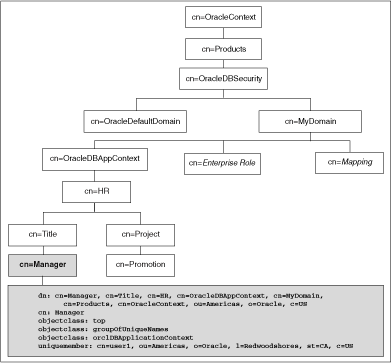
Description of the illustration adfns001.gif
How Globally Initialized Database Session-Based Application Contexts Work
To use a globally initialized secure application, you must first configure Enterprise User Security. Note: Enterprise User Security (EUS) is deprecated with Oracle AI Database 26ai.Oracle recommends that you migrate to using Centrally Managed Users (CMU). This feature enables you to directly connect with Microsoft Active Directory without an intervening directory service for enterprise user authentication and authorization to the database. If your Oracle Database is in the cloud, you can also choose to move to one of the newer integrations with a cloud identity provider.
Then, you configure the application context values for the user in the database and the directory.
When a global user (enterprise user) connects to the database, Enterprise User Security verifies the identity of the user connecting to the database. After authentication, the global user roles and application context are retrieved from the directory. When the user logs on to the database, the global roles and initial application context are already set.
Related Topics
Initializing a Database Session-Based Application Context Globally
You can configure and store the initial application context for a user, such as the department name and title, in the LDAP directory.
The values are retrieved during user login so that the context is set properly. In addition, any information related to the user is retrieved and stored in the SYS_USER_DEFAULTS application context namespace.
-
Create the application context in the database.
CREATE CONTEXT hr USING hrapps.hr_manage_pkg INITIALIZED GLOBALLY; -
Create and add new entries in the LDAP directory.
An example of the entries added to the LDAP directory follows. These entries create an attribute named
Titlewith the attribute valueManagerfor the application (namespace)HR, and assign user namesuser1anduser2. In the following,cn=examplerefers to the name of the domain.dn: cn=OracleDBAppContext,cn=example,cn=OracleDBSecurity,cn=Products,cn=OracleContext,ou=Americas,o=oracle,c=US changetype: add cn: OracleDBAppContext objectclass: top objectclass: orclContainer dn: cn=hr,cn=OracleDBAppContext,cn=example,cn=OracleDBSecurity,cn=Products,cn=OracleContext,ou=Americas,o=oracle,c=US changetype: add cn: hr objectclass: top objectclass: orclContainer dn: cn=Title,cn=hr, cn=OracleDBAppContext,cn=example,cn=OracleDBSecurity,cn=Products,cn=OracleContext,ou=Americas,o=oracle,c=US changetype: add cn: Title objectclass: top objectclass: orclContainer dn: cn=Manager,cn=Title,cn=hr, cn=OracleDBAppContext,cn=example,cn=OracleDBSecurity,cn=Products,cn=OracleContext,ou=Americas,o=oracle,c=US cn: Manager objectclass: top objectclass: groupofuniquenames objectclass: orclDBApplicationContext uniquemember: CN=user1,OU=Americas,O=Oracle,L=Redwoodshores,ST=CA,C=US uniquemember: CN=user2,OU=Americas,O=Oracle,L=Redwoodshores,ST=CA,C=US -
If an LDAP
inetOrgPersonobject entry exists for the user, then the connection retrieves the attributes frominetOrgPerson, and assigns them to the namespaceSYS_LDAP_USER_DEFAULT. Note that the context is only populated with non-NULLvalues that are part of theinetOrgPersonobject class. No other attributes will be populated.The following is an example of an
inetOrgPersonentry:dn: cn=user1,ou=Americas,O=oracle,L=redwoodshores,ST=CA,C=US changetype: add objectClass: top objectClass: person objectClass: organizationalPerson objectClass: inetOrgPerson cn: user1 sn: One givenName: User initials: UO title: manager, product development uid: uone mail: uone@us.example.com telephoneNumber: +1 650 555 0105 employeeNumber: 00001 employeeType: full time -
Connect to the database.
When
user1connects to a database that belongs to theexampledomain,user1will have theirTitleset toManager. Any information related touser1will be retrieved from the LDAP directory. The value can be obtained using the following syntax:SYS_CONTEXT('namespace','attribute name')For example:
DECLARE
 tmpstr1 VARCHAR2(30);
 tmpstr2 VARCHAR2(30);
BEGIN
 tmpstr1 = SYS_CONTEXT('HR','TITLE);
 tmpstr2 = SYS_CONTEXT('SYS_LDAP_USER_DEFAULT','telephoneNumber');
 DBMS_OUTPUT.PUT_LINE('Title is ' || tmpstr1);
 DBMS_OUTPUT.PUT_LINE('Telephone Number is ' || tmpstr2);
END;
The output of this example is:
Title is Manager
Telephone Number is +1 650 555 0105