About Data Grants
Data grants are the central policy mechanism in Oracle Deep Data Security (Deep Sec) for controlling fine-grained access at the row, column, and cell levels.
A data grant authorizes access to specific rows and columns within a table, view, or materialized view. Each data grant specifies the privileges and an optional predicate to filter rows, and establishes who receives the authorization in one of two ways:
-
Directly, by naming one or more end users or data roles as grantees, or
-
Conditionally, by deriving the authorization from data privileges held on a related parent object (a cross-table data grant). See Understand Cross-Table Data Grants.
Through multiple data grants on the same object, a user can hold different privileges on different row sets and column values (cells); for example, SELECT on some rows, UPDATE on specific column values within a subset of those rows, and SELECT, UPDATE, DELETE on another set of rows. Data grants are additive: the effective authorization is the union of all applicable data grants.
Deep Sec also provides data grant filters, which further limit the rows and column values available through applicable data grants. A data grant filter does not independently authorize access. Deep Sec evaluates data grants and data grant filters as follows:
-
Applicable data grants combine with
ORto form the authorization result. -
Applicable data grant filters combine with
ANDto form the filter result. -
The authorization result and the filter result combine with
AND. -
Data grants and data grant filters that do not apply to the current end user do not participate in the result.
A data grant filter can restrict rows by using a WHERE predicate and can restrict column values by specifying columns for the SELECT privilege. Column values that are not available after filter evaluation are returned as NULL, in accordance with the existing Deep Sec column-security behavior. For the supported privileges and restrictions, see Create Data Grants.
You define data grants and data grant filters using the CREATE DATA GRANT statement and remove them with DROP DATA GRANT. When a data grant names grantees, they must be Deep Sec end users or data roles; standard database users and roles cannot be grantees of a data grant.
You can query the DBA_DATA_GRANTS data dictionary view to review the existing data grants and data grant filters. Use GRANT_TYPE to determine whether an entry represents a data grant or a data grant filter. Use TAG_NAME to identify the tag specified using the WITH TAG clause. Both columns are also available in ALL_DATA_GRANTS and USER_DATA_GRANTS, subject to the existing visibility rules for those views. For cross-table data grants and data grant filters, you can additionally query the DBA_REQUIRED_PARENT_DATA_PRIVILEGES view to review the privileges that must be held on the parent object.
Note the following high-level behaviors of data grants:
-
Unauthorized column values are returned as NULL. On a
SELECT(or any DML statement with aSELECTclause), cells that the end user is not authorized to read are returned asNULL. -
Unauthorized rows and columns, and rows that do not match the predicate are silently skipped. Rows that fail an applicable predicate are filtered out of query results. When an
UPDATEtargets multiple cells in a single row and any target cell is unauthorized, the entire row is left unchanged and no error is raised, provided the user has someUPDATEandSELECTprivileges on the table or view through the data grant. ADELETEthat violates an authorized predicate is silently skipped, provided the user has someDELETEandSELECTprivileges on the table or view through the data grant. -
Errors are raised in the following cases. An
INSERT,UPDATE, orDELETEon a table or view for which the user has no applicable privilege granted through a data grant fails withORA-41900. AnINSERTthat violates an authorized predicate or attempts to populate a column outside the granted scope fails withORA-28115. ForUPDATE, any modification that violates the predicate raisesORA-28115. AnUPDATEorDELETEalso fails withORA-41900when the statement reads a column for which the user lacksSELECTprivilege: forUPDATE, this applies to columns referenced on the right-hand side of aSETexpression or in theWHEREclause; forDELETE, this applies to columns referenced in theWHEREclause. -
Data grants are the sole access path when USE DATA GRANTS ONLY is enabled. When this setting is enabled on a table or view, that object can be accessed only through data grants, and the same restrictions are enforced whether the object is queried directly or through a view. This setting applies to Deep Sec users only and does not affect standard database users with table-level privileges. For details, see Enforce Mandatory Data Privileges.
Reference table: hr.employees
Except where noted, examples in this chapter use the following hr.employees table.
EMPLOYEE_ID  FIRST_NAME  LAST_NAME  EMAIL       MANAGER     SSN          SALARY  PHONE
-----------  ----------  ---------  ----------  ----------  -----------  ------  --------
100          Victoria    Williams   vwilliams               219-09-9999  13000   555-0100
200          Marvin      Anderson   manderson   vwilliams   457-55-5462  12030   555-0200
300          Chris       Evans      cevans      vwilliams   321-12-4567   6900   555-0300
400          Emma        Baker      ebaker      manderson   733-02-9821   8200   555-0400
500          Taylor      Mills      tmills      manderson   558-76-1243   9000   555-0500
Understand Cross-Table Data Grants
Tables with related data often need to be secured as a unit. For example, access to rows in an order items table should depend on which orders a user is authorized to access. Similarly, in a star schema, access to rows in the central fact table should be determined by the rows that the user can view in the corresponding dimension table. Cross-table data grants address this requirement by propagating authorization through relationships between objects.
A cross-table data grant derives its authorization from a related object instead of naming grantees directly. The object that the grant protects, which is specified in the ON clause, is called the child object. The related object from which authorization is derived, which is specified in the WHEN ... GRANTED ON clause, is called the parent object. The grant specifies the privileges that must be held on the parent object, the privileges that are granted on the child object as a result, and a predicate that defines the join relationship between the two objects.
Note: In a cross-table data grant, do not use table aliases for the parent or child object names. Use fully qualified object names in the ON clause, the WHEN ... GRANTED ON clause, and the WHERE clause.
A cross-table data grant does not contain a TO clause. Any end user that holds the required privileges on a parent row (for example, through a data grant on the parent object) automatically receives the specified privileges on the corresponding child rows. When a user accesses the child object, Deep Sec automatically checks whether the user has access to the corresponding parent records. If access to a parent record is not present, access to its associated child records is not allowed.
Cross-table data grants can be layered into hierarchies in which the parent object is itself the child object of another cross-table data grant. For example, in a customers > orders > order items hierarchy, access to orders is derived from the customers a user is authorized to view, and access to order items is derived from those orders in turn. At runtime, Deep Sec determines access to rows in a target table based on access to the corresponding rows in its parent table, recursing through further ancestor tables in the hierarchy where applicable.
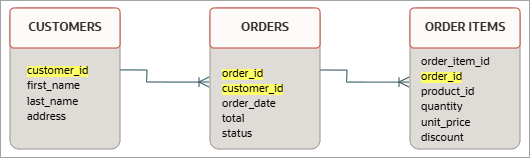
The following statements implement the two-step propagation shown in the figure. The first grant controls access to oe.orders, deriving authorization from oe.customers; the second controls access to oe.order_items, deriving authorization from oe.orders.
CREATE DATA GRANT oe.view_orders_by_customers
    AS SELECT, INSERT, UPDATE
    ON oe.orders
    WHEN SELECT, INSERT GRANTED ON oe.customers
    WHERE oe.orders.customer_id = oe.customers.customer_id;

CREATE DATA GRANT oe.view_order_items
    AS SELECT, INSERT, UPDATE
    ON oe.order_items
    WHEN SELECT GRANTED ON oe.orders
    WHERE oe.orders.order_id = oe.order_items.order_id;
The oe.view_orders_by_customers grant provides SELECT, INSERT, and UPDATE privileges on an order row if the user holds SELECT and INSERT access on the corresponding customer row. Similarly, oe.view_order_items grants those same three privileges on an order item by verifying the user has SELECT access on the parent order row (a privilege supplied by the first grant). Together, these two grants create a chain that propagates authorization from customers to orders to order items.
Use cases and benefits
Typical use cases for cross-table data grants include the following:
-
Analytics and reporting: In a star schema, access to rows in a fact table is based on the rows that the user can view in the related dimension tables.
-
Document management: Access to document versions or attachments (the child) is granted only if the user has permission to view the main document (the parent).
-
Healthcare records: A patient’s medical history details (the child) are accessible only if the user is authorized to access the patient’s main record (the parent).
Cross-table data grants provide the following benefits:
-
Simplified access management: A data grant defined once against the parent object automatically governs access to related child objects, which reduces the number of data grants that you must write and maintain.
-
Targeted access: Precise row-level and column-level controls ensure that users see only the parent and child records that they are authorized to see, and that access is enforced consistently across related tables.
You can create a cross-table data grant with the cross_table_datagrant_option of the CREATE DATA GRANT statement. See Create Data Grants.
Data Manipulation Language Privilege Semantics
Data grants combine row- and column-level privileges into a fine-grained authorization model that applies to all CRUD operations.
Each DML operation is evaluated against the user’s applicable data grants as follows:
-
SELECT: This is a row- and column-level operation. It returns only rows where a row-level or authorized column-level predicate evaluates to
TRUE.-
For returned rows, unauthorized column values (cell values) are
NULL. -
DML statements with
SELECTclauses (such asINSERT ... AS SELECT,CREATE TABLE AS SELECT, andUPDATE ... AS SELECT) also useNULLfor unauthorized column values. -
The
SELECTprivilege is also checked forUPDATE,INSERT, andDELETEstatements withRETURNING INTOclauses. -
If the
sql92_securityparameter is enabled, theSELECTprivilege is also evaluated forUPDATEandDELETEstatements.
-
-
UPDATE:This is a cell-level operation. It updates only cells that satisfy either a row-level or column-level predicate.-
For this operation, any modification that violates the predicate raises
ORA-28115. -
If the user has no
UPDATEprivilege at all on the target table or view, theUPDATEfails withORA-41900. -
If the right-hand side of a
SETexpression or theWHEREclause references a column for which the user lacksSELECTprivilege, theUPDATEfails withORA-41900. -
When multiple cells in a single row are targeted, all cells must be individually authorized; if any target cell is unauthorized (for example, the
UPDATEmodifies a column outside the granted scope), the entire row update is silently skipped. -
Additionally, a post-update check ensures the updated data still satisfies the authorized predicates (equivalent to a
WITH CHECK OPTIONin views). If it doesn’t, an error is raised.
-
-
INSERT: This is a row- or cell-level operation. It inserts records only if the user has a row-level privilege or column-level privileges for all columns being populated. Any unspecified columns are populated with their default values.
-
If the user has no
INSERTprivilege at all on the target table or view, theINSERTfails withORA-41900. -
If the
INSERTviolates an authorized predicate or attempts to populate a column outside the granted scope, theINSERTfails withORA-28115.
-
-
DELETE:This is a row-level operation enforcing row-levelDELETEprivilege. Unlike other operations,DELETEprivileges cannot be combined with column-level grants.-
If the user has no
DELETEprivilege at all on the target table or view, theDELETEfails withORA-41900. -
If the
WHEREclause references a column for which the user lacksSELECTprivilege, theDELETEfails withORA-41900. -
If the
DELETEviolates an authorized predicate, theDELETEis silently skipped and no error is raised, provided the user has someDELETEandSELECTprivileges on the target table or view through the data grant.
-