6.5 Local Application Users Connecting Through the Application
In this scenario, you manage end users in an application's own user store, such as a separate database, a Lightweight Directory Access Protocol (LDAP) directory, or an application-managed identity system. These users then connect to the database through the application.
Use case
This scenario is ideal when your application maintains its own user directory, and you want to enforce fine-grained data authorization at the database layer without requiring your end users to have external IAM accounts.
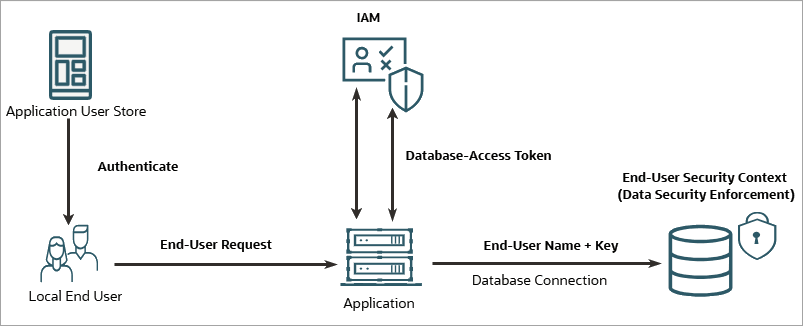
Database authentication flow
Prerequisite setup:
To enable Deep Sec for this pattern, you
must complete the following configuration:
- IAM setup: Register the database as an OAuth resource. Next, register the application with a client secret, and grant the application access to the database resource.
- Database setup: Configure IAM as an external identity provider, and create local end-user accounts with names that match the users in the application's user store. Create these accounts without passwords, because they rely on the application's trusted connection instead of direct database authentication. Finally, grant data roles that are managed locally to these accounts.
The runtime flow is as follows:
- End-user authentication: The application authenticates the end user against its own local user store.
- Application authentication: The application obtains its own database-access token, with the application as the subject and the database as the audience.
- Security context payload propagation: The application uses its database-access token to authorize the connection. As the end-user security context payload, the application forwards the end user's name and an optional security context lookup key.
- Security context establishment: The database validates the token, matches the supplied name to the local end-user account, establishes the end-user security context, and activates the data roles granted to the user.
Configuration path
- Register the database and the application in your IAM system. Depending on your IAM provider, see one of the following topics:
- Configure the database. See Set Up Local Authentication for Application-Mediated Connections.
- Configure the application. See Update Application Configuration with IAM Details.