6.1 Local End Users Connecting Directly
In this scenario, you create and manage end users in the database, and they connect using a SQL client (for example, SQL*Plus) and password-based authentication. No application or IAM system is involved in managing the end-user identity or data roles. If you configure multifactor authentication (MFA) for end users, the database also enforces push-based authentication prior to session establishment.
Use case
Because it is the simplest scenario to configure, this setup is ideal for development and test environments, product demonstrations, or applications with a small, manageable number of users who connect directly to the database.
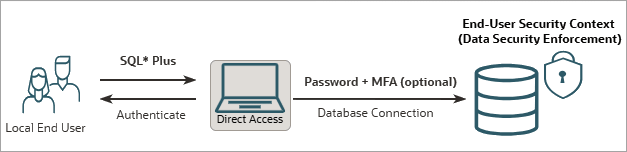
Database authentication flow
Prerequisite setup: To enable Deep Sec for this scenario, you must create an end-user account identified by password in the database and assign it data roles that are managed locally. In addition, you must grant the end user the system privilege to create a database session. To implement MFA, configure the MFA provider and SMTP prerequisites, then alter the end-user account to include a supported authentication factor.
The runtime flow is as follows:
- User login: The end user connects directly to the database using their user name and password.
- Database authentication: The database authenticates the
end user according to the configured authentication method.
- For password-only authentication, the database validates credentials against the local end-user account.
- If MFA is configured, the database also sends a push notification through the configured external authenticator. The sign-in process continues only after the user approves the push notification.
- Security context establishment: After successful connection, the database establishes an end-user security context. The end user's granted data roles are activated, and the corresponding data grants are enforced for all subsequent SQL operations of the end user.
Configuration path
- Configure the database for local end-user authentication. See Set Up Local Authentication for Direct Logon.
Example configuration
For a step-by-step example of this configuration, see Configure Oracle Deep Data Security for Direct Logon with Local End Users.