Oracle Data Guard
Oracle Data Guard ensures high availability, data protection, and disaster recovery for enterprise data.
Data Guard provides a comprehensive set of services that create, maintain, manage, and monitor one or more standby databases to enable Oracle databases to survive outages of any kind, including natural disasters and data corruptions. A Data Guard standby database is an exact replica of the production database and thus can be transparently utilized in combination with traditional backup, restoration, flashback, and cluster techniques to provide the highest possible level of data protection, data availability and disaster recovery. Data Guard is included in Oracle Enterprise Edition.
A Data Guard configuration consists of one primary database and one or more standby databases. A primary database can be either a single-instance Oracle database or an Oracle RAC database. Similar to a primary database, a standby database can be either a single-instance Oracle database or an Oracle RAC database. Using a backup copy of the primary database, you can create up to 30 standby databases that receive redo directly from the primary database. Optionally you can use a cascaded standby to create Data Guard configurations where the primary transmits redo to a single remote destination, and that destination forwards redo to multiple standby databases. This enables a primary database to efficiently synchronize many more than 30 standby databases if desired.
Note:
Oracle Active Data Guard is an extension of basic Data Guard providing advanced features that off-load various types of processing from a production database, extend zero data loss protection over any distance, and that enhance high availability. Oracle Active Data Guard is licensed separately from Oracle AI Database Enterprise Edition.
There are several types of standby databases. Data Guard physical standby database is the MAA best practice for data protection and disaster recovery and is the most common type of standby database used. A physical standby database uses Redo Apply (an extension of Oracle media recovery) to maintain an exact, physical replica of the production database. When configured using MAA best practices, Redo Apply uses multiple Oracle-aware validation checks to prevent corruptions that can impact a primary database from impacting the standby. Other types of Data Guard standby databases include: snapshot standby (a standby open read/write for test or other purposes) and logical standby (used to reduce planned downtime).
Benefits of Using Data Guard
-
Continuous Oracle-aware validation of all changes using multiple checks for physical and logical consistency of structures within an Oracle data block and redo, before updates are applied to a standby database. This isolates the standby database and prevents it from being impacted by data corruptions that can occur on the primary system.
-
Transparent operation: There are no restrictions on the use of Data Guard physical standby for data protection. Redo Apply supports all data and storage types, all DDL operations, and all applications (custom and packaged applications), and guarantees data consistency across primary and standby databases.
-
Highest performance: Fast redo transport for best recovery point objective, fast apply performance for best recovery time objective. Multi-instance redo apply provides Oracle RAC scalability for redo apply, eliminating bottlenecks of a single database server. Redo apply can essentially scale up to available CPU, I/O, and network across your Oracle RAC cluster. An observed redo apply rate of 3500 MB per second (12 TB/hour) on 8 node RAC Exadata.
-
Fast failover to a standby database to maintain availability should the primary database fail for any reason. Failover is either a manual or automatic operation depending on how Data Guard is configured.
-
Integrated client notification framework to enable application clients to connect to a new primary database after a failover occurs.
-
Automatic or automated (depending upon configuration) resynchronization of a failed primary database, quickly converting it to a synchronized standby database after a failover occurs.
-
Choice of flexible data protection levels to support all network configurations, availability and performance SLAs, and business requirements.
-
Management of a primary and all of its standby databases as a single configuration to simplify management and monitoring using either the Data Guard Broker command-line interface or Oracle Enterprise Manager Cloud Control.
-
Data Guard Broker greatly improves manageability with additional features for comprehensive configuration health checks, resumable switchover operations, streamlined role transitions, support for cascaded standby configurations, and user-configurable thresholds for transport and apply lag to automatically monitor the ability of the configuration to support SLAs for recovery point and recovery time objectives at any instant in time.
-
Efficient transport to multiple remote destinations using a single redo stream originating from the primary production database and forwarded by a cascading standby database.
-
Snapshot Standby enables a physical standby database to be open read/write for testing or any activity that requires a read/write replica of production data. A snapshot standby continues to receive but does not apply updates generated by the primary. When testing is complete, a snapshot standby is converted back into a synchronized physical standby database by first discarding the changes made during the open read/write, and then applying the redo received from the primary database. Primary data is always protected. Snapshot standby is particularly useful when used in conjunction with Oracle Real Application Testing (workload is captured at the production database for replay and subsequent performance analysis at the standby database-an exact replica of production).
-
Reduction of planned downtime by using a standby database to perform maintenance in a rolling manner. The only downtime is the time required to perform a Data Guard switchover; applications remain available while the maintenance is being performed.
-
Increased flexibility for Data Guard configurations where the primary and standby systems may have different CPU architectures or operating systems subject to limitations defined in Data Guard Support for Heterogeneous Primary and Physical Standbys in Same Data Guard Configuration (KB142824).
-
Efficient disaster recovery for a container database (CDB). Data Guard failover and switchover completes using a single command at a CDB level regardless of how many pluggable databases (PDBs) are consolidated within the CDB.
-
Enables a specific administration privilege, SYSDG, to handle standard administration duties for Data Guard. This new privilege is based on the least privilege principle, in which a user is granted only the necessary privileges required to perform a specific function and no more. The SYSDBA privilege continues to work as in previous releases.
-
The Oracle AI Database In-Memory column store is supported on standby databases in an Active Data Guard environment.
-
Further improves performance and availability of Data Warehouses in a Data Guard configuration by tracking information from
NOLOGGINGoperations so they can be repaired with the new RMAN commandRECOVER DATABASE NOLOGGING. -
Improves the impact multiple SYNC transport destinations have on the primary database through the use of a new parameter
DATA_GUARD_SYNC_LATENCY. This parameter defines the maximum amount of time (in seconds) that the Primary database must wait before disconnecting subsequent destinations after at least one synchronous standby has acknowledged receipt of the redo. -
Data Guard Broker improves manageability by supporting destinations of different Endianess than the primary in addition to enhancing management of alternate destinations.
-
Data Guard improves protection and Return To Operations (RTO) and Recovery Point Objectives (RPO) through multiple features including:
-
Multi-Instance Redo Apply (MIRA) provides scalable redo apply performance across Oracle RAC instances reducing RTO for even higher production OLTP or batch workloads
-
Compare primary and standby database blocks using the new
DBMS_DBCOMPpackage to help identify lost writes so they can be resolved efficiently. -
Fast Start Failover (FSFO) has the robustness of highly available zero data loss configurations with support for Maximum Protection mode while giving the flexibility of multiple observers and multiple failover targets for high availability in any configuration. FSFO can also be configured to automatically fail over to the standby with the detection of a lost write on the primary .
-
RPO is improved with no data loss failovers after a storage failure in ASYNC configurations and Data Guard Broker support for Application Continuity, improving the user experience during Data Guard role transitions.
-
-
Oracle Data Guard Broker further improves the management of databases by supporting destinations of different endianness than the primary in addition to enhancing management of alternate archive destinations when the primary destination is unavailable.
-
Oracle Data Guard Database Compare tool compares data blocks stored in an Oracle Data Guard primary database and its physical standby databases. Use this tool to find disk errors (such as lost write) that cannot be detected by other tools like the DBVERIFY utility.
-
Oracle Data Guard Broker supports multiple automatic failover targets in a fast-start failover configuration. Designating multiple failover targets significantly improves the likelihood that there is always a standby suitable for automatic failover when needed.
-
Dynamically change Oracle Data Guard Broker Fast-Start Failover target. The fast-start failover target standby database can be changed dynamically, to another standby database in the target list, without disabling fast-start failover. (introduced in Oracle Database 19c)
-
Propagate restore points from primary to standby Site. Restore points created on the primary database are propagated to the standby sites, so that they are available even after a failover operation. (introduced in Oracle Database 19c)
-
Oracle Data Guard automatic outage resolution can be tuned to fit your specific needs. Oracle Data Guard has an internal mechanism to detect hung processes and terminate them, allowing the normal outage resolution to occur. (introduced in Oracle Database 19c)
-
Active Data Guard DML redirection helps load balancing between the primary and standby databases. Incidental Data Manipulation Language (DML) operations can be run on Active Data Guard standby databases. This allows more applications to benefit from using an Active Data Guard standby database when some writes are required. When incidental DML is issued on an Active Data Guard standby database, the update is passed to the primary database where it is processed. The resulting redo of the transaction updates the standby database after which control is returned to the application. (introduced in Oracle Database 19c)
Oracle Active Data Guard
Oracle Active Data Guard is Oracle's strategic solution for real time data protection and disaster recovery for the Oracle database using a physical replication process.
Oracle Active Data Guard also provides high return on investment in disaster recovery systems by enabling a standby database to be open read-only while it applies changes received from the primary database. Oracle Active Data Guard is a separately licensed product that provides advanced features that greatly expand Data Guard capabilities included with Oracle Enterprise Edition.
Figure 3-1 Oracle Active Data Guard Architecture
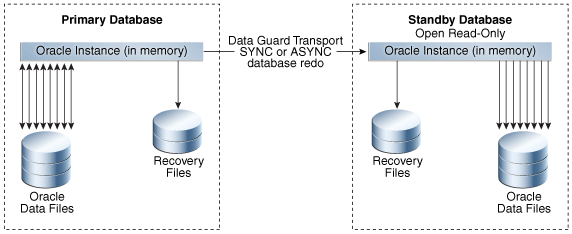
Description of "Figure 3-1 Oracle Active Data Guard Architecture"
Oracle Active Data Guard enables administrators to improve performance by offloading processing from the primary database to a physical standby database that is open read-only while it applies updates received from the primary database. Offload capabilities of Oracle Active Data Guard include read-only reporting and ad-hoc queries (including DML to global temporary tables and unique global or session sequences), data extracts, fast incremental backups, redo transport compression, efficient servicing of multiple remote destinations, and the ability to extend zero data loss protection to a remote standby database without impacting primary database performance. Oracle Active Data Guard also increases high availability by performing automatic block repair and enabling High Availability Upgrades automation.
Note:
Oracle Active Data Guard is licensed separately as a database option license for Oracle AI Database Enterprise Edition. All Oracle Active Data Guard capabilities are also included in an Oracle Golden Gate license for Oracle Enterprise Edition. This provides customers with the choice of a standalone license for Oracle Active Data Guard, or licensing Oracle GoldenGate to acquire access to all advanced Oracle replication capabilities.
Benefits of Oracle Active Data Guard
Oracle Active Data Guard inherits all of the benefits previously listed for Data Guard, plus the following:
-
Improves primary database performance: Production-offload to an Oracle Active Data Guard standby database of read-only applications, reporting, and ad hoc queries. Any application compatible with a read-only database can run on an Oracle Active Data Guard standby. Oracle also provides integration that enables the offloading of many Oracle E-Business Suite Reports, PeopleTools reporting, Oracle Business Intelligence Enterprise Edition (OBIEE), and Oracle TopLink applications to an Oracle Active Data Guard standby database.
-
DML global temporary tables and the use of sequences at the standby database significantly expands the number of read-only applications that can be off-loaded from production databases to an Oracle Active Data Guard standby database.
-
The unique ability to easily scale read performance using multiple Oracle Active Data Guard standby databases, also referred to as a Reader Farm.
-
Production-offload of data extracts using Oracle Data Pump or other methods that read directly from the source database.
-
Production-offload of the performance impact from network latency in a synchronous, zero data loss configuration where primary and standby databases are separated by hundreds or thousands of miles. Far sync uses a lightweight instance (control file and archive log files, but no recovery and no data files), deployed on a system independent of the primary database. The far sync instance is ideally located at the maximum distance from the primary system that an application can tolerate the performance impact of synchronous transport to provide optimal protection. Data Guard transmits redo synchronously to the far sync instance and far sync forwards the redo asynchronously to a remote standby database that is the ultimate failover target. If the primary database fails, the same failover command used for any Data Guard configuration, or mouse click using Oracle Enterprise Manager Cloud Control, or automatic failover using Data Guard Fast-Start Failover initiates a zero data loss failover to the remote destination. This transparently extends zero data loss protection to a remote standby database just as if it were receiving redo directly from the primary database, while avoiding the performance impact to the primary database of WAN network latency in a synchronous configuration.
-
Production-offload of the overhead of servicing multiple remote standby destinations using far sync. In a far sync configuration, the primary database ships a single stream of redo to a far sync instance using synchronous or asynchronous transport. The far sync instance is able to forward redo asynchronously to as many as 29 remote destinations with zero incremental overhead on the source database.
-
Data Guard maximum availability supports the use of the
redo transport attribute. A standby database returns receipt acknowledgment to its primary database as soon as redo is received in memory. The standby database does not wait for the Remote File Server (RFS) to write to a standby redo log file.NOAFFIRMThis feature provides increased primary database performance in Data Guard configurations using maximum availability and SYNC redo transport. Fast Sync isolates the primary database in a maximum availability configuration from any performance impact due to slow I/O at a standby database. This new FAST SYNC feature can work with a physical standby target or within a far sync configuration.
-
Production-offload of CPU cycles required to perform redo transport compression. Redo transport compression can be performed by the far sync instance if the Data Guard configuration is licensed for Oracle Advanced Compression. This conserves bandwidth with zero incremental overhead on the primary database.
-
Production-offload and increased backup performance by moving fast incremental backups off of the primary database and to the standby database by utilizing Oracle Active Data Guard support for RMAN block change tracking.
-
Increased high availability using Oracle Active Data Guard automatic block repair to repair block corruptions, including file header corruptions, detected at either the primary or standby, transparent to applications and users.
-
Increased high availability by reducing planned downtime for upgrading to new Oracle AI Database release updates and database releases using the additional automation provided by high availability Upgrade.
-
Connection preservation on an Active Data Guard standby through a role change facilitates improved reporting and improves the user experience. The connections pause while the database role changes to a primary database and resume, improving the user experience.
-
The Oracle Enterprise Manager Diagnostic tool can be used with Active Data Guard to capture and send performance data to the Automatic Workload Repository, while the SQL Tuning Advisor allows primary database SQL statement tuning to be offloaded to a standby database.
-
Active Data Guard support for the Oracle AI Database In-Memory option enables reporting to be offloaded to the standby database while reaping the benefits the In-Memory option provides, including tailored column stores for the standby database workload.
Oracle Data Guard Advantages Over Traditional Solutions
Oracle Data Guard provides a number of advantages over traditional solutions.
-
Fast, automatic or automated database failover for data corruptions, lost writes, and database and site failures, with recovery times of potentially seconds with Data Guard as opposed to hours with traditional solutions
-
Zero data loss over wide area network using Oracle Active Data Guard Far Sync
-
Offload processing for redo transport compression and redo transmission to up to 29 remote destinations using Oracle Active Data Guard Far Sync
-
Automatic corruption repair automatically replaces a physical block corruption on the primary or physical standby by copying a good block from a physical standby or primary database
-
Most comprehensive protection against data corruptions and lost writes on the primary database
-
Reduced downtime for storage, Oracle ASM, Oracle RAC, system migrations and some platform migrations, and changes using Data Guard switchover
-
Reduced downtime for database upgrades with Data Guard rolling upgrade capabilities
-
Ability to off-load primary database activities—such as backups, queries, or reporting—without sacrificing the RTO and RPO ability to use the standby database as a read-only resource using the real-time query apply lag capability, including Database In-Memory column support
-
Ability to integrate non-database files using Oracle AI Database File System (DBFS) or Oracle Advanced Cluster File System (Oracle ACFS) as part of the full site failover operations
-
No need for instance restart, storage remastering, or application reconnection after site failures
-
Transparency to applications
-
Transparent and integrated support (application continuity and transaction guard) for application failover
-
Effective network utilization
-
Database In-Memory support
-
Integrated service and client failover that reduces overall application RTO
-
Enhanced and integrated Data Guard awareness with existing Oracle technologies such as Oracle RAC, RMAN, Oracle GoldenGate, Enterprise Manager, health check (
orachk), DBCA, and Fleet Patch and Provisioning
For data resident in Oracle databases, Data Guard, with its built-in zero-data-loss capability, is more efficient, less expensive, and better optimized for data protection and disaster recovery than traditional remote mirroring solutions. Data Guard provides a compelling set of technical and business reasons that justify its adoption as the disaster recovery and data protection technology of choice, over traditional remote mirroring solutions.
Data Guard and Planned Maintenance
Data Guard standby databases can be used to reduce planned downtime by performing maintenance in a rolling fashion. Changes are implemented first at the standby database. The configuration is allowed to run with the primary at the old version and standby at the new version until there is confidence that the new version is ready for production. A Data Guard switchover can be performed, transitioning production to the new version or same changes can be applied to production in a rolling fashion. The only possible database downtime is the time required to perform the switchover.
There are several approaches to performing maintenance in a rolling fashion using a Data Guard standby. Customer requirements and preferences determine which approach is used.
Data Guard Redo Apply and Standby-First Patching
Beginning with Oracle Database 10g, there has been increased flexibility in cross-platform support using Data Guard Redo Apply.
In certain Data Guard configurations, primary and standby databases are able to run on systems having different operating systems (for example, Windows and Linux), word size (32bit/64bit), different storage, different Exadata hardware and software versions, or different hardware architectures. Redo Apply can also be used to migrate to Oracle Automatic Storage Management (ASM), to move from single instance Oracle databases to Oracle RAC, to perform technology refresh, or to move from one data center to the next.
Beginning with Oracle Database 11g Release 2 (11.2), Standby-First Patch Apply (physical standby using Redo Apply) can support different database software patch levels between a primary database and its physical standby database for the purpose of applying and validating Oracle patches in a rolling fashion. Patches eligible for Standby-First patching include:
-
Database Release Updates (RUs) or Release Update Revisions (RURs)
-
Database Patch Set Update (PSU)
-
Database Critical Patch Update (CPU)
-
Database bundled patch
Standby-First Patch Apply is supported for certified database software patches for Oracle Database Enterprise Edition 11g Release 2 (11.2) and later.
In each of the types of planned maintenance previously described, the configuration begins with a primary and physical standby database (in the case of migration to a new platform, or to ASM or Oracle RAC, the standby is created on the new platform). After all changes are implemented at the physical standby database, Redo Apply (physical replication) is used to synchronize the standby with the primary. A Data Guard switchover is used to transfer production to the standby (the new environment).
See Also:
My Oracle Support Note 413484.1 for information about mixed platform combinations supported in a Data Guard configuration.
My Oracle Support Note 1265700.1 for more information about Standby First Patch Apply and the README for each patch to determine if a target patch is certified as being a Standby-First Patch.
Data Guard Transient Logical Rolling Upgrades
There are numerous types of maintenance tasks that are unable to use Redo Apply (physical replication) to synchronize the original version of a database with the changed or upgraded version. These tasks include:
-
Database patches or upgrades that are not Standby-First Patch Apply-eligible. This includes database patch-sets (11.2.0.2 to 11.2.0.4) and upgrade to new Oracle Database releases (18c to 19c).
-
Maintenance must be performed that modifies the physical structure of a database that would require downtime (for example, adding partitioning to non-partitioned tables, changing Basicfile LOBs to Securefile LOBs, changing XML-CLOB to Binary XML, or altering a table to be OLTP-compressed).
All of the previous types of maintenance can be performed in a rolling fashion using a Data Guard standby database by using Data Guard SQL Apply (logical replication) to synchronize the old and new versions of the database. Prior to Oracle Database 11g this required creating a logical standby database, performing the maintenance on the logical standby, resynchronizing the standby with the primary, and then switching over. Additionally if a physical standby was being used for disaster recovery, then a new physical standby database would have to be created from a backup of the production database at the new version. This represented a number of logistical and cost challenges when upgrading a multi-terabyte database.
Beginning with Oracle Database 11g, database rolling upgrades can use a new procedure called Transient Logical that begins and ends with a physical standby database. SQL Apply is only used during the phase when Data Guard is synchronizing across old and new versions. A new logical standby database does not need to be created if there is already a physical standby in place. A new physical standby database does not need to be created from a backup of the production database at the new version after the maintenance is complete. Similar to the traditional process of upgrading a Data Guard configuration having an in-place physical standby, the original primary is upgraded or changed using redo from the new primary database and Redo Apply (a single catalog upgrade migrates both primary and standby databases to the new Oracle release).
Transient Logical upgrades require that the primary database be at Oracle Database 11g release 1 (11.1) or later and that the database meet the prerequisites of SQL Apply.
Oracle provides a Bourne shell script that automates a number of the manual steps required by the Transient Logical rolling upgrade process.
Databases that use Oracle AI Database Vault can be upgraded to new Oracle AI Database releases and patch sets by using Oracle Data Guard database rolling upgrades (transient logical standby only).
See Also:
http://www.oracle.com/goto/maa for Oracle MAA technical brief “Oracle Database Rolling Upgrades: Using a Data Guard Physical Standby Database”
Rolling Upgrade Using Oracle Active Data Guard
Rolling database upgrade using Oracle Active Data Guard provides a simpler, automated, and easily repeatable method for reducing planned downtime than represented by the manual Transient Logical rolling upgrade procedure.
Rolling upgrade using Oracle Active Data Guard transforms the 42 or more steps required by the manual procedure into several easy-to-use DBMS_ROLLING PL/SQL packages. Rolling upgrades performed using the DBMS_ROLLING PL/SQL package are supported on a multitenant container database (CDB).
A rolling upgrade using Oracle Active Data Guard:
-
Generates an upgrade plan with a configuration-specific set of instructions to guide you through the upgrade process.
-
Modifies parameters of the rolling upgrade.
-
Configures primary and standby databases participating in the upgrade.
-
Performs switchover of the production database to the new version. Switchover is the only downtime required.
-
Completes the upgrade of the old primary and any additional standby databases in the Data Guard configuration and resynchronizes with the new primary.
Rolling upgrade using Oracle Active Data Guard has the following additional benefits:
-
Provides a simple specify-compile-run protocol
-
Catches configuration errors at the compilation step
-
Runtime errors are detected during processing
-
-
The state is kept in the database
-
Enables a reliable, repeatable process
-
-
Runtime steps are constant regardless of how many databases are involved
-
Handles failure at the original primary database
-
Enables data protection for the upgraded primary at all times
See Also:
http://www.oracle.com/goto/maa for Oracle MAA technical brief “Oracle Database Rolling Upgrades: Using a Data Guard Physical Standby Database”